Build a Money-Making App from Scratch Without Code: The 8-Step Process and a $151 Bill

Using AI coding plus free cloud services, build a money-making app from scratch in eight steps for $151.
The article breaks down a YouTube creator's eight-step process: develop the app in natural language with AI agents like Claude Code, save code on GitHub, host and auto-deploy on Cloudflare, use D1 and R2 for the backend, register a New Mexico LLC through Northwest ($91), apply for an EIN for free from the IRS, collect payments with Stripe Checkout, and fill in legal pages like a privacy policy. Development, hosting, and the database all fall within free tiers, with spending concentrated in the Claude Pro subscription ($60 for three months) and company registration—totaling $151. The article stresses that the real barrier has shifted from technical implementation to compliance and operations, and acquiring users after launch is the next battlefield.
Build a Money-Making App from Scratch Without Code: The 8-Step Process and a $151 Bill
Writing code is no longer the hardest part of building an app. The real challenges come after: where does the app live? Where does the data go? Do you need to register a company? How do you get paid? A YouTube creator broke this entire path down into eight steps, named the tools he'd pick at each stage, and arrived at a final tally: from idea to a real business that can actually collect payments, the total cost is $151.
What makes that number work is separating "it runs" from "it earns"—development, hosting, database, and storage are almost entirely pushed into free tiers, with spending confined to just two places: the AI coding subscription and company registration. Below, I'll walk through the eight steps in the original video's order and add some judgment calls that are easy to overlook.
Step 1: Use AI to write code, not to learn to code
This step is called vibe coding: describe the app in natural language, and an AI agent writes the code. The original video names two tools—Claude Code and Codex—both of which can read the entire project, write files, run the app, and fix errors on their own. The author's recommendation for most people is Claude Code paired with a Claude Pro subscription, at $20/month billed monthly (cheaper if paid annually), which he considers the best value option.
There are three rules worth remembering for the actual process. Plan first: tell the AI what the app does and who it's for, and ask it to propose an approach before writing any code. Do one feature at a time: small steps are easy to verify, while giant prompts will only wreck the project. Run and test it yourself: when something breaks, paste the error back and let the agent fix it, looping until the app works.
By the end of this stage, the app exists only on your laptop. If the computer dies, everything is gone—which is exactly why the next step exists.
Vibe coding is a term coined by Andrej Karpathy in early 2025, referring to developers no longer writing code line by line but describing intent in natural language, with an AI agent handling implementation, running, and debugging. What distinguishes it from traditional "code completion" is that the agent has project-level context: it can read multiple files, execute commands, observe runtime results, and modify accordingly. Claude Code and Codex are both command-line/terminal-type agents, not chat plugins inside an IDE. This mode is especially friendly to non-programmers, but it also means you need basic verification skills—you must be able to tell whether the app runs as expected, or you won't notice when the agent breaks something.
Step 2: Store the code on GitHub
GitHub's role in this process is "the save button for the entire project," and it comes with history. Save a version every time a feature works; if you break the app the next day, you can roll back to yesterday's state. No need to learn commands—just tell the agent to "commit and push to GitHub." Free accounts already offer unlimited private repositories, so this line item costs zero.
Step 3: Put the app online
For the app to be accessible to others, it needs a machine that's always online to serve it. The original video's first choice is Cloudflare, for three reasons: generous free tier (100,000 requests per day), fast access because it runs in data centers worldwide, and a direct GitHub connection so every push of new code automatically builds and deploys. The alternative is Hostinger—simple and reliable, but with no free option, and low prices are tied to long-term contracts.
Deploying on Cloudflare also gives you a free URL that you can share directly. For the vast majority of new apps, starting here is enough.
Cloudflare Workers is the underlying product behind the hosting capability here—it runs code in isolated environments across Cloudflare's edge network rather than on a fixed server. This has two practical implications: first, cold starts are extremely fast and billing is per-request, so you incur no cost within the free tier; second, it is not a traditional Node.js environment—some dependencies and file-system operations are unavailable, and you need to use Cloudflare's own APIs. If the agent hits deployment errors while writing code, it's most likely this runtime difference; paste the error back and let it fix it.
Step 4: Keep the data on Cloudflare too
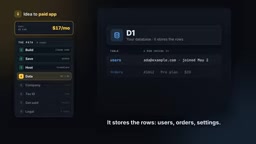
The app must remember users, orders, and uploaded files—all of which require a backend. The author believes only two components are needed: D1 is the database for row data (users, orders, settings), with a free tier that's quite generous for a new app; R2 is object storage for photos, videos, and PDFs, also with a free tier, and more importantly, R2 doesn't charge extra when files are downloaded, which many cloud providers do.
For most small and mid-sized apps, D1 plus R2 is the entire backend you need, and you can have the agent set it up for you.
Step 5: Register a company
The app runs and is accessible, but it can't take money yet—collecting payments may require a business entity. The original video is clear: not everyone needs this on day one. But if you want a US company to receive payments, the cheapest clean option the author found is a New Mexico LLC, filed through Northwest Registered Agent.
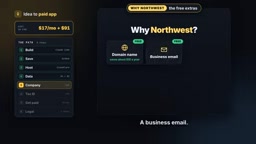
The cost structure: Northwest charges $39, the state fee shows as $52, totaling $91, including a registered agent for the first year—the role that receives official company mail on your behalf. Renewal in the second year is $125 annually. New Mexico was chosen because the filing fee is low and the state's LLCs don't need to file annual reports—less to pay, less to remember. Northwest was chosen for its included freebies: a free domain (saving about $10 for a year), a business email, a business address, a phone line, and even a starter website. The author warns to confirm the duration of each free service and to watch for paid add-ons on the checkout page—one of which should be skipped.
LLC (Limited Liability Company) is the most common corporate form adopted by indie developers and small businesses in the US: it shields personal assets from company debts while being taxed as a pass-through entity—the company itself pays no corporate income tax, and profits flow directly onto the members' personal tax returns. Compared with a C-Corp, an LLC has no mandatory governance structures like a board of directors or shareholder meetings, so maintenance costs are low. Non-US residents can also register an LLC and obtain an EIN, but should be aware of follow-up obligations like opening a bank account and tax filing (e.g., Form 5472)—registration is only the first step.
Steps 6 and 7: Get a free tax ID, then connect payments
Step 6 is the tax ID, or EIN, the equivalent of a social security number for the company—needed to open a bank account and to connect Stripe. Company registration services sell it to you as a paid add-on, potentially costing hundreds of dollars—but the IRS always issues EINs for free. Those with a social security number can apply directly on the IRS website for free; those outside the US can call the IRS international line, answer a few questions, and get the number on the spot, with the only cost being the phone bill, usually a few dollars. One phone call saves hundreds of dollars.
Step 7 is getting paid, using Stripe. No account-opening fee, no monthly fee, only a cut when a sale happens; in the US it's 2.9% plus 30 cents per card charge. You don't need to build the checkout flow yourself: have the agent integrate Stripe Checkout, so when a customer clicks buy they pay on a Stripe-hosted page and then get redirected back to your app—you never touch card numbers at any point. Before going live, be sure to run a few fake payments using Stripe's test mode and test cards.
Step 8: Fill in the legal pages
Once you start taking real money and storing real data, you must have a few "boring but necessary" pages. The original video lists three documents: a privacy policy explaining what data you collect and how you use it; terms and conditions setting the rules for using the app; and a cookie policy, needed when the site uses cookies for tracking. Since you're selling something, add a refund policy and a contact email—Stripe checks for these. Links should go in the footer of every page.

The author's advice is to have the agent write the first draft, but since this part involves the law and varies by country, have a real lawyer review it before you scale.
What makes up the $151 bill—and where the real difficulty lies
Adding it all up: Claude Pro billed monthly, assuming three months to launch, $60; GitHub free; Cloudflare hosting, database, and storage free; LLC registration $91; EIN free; Stripe free until you sell something; legal page drafts free. Total: $151, from idea to a real business that can collect payments.
What's notable about this bill isn't the amount but the shift in cost structure it reveals: the barrier has moved from "technical implementation" to "compliance and operations." Development, deployment, and backend—the parts that used to burn the most money—are absorbed by free tiers and AI agents, leaving only tool subscriptions and the company entity as expenses. But the author also makes the next step clear: launching is just the beginning, and next you need users—how to build apps faster, how to market, how to automate the tedious work—that's another battlefield entirely.
Background notes
Stripe Checkout is the hosted checkout page provided by Stripe: your app only needs to create a Checkout Session on the backend and redirect the user there—payment, 3D Secure verification, and card collection all happen on Stripe's domain, then redirect back to your specified address on success. This shifts the PCI compliance burden to Stripe; you don't need to handle or store any card data. Combined with a webhook to receive payment success events and mark order status in your database, this forms a complete and compliant payment pipeline. In test mode, you can use fake card numbers starting with 4242 to repeatedly verify the entire flow.
One-line Summary
Using AI coding plus free cloud services, build a money-making app from scratch in eight steps for a total cost of $151.
Paragraph Summary
The article breaks down an eight-step process summarized by a YouTube creator: develop the app in natural language with AI agents like Claude Code, save code on GitHub, host and auto-deploy on Cloudflare, use the D1 database and R2 storage for the backend, register a New Mexico LLC through Northwest ($91), apply for an EIN for free from the IRS, collect payments with Stripe Checkout, and fill in legal pages like a privacy policy. Development, hosting, and the database all fall within free tiers, with spending concentrated in just two areas—the Claude Pro subscription ($60 for three months) and company registration—totaling $151. The article emphasizes that the real barrier has shifted from technical implementation to compliance and operations, and that acquiring users after launch is the next battlefield.
Related articles

Claude Code Advisor Mode Explained: How Fable 5.2 and Sonnet 5.5 Collaborate on Code
A deep dive into Claude Code's experimental Advisor mode: how Fable 5.2 and Sonnet 5.5 split the work, access requirements, version thresholds, three ways to enable it, Fable's special billing rules, and a fact-check of the "3.4x cost reduction" claim against official docs.
Claude Code Advisor Mode: Two-Model Collaboration for Cost-Effective Coding
Explaining Claude Code's experimental Advisor Mode: primary model writes code, strong model intervenes at key points. Covers version requirements, three activation methods, model pairing rules, and real cost boundaries, clarifying the community's 3.4x savings claim.

Two Cursors: A Hopeful Song About Writing Software with AI
YouTube music video *Two Cursors* uses lyrics to portray AI-assisted programming: from a single cursor to two-cursor collaboration to a three-party debugging scene, offering a hopeful view of conversational collaboration between developers and AI.