Build a Text and Voice Telegram AI Chatbot with n8n

Build a text-and-voice Telegram AI chatbot using the n8n low-code automation platform.
This article introduces a Telegram AI chatbot built on the open-source automation platform n8n, with dual support for text and voice interaction. Users can type queries or ask via voice, and the bot retrieves information and responds in the matching format. The underlying architecture uses n8n's visual node orchestration to connect Telegram triggers, speech transcription, AI retrieval, and voice synthesis into a modular workflow. The demo covers information retrieval scenarios like cricket and football stadiums, proving that low-code tools can rapidly assemble capable multimodal AI applications.
A Telegram Bot That Listens and Speaks
A short YouTube demo showcases how to build a Telegram AI chatbot using the automation platform n8n, with its standout feature being support for both text and voice interaction. Users can type questions directly into the chat or have the bot respond via audio, significantly expanding its everyday use cases.
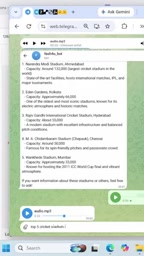
In the demo, the creator starts by querying "Top 5 Cricket Stadiums in India." The bot converts the text into a search command, performs the lookup in the background, and returns results including Narendra Modi Stadium, Eden Gardens, Rajiv Gandhi Stadium, along with their capacities. The entire process is intuitive and fast.
A Dual-Channel Design: Text and Voice
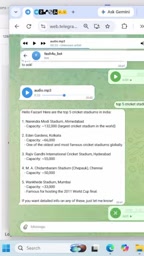
The core value of this bot lies in its interaction flexibility. Users who prefer typing can send text messages directly, while those in voice-friendly situations can switch to audio mode with a single tap. The creator specifically demonstrates the voice feature — asking about the "Top 5 Football Stadiums in the World" — and after the bot completes the search in the background, it delivers the results as a voice message.
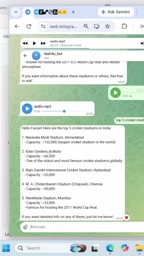
This dual-channel design essentially integrates Speech-to-Text (STT) and Text-to-Speech (TTS) capabilities into the same automation workflow. Text input is processed directly, while voice input is first transcribed before entering the retrieval pipeline — keeping the backend logic unified.
Speech-to-Text (STT) and Text-to-Speech (TTS) are the two foundational technologies behind voice interaction. Leading cloud-based options include OpenAI Whisper (STT, known for high accuracy and multilingual support), Google Cloud Speech-to-Text, ElevenLabs (TTS, praised for naturalness and emotional expression), and Microsoft Azure Cognitive Services. In n8n workflows, these capabilities are typically integrated via HTTP Request nodes or dedicated integration nodes, with audio files passed between nodes as Base64-encoded strings or binary streams. It's worth noting that Telegram stores voice messages sent by users as Opus-encoded .ogg files. The workflow must first download the file via the Telegram API before passing it to an STT service for transcription — a commonly overlooked technical detail when configuring the voice channel.
n8n as the Automation Hub
The backbone of this bot is n8n — an open-source workflow automation platform. Compared to traditional code-only development, n8n uses visual node orchestration to connect Telegram, AI retrieval services, and voice processing into a single pipeline, lowering the barrier to entry significantly.
Based on the demo, the approximate workflow structure looks like this:
- Trigger node: Receives incoming user messages from Telegram (text or voice)
- Conditional node: Detects input type; voice messages are transcribed to text first
- Retrieval/AI node: Executes a search based on the query and generates a response
- Output node: Returns the result to the user as text or audio
The advantage of this architecture is its high modularity. Each component can be independently swapped or extended — for example, replacing the search engine, connecting a different large language model, or changing the TTS voice — without rewriting the entire workflow.
n8n (pronounced "n-eight-n") was created in 2019 by Jan Oberhauser and released under a "fair-code" license, allowing self-hosted deployments and avoiding the usage-based billing model of SaaS automation platforms like Zapier or Make. It includes over 400 pre-built integration nodes covering major communication tools, databases, AI services, and cloud platforms. For AI use cases, n8n has expanded its LangChain-compatible nodes and AI Agent nodes in recent years, dramatically reducing the cost of integrating LLMs from OpenAI, Anthropic, and others. Compared to pure-code solutions, n8n's core advantage is the visual "glue layer": developers don't need to manually handle API authentication, error retries, or data format conversions — they can focus entirely on business logic.
Real-World Value and Use Cases
A voice-enabled Telegram bot has practical value in a variety of scenarios. For users who are driving, exercising, or otherwise have their hands full, voice Q&A provides an accessible way to retrieve information. For tasks requiring quick lookup of structured data — such as venue rankings, statistics, or lists — automated retrieval is far more efficient than manual searching.
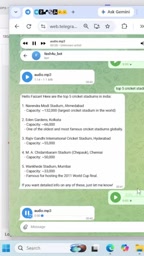
It's worth noting that this material is a short video demo focused on showcasing the end result rather than a complete build tutorial. It does not disclose which AI model was used, how API keys were configured, or which voice conversion service was called. As such, it's best treated as a proof of concept — demonstrating that low-code tools like n8n can indeed be used to rapidly assemble a fully functional multimodal chatbot.
Conclusion
This example highlights the potential of low-code automation tools in AI application development: without deep programming expertise, you can combine Telegram, AI retrieval, and voice interaction into a practical, working bot. For developers and enthusiasts looking to explore AI automation, n8n's visual node orchestration is a starting point well worth investigating. To replicate this setup, it's recommended to seek out a complete workflow configuration tutorial that fills in the technical details not shown in the demo.
Related articles

Chain of Thought Isn't Just for AI: How Humans Can Use CoT to Improve Thinking Quality
Chain of Thought isn't just a prompt trick for large models. Starting from a Hacker News discussion, this article analyzes why CoT works for human thinking too, breaks down actionable ways to transfer it, and highlights the key differences between human CoT and machine CoT.
Cloudflare Teams Up with OpenAI: Closi…
Cloudflare Teams Up with OpenAI: Closing the Loop from Vulnerability Discovery to Defense with AI
Cloudflare uses OpenAI Daybreak to investigate security vulnerabilities and generate reviewable remediation plans, while developers use Codex to boost coding efficiency and quality.

Orca Multi-Agent Orchestration in Practice: A Guide to Parallel Collaboration with Claude and Codex
Orca is Stable AI's free open-source agent workbench supporting 34 agents like Claude Code and Codex in parallel. Learn its Git worktree isolation, multi-model orchestration, and mobile management.