Build a WhatsApp AI Agent in n8n with Just Three Nodes: Complete Tutorial

Three nodes connect n8n's AI Agent to WhatsApp for automatic replies
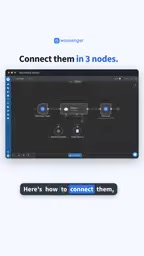
The article breaks down a minimalist YouTube tutorial: just three nodes to connect n8n's AI Agent to WhatsApp. First, install the Wasinger community node and add a Wasinger Trigger to listen for inbound messages. Second, connect an existing Agent using the AI Agent node or Message an Agent. Third, use Wasinger Send Text Message to reply in the same conversation. The core value is compressing a traditional Webhook-middleware-server pipeline into trigger, inference, and reply steps. On security, read-only tools run automatically while sensitive tools wait for human approval. Real production use still requires attention to community node stability, message deduplication, multi-turn memory, and error handling.
When a customer messages you on WhatsApp, your n8n AI Agent can't reach them—this is a gap many automation developers run into. A tutorial from YouTube demonstrates a minimalist approach: just three nodes to connect n8n's AI Agent to WhatsApp for automatic replies.
The video is short and to the point, skipping the fluff and going straight to a deployable node configuration strategy. Below, we break down the key steps and design logic, plus add some details you should watch for in real-world deployment.
Why the Three-Node Approach Is Worth Your Attention
The traditional way to connect an AI Agent to a messaging platform involves Webhook forwarding, middleware, server deployment, and a pile of other tedious steps. For automation enthusiasts who aren't familiar with backend development, the barrier to entry is high.
The core value of this approach is reducing integration complexity. It uses community nodes to connect directly to WhatsApp, compressing the entire pipeline into three steps: trigger, inference, reply. For developers who want to quickly validate a chatbot idea, this is an efficient starting point.
n8n community nodes are part of n8n's open ecosystem. n8n itself only ships with commonly used official integrations (such as HTTP, databases, and major SaaS platforms), but it allows third-party developers to publish custom nodes as npm packages. Once installed, users can drag and drop them into their workflows just like official nodes. The advantage of community nodes is broad coverage and fast updates—almost any niche platform has someone who's built an integration; the downside is uneven quality. They're typically maintained by individuals, lacking official-level testing, documentation, and long-term compatibility commitments. So before using one in production, it's wise to validate it in a test workflow against your current n8n version, and check its GitHub repo for recent commits and how issues are being handled.
Wasinger is one such community node, purpose-built for the WhatsApp interface, wrapping "listen for messages" and "send messages" into visual nodes.
The Specific Configuration of the Three Nodes
Node 1: Install the Community Node and Set Up the Message Trigger
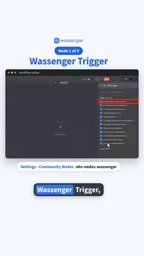
According to the YouTube tutorial, the first step is to install the Wasinger community node, then add a Wasinger Trigger and configure it to listen for new inbound messages (on new inbound message).
This trigger acts like a pair of "ears"—it continuously listens for new messages on WhatsApp, and as soon as a customer sends something, it kicks off the rest of the workflow.
Node 2: Connect Your AI Agent
The second step is to configure the AI Agent node. The video mentions two approaches: using the AI Agent node, or calling your existing n8n Agent via Message an Agent.
If you've already built an Agent with specific capabilities (like querying orders or answering product questions), you just need to plug it into the trigger chain here—no need to rewrite the logic. This modular approach makes the whole workflow easier to maintain.
Node 3: Send the Reply Back to the Same Conversation
The third step uses the Wasinger Send Text Message node to send the AI-generated reply back to the original chat window.
This ensures conversation continuity—a customer asks a question in WhatsApp, and the reply shows up in the same conversation, delivering a complete experience.
Real-World Testing and Security Design
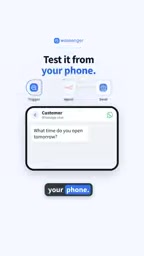
The video recommends testing from your phone: send a WhatsApp message and watch whether the AI reply lands correctly in the chat window. This end-to-end verification step shouldn't be skipped, because the community node's permission configuration and message format can both affect the final result.
Worth noting is the "Pro tip" mentioned in the video: read-only tools run automatically, sensitive tools wait for approval. This means your Agent can return results directly when performing query-type operations, but when it involves write operations or payment-type actions, it pauses and waits for human confirmation.
This is a pragmatic security design. In customer service scenarios, AI can freely answer common questions, but for sensitive operations like refunds or modifying orders, keeping a human backstop effectively reduces the risk of automation running out of control.
The distinction between read-only and sensitive tools is essentially putting a permission gate on every tool call the AI Agent makes. Read-only operations (querying orders, reading product catalogs, searching knowledge bases) don't change system state—even if the AI gets it wrong, the worst outcome is just an incorrect answer, so they can run fully automatically in exchange for response speed. Write operations—refunds, changing addresses, canceling orders, initiating payments—can cause irreversible financial or data changes once executed, so they're designed to be suspended, waiting for human confirmation in n8n before continuing. In n8n, this is typically implemented with human approval nodes or by isolating the execution branch for these tools separately. For customer service bots, this tiered mechanism is more realistic than chasing full automation at all costs: it demotes AI from "executor" to "advisor," keeping humans in the loop for key decisions.
Limitations and Future Optimization Directions
It's worth noting that the video is a streamlined guide, and the full tutorial link is in the bio. While the three-node approach is concise, in actual deployment you may also need to consider:
- Community node stability: The update frequency and compatibility of community-maintained nodes need to be verified yourself.
- Message deduplication and concurrency: Whether a message queue buffer is needed in high-concurrency scenarios.
- Agent memory capability: Whether multi-turn conversations maintain context depends on how you configure Node 2.
- Error handling branches: Whether to give users a friendly fallback reply when the AI call fails or times out.
Three nodes is a skeleton. When you actually put it into production, the monitoring, logging, and exception handling around it are equally important.
Multi-turn conversation memory depends on the model and memory configuration behind the Agent node. By default, each trigger is a stateless call—the AI only sees the current message and has no idea what the customer said before, leading to follow-up questions like "What was that order number you just mentioned?" To maintain context, you need to integrate a memory component into the Agent (such as a message history buffer stored by session ID) and pass WhatsApp's conversation identifier as the memory key.
Message deduplication stems from a universal characteristic of messaging interfaces: Webhooks redeliver the same message on timeout or retry. Without idempotency handling, users might receive two identical replies. A common approach is to use the message ID for uniqueness validation, or add a caching check at the workflow entry point.
One-line Summary
Three nodes connect n8n's AI Agent to WhatsApp for automatic replies
Paragraph Summary
The article breaks down a minimalist approach from a YouTube tutorial: just three nodes to connect n8n's AI Agent to WhatsApp. Step one: install the Wasinger community node and add a Wasinger Trigger to listen for inbound messages. Step two: use the AI Agent node or Message an Agent to connect an existing Agent. Step three: use Wasinger Send Text Message to send the reply back to the same conversation. The core value is compressing a pipeline that traditionally requires Webhook forwarding, middleware, and server deployment into three steps—trigger, inference, reply—dramatically lowering the integration barrier. On security, the tutorial emphasizes read-only tools running automatically while sensitive tools wait for human approval, providing a backstop for high-risk operations like refunds. The article also notes that real production use requires considering community node stability, message deduplication and concurrency, multi-turn memory, and error handling.
Related articles

Chain of Thought Isn't Just for AI: How Humans Can Use CoT to Improve Thinking Quality
Chain of Thought isn't just a prompt trick for large models. Starting from a Hacker News discussion, this article analyzes why CoT works for human thinking too, breaks down actionable ways to transfer it, and highlights the key differences between human CoT and machine CoT.
Cloudflare Teams Up with OpenAI: Closi…
Cloudflare Teams Up with OpenAI: Closing the Loop from Vulnerability Discovery to Defense with AI
Cloudflare uses OpenAI Daybreak to investigate security vulnerabilities and generate reviewable remediation plans, while developers use Codex to boost coding efficiency and quality.

Orca Multi-Agent Orchestration in Practice: A Guide to Parallel Collaboration with Claude and Codex
Orca is Stable AI's free open-source agent workbench supporting 34 agents like Claude Code and Codex in parallel. Learn its Git worktree isolation, multi-model orchestration, and mobile management.