Build an Animated E-Commerce Website with Free AI Tools: A No-Code Complete Tutorial

Build a fully animated e-commerce site with three free AI tools — zero coding required.
This article walks through a workflow for building an e-commerce website using three free AI tools: Google Stitch, ChatGPT, and Lovable. The process has three steps — generate a site prototype with Stitch using a reference screenshot and prompt, use ChatGPT to batch-separate product banner images into individual PNG assets and feed them back into the prototype, then have Lovable convert the prototype and requirements into a complete responsive site with scroll, carousel, and auto animations. Deployment is handled by connecting to GitHub, with options for a subdomain or custom domain via source code build and upload. The entire flow requires no manual coding and can be completed within free credit limits, though the build/deploy step involves some Git and command-line familiarity.
Building a Professional E-Commerce Website with AI Tools Is Now Possible
This tutorial comes from a creator who has actually sold AI-generated websites to clients. The core premise is straightforward: without writing a single line of code, and using only three free AI tools, you can build a complete e-commerce website with scroll animations, carousel effects, and auto-play animations.
The finished product the author showcases is an e-commerce website already delivered to a client, featuring all the essential functionality you'd expect — product displays, category navigation (such as "New Arrivals"), add-to-cart buttons, and three types of animation effects: scroll animations, carousel animations, and auto animations. Not one line of code was written manually throughout the entire process, and every tool used is free.
This kind of "AI-generated website" workflow is becoming the go-to path for no-code development. It delegates design prototyping, asset generation, and front-end implementation to three different AI tools working in concert.
The Three Core Tools in This Workflow
The entire build process is linked together by three free tools, each handling a distinct role:
Step 1: Generate a Prototype Layout with Google Stitch
The author uses Google Stitch to generate the full-site prototype layout. After opening Google Stitch, you select website (rather than app) prototype mode, then paste a detailed prompt into the input field. Click run, and within a few minutes the tool produces a complete website prototype — including a Hero section (the main above-the-fold visual) and the homepage layout.
The generated prototype's visual style references whatever example website you provide — the author uploads a screenshot of a target site, and Stitch reproduces a close approximation of its page structure and look and feel.
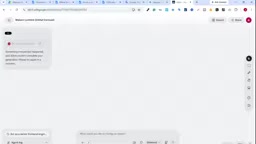
Google Stitch is an AI prototyping tool from Google, released as an experimental product under Google Labs. Its core capability is generating interactive UI prototypes directly from natural language descriptions (prompts). It supports both web and mobile app modes, and its output includes complete page structure, component hierarchy, and base styles. Compared to traditional prototyping tools like Figma or Sketch, Stitch eliminates the manual drag-and-drop process, making it ideal for rapidly validating layout ideas. Generated prototypes can be exported as design files or code snippets for use in downstream tools. Since it's still in an experimental phase, some features require access requests, and output quality is highly dependent on prompt precision — more detailed requirement descriptions generally yield layouts closer to what you have in mind.
Step 2: Separate and Generate Product Images with ChatGPT
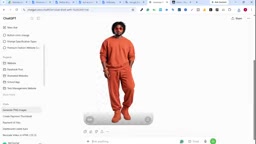
A key technique here is image processing. E-commerce sites need a large volume of product images. The author's approach is to upload a banner image containing multiple products to ChatGPT and ask it to "separate each product in the image individually and generate them as standalone PNG files." This lets you batch-produce product assets with transparent backgrounds that can be used independently.
After downloading each image, you feed them back into Google Stitch so the prototype can regenerate using real product assets, making the layout far closer to the final result.
Step 3: Implement the Website with Lovable
The final website implementation is handed off to Lovable. The author first has ChatGPT "read" the downloaded prototype and generate a detailed implementation prompt that explicitly demands "no errors whatsoever." That prompt, along with the prototype file, is then uploaded to Lovable and executed.
Lovable first visualizes and analyzes the entire prototype, then combines it with the prompt to generate the complete website code. The author places particular emphasis on cost management: Lovable offers 5 free credits, and a complete website can typically be built within that allowance. Even if you run out, 5 more free credits are issued every 12 hours, letting you resume the project from where it left off.
Lovable is an LLM-based AI full-stack development tool, positioned as a "from description to running code" solution. After a user inputs a requirement description, Lovable generates a complete front-end project — including HTML, CSS, and JavaScript (typically using React or Next.js) — and provides a live preview. Compared to similar tools like Bolt.new or v0, Lovable's distinguishing feature is its deep GitHub integration: every generation or modification is synced to a repository as a commit, making version control and manual adjustments easier down the line. "Credits" are its billing unit — every instruction sent to the AI (including generation, modification, and debugging) consumes a certain number of credits. The free plan's mechanism of replenishing credits daily or every 12 hours means lightweight projects can be completed in batches without payment, though for complex projects that require frequent iteration, a paid plan is generally more efficient.
The Final Product: Responsive Design with Multiple Animations
The generated website automatically lays out content based on the product images provided earlier. The site includes all three animation types — scroll, carousel, and auto — with the Hero section's main visual centered prominently, accompanied by product descriptions and add-to-cart cards below.
The author considers the Hero section the single most important hook on the entire website — it's the first thing visitors see when the page loads, which is why animation effects matter most there.
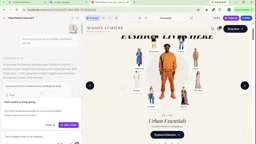
The finished product also achieves full responsive adaptation. The author walks through desktop, laptop, tablet, and mobile views in sequence, all of which display correctly. He also notes that additional feature modules can continue to be added after the site is generated.
Going Live: From Lovable to a Custom Domain
The second half of the tutorial covers how to actually publish the website. The core path is: connect your Lovable account to GitHub, confirm the connection is active, then click Publish/Deploy within the project to complete publication.
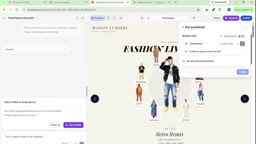
After publishing, Lovable provides a subdomain you can use to access the site directly. To deploy to your own domain or a free hosting service, the author's approach is to clone the GitHub project repository locally (using VS Code and the git clone command) — note that the repository needs to be set to Public for the clone to work.
Since what's on GitHub is source code that can't be used directly, you first need to build the project to generate deployable files, then compress the build output into an archive and upload it to a hosting service. After extracting it, the site becomes accessible via the corresponding address.
This touches on an important front-end concept: the distinction between source code and build output. Projects generated by Lovable are typically source code based on modern JavaScript frameworks (such as React/Vite), which browsers cannot parse directly. A "build" step is required — running npm run build or a similar command to compile, bundle, and minify the source into plain HTML/CSS/JS files that static hosting services can recognize. Build output is typically placed in a dist or build directory. Compressing that directory and uploading it to a static hosting platform like Netlify Drop, Vercel, or Cloudflare Pages completes the free deployment and gives you a live URL. This process does present a bit of a learning curve for complete beginners — mainly because it requires installing a local Node.js environment and running build commands via the command line — but the steps are fixed and following the documentation yields a high success rate.
The Value and Limitations of This Workflow
The greatest value of this workflow lies in proving that the entire chain — design, assets, implementation, and deployment — can be completed with free AI tools, which has real practical significance for non-technical entrepreneurs and freelancers. The author himself has used similar output to complete client deliveries.
That said, a realistic assessment is warranted: the limited free credit allowance means complex projects may need to be completed in multiple sessions or wait for credits to refresh; the build and deployment steps still involve Git and command-line operations, which present a real barrier for complete beginners; and the quality of AI-generated code, long-term maintainability, and customization potential all need to be evaluated through actual use. For scenarios focused on rapid prototyping and lightweight e-commerce pages, this workflow is definitely worth trying.
Related articles

Chain of Thought Isn't Just for AI: How Humans Can Use CoT to Improve Thinking Quality
Chain of Thought isn't just a prompt trick for large models. Starting from a Hacker News discussion, this article analyzes why CoT works for human thinking too, breaks down actionable ways to transfer it, and highlights the key differences between human CoT and machine CoT.
Cloudflare Teams Up with OpenAI: Closi…
Cloudflare Teams Up with OpenAI: Closing the Loop from Vulnerability Discovery to Defense with AI
Cloudflare uses OpenAI Daybreak to investigate security vulnerabilities and generate reviewable remediation plans, while developers use Codex to boost coding efficiency and quality.

Orca Multi-Agent Orchestration in Practice: A Guide to Parallel Collaboration with Claude and Codex
Orca is Stable AI's free open-source agent workbench supporting 34 agents like Claude Code and Codex in parallel. Learn its Git worktree isolation, multi-model orchestration, and mobile management.