Build an MCP Server in 30 Lines of Python and Connect It to Claude Code

Build a finance MCP server from scratch with the Python SDK, exposing three capability types, then connect it to Claude Code
This article explains how to build a finance MCP server with the official Python SDK. MCP is an open standard connecting AI applications with tools and data, with three roles—host, client, server—and servers can provide three capability types: Tools, Resources, and Prompts. Using the get-spending tool, budgets://current resource, and monthly review prompt as examples, it demonstrates decorators, type hints auto-generating schemas, and docstrings becoming tool descriptions, and notes that the server class was renamed to mcp-server in SDK v2. After writing, verify results with MCP Inspector first, then connect to Claude Code with claude mcp add, keeping in mind scope settings and how tool lists consume context.
What Is MCP: The USB-C Port for AI Applications
MCP stands for Model Context Protocol, an open standard for connecting AI applications to tools and data. The original video uses a fitting analogy: it's like the USB-C port of the AI world—one plug shape that fits all kinds of devices.
There are three roles in this protocol. The Host is the AI application itself, such as Claude Code; inside the Host there's an MCP client, which maintains connections to the various servers; and the part we're writing today is the server—it exposes tools that any MCP-compatible application can plug into. In other words, write once, use everywhere.
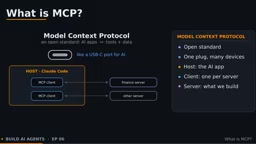
This solves the problem left over from the previous episode: all the finance tools were crammed into a single Python script, and only that one agent could use them. Once packaged as an MCP server, the tools' reach suddenly expands.
MCP was released and open-sourced by Anthropic at the end of 2024. It uses JSON-RPC 2.0 as its message format, so clients and servers implemented in different languages and on different platforms can interoperate. The protocol defines standard message types for the initialization handshake, capability negotiation, tool calls, resource reads, prompt retrieval, and notifications. Besides the Python SDK used in this article, the official team also provides a TypeScript SDK, and the community has Go, Java, Rust, and other implementations. Because it's an open protocol rather than a vendor's proprietary interface, the community has already accumulated a large number of ready-made servers for file systems, databases, browsers, Git repositories, and more, which you can reuse directly.
What a Server Can Provide: Tools, Resources, Prompts
An MCP server can expose three types of content:
- Tools: functions the model can call that execute code or produce actions—the type used in episode three.
- Resources: data the application can load directly into context, each with its own address, similar to files.
- Prompts: reusable templates that users select themselves; in Claude Code they show up as slash commands.
The finance server in this article provides all three, which is also the best way to understand MCP's capability boundaries—Tools are "let the model do things," Resources are "show the model data," and Prompts are "help the user organize requests."
The three capability types differ fundamentally in control flow: Tools are invoked at the model's discretion, and calls usually require user approval because they may have side effects; Resources are loaded at the choice of the application or user, with the model not reading them proactively—suitable for read-only data like budget tables and config files; Prompts are explicitly triggered by the user, often used to package a fixed workflow into a one-click operation. When designing a server, putting state-changing operations in Tools and read-only data in Resources makes permission boundaries clearer and makes approval and auditing at the application layer easier.
Let's Write It: Decorators, Type Hints, and Docstrings
First install the official Python SDK: pip install mcp. Remember to include cli-extra, and you need Python 3.10 or newer.
One easy pitfall: after the SDK reached version 2, the server class was renamed to mcp-server, while older tutorials still call it fast-mcp. Import mcp-server and create a server named finance—that one line is already a working server.
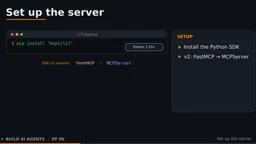
Next, add things to it. Take the get-spending tool as an example: it's just an ordinary Python function with the mcp.tool decorator. The SDK automatically builds the input schema from type hints: category and month become required string fields; because category is a Literal type, the schema automatically generates an enum with values food, rent, or transport. The function's docstring becomes the tool description, so as in episode three, write it clearly and in detail. The function returns a dictionary, which the SDK passes back to Claude as the tool result.
Resources are declared with the mcp.resource decorator. Give it an address, such as budgets://current, and the application can load it directly into context without the model having to call a tool first.
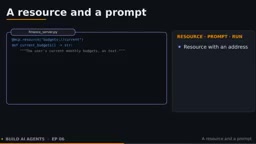
Prompts define monthly review, which takes a month parameter and returns a ready-made request to hand to Claude.
Finally, call mcp.run. By default it uses standard input/output, i.e., the stdio transport: the application starts the script as a local process, and the two sides exchange messages through its input and output.
stdio and streamable HTTP are MCP's two transport modes. With stdio, the host starts the server script as a subprocess, and the two sides exchange JSON-RPC messages line by line over standard input/output—suitable for local tools, with the process ending when the application exits. With streamable HTTP, the server runs as an independent service listening on a port, and the host connects via a URL, supporting sharing among multiple clients and remote deployment, and can use SSE for server-side push. Which transport to choose depends mainly on whether the tools need to be shared across machines and whether they need to run long-term—not on the tools' implementation itself.
Test First, Then Connect: Inspector and mcp add
Before connecting Claude, test the server on its own. Run mcp-dev with the server file, and the MCP inspector opens in your browser. It lists our two tools, one resource, and one prompt. Call get-spending with food and October, and the result is 620 spent against a 500 budget—over budget. If anything is wrong, you can find it here before the model gets involved.
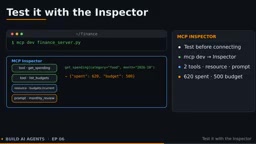
The connection command is claude mcp add. Write the name first, then two hyphens, followed by the command that starts the server. Everything after the two hyphens is the command Claude Code will execute; not passing a transport parameter means it's a local stdio server. Run claude mcp list, and if you see connected, the connection succeeded.
Launch Claude Code and just ask, "Did I go over budget on food this month?" The first call needs approval. This call carries our server's name as a marker, so you can see at a glance that the answer comes from your own data.
Scope is worth noting: by default the server is added only for the current project; adding scope user makes it available in all projects; scope project writes out a .mcp.json file that can be committed to the repository, and teammates simply approve it on first run.
If you want to go over the network rather than a local process, run the server with the streamable HTTP transport and add it with transport http plus a URL.
One more practical reminder: every connected server's tools are loaded in each session and consume context, so keep the tool list lean and focused.
Key Takeaways
MCP is an open standard for connecting AI applications with tools and data; a server provides three capability types: tools, resources, and prompts; with mcp.server, decorators, type hints, and docstrings, the SDK handles most of the work automatically; verify with the inspector first, then connect with claude mcp add. In the next episode, we'll build an agent with the Claude Agent SDK, using the same engine that powers Claude Code.
Related articles
Ollama+RAG Local Knowledge Base Setup: A Step-by-Step AnythingLLM Tutorial
Based on a Bilibili tutorial, this guide details building a local RAG knowledge base with Ollama + AnythingLLM: from general LLM knowledge limits and RAG principles to document upload, vector storage, and verification.
The Ultimate Ollama Tutorial: A Beginner's Guide to Running Large Models Locally for Free
Ollama is an open-source local large model management tool supporting free download and deployment of models like DeepSeek, with command-line and Web UI, cross-platform, automatic GPU/CPU scheduling — ideal for AI beginners and private deployment.
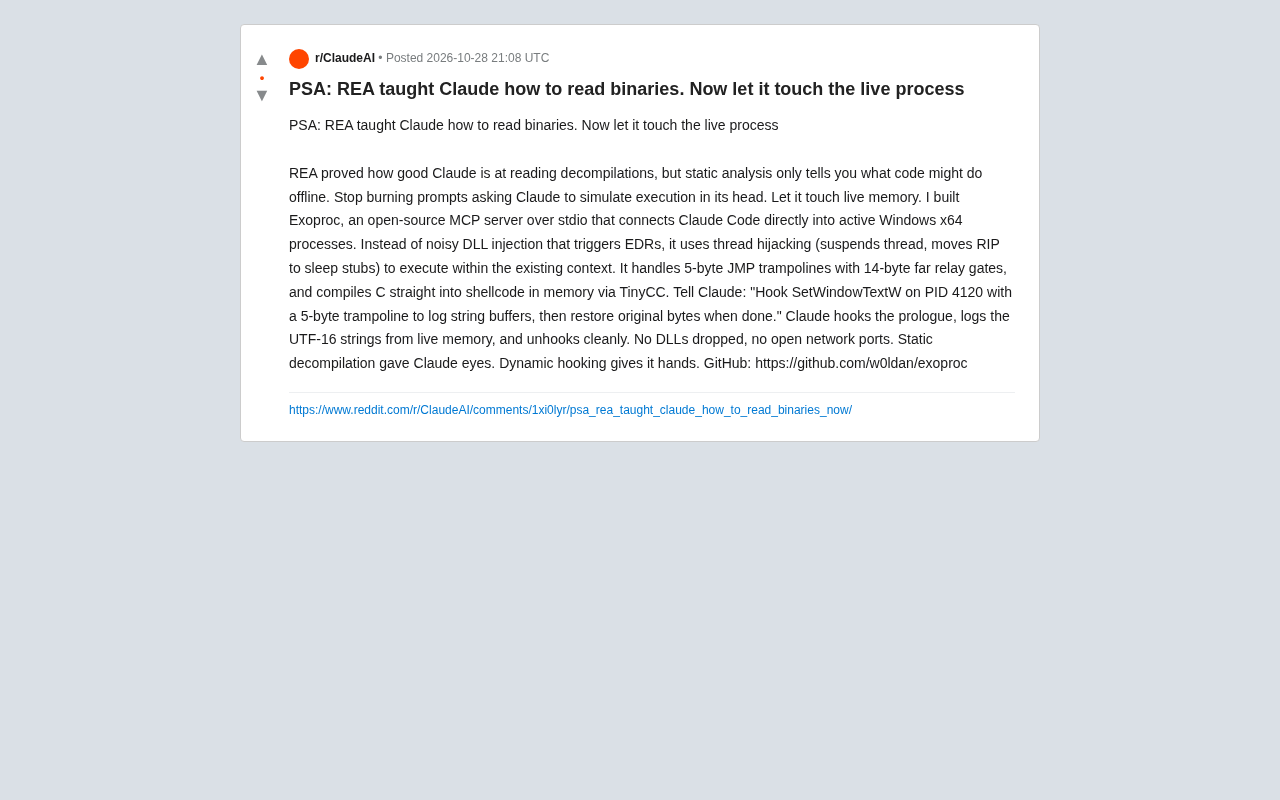
Giving Claude "Hands": Exoproc Open-Source MCP Server Enables Live Process Hooking
Exoproc is an open-source MCP server enabling Claude Code to hook live Windows x64 processes via thread hijacking, bypassing EDR for dynamic analysis. Static decompilation gave Claude eyes; dynamic hooking gives it hands.