Build Your First AI Agent on n8n at Zero Cost: A Hands-On Guide

Build a free AI Agent on n8n that autonomously queries Wikipedia and runs calculations.
This article walks through a hands-on n8n demo showing how to build an AI Agent with tool-calling capabilities at zero cost. n8n is an open-source, self-hostable workflow platform with built-in AI Agent nodes and a chat window for testing. The demo Agent receives a compound question — finding n8n's founding year and calculating how long ago that was relative to 2026 — then autonomously calls Wikipedia for the fact and a calculator for the math. The logs panel records every tool call for full observability, covering the three core elements of AI Agents: memory, tool calling, and autonomous decision-making.
Why Choose n8n for Your First AI Agent
Want to experience the power of AI Agents but worried about expensive API and platform fees? You can actually build an intelligent agent with memory and tool-calling capabilities at zero cost. n8n, an open-source workflow automation platform, comes with built-in AI Agent nodes and a chat window — making it accessible even for users without a heavy engineering background.
This article breaks down a hands-on n8n demo, walking you through how to build an AI Agent from scratch that can autonomously look up information, call a calculator to complete reasoning tasks, and understand the decision-making logic behind it all.
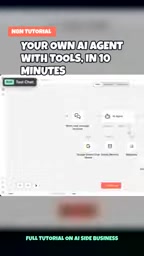
n8n (pronounced "n-eight-n") is a node-based, open-source workflow automation tool released under a fair-code license that supports self-hosted deployment. Unlike SaaS platforms such as Zapier or Make, n8n lets you run the entire service on your own server or local machine, eliminating per-task billing costs. Its core design philosophy is "visual node orchestration": each node represents an operation (e.g., an HTTP request, database read/write, or AI model call), and users connect nodes to define data flow logic without writing glue code. In recent years, n8n has significantly strengthened its AI capabilities, adding built-in LangChain integration, AI Agent nodes, vector database connectors, and more — making it a popular choice for rapidly prototyping AI workflows.
The Setup: From Saving Your Workflow to Starting a Conversation
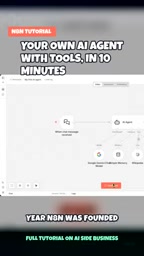
The entire process revolves around n8n's visual orchestration capabilities. Once you've configured the AI Agent node, the first step is to save your workflow, then open n8n's built-in chat window. This chat window is the most direct way to test Agent behavior — no need to build a separate frontend.
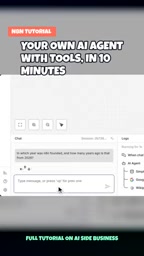
In the demo, the tester entered a question with a built-in reasoning requirement: What year was n8n founded, and how many years ago was that relative to 2026? This question cleverly involves two steps — one that requires looking up a fact (the founding year) and one that requires a mathematical calculation (the difference in years).
After clicking send, the Agent begins processing the request. This design — a single question triggering a multi-step task — is an excellent way to verify whether an AI Agent truly has tool-calling capabilities.
How the Agent Autonomously Decides Which Tools to Use
The fundamental difference between a capable AI Agent and an ordinary chatbot is that the Agent can independently determine which tool to use for which problem, rather than relying solely on the language model's internal knowledge.
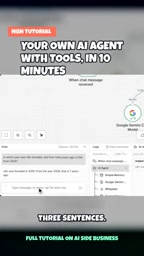
In this case, the Agent's answer appears directly in the chat window, kept to three sentences for clarity and conciseness. Even more telling is the logs panel beside it — which records the Agent's complete reasoning path:
- Called the Wikipedia tool: Automatically queried Wikipedia for n8n's founding year to ensure factual accuracy.
- Called the calculator tool: Used the calculator to compute the difference between the founding year and 2026.
This division of labor — "look it up first, then calculate" — demonstrates the Agent's ability to decompose tasks. Rather than hallucinating a founding year, it retrieved reliable information through an external tool and passed the result to a dedicated calculation module.
An AI Agent's tool-calling capability is built on the ReAct (Reasoning + Acting) framework: before generating a response, the model first outputs a reasoning step (Thought) to determine whether the current task requires an external tool. If so, it issues a tool call (Action) and waits for the result (Observation), then decides whether to call another tool or generate the final answer. This loop can repeat multiple times until the model determines it has sufficient information. n8n's AI Agent node is built on exactly this mechanism, wrapping functions like Wikipedia search and a calculator into standard tool interfaces that the language model can invoke on demand. This is precisely why the Agent doesn't "hallucinate" n8n's founding year — it triggers a real external query and feeds the reliable data into subsequent reasoning steps.
The Logs Panel: Your Key Window Into Agent Behavior
For anyone learning how AI Agents work, the logs panel is just as valuable as the final result. It visualizes the Agent's "black box" decision-making process, clearly showing which tool was called at each step, what input was provided, and what was returned.
When you need to debug unexpected Agent behavior — such as calling the wrong tool or producing an incorrect calculation — the logs panel is your first line of investigation. This kind of observability is an indispensable part of building reliable automated workflows.
What This Introductory Example Teaches Us
Although this is a minimal demo, it covers the core elements of an AI Agent: memory, tool calling, and autonomous decision-making. Through a simple task of "look up a year + calculate the difference," beginners can intuitively grasp how an Agent actually works.
Starting at zero cost means you can experiment freely in a locally deployed n8n environment without worrying about expenses. Once you've mastered this foundational framework, you can gradually add more tools — such as database queries, API calls, and email sending — upgrading your Agent into an automated assistant capable of handling complex business workflows.
For developers and operations professionals looking to get started with AI automation, this is a low-barrier, high-reward hands-on project.
Related articles

Chain of Thought Isn't Just for AI: How Humans Can Use CoT to Improve Thinking Quality
Chain of Thought isn't just a prompt trick for large models. Starting from a Hacker News discussion, this article analyzes why CoT works for human thinking too, breaks down actionable ways to transfer it, and highlights the key differences between human CoT and machine CoT.
Cloudflare Teams Up with OpenAI: Closi…
Cloudflare Teams Up with OpenAI: Closing the Loop from Vulnerability Discovery to Defense with AI
Cloudflare uses OpenAI Daybreak to investigate security vulnerabilities and generate reviewable remediation plans, while developers use Codex to boost coding efficiency and quality.

Orca Multi-Agent Orchestration in Practice: A Guide to Parallel Collaboration with Claude and Codex
Orca is Stable AI's free open-source agent workbench supporting 34 agents like Claude Code and Codex in parallel. Learn its Git worktree isolation, multi-model orchestration, and mobile management.