Build Your First AI Agent with Claude Code in 20 Minutes — No Code Required
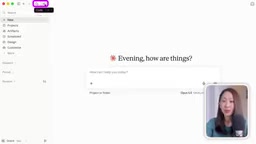
Build a self-evolving content agent with Claude Code — no code required
A no-code content creator uses only the Claude desktop app to build an automated carousel-post agent, distilling a transferable four-level framework: workspace, agent, skills, and memory, ending with Notion, GitHub, and scheduled tasks for unattended cloud operation. The key difference between chatbots and agents is judgment, and higher levels yield more automation but require more investment.
Why Claude Code Isn't Just a Tool for Developers
Many people see the name "Claude Code" and immediately assume it's a coding assistant for programmers. But one content creator who claims to write no code at all used Claude Code to build an AI agent that automatically generates animated carousel posts — and did the whole thing inside the Claude desktop app without ever opening a terminal.
This approach is worth paying attention to. Chatbots answer questions; agents take work off your hands. The difference isn't in the model itself — it's in "judgment." You give an agent a goal, and it decides what to do first, which tools to use, and whether the result is good enough.
In this case, the creator built a content-creator agent for their Instagram business that turns long videos and newsletters into on-brand carousel posts. What the business actually does doesn't matter — the methodology transfers to any scenario.
The Five Components of an Agent
To make good judgments, every agent needs the same five parts:
- Brain: the AI model doing the thinking
- Context: how much it knows about your brand
- Task: the goal it's working toward
- Rules: how it should work and what it must never do
- Tools: what it's allowed to use to get the job done
These five elements run through every build step that follows, and they double as a checklist for whether an agent is "complete."
Level 0: Set Up the Workspace First (the Step Most People Skip)
Before building an agent, prepare its "office." Create a local folder — call it something like "business OS" — and drag in your brand logo, personal photos, and a few real IG posts for reference. This is the central location where all your agents live and work.
Open the Claude desktop app and switch to the Code tab. Claude Code has two modes: local and cloud — start with local. Select the folder you just created, and for permission mode, start with auto so the agent can work without interruption while still blocking risky operations. For the model, the creator chose Opus, citing its more precise adherence to detailed instructions and better design taste.
Key move: have Claude read your brand website and the files in your folder to generate two things — an "onboarding guide" that the Claude agent reads first every time it starts (the CLAUDE.md file), and a brand context file covering your business, audience, tone, and visual style. It will proactively ask you which fonts you use and why you like those example posts.
How to test: start a new session and ask it to plan next week's posts about a given topic. You'll find the output clearly matches your brand — the colors and language style are right. Give the same request in an empty folder with the same model and the results are worlds apart. The only difference is the workspace.
The CLAUDE.md File and the "Onboarding Guide" Mechanism
CLAUDE.md is the conventional project-level instruction file for Claude Code: every time a session starts, the tool automatically reads it and injects it into the model's context — essentially the agent's "first-day onboarding manual." It typically records project structure, common commands, code style, prohibitions, and other rules so the model doesn't have to figure things out from scratch each time.
In this case, Claude read the brand website and reference files and automatically generated this onboarding guide plus a brand context file. This solves the "context amnesia" problem agents often suffer from — the same prompt produces vastly different output quality in an empty folder versus one with instructions, because it comes down to whether the model gets stable background information at startup. Keep CLAUDE.md lean: include only long-lived rules and preferences, and leave temporary task instructions in the conversation — otherwise file bloat dilutes the truly critical constraints.
Level 1: Build Your First Agent
You don't need to write the agent yourself. The creator used a ready-made "agent designer" prompt — paste it in, describe the task, and it interviews you and helps you design it. Claude clarifies the requirements, then summarizes the agent plan according to the five components and creates the corresponding agent folder.
For non-technical users, it's fine if you don't understand the folder structure — just skip it. What matters more is knowing how to use it: type add to select your content-creator agent, then give it a video transcript and ask for a carousel post of no more than 10 pages. The agent reads the input file, makes judgments, suggests an angle, and then produces a first draft.
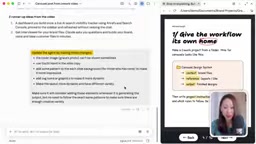
The first version usually isn't great — images don't show up, font sizes are wrong, and the whole thing looks a bit plain. That's normal. The first version is almost never the version you'll end up using; iteration is the norm.
Level 2: Use Skills to Make Output Stable and Reliable
The first version of the agent makes ad-hoc decisions about hooks, layouts, and design on every run, which makes output inconsistent. The solution is to create "skills" for the agent — essentially an operating manual it must follow every time.
The most effective approach is to have Claude interview you in reverse: what needs improving? What's the overall energy of the brand? What should the signature motion look like? The creator specifically notes that telling Claude to "think hard" noticeably improves the quality of its questions.
Once the skill is built, you also need to assign it to the agent and note in CLAUDE.md that "when I say carousel post, use this agent." That way every task reliably reuses the same process.
Demonstration effect: the agent animates the earlier carousel post page by page — the cover portrait moves, the ring chart draws itself, the roadmap is drawn from top to bottom, and a glass jar travels across the pages as a moving element. Each page exports as a separate video file ready to upload to social media.
Skills vs. Prompts
Skills are a reusable capability encapsulation in the Claude ecosystem, typically stored as folders containing an instruction document (SKILL.md) plus templates, scripts, and other resources. They differ from ordinary prompts: a prompt is a one-off conversational input, while a skill is a persistently available asset that is "loaded on demand" — the model proactively invokes the process defined in it when it judges the task is relevant.
This explains the "inconsistent output" problem described above — without skills, the agent makes ad-hoc decisions about hooks, layouts, and design every time, so results naturally drift. Once you solidify a repeatedly refined approach into a skill, the same type of task reuses the same checklist and steps, and stability improves markedly. Skills can also be composed in layers, letting a single agent master multiple output formats. For the carousel posts in this example, a skill amounts to a combined "brand design spec + operating steps" manual.
Level 3: Add Memory So the Agent Evolves Itself
By default, an AI agent starts from scratch every time, and you have to give the same feedback over and over. The fix is to give it "memory" — a learning notebook that records work experience.
At this point the agent reads three things: the onboarding guide (the manual it got on day one), the skills manual (how the work should be done), and the memory notes (lessons learned from working together).
There's a key detail when creating memory: explicitly tell it to record only feedback that applies to future posts, not one-off edits. Otherwise it will record every last detail, diluting what really matters.
Real test: the creator gave feedback item by item — no brown blocks outside the brand colors, inner-page backgrounds need variety. The next test with a brand-new newsletter produced noticeably better output: more varied backgrounds and no stray brand colors. There were still minor issues (a robot icon it wanted swapped for the default, black borders on the cover portrait that needed removing), but the agent wrote that feedback into the memory file too, avoiding repeats. It gets smarter the more you use it — that's what "self-evolution" means.
Memory Files and the Context Window
A large model's context window is finite, and by default each new session retains no history — that's the root of the agent "starting from scratch every time." A memory file is essentially a way to write information that remains valid across sessions to disk, so it gets read back into context on the next startup just like CLAUDE.md, thereby working around the window limit.
So memory management follows the same principle as prompt engineering: keep only high-value, reusable entries, and periodically merge or prune. The article's emphasis on "recording only feedback that applies to future posts" is precisely to prevent memory bloat from drowning out key constraints. Think of it as a continuously maintained knowledge base — the more restrained the writing, the more precise the hits; if you record everything, you've effectively recorded nothing.
Level 4: Move It to the Cloud and Let It Run on Its Own
The first three levels already give you a usable agent. Level 4 is the one most people never touch: put the agent in the cloud so it works even when you're not watching.
First, give it two new tools. The first is the Notion connector, so the agent can put its output directly into Notion instead of leaving it locally. The second is GitHub — sync the business OS folder into a private repository. Even if you've never signed up, it's easy: just create a free account. This step gives the whole workspace a cloud copy.
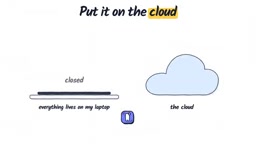
Next, create a "content inbox" in Notion. When you're out and about, use the Claude mobile app to start a new session, select the same repository, and have the agent check the pending ideas in the inbox and turn them into carousel posts. The task runs in the background — turning off your phone screen doesn't affect it. When the agent finishes, it reports back with the Notion link and automatically marks the task as complete.
The final step is scheduled tasks: set up a "daily content drop" that checks for new inbox entries every evening, generates carousel posts, and even has it suggest improvements to the skills manual based on feedback. Toss materials into the inbox during the day, and by the next morning the drafts are waiting for your review.

How Connectors, Repositories, and Scheduled Tasks Divide the Work
Cloud operation relies on three parts working together: connectors (like Notion) let the agent read and write data in external apps, a private Git repository (like GitHub) turns your local workspace into a versioned copy the cloud can read, and scheduled tasks wake the agent on a schedule when no one triggers it.
All three are essential: without a repository, the cloud can't see your brand files or skills manual; without a connector, output stays local and can't be collected or viewed on your phone; without scheduled tasks, the agent still passively waits for instructions. Writing the task as a closed loop of "check inbox → generate content → write back link → mark complete" is the typical form of unattended automation. Note that cloud operation means the model executes operations autonomously, so permission scope, repository visibility, and where sensitive information is stored should all be planned in advance.
Where This Method Can Be Reused
The creator stresses that this four-level framework isn't limited to content creation. Any repetitive work where you want AI to take over the judgment — organizing materials, aggregating data, drafting client replies — can be built in the order of "workspace → agent → skills → memory → cloud." You don't have to do it all at once; go one level at a time.
The trade-off worth noting: the higher the level, the greater the automation payoff, but the higher the upfront setup investment and debugging cost. If you only use it occasionally, Level 1 is enough; if you handle the same type of task every day, the returns from Levels 3 and 4 really show up.
FAQ
Can you really do this without writing any code? Yes. The entire process happens inside the Claude desktop app, using natural-language instructions to operate folders and configuration files — no terminal required.
What if the agent's first version isn't ideal? That's normal. Tell it your feedback clearly and have it write that into the memory file, and the next round will improve. The key is to let feedback accumulate rather than manually fixing things each time and moving on.
One-line Summary
Build a self-evolving content agent with Claude Code in layered steps — no code required
Paragraph Summary
This article describes how a no-code content creator built an automated carousel-post agent using only the Claude desktop app, distilling a transferable four-level framework. The author first emphasizes that the essential difference between chatbots and agents is "judgment," and lays out the five components of an agent: brain, context, task, rules, and tools. Then it walks through Levels 0 to 4: first build a workspace with brand materials and generate CLAUDE.md and brand context, then build the first agent with a ready-made prompt, then stabilize output with a skills manual and enable self-evolution with a memory file, and finally achieve unattended cloud operation using Notion, GitHub, and scheduled tasks. The article also notes that higher levels yield greater returns but require more investment, so choose based on how often you'll use it.
Related articles

DeepSeek Harness in Detail: DIY Your Own Software Like Building with LEGO
What is DeepSeek Harness? Using the metaphor of a car assembly platform, this article explains this equipment system of freely combinable functional modules, analyzes its spatiotemporal composability technical foundation, and shows how ordinary users can DIY exclusive software that does not exist on the market at extremely low cost.

DeepSeek Harness Step-by-Step Tutorial: Master DSH and Its Plugin Ecosystem in 50 Minutes
DeepSeek Harness step-by-step install tutorial: from Node.js environment setup to client installation, covering three plugin install methods — chat, marketplace, and command line — plus practical uses of local file access and plugin extensions.

DeepSeek Open-Sources Super-agent Architecture: A Turning Point for Proactive AI
DeepSeek's open-source Super-agent architecture proposes a new proactive AI paradigm: a central Agent dispatches tasks, sub-Agents execute autonomously, and humans only decide and accept. This article analyzes the watershed between passive and proactive AI, and the implementation logic of proactive Agents in scenarios like short-video lead generation.