Build Your Own ChatGPT with Flutter and Gemini API: Streaming Chat in 200 Lines of Code

Build a Gemini chat app with streaming replies and conversation memory in under 200 lines of Flutter code.
This article covers a developer's practice of building a ChatGPT-like chat app with Flutter and Google's Gemini API. The core architecture calls Gemini through Firebase AI Logic as a middle layer, avoiding leaking API keys embedded in mobile apps while enjoying a free tier. Streaming replies use sendMessageStream for word-by-word output, with a mutable text field to support continuous appending. Chat sessions automatically maintain history for contextual memory, and system instructions set the AI's personality and enforce plain-text output to avoid Markdown symbols polluting bubbles. The UI uses ListView.builder for long-conversation performance, with auto-scroll and try-catch defensive design. The article also notes often-missed details like WidgetsFlutterBinding.ensureInitialized() and suggests extensions such as changing personality, clearing conversations, and local persistence.
Why Not Let the App Call Gemini Directly?
Embedding API keys directly in a mobile app is dangerous. The original author points out bluntly in the video: anyone can unpack your app and steal the key. By routing through Firebase, the key is never distributed with the app.
Firebase AI Logic is Google's officially recommended way to call Gemini from mobile. It offers a free tier, letting learners follow along without paying. Interestingly, the Flutter package used is firebase_ai, which has replaced the deprecated google_generative_ai package—if you see different usage in older tutorials, that's why.
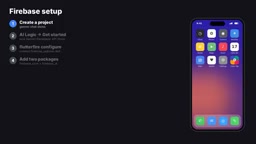
The setup process isn't complicated: create a project in the Firebase Console, enable AI Logic and select the Gemini Developer API with a free tier, then run flutter fire configure in your Flutter project to generate the config file, and finally add the firebase_core and firebase_ai dependencies.
Firebase AI Logic is a service Google launched in 2025 as part of the Firebase ecosystem, designed to provide secure access to Gemini models for mobile and web apps. Its core mechanism: client SDKs carry no API keys; instead, requests are authenticated via Firebase project identity and App Check, then proxied through Google's backend to the Gemini API. Beyond key security, it unifies the calling interface across iOS, Android, Web, and Flutter, and includes built-in quota management and abuse protection. For learners, Firebase AI Logic offers a free tier of the Gemini Developer API, so you can start experimenting without a credit card—significantly lowering the barrier to entry. Note that the free tier has rate and total limits, suitable for prototyping but not production traffic.
How Is Streaming Implemented?
The core secret is sendMessageStream. Unlike sendMessage, which waits for a complete answer, the streaming interface pushes text chunks back as Gemini generates content. The developer iterates over each chunk with an await for loop, appends it to the message object's text field, and each setState triggers a repaint, so the user sees the answer emerge word by word.
This also explains why the text field in the message model can't be declared final—it needs to keep changing during streaming.
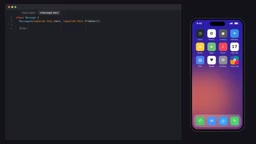
While waiting for the first response, the message text is empty and the UI shows three dots as a loading indicator. It's a small detail, but it makes the app feel more alive.
Streaming significantly improves chat experience because large language models generate token by token. Traditional sendMessage waits for the model to finish the entire answer before returning it all at once—users may stare at a blank screen for several seconds. sendMessageStream pushes each text fragment the moment the model produces it, so time-to-first-token is usually under a second. In Dart, sendMessageStream returns a Stream, and the await for loop consumes it until the stream closes. Each new fragment triggers a setState rebuild, and Flutter's incremental rendering ensures only changed parts are repainted. This pattern is also more resilient to network fluctuations—even if the connection drops, already-received text remains on screen.
Conversation Memory: The Role of Chat Sessions
An AI that remembers context feels like a real assistant. The chat session created by model.startChat() stores the full conversation history and sends it along with each request to Gemini. That's why when the user asks "tell me another one," the AI knows we're still talking about octopuses—session maintains continuity, and developers don't need to manually concatenate history messages.
The system instruction is like setting the AI's personality. The original author tells it to "be friendly, keep answers concise, use plain text." The last point is especially critical: without that restriction, Gemini returns Markdown, and chat bubbles end up with little asterisks around bold text.
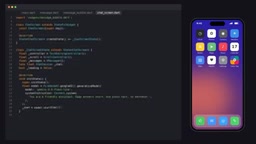
This system instruction can be changed freely—math tutor, travel guide, even a pirate voice, all up to your imagination.
System instructions differ from regular user messages in LLM APIs: they set global behavioral constraints before the conversation begins, with higher priority than any single user input. In the Gemini API, system instruction is sent as a separate field with each request, and the model treats it as a non-negotiable contextual premise during generation. It's the right place for role definitions, output format requirements, safety boundaries, and similar content. Compared to few-shot examples, system instruction is lighter and doesn't occupy conversation history slots. That said, system instruction isn't absolutely reliable—the model may still occasionally deviate, so scenarios with strict formatting requirements (e.g., JSON output) usually need response schema or post-processing validation.
UI Details and Performance Considerations
Chat bubbles follow a classic layout: user messages right-aligned in the primary color, AI messages left-aligned in a soft gray. Width is constrained to 300 pixels so long answers wrap naturally instead of stretching across the screen.
The message list uses ListView.builder, which only builds visible items, so even long conversations stay smooth. As the answer grows, the code auto-scrolls to the bottom after the frame is drawn—otherwise new text would slide off screen.
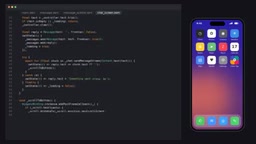
The send logic also has some defensive design worth borrowing: return early on empty input or while waiting for a reply; wrap network requests in try-catch to show a message instead of crashing on error; clear the loading state regardless of success or failure.
WidgetsFlutterBinding.ensureInitialized() is a key step in the Flutter framework startup process. Before runApp, the communication channel between the engine and the Dart layer isn't established yet; calling plugins that depend on platform channels at that point (like Firebase Core initialization) throws the error Binding has not yet been initialized. This line explicitly initializes the binding, ensuring platform channels are available. In pure UI apps, runApp handles this initialization automatically, so many developers have never called it manually—but as soon as you use plugins like Firebase or SharedPreferences at the start of main, you must call it first. This is one of the most common startup errors when integrating Firebase on mobile.
Prerequisites and Extension Ideas
The project's barrier to entry isn't high: Flutter basics, a Google account, and a basic understanding of async programming. The line WidgetsFlutterBinding.ensureInitialized() is easy to forget—without it, Firebase throws an error at startup.
The original author suggests a few extension exercises: change the system instruction to give the bot a personality, add a clear-conversation button, persist chat history locally. All of these can be iterated on quickly based on the existing code.
From a broader perspective, this project illustrates a trend in modern AI app development: maturing infrastructure lets developers focus on experience. Key management, API calls, and streaming—once thorny problems—have been abstracted by platforms like Firebase into a few lines of configuration. Behind those 200 lines is an entire ecosystem lowering the barrier to AI apps.
Related articles

Last Week Tonight Exposé: The Dangerous Ties Between Politicians and White Supremacy
Last Week Tonight investigates Georgia Senate candidate Mike Collins and Florida candidate Marshall Rawson, exposing their multiple ties to white supremacists and the Republican Party's silent response.
AI Buzz Weekly: GPT-6.5 Leak, New Claude Model, and MiniMax's Cost-Effectiveness
This week's AI buzz roundup: suspected GPT-6.5 leak, Microsoft configs showing GPT-6.1 Tera, Anthropic's new model that can identify entire classes of bugs, disappointing early Gemini 4 Carbon results, and MiniMax M3.1 Flash beating Claude Opus 5 and GPT-5.6 Sol in benchmarks at extremely low cost.
AI Briefing: Gemini 4 Carbon Released, Ant Open-Sources Ling-3.1
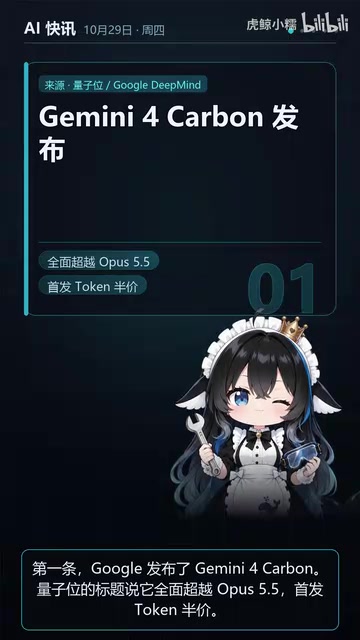
AI Briefing: Google releases Gemini 4 Carbon qubit model, claiming to surpass Opus 5.5 with half-price tokens; Ant open-sources Ling-3.1-1019 for real-task Personal Agents; domestic AI drug discovery succeeds in 18 of 19 projects, hitting all 6 GPCR targets; zero-revenue company valued at $20B raises another $1B; Sichuan convenience store robot sales fail.