Build Your Own Inference Stack: A Practical Guide to Running Production-Grade AI Agents on Dedicated GPUs

Building a self-hosted inference stack with Kubernetes and vLLM on dedicated GPUs: a practical path through quantization, speculative decoding, and concurrency tuning.
Based on an Akamai technical workshop, this article explains how to build a production-grade AI agent inference stack on dedicated GPUs in a Kubernetes cluster. It first weighs self-hosting against renting APIs: data sovereignty, controllable cost, and deep tuning are the benefits, but only high-frequency, stable workloads amortize GPU costs. The infrastructure uses LKE plus vLLM, gaining production features through continuous batching, PagedAttention, and an OpenAI-compatible API, while a gateway fills in routing, authentication, and rate limiting. For VRAM planning, model weights and KV cache are zero-sum: Qwen3 4B weights take 8GB at BF16, leaving room for about 37,000 tokens. Switching BF16 to FP8 measured about 1.42x throughput gain, but time to first token deteriorates sharply beyond 32 concurrency. Properly configured speculative decoding speeds things up 1.5-3x, while a mismatched drafter causes throughput to collapse. The final methodology is to change one parameter at a time and run a load test each time to find the knee point of throughput and latency.
Build Your Own Inference Stack: A Practical Guide to Running Production-Grade AI Agents on Dedicated GPUs
When your AI agent processes hundreds of thousands of tokens a day, requires multi-turn tool calls, and must keep data within your private domain, continuing to pay API providers per token means both your bill and your latency will become bottlenecks. In a technical workshop on Bilibili, Akamai developer evangelist DeJuan Lightfoot and senior software engineer Omer gave a complete demonstration of how to turn "rented intelligence" into "your own inference capability"—covering everything from GPU selection and vLLM tuning to quantization compression and speculative decoding, all carried out hands-on on a Kubernetes cluster.
This article is based on the full content of that workshop and lays out the key decision points and tuning paths for building your own inference stack.
Why Bring Inference Back In-House
In his opening, DeJuan recalled that when he built his first agent in early 2023, he could only manually parse prompts in Python and stitch together tool call results. That approach "quickly became very expensive." Switching to a local small model brought new problems: insufficient capability, not enough VRAM, and an inability to sustain multi-turn conversations and tool calls over long contexts.
Self-hosted inference offers three core benefits: data sovereignty (neither requests nor model weights leave your own cluster or VPC), controllable cost (under high-frequency, stable workloads, renting a GPU is more economical than per-token billing), and deep tuning headroom (you can freely modify batching strategies, quantization precision, and VRAM allocation). According to DeJuan's estimate, managed calls processing 200,000 tokens a day cost about $1,500 per month, while renting a dedicated GPU costs about $1,000—but only if that card runs at full utilization continuously; otherwise you're paying for idle capacity.
Conversely, when traffic is low and bursty, when the team lacks operational experience, or when you must use the capabilities of top-tier closed-source models, renting an API remains the more rational choice.
The Infrastructure Stack: Kubernetes + vLLM + Dedicated GPU
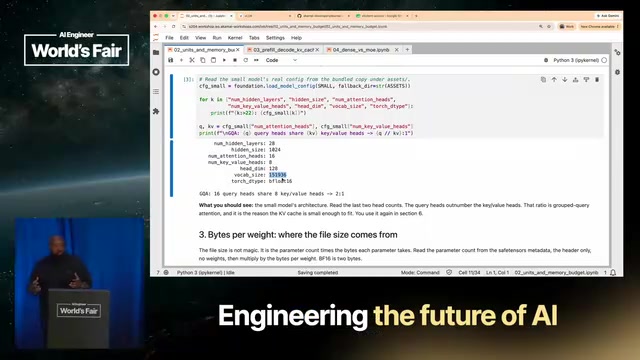
The workshop environment was an Akamai LKE (Linode Kubernetes Engine) cluster with more than 200 GPU nodes. Each participant received an isolated namespace on a single RTX 4000 ADA card, containing a Jupyter Notebook and a vLLM inference endpoint.
Omer focused on the key specs of this card: 20GB VRAM, 360GB/s memory bandwidth, and a large number of CUDA cores. High bandwidth means fast decode; high TFLOPs and a large CUDA core count mean fast prefill. A single node can scale up to 4 cards with 80GB of VRAM, enough to hold a mid-sized model.
vLLM was chosen over Ollama as the inference engine for its production features: out-of-the-box continuous batching, PagedAttention (referred to as page retention in the workshop), and an OpenAI-compatible API. DeJuan used a school bus analogy to explain continuous batching—static batching must wait for a full bus of children to get off before picking up the next group, whereas continuous batching can drop off and pick up at the same time, making far more efficient use of the KV cache during the prefill stage.
Note vLLM's boundaries: one endpoint serves only one model, so multiple models require a model routing gateway; it supports authentication but not authorization; and it has no rate limiting. Production environments typically need a gateway layer in front (such as an agent gateway or KServe) to handle routing, authentication, and throttling.
The Relationship Between PagedAttention and KV Cache
PagedAttention is vLLM's core innovation, inspired by virtual memory paging in operating systems. Traditional inference engines reserve a contiguous block of VRAM for each request's KV cache; because generation length is unpredictable, they often reserve for the maximum length, causing significant internal fragmentation. PagedAttention divides the KV cache into fixed-size blocks (pages) and uses a page table to map logically contiguous tokens to physically non-contiguous VRAM blocks, reducing fragmentation from 60%-80% to single digits. This matters greatly for self-hosted inference: on the same 20GB card, PagedAttention substantially increases the KV cache space available for concurrent requests, directly determining how many users you can serve simultaneously and how long a context you can support. It is also the prerequisite for continuous batching to run efficiently—new requests join and old ones exit at any time, with pages dynamically allocated and reclaimed.
VRAM Budgeting: The Zero-Sum Game Between Model Weights and KV Cache
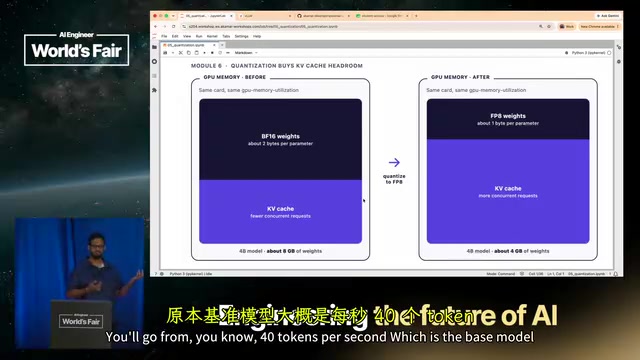
The most commonly underestimated part of self-hosted inference is VRAM planning. Take Qwen3 4B as an example: at BF16 precision, the weights take 8GB (parameter count × 2 bytes), and all remaining VRAM goes to the KV cache—that is, how much context you can hold.
There's an often-overlooked detail here: the prefill stage reads the entire prompt into the model and stores it in the KV cache, and then every generated token updates it, so the KV cache keeps growing. System prompts, tool definitions, and multi-turn history all have to squeeze into this space. DeJuan's measured data: on a single card, after subtracting 8GB for weights, the remaining space holds roughly 37,000 tokens. If four users each send an 8,000-token request, that fills it exactly.
Quantization is the primary means of freeing VRAM. Going from BF16 to FP8 halves the weight size, taking Qwen3 4B from 8GB down to about 5GB—note it's not exactly 4GB, because some layers are kept at higher precision. According to Omer, this "dynamic" quantization strategy compresses only specific parts such as attention heads while keeping the rest at original precision, trading off quality against performance.

The Difference Between the Prefill and Decode Phases
Understanding VRAM and performance requires distinguishing the two phases of inference. The prefill phase sends the user's entire prompt into the model in parallel at once; it is compute-intensive, constrained by the GPU's TFLOPs and CUDA core count, and writes the Key/Value of each layer into the KV cache. The decode phase generates tokens autoregressively one at a time, computing only one token per step but reading through the entire KV cache of all previous tokens, making it memory-bandwidth-intensive and constrained by GB/s. This explains two things: why high-bandwidth cards decode faster, and why the KV cache keeps growing during generation—it is built once during prefill and repeatedly read and appended to during decode. Time to first token is mainly determined by prefill, while the inter-token interval (TPOT) is mainly determined by decode and bandwidth; these two metrics should be tuned separately.
Quantization in Practice: How Much You Gain from BF16 to FP8
The comparison Omer showed was very intuitive. The baseline BF16 model runs at about 37.5 tokens/s at single concurrency, with 714 tokens/s aggregate throughput at 32 concurrency and 61ms time to first token. After switching to FP8 weights (by changing the model path in vllm.yaml and redeploying), single-concurrency throughput rose to 53.4 tokens/s, and peak throughput at 64 concurrency rose from about 800 to 1,140 tokens/s—about 1.42x.
The cost is that time to first token rises noticeably with concurrency: 277ms at 32 concurrency, jumping to 1,300ms at 64 concurrency. This inflection point determines your service ceiling—beyond 32 concurrency, throughput stops growing while latency deteriorates sharply, so it's better to stop at the inflection point than to push through it.
Omer repeatedly stressed the importance of an evaluation set: quantization can cause broken JSON generation, failed function calls, and models getting stuck in loops, so you must validate with your own eval set. BF16 to FP8 is usually a "negligible quality loss," but when it comes to your specific business scenario, only your own test data has the final say.
Speculative Decoding: Not a Panacea, and Misconfiguration Backfires
The principle of speculative decoding is to use a small draft model to generate several tokens ahead, then have the main model verify them in parallel, accepting or rejecting each. According to the vLLM report cited by Omer, token generation speed can improve by about 1.5x when properly configured; in his personal home lab, using Qwen3 35B MoE with a DFlash drafter, he measured 2-3x improvement—close to 3x for coding scenarios and about 1.5x for browser automation.
But the workshop deliberately demonstrated a failure case: using Qwen3 0.6B as the drafter for a 4B model with the speculative token count set to 4, throughput plummeted from 58.2 tokens/s to 16 tokens/s, and from 700 to 240 at 16 concurrency. The reason is that this drafter doesn't match the main model, so the acceptance rate is extremely low—both models consume compute, while the verifier keeps rejecting draft tokens.
The conclusion is clear: prefer the model's official matching drafter; if none exists, choose a third-party one but you must measure the acceptance rate; the speculative token count needs repeated tuning, and Omer suggests starting from 2 to 4 rather than being greedy. An attendee also asked about the impact of mixed precision (main model in FP8, drafter in INT4), and Omer confirmed that mismatched precision lowers the acceptance rate, and that the drafter itself needs to be distilled and trained against the main model.
Why Acceptance Rate Is the Achilles' Heel of Speculative Decoding
The benefit of speculative decoding doesn't come from the draft model "guessing right"—it comes from "when it guesses right, the main model verifies multiple tokens in a single forward pass." Let the draft model generate γ candidate tokens at once; after parallel verification, the main model accepts a proportion α of them (the acceptance rate). The theoretical speedup is roughly (1-α^(γ+1))/((1-α)(1+cγ)), where c is the ratio of the draft model's per-step cost to the main model's. When the acceptance rate is very low, most drafts are rejected, the draft model's cost is pure waste, and the speedup drops below 1—exactly why throughput in the workshop fell from 58 to 16 tokens/s. Key factors affecting acceptance rate include: whether the draft and main models are from the same source (official matching drafters have the highest acceptance rates), whether their precisions match, the task type (structured text like code completion has high acceptance, free-form creation low), and the value of γ (too large and the latter half of the draft is likely to be rejected). Therefore, you must measure the acceptance rate before deploying speculative decoding and adjust γ according to your traffic distribution.
Finding the "Knee Point" of Throughput and Latency
The core concept of Module 7 is saturation—keeping the GPU running at full load for as long as possible. As concurrency increases, throughput rises and then flattens, while latency keeps climbing; the inflection point of the two curves is the optimal operating point. In the demonstration, this point was 32 concurrency.
Module 8 presents methods for breaking through bottlenecks: change only one parameter at a time, and run a load test after each change. Key knobs include GPU memory utilization (raise to 0.9 or even 0.95 when the card is dedicated), max num sequences (after the workshop raised it from 32 to 128, throughput at 64 concurrency rose from 800 to 1,100 tokens/s and latency dropped from 2,000ms to 800ms), max model len, and batch tokens. If tuning still hits the theoretical ceiling, that's the hardware ceiling, and you need to add cards or switch cards.
For bursty traffic, Omer mentioned that LKE supports autoscaling, and you can also build a statistical model based on historical traffic for predictive scaling.

How GPU memory utilization and max num sequences Work
vLLM's gpu_memory_utilization (default 0.9) at startup determines what proportion of VRAM the engine can occupy, with the remainder left for the CUDA context, activations, and framework overhead. On a dedicated card you can raise it to 0.95, but raising it too high can cause the engine to fail at startup or crash during operation due to OOM, so leave a safety margin. max_num_seqs limits the number of sequences processed simultaneously within a single scheduling step; it determines the upper bound of the continuous batching batch size: set it too small and the GPU is underfed during decode with insufficient bandwidth utilization; set it too large and the KV cache is divided among more sequences, shortening the available context per sequence and increasing scheduling overhead and VRAM pressure. In the workshop, raising it from 32 to 128 actually reduced latency at 64 concurrency precisely because a larger batch lets the decode phase make fuller use of memory bandwidth. Together with max_model_len, these two parameters form a three-way constraint on VRAM allocation, and adjusting any one of them requires rerunning the load test to confirm you haven't hit the ceiling.
Final Thoughts
The value of this workshop is that it doesn't stop at the slogan "self-hosting is cheaper" but lays out the cost of every decision: quantization saves VRAM but may hurt quality, speculative decoding speeds things up but misconfiguration sets you back, and raising the concurrency ceiling can reduce latency but is limited by VRAM. What truly squeezes the performance out of a dedicated GPU isn't some magic parameter but the loop of "measure—change one variable—measure again." All code and notebooks are publicly available in the Akamai developer repository, ready to be reproduced on your own cluster.
Related articles

JobRunner MCP Server: AI Agents Can Now Fix Failed Java Jobs
JobRunner launches an open-source MCP server enabling AI agents to view cluster status, diagnose failures, and recover Java jobs—incident response from any cloud coding environment or existing agent.

MLAI Digital Launches 9 Security Agents: MCP Server Safeguards the Full Lifecycle of Agentic AI
MLAI Digital launches Security MCP Server with nine built-in specialized security agents covering vulnerability discovery, attack simulation, prompt injection detection, API and infrastructure assessment, and accelerated remediation—embedding security validation across the full Agentic AI lifecycle from development to production.

Running Isaac Lab on H100 GPUs: Exploring Better Approaches
Exploring optimization methods for running Isaac Lab on NVIDIA H100 GPUs, including MIG configuration, mixed precision, TensorRT acceleration, and community experience to improve robotics simulation and reinforcement learning efficiency.