Building a Billable Paid API from Scratch: API Keys, Edge Functions, and Production-Grade API Design

A complete engineering blueprint for building a production-grade, usage-based paid API on Supabase.
This article walks through building a production-grade paid API on Supabase. The core security rule: store only the SHA256 hash of API keys, generate them server-side only, and route all access through edge functions — the database is never directly exposed. It explains why Supabase's built-in JWT approach fails for API key scenarios (JWTs can't be instantly revoked), while a hash-lookup system enables delete-to-revoke. On API design: plural noun endpoints, honest status codes, default pagination, and version numbers from day one. Security covers user-level rate limiting, SQL injection prevention, CORS origin control, and enforced HTTPS. Finally, "copy-paste and it works" documentation is framed as the key activation moment for converting users into paying customers.
Turning a plain database table into a public API you can charge for is many indie developers' dream of passive income. In this tutorial, Bilibili creator Oliver (previously involved in tools like Response AI) uses a fictional "haunted house property listing table" as a working example to walk through how to build a usage-based paid API system on Supabase. Setting aside the clickbait framing, what's genuinely valuable in the video are the engineering decisions that separate a toy from a real product. This article distills those core ideas.
The Business Model: Why a Database Table Can Become a Revenue Stream
The basic logic of a paid API is straightforward: developers register, generate an API key, and pay per call. The author uses a common pricing benchmark — roughly $20/month for 10,000 calls.
The video uses "haunted house listings" as joke data, but the author makes a sharp point: the exact same pattern applies to any valuable dataset. Swap "haunted houses" for "Texas real estate with pricing, sales history, and purchase records," and you have something local real estate agents genuinely need — and will pay to access.
In other words, the commercial value of the underlying data sets the ceiling. The API is simply the monetization channel. How professionally that channel is built determines whether customers stick around and keep paying.
Why Not Just Use Supabase's Built-in API
Supabase auto-generates a REST API for every table, but the author explicitly rules it out for this use case. The issue is authentication: Supabase uses JWT by default, and JWTs are like "festival wristbands" — they expire roughly every hour, designed for users logging into a browser or mobile app.
API customers are developers who embed keys directly in their code. Those keys need to work for months. They need a "permanent badge" or "tattoo-like" credential — not an hourly wristband.
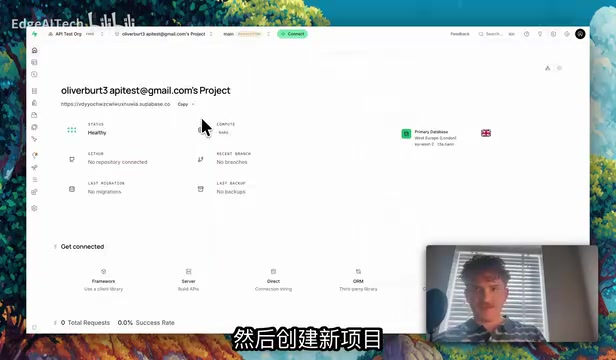
Since Supabase has no built-in long-lived key system, the author builds one. His analogy: the database is a VIP nightclub, the API key is the VIP badge, and the edge function is the bouncer at the door scanning badges.
JWT (JSON Web Token) is a stateless identity token — the server can verify it without querying the database, which is both its strength and its limitation. JWTs embed an expiration time (exp field) in the payload; the server simply decodes and checks the timestamp. Because no database lookup is required, revoking a JWT is nearly impossible: even if you delete the user record from the database, any previously issued JWT remains valid until it expires. For login sessions in admin panels or mobile apps, this is fine (tokens expire in an hour anyway). But for API keys that need to be long-lived and instantly revocable on demand, this property is a fatal flaw. Building a hash-based lookup system means every request hits the database for verification — "delete the row, revoke the key" — at the cost of one extra database query per request. For a security-sensitive paid API, that tradeoff is worth it.
The Three-Part Key System: Never Store the Real Key
The entire key system follows one iron rule: never store the actual key anywhere. If your database leaks and you stored plaintext keys, every customer's key leaks with it — potentially exposing you to massive liability. The solution: store only the key's "fingerprint."
Part One: The Key Table
Create an API key table. The most important column is key_hash — not the key itself. Each key is run through SHA256 to produce a one-way fingerprint that can't be reversed. Also store a "prefix" (e.g., sk_live_L1A2B) so customers can identify which key is which in their dashboard — exactly what Stripe does. Because the prefix is not the complete key, it's safe to store in plaintext.
Finally, lock it down with Row Level Security (RLS). The core policy: the authenticated UID must equal the user ID — otherwise anyone could list everyone else's key hashes.
Part Two: The Key Generator
Keys must be generated inside the database — never in the frontend. A key generated in the browser travels over the internet before it can be saved, introducing an extra point of exposure. The author implements this as a Postgres function: the customer clicks "Generate," the function creates a random string, hashes it, stores only the hash, and displays the real key exactly once on screen. A modal prompts the user to copy it: "You'll never see this again."
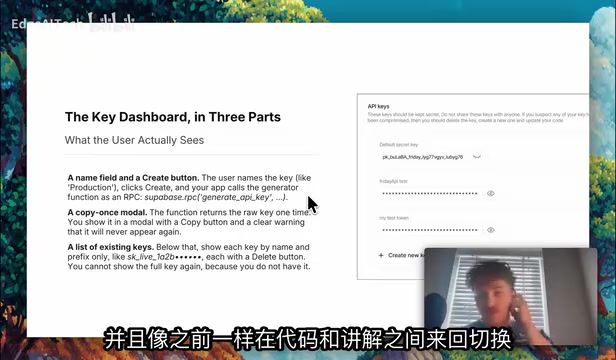
Part Three: The Gatekeeper (Edge Function)
Customers never talk directly to the database. All requests go to a Supabase-hosted edge function. This "bouncer" does five things in milliseconds: reads the key from the request header, hashes it, queries the key table to confirm the fingerprint exists, identifies the corresponding customer, and returns the property data. The edge function uses the service role key — a high-privilege credential that bypasses all security policies — so it must only run server-side and must never appear in browser code.
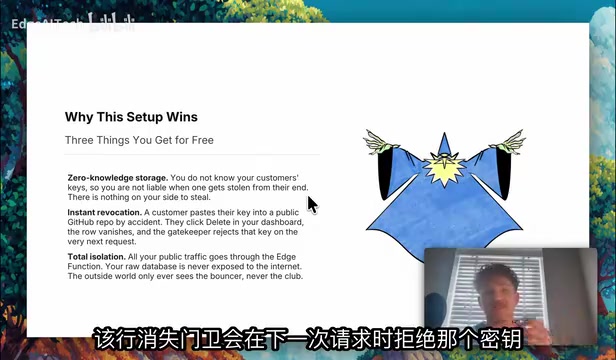
The author demonstrates the result: sending a random string as a key returns empty data; sending a key generated by an authenticated user to fetch "all haunted houses" correctly returns only properties where Haunted = true. RLS intercepts unauthorized access at the database layer. Deleting a key row equals "instant revocation" — the next request fails automatically, no extra code needed.
Edge Functions are lightweight serverless functions deployed on globally distributed nodes. Compared to traditional servers, they run geographically closer to end users, reducing network latency. Supabase's edge functions are built on the Deno runtime, with cold start times typically in the tens of milliseconds. In this architecture, the edge function carries all "application layer" responsibilities: it holds the service role key (essentially a database superadmin credential) and can bypass row-level security to operate directly on data. It must therefore live in a controlled server-side environment and must never be bundled into frontend code. This design pattern is essentially a simplified "zero-trust architecture" — the public internet only ever sees the edge function's entry point; the database itself is completely invisible externally, minimizing the attack surface.
Good API Design: What Separates a Toy from a Product
The author emphasizes that a working key system only gets people "through the door." Good API design is what makes them stay and keep paying. The gold standard: a great API lets developers get started without reading the docs.
Naming and HTTP Methods
Endpoints should be plural nouns — /properties, not /getProperties. The HTTP method already expresses the action: GET reads, POST creates, PUT/PATCH updates, DELETE removes. So GET /properties returns a list, GET /properties/42 returns a single property, and the same URL with DELETE removes it. Stay consistent with plurals and naming conventions throughout.
Honest Status Codes
Status codes tell developers what happened: 200 for success, 201 for created, 401 for missing or invalid key, 404 for resource not found, 429 for rate limit exceeded, 500 for server error. The author is emphatic: never return 200 with an error hidden in the response body. An invalid key is a 401, no exceptions. Clear error codes are the difference between a developer continuing to use your API or churning.
Pagination, Filtering, and Versioning
Never return all records at once. Paginate by default like Google search (e.g., page=2&limit=20), push filtering and sorting to the database, and return only what was requested. Also, include a version number in the path from day one (e.g., /v1/properties). That way, when you refactor your data later, you can launch /v2 while keeping /v1 running — no breaking changes that silently destroy hundreds of developers' integrations.
In API versioning, a "breaking change" is any modification that invalidates existing caller code: removing or renaming fields, changing field types, altering pagination structure, changing the meaning of error codes, and so on. "Non-breaking changes" — like adding new fields or new endpoints — can generally be shipped safely within the same version. Putting /v1 in the path from day one isn't just about leaving room to grow; it's an implicit contract with your customers: behavior under the same version path won't suddenly change. Stripe still maintains API versions from years ago — some developers' code has never been updated and still works fine. That kind of reliability is itself a core retention driver for paying users.
Locking It Down: Four Layers of Protection
The key system handles "who gets in." This section handles "what they can do once they're in."
Rate Limiting: Set a cap per key — say, 100 requests per minute — and return 429 when exceeded. The author demonstrates rate-limiting logic in the edge function and flags a critical trap: limits must be enforced at the user level, not the key level. Otherwise, users can just keep creating new keys to bypass the cap. Sensible limits can also be sold as pricing tiers — e.g., 10 free calls per day, unlimited on a paid plan.
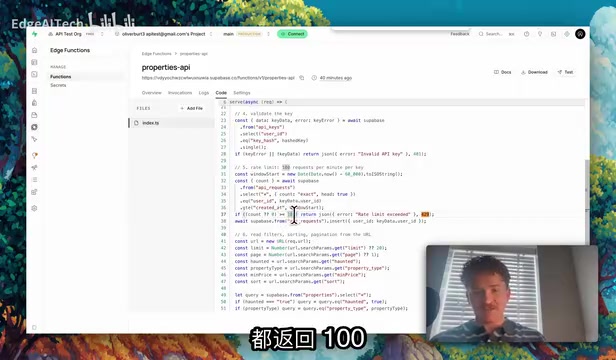
Tamper Prevention and SQL Injection: Quota configurations must live in tables users can't edit — otherwise a user could just open browser DevTools and change their limit to 10 million. Never concatenate raw strings into SQL queries; use Supabase's built-in client methods, which treat input as data rather than commands. Also validate basics upfront: is "minimum price" actually a number?
CORS Origin Control: Think of it as a guest list at the door — only allow specified websites to call your API from the browser. Read-only public data can be more permissive, but anything involving login sessions or paid data must be strict. Default to exposing only what absolutely must be exposed.
HTTPS and Least Privilege: HTTP is like a postcard — anyone along the route can read the key. HTTPS is a sealed envelope. Supabase enables HTTPS by default; the rule is "never turn it off." Assign minimum necessary permissions to every key. The service role key lives exclusively inside edge functions — it never appears on the client side.
Documentation as Onboarding
The final step is shipping documentation alongside the product. The author recommends giving customers "copy-paste-and-it-works" examples in the style of Stripe or OpenAI — a single curl command with the endpoint, the key header, and a realistic-looking sample key. Developers swap in their own key, see data come back within 10 seconds, and that first successful call is the activation moment. The faster you get them there, the more likely they are to pay. The author calls documentation "onboarding," because that's exactly what it is.
Summary
The value of this tutorial isn't the "make millions while you sleep" marketing pitch — it's the clear articulation of the engineering decisions a production-grade paid API actually requires: store only the hash, generate keys server-side, route access through edge functions, use RLS for data isolation, and layer in naming conventions, status codes, pagination, versioning, rate limiting, injection prevention, CORS, and HTTPS. For indie developers looking to monetize data they already have, this is a checklist you can act on directly.
Related articles

Felix Rieseberg Personal Homepage
Felix Rieseberg's personal homepage sparks attention on Hacker News. This article covers the Slack engineer's technical background, the rise and fall of nativefier, and the value of a developer homepage as a tech calling card.

@ai-sdk/vue 3.0.306 Patch Release Syncs with [email protected] Update
@ai-sdk/vue 3.0.306 released, synced with [email protected]. A routine patch release for the Vercel AI SDK ecosystem with no public API changes; the Vue adapter layer stays version-aligned with the core package.

Gemini 4 Argon API Launches: The Era of Million-Token Output Begins
Google launches Gemini 4 Argon with sparse MoE architecture, up to 1M output tokens, and a 68.90% Vals Index score, available across API, AI Studio, and the Gemini app.