Building a Memory-Enabled Gemini AI Agent with n8n and Postgres: A Full Docker Walkthrough

Build a stateful AI agent with n8n, Google Gemini, and Postgres running on dual Docker containers.
This article breaks down an n8n-based AI agent setup using Google Gemini as the conversational model and Postgres for persistent chat history, running entirely on a dual Docker container architecture. The key technical challenge is connecting the containers: you need to modify `postgresql.conf` to open the listen address and add subnet authorization rules in `pg_hba.conf`. Testing confirms that conversation history is written in real time to the `n8n_chat_histories` table. The tutorial also demonstrates how different Gemini model versions handle time-sensitive questions, highlighting the importance of knowledge cutoff dates. The setup is ideal for quickly prototyping stateful AI chatbots, though production deployments will need stronger security and access controls.
Why Give an AI Agent "Memory"?
Most people building AI workflows in n8n stop at simple one-shot exchanges — send a message, get a reply. But a true agent needs context awareness: it should remember previous exchanges to carry on coherent, multi-turn conversations. This article breaks down a YouTube tutorial demonstrating how to integrate Google Gemini as the conversational model in n8n, with Postgres as the persistent store for chat history.
The standout feature of this setup is that everything runs on Docker containers: the n8n agent service runs in one container, and the Postgres database runs in another. This decoupled architecture makes deployment, migration, and maintenance much cleaner — and it closely mirrors how production systems are actually built.
n8n is an open-source, low-code workflow automation platform — similar in positioning to Zapier or Make (formerly Integromat), but with self-hosting support. It connects APIs and services through a visual node-based interface, and with the recent addition of AI nodes, it has become a popular choice for building lightweight AI agents. Docker is the dominant containerization technology today, packaging an application and its dependencies into an isolated environment (a container) that follows the "build once, run anywhere" principle. Together, this means the entire AI workflow system can be launched on any machine with Docker installed — no need to manually install n8n or Postgres on the host, and no version conflicts to worry about.
Overall Workflow Architecture
The core objective of this workflow is straightforward: a user sends a message through the chat interface, the agent passes it to Gemini for processing and returns a response, while simultaneously writing the conversation history to Postgres.
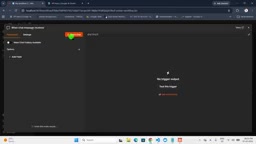
The system is made up of three main components:
- Chat Trigger: The entry point of the workflow, receiving messages from the user;
- AI Agent node: The central orchestrator, responsible for forwarding messages to the LLM and deciding how to respond;
- Chat Model + Memory: Gemini handles response generation; Postgres handles context storage.
The first test question in the tutorial was "How many countries are there in the world?" — to which the model responded "It depends on how you count, roughly 195, with 193 being UN member states." A standard, accurate answer that confirmed the core pipeline was working.
Configuring the Gemini Model Node
To use Gemini in the agent, you need to select Google Gemini as the Chat Model and provide the corresponding API key. The setup process goes roughly like this:
- Click on the Chat Model under the AI Agent node, scroll down, and select the Gemini option;
- Enter your API key, generated in advance from Google AI Studio;
- Select the specific model version.
The tutorial specifically demonstrates the flexibility of switching models. When an older model was asked "Who is the current Leader of the Opposition in India?", it returned an answer based on stale training data (referencing 2024 information); switching to a newer Gemini model produced a more accurate and up-to-date response. This highlights an important consideration: a model's knowledge cutoff date directly affects the quality of answers on current events, and this should be factored into your model selection.
Google AI Studio is a free online platform provided by Google where developers can obtain API keys for the Gemini family of models and test different model versions. Gemini has multiple versions in active development, differing in knowledge cutoff date, context window size, and reasoning capability. The "knowledge cutoff" refers to the last date represented in a model's training data — the model has no awareness of events after that point, which is a shared limitation of all statically trained models. To retrieve real-time information, you typically need to connect an additional search tool to the agent (such as the Google Search API or Tavily). Switching model versions can mitigate the problem but cannot fundamentally solve it.
Persistent Memory with Postgres
This is the most technically involved part of the setup. In the Memory section, select "Postgres Chat Memory" and configure the database connection credentials — including database name, host, username, and password.
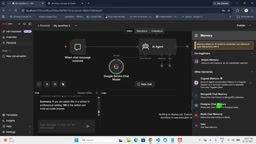
Before connecting, however, there is a commonly overlooked but critical step: you need to modify Postgres's configuration files to allow the n8n container to connect to the database from outside. Two changes are required:
- In
postgresql.conf, setlisten_addresses = '*'to allow connections from any external address; - In
pg_hba.conf, add the corresponding subnet authorization rule.
The author notes that setting global listening means anyone could potentially connect to the database, so in a production environment you should tighten these permissions. Once the changes are made, running docker ps shows two containers running — one for the n8n service and one for Postgres. You can then set the host directly to the container name postgres, and the username to postgres as well.
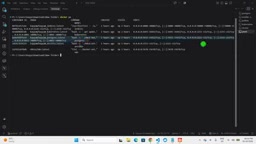
Verifying That Memory Is Actually Persisted
After completing the configuration, the author checks Postgres to confirm that the n8n_chat_histories table was created. After a few rounds of conversation, the table indeed contains a record of the exchanges between the user and the model. This means the agent is no longer "goldfish-brained" — it can work with ongoing context drawn from conversation history.
PostgreSQL (Postgres for short) is a powerful open-source relational database known for its reliability and SQL standard compliance. In AI agent scenarios, storing conversation history in a database rather than in memory offers a clear advantage: in-memory context disappears when a container restarts or a process exits, whereas records written to a database persist across sessions and restarts. postgresql.conf is Postgres's main configuration file, controlling server-level runtime parameters — listen_addresses determines which network interfaces the database listens on. pg_hba.conf (Host-Based Authentication) is the client authentication rules file, defining line by line which IPs, which users, and which authentication methods are permitted to connect. Both files need to be modified because the former controls "whether to accept external network requests" and the latter controls "who is authorized to authenticate" — neither alone is sufficient. Within a Docker network, containers on the same compose network can reach each other using the container name as the hostname, which is why setting the host to postgres works directly.
Real-World Conversation Test Results
After the setup was complete, the tutorial ran a series of real tests. Here's how Gemini performed:
- "How many states does India have?" → 28 states plus 8 union territories;
- "What is India's current GDP?" → Approximately $3.? trillion;
- "Who is India's opposition leader?" → The older model answered Mallikarjun Kharge; the newer model also included updated information about Rahul Gandhi.
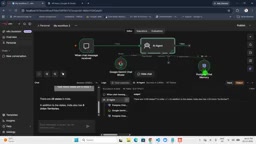
With each exchange, both the user input and model output are written synchronously to Postgres. Output formatting is also flexible — responses can be plain text, tabular, or even exported as a file, switchable based on your needs.
Value and Limitations of This Approach
The practical value of this tutorial lies in providing a reproducible, containerized workflow that connects a low-code automation platform, a large language model, and persistent memory — making it well-suited for developers who want to quickly build stateful AI customer service bots or Q&A systems. Docker-based deployment also gives this setup excellent portability.
That said, it's worth keeping a clear head about its limitations: the tutorial focuses on hands-on demonstration and only briefly touches on security concerns (such as the risks of global listening), performance tuning, and memory window management. Taking this to production would require more careful engineering around credential management, access control, and model cost.
For readers looking to get started with AI workflow automation, the Gemini + Postgres + n8n combination offers a clear and concrete starting point for understanding how a memory-enabled agent actually works in practice.
Related articles

Felix Rieseberg Personal Homepage
Felix Rieseberg's personal homepage sparks attention on Hacker News. This article covers the Slack engineer's technical background, the rise and fall of nativefier, and the value of a developer homepage as a tech calling card.

@ai-sdk/vue 3.0.306 Patch Release Syncs with [email protected] Update
@ai-sdk/vue 3.0.306 released, synced with [email protected]. A routine patch release for the Vercel AI SDK ecosystem with no public API changes; the Vue adapter layer stays version-aligned with the core package.

Gemini 4 Argon API Launches: The Era of Million-Token Output Begins
Google launches Gemini 4 Argon with sparse MoE architecture, up to 1M output tokens, and a 68.90% Vals Index score, available across API, AI Studio, and the Gemini app.