Building a Mini Program Development Workflow with WorkBuddy from Scratch: Create a Launchable WeChat Mini Program Without Writing Code

WorkBuddy zero-basics course: build WeChat mini programs through conversation without code—first understand boundaries and costs.
WorkBuddy is an AI tool that directly controls your computer, automatically breaking down tasks, processing files, and coordinating software—considered a domestic alternative to Codex. The "most comprehensive" Bilibili course has 28 knowledge points, with 12 episodes on mini program development focusing on creating launchable WeChat mini programs through conversation without writing code or installing developer tools. Episode 1 focuses on "boundaries and expectations": WorkBuddy generates page code, connects cloud services, uploads code, and submits for review—but account registration, entity verification, filing, and review compliance are the user's responsibility. The article also covers five doable scenarios (brand display, appointments, events, internal collaboration, lightweight tools) with a decision formula, lists four "can't do" categories as a stop-loss checklist, calculates three cost types (time, account, cloud services), and provides three entry points plus a six-element prompt template.
WorkBuddy is more than just an AI chat box. Some people use it to build fully automated workflows, handling e-commerce, customer service, data organization, and mini program development all at once. If you're only going to dive deep into one AI tool this year, it's worth prioritizing—think of it as a domestic alternative to Codex, designed specifically for Chinese workers. It requires no complex deployment, has low computer hardware requirements, offers free quota, works out of the box, and is compatible with all kinds of domestic office software.
Its most fundamental difference from ordinary large models: ordinary AI only gives you text-based ideas, while WorkBuddyAd can directly control your computer. With a single command, it automatically breaks down tasks, plans steps, batch-processes local files, coordinates multiple software applications, and completes entire workflows. But most beginners only know how to ask simple questions, leaving its automation capabilities completely untapped.
Recently, a course on Bilibili has been called the "most comprehensive and detailed" WorkBuddy zero-basics practical course, with 28 actionable knowledge points divided into four modules: Introduction, Case Studies, Advanced, and Industry Applications, with hands-on practice based on real office scenarios. The mini program development series consists of 12 episodes totaling about 70+ minutes, focusing on "not writing code, not installing WeChat Developer Tools, and turning ideas into an online-published WeChat mini program through conversation."
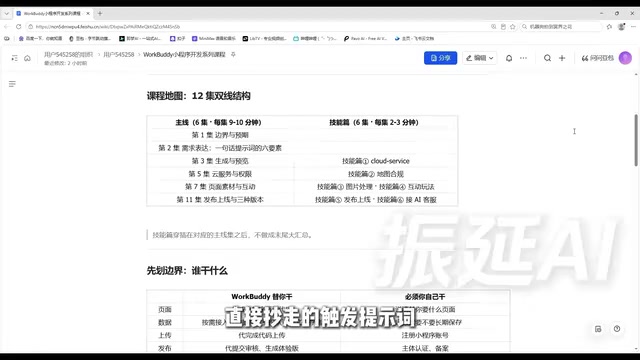
1. First Understand the Boundaries: What WorkBuddy Does for You and What You Must Do Yourself
This course places "Boundaries and Expectations" in the first episode. It doesn't teach operations, but it determines whether the remaining 11 episodes will go smoothly. The core logic is simple: if you can't distinguish which tasks it handles for you and which tasks you must handle yourself, you'll wait in the wrong places and worry in the wrong places.
Four things it does for you:
- Generates mini program page code. You don't need to understand project structure or set up a local development environment—this is an officially documented capability.
- Connects cloud services based on requirements. When you need to save data, enable user login, or upload images, it will prompt you during generation whether to enable these features, and after confirmation, it handles the configuration.
- Completes code upload. Normally you'd need to click upload in WeChat Developer Tools, fill in version numbers, and write notes—now this step is managed for you.
- Submits for review, generates trial versions, and publishes tasks—note that it submits on your behalf, not approves on your behalf.
Four things you must do yourself:
Clearly explain what you want (AI doesn't know how many stores you have or how appointment time slots are arranged); register a mini program account (long-term operating accounts must be your own); complete entity verification and filing; review rules and operational standards—whether content is compliant and categories are correct is your responsibility.
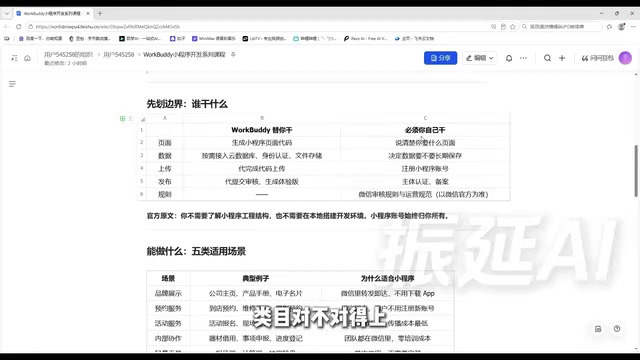
The course specifically emphasizes an official quote: mini program accounts always belong to you. You're not publishing under someone else's shell—this determines that the whole thing is safe and sustainable long-term.
Entity verification and filing are necessary steps for legal mini program launch. Entity verification refers to verifying the true identity of the entity (individual or enterprise) that owns the mini program on the WeChat Public Platform. Individual entities need to provide ID information; enterprise entities need to provide business licenses and complete corporate bank transfer verification. Filing refers to completing the ICP filing required by the Ministry of Industry and Information Technology—unfiled mini programs cannot be published or accessed normally. These two steps must be completed by users themselves because they are directly tied to the legal ownership of the account and involve real identity and qualification materials that AI cannot provide or authorize on your behalf. Verification and filing typically take 1-3 business days, so it's recommended to start before development to avoid getting stuck at the qualification stage after the code is written.
2. What Ideas Can Become Mini Programs? Five Categories of Scenarios and One Decision Formula
The official documentation provides five trial scenarios, and the course provides examples for each:
- Brand display: Company main business, product manuals, electronic business cards. Forward to clients in WeChat and they can view it immediately—more professional than sending a PDF, and more effective than asking people to save your phone number.
- Appointment services: In-store appointments, repair registration, photography bookings. Essentially a form plus a record table—users can use it and leave without needing to register a new account for appointments.
- Event services: Event registration, on-site check-in, surveys. Scan the code to enter—lowest propagation cost.
- Internal collaboration: Equipment borrowing, matter reporting, progress tracking. Teams are already in WeChat every day—the learning cost of downloading an extra app is 10x higher than opening a mini program. Zero training cost is the biggest value for internal enterprise scenarios.
- Lightweight tools: Quote calculators, calculators, lottery wheels. Single-use tools where asking users to install an app is simply impossible.
One decision formula: if the requirement can be broken down into a combination of "information display + form submission + simple query," go ahead confidently. If it requires real-time communication, high-frequency interaction, or high rendering performance, switch approaches—don't force it. This formula can help you avoid half the pitfalls before you even start.
3. Four Categories of "Can't Do": A Stop-Loss Checklist to Know Early
This part isn't pleasant to hear, but it must be discussed upfront—otherwise you'll waste effort only to find out at publication time.
Category 1: Regulated service categories. Medical consulting, financial management, education training, etc. have clear category and qualification requirements. It's not that it's technically impossible—it's that without the corresponding qualifications, you can't pass review. If your idea falls into this category, the first step isn't generating pages—it's checking on the WeChat Public Platform what qualifications the category requires.
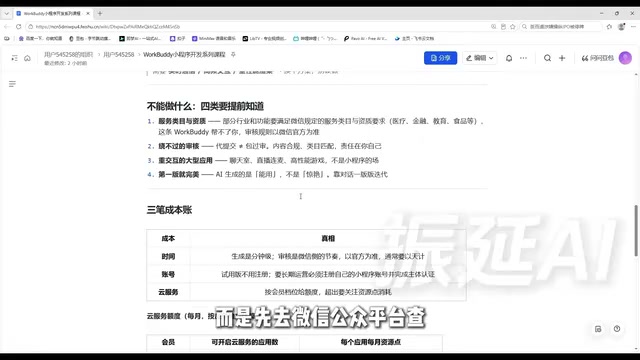
Category 2: Reviews you can't bypass. Submitting on your behalf doesn't mean guaranteed approval. Content compliance, category matching, and whether there's induced sharing are your responsibility. Read the operational standards in advance—don't put yourself in a gray area.
Category 3: Heavy-interaction large applications. Chat rooms, live streaming, high-performance games aren't what mini programs were designed for—forcing them will definitely result in poor experience.
Category 4: Don't expect the first version to be perfect. The AI-generated first version is "usable," not "stunning." Ugly pages and stiff interactions are normal. The right approach is to iterate version by version through conversation, addressing issues one at a time. The first episode discussing boundaries isn't meant to discourage you—it's to help you focus your energy in the right places.
4. Three Cost Calculations: Time, Account, Cloud Services
Time cost: Generation takes minutes—you can see a clickable mini program within minutes of giving a command. Review follows WeChat's pace, measured in days. The expectation should be "build fast, wait patiently"—plan your launch timeline in advance.
Account cost: For trying out the experience, you can use the trial version—scan the code to authorize and generate an accessible version, but with clear limitations. For long-term operation, you must register your own mini program account on the WeChat Public Platform and complete verification and filing. Don't skip this step—it's the mini program's legal identity.
Cloud service cost: Resource points are allocated by membership tier, calculated and refreshed independently per application—Trial version: 10 applications, 5,000 points per application per month; Standard version: 30 applications, 25,000 points per month; Advanced version: 50 applications, 50,000 points per month; Flagship version: 99 applications, 150,000 points per month. Exhausting one application's quota doesn't affect other applications. Resource points start counting from the day cloud services are activated, with a monthly cycle that auto-refreshes upon expiration. Course reminder: numbers may adjust with versions—refer to what's actually displayed in your account.
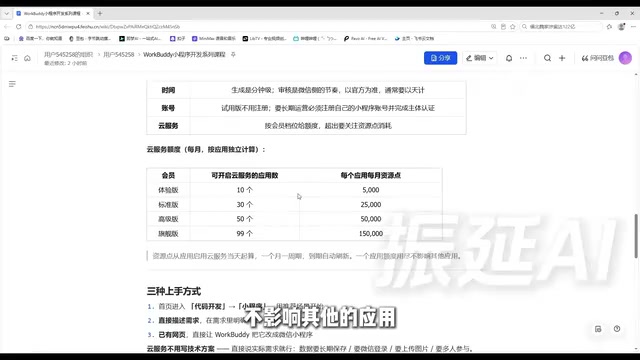
WorkBuddy's resource points are similar to cloud service usage quotas, used to offset backend resource consumption during mini program operation, such as database reads/writes, file storage, and cloud function calls. Different membership tiers provide different numbers of applications and monthly resource point limits per application, with each application's quota calculated independently without affecting others. Resource points refresh monthly, starting from the day cloud services are activated. For most lightweight mini programs (like appointments and registrations), 5,000 points per month is usually sufficient; if there's significant image uploading or high-frequency data reads/writes, pay attention to consumption speed and upgrade tiers or optimize data operations in time.
5. Three Ways to Get Started and One Prompt Template You Can Copy Directly
- Enter code development from the homepage and select mini program: The platform provides recommended scenarios (scan-to-order, event registration, etc.)—modify and start, suitable for finding a starting point when you haven't figured out specific requirements yet.
- Directly describe requirements: Most flexible and commonly used, but with a hard requirement—you must explicitly write "WeChat mini program" in your requirements. Writing "help me make an appointment tool" versus "help me make a WeChat mini program for appointments" determines whether you get a webpage or a mini program.
- Convert existing webpages to mini programs: Most convenient, suitable for scenarios where you've already built H5 event pages.
You don't need to write technical specifications for cloud services at all. No need to say "I want a database" or "I want a login interface"—just speak plainly: data needs to be saved long-term, WeChat login needed, image upload needed, multiple people involved. It understands and will prompt you to enable features when needed.
The course provides a directly copyable prompt template (using in-store appointments as an example), which contains six elements: who's using it, what they need to do, what pages are needed, whether login is needed, whether data storage is needed, and what style. Each element directly affects the generated result—Episode 2 will break them down one by one.
Episode Summary: Code and upload are handled for you; accounts and reviews are your responsibility. What can be done: information display, form submission, simple queries. What can't be done: bypassing qualification reviews and heavy-interaction large applications. Generation is fast, reviews require patience, long-term operation requires your own account. Choose from three entry points—just speak plainly for cloud services. This episode has no operations, but it's the foundation for the next eleven.
Background Supplement
WeChat mini program service categories are the platform's classification management mechanism for mini program functional scope, with each category corresponding to different qualification requirements. For example, the "medical" category requires a "Medical Institution Practice License," the "financial" category requires relevant financial licenses, and the "education" category may require a school operating license. Developers must select a category before submitting for review in the mini program backend. If actual functions don't match the selected category or corresponding qualifications are missing, the review will be rejected. Therefore, before starting development, you should first log into the WeChat Public Platform to view the "Service Categories" list and confirm which category your business belongs to and what materials are required—this is a key step to avoid wasted development.
One-line Summary
WorkBuddy zero-basics practical course: build WeChat mini programs through conversation without writing code—first understand boundaries and costs.
Related articles

Chain of Thought Isn't Just for AI: How Humans Can Use CoT to Improve Thinking Quality
Chain of Thought isn't just a prompt trick for large models. Starting from a Hacker News discussion, this article analyzes why CoT works for human thinking too, breaks down actionable ways to transfer it, and highlights the key differences between human CoT and machine CoT.
Cloudflare Teams Up with OpenAI: Closi…
Cloudflare Teams Up with OpenAI: Closing the Loop from Vulnerability Discovery to Defense with AI
Cloudflare uses OpenAI Daybreak to investigate security vulnerabilities and generate reviewable remediation plans, while developers use Codex to boost coding efficiency and quality.

Orca Multi-Agent Orchestration in Practice: A Guide to Parallel Collaboration with Claude and Codex
Orca is Stable AI's free open-source agent workbench supporting 34 agents like Claude Code and Codex in parallel. Learn its Git worktree isolation, multi-model orchestration, and mobile management.