Building a Monitorable AI Data Assistant with Slack + BigQuery + Langfuse

Build a production-grade Slack data assistant with Gemini, MCP, and Langfuse for secure querying and full observability.
This article presents a complete engineering solution for building an enterprise data query assistant inside Slack. A single Cloud Run service runs both a Slack bot (using Socket Mode to avoid public webhooks) and an MCP server that gives Gemini read-only BigQuery access with whitelist and SQL validation guardrails. Langfuse provides end-to-end observability, turning every question into a traceable record of user identity, token usage, and tool calls. Slack threads serve as natural conversation memory, making the whole system a production-ready reference for teams integrating LLMs with internal data.
Why Build a Data Assistant Inside Slack
When marketing and sales teams make bidding decisions, they often need fast, reliable numbers: how much to bid for a given client, at what price to close. The traditional workflow means submitting a request to an analyst and waiting in the queue. In real-time bidding scenarios, that delay is nearly fatal.
The approach in this tutorial: ask questions in plain English directly in Slack to a "Data Assistant," which automatically queries BigQuery and returns real data — so every bid is backed by evidence. More importantly, the entire system is wired into Langfuse for observability — who's asking, what they asked, how many tokens each question consumed, how long it took, and which queries the assistant ran. All of it is traceable.
The value of this architecture isn't just "you can query data with AI." It's that it turns access control, cost monitoring, and conversation memory into a real, production-ready engineering solution.
Overall Architecture: One Cloud Run Service, Two Components
The heart of the system is a single Cloud Run service running two components simultaneously: a Slack bot and an MCP server.
The Slack bot connects to Slack via Socket Mode using an outbound WebSocket connection, which means no public webhook needs to be exposed — a significant security win. The bot's various tokens are loaded from Secret Manager rather than hardcoded.
When a question arrives, Gemini's agent loop decides which tools to call. These tools are hosted on the MCP server, which performs read-only SQL queries against a whitelisted set of BigQuery tables — nothing else. This "least privilege" design is the security foundation of the entire solution.
Socket Mode is Slack's alternative to public webhooks for receiving events: the app proactively establishes an outbound persistent WebSocket connection to Slack, and Slack pushes events through that connection rather than sending POST requests to an HTTP endpoint. This is ideal for services running behind a firewall or private network — no public IP, domain name, TLS certificate, or inbound firewall rules required. The tradeoff is that the application must manage connection state itself, and Slack requires an App-Level Token with
connections:writepermission to establish the connection. Because Socket Mode relies on a single persistent WebSocket connection to receive and acknowledge events, running multiple instances causes each instance to receive the same event and reply independently — resulting in duplicate responses. This is the fundamental reason the article emphasizes keeping Cloud Run instances fixed at 1, not a limitation of the Cloud Run platform itself.
The MCP Server: A Safe Tool Interface for the LLM
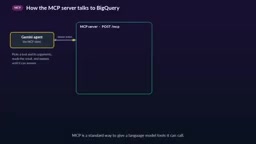
MCP (Model Context Protocol) is a standardized way to provide callable tools to a language model. In this system, Gemini is the client, calling the MCP server over HTTP with a bearer token.
The server exposes three tools:
- ListTables: Returns the tables Gemini is allowed to use
- GetTableSchema: Returns column names and field descriptions for a table
- RunQuery: Executes a SQL query
Each tool calls BigQuery using Google client libraries under the Cloud Run service account's identity, and operates only against a fixed set of allowed tables.
The critical detail is that every query is validated before execution: only SELECT or WITH statements are allowed, only whitelisted tables, a billing cap of 100MB, and a maximum of 200 rows returned. Query results come back as JSON, which Gemini then transforms into an answer posted in the Slack thread. These layers of defense effectively prevent accidental operations, runaway bills, and data leaks.
MCP (Model Context Protocol) was proposed and open-sourced by Anthropic in late 2024, with the goal of solving the fragmentation problem of "every AI app needing to integrate every tool separately." It draws inspiration from LSP (Language Server Protocol): defining a standard client-server protocol so that any MCP-compatible model can call any MCP-compatible tool server without custom adapters for each combination. Previously, connecting LLMs to external tools typically relied on each platform's custom Function Calling format, with inconsistent tool descriptions, parameter schemas, and invocation styles that made migration costly. MCP standardizes tool declaration (
tools/list), invocation (tools/call), and resource access, allowing the same MCP server to be reused across Gemini, Claude, GPT, and other models. In this architecture, the MCP server acts as a "controlled database proxy" — it's not just a technical specification, it's the key design that pushes permission boundaries down from the model layer to the tool layer. Even if the model is manipulated into generating a malicious query, the server-side whitelist and SQL validation remain the last line of defense.
Using Langfuse to Make Every Question a Traceable Event
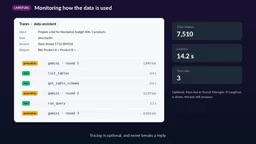
Observability is the other half of this system's value. Every Slack question becomes a trace.
The trace stores the question and final answer, the Slack user who asked it, and the thread it belongs to — so an entire conversation is grouped into a session. Within the session, each round of Gemini's reasoning is recorded as a generation, including its prompt, response, and token count; each MCP tool call is also logged along with its parameters and return values.
This means the team can clearly see: who's using the data, what they're asking, and how much each answer costs in tokens and time. For teams that need to control AI usage costs and conduct compliance audits, this level of monitoring granularity is extremely practical.
Notably, tracing is optional. The Langfuse credentials are also stored in Secret Manager, and if Langfuse is unavailable, the bot continues to answer normally — failures in the monitoring layer don't bring down the main flow.
Langfuse is an open-source observability platform designed specifically for LLM applications. Its core data model revolves around three levels: Trace, Span, and Generation. A Trace corresponds to one complete user interaction (in this article, a single Slack question). A Generation specifically records a model inference step, containing the input prompt, output, and token usage. A Span marks any intermediate step, such as a tool call. This hierarchical structure makes it straightforward to answer questions like "how many rounds of model inference did this user question trigger, what tools were called in each round, how long did the whole thing take, what did it cost" — all answerable directly through Langfuse's UI or API. The Session concept groups multiple Traces from the same conversation thread together, making it easier to analyze the full context of multi-turn conversations. Compared to general-purpose APM tools like Datadog or Jaeger, Langfuse is purpose-built for LLM scenarios: it natively understands token billing units, supports prompt version management, and allows human scoring annotations on model outputs. For enterprise teams that need to report AI usage costs to management or demonstrate data access compliance to audit teams, this level of fine-grained recording is often the necessary condition for moving AI tools from "experiment" to "production system."
The Build Process: From Creating a Slack App to Deploying on Cloud Run
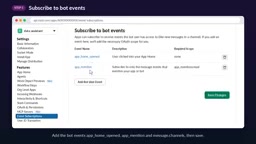
The full build process breaks down into a few key stages.
Configuring the Slack App
Go to api.slack.com/apps, click "Create New App," choose to start from scratch, name it, and select your workspace. It's recommended to use two separate apps for development and production.
Under OAuth & Permissions, add the following Bot Token Scopes: app_mentions:read, channels:history, chat:write, commands.
Then enable Socket Mode — this routes payloads through WebSocket rather than a public request URL. Slack will ask you to generate an App-Level Token with connections:write permission, prefixed with xapp. Under Event Subscriptions, subscribe to events including app_home_opened, app_mention, and message.channels. Finally, install to your workspace and retrieve the Bot User OAuth Token, which starts with xoxb.
Managing Secrets and Permissions
Store both tokens together as a single JSON secret in Secret Manager, and grant the Cloud Run service account permission to read it. That account also needs two BigQuery roles: Data Viewer and Job User.
Also generate a random MCP OAuth Token (using openssl) to protect the MCP endpoint. No real tokens should ever be committed to Git or pasted into code, chat, or screenshots.
Local Verification and Deployment
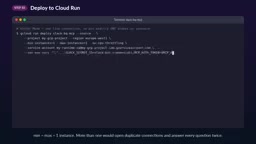
After installing dependencies, log in with Application Default Credentials and run main.py, checking the startup logs to verify the bot is configured as expected.
There's one critical detail when deploying to Cloud Run: Socket Mode maintains a persistent connection, so you must fix both the minimum and maximum instance count to 1. With multiple instances, every question will be answered twice.
What It's Like to Use
After running /invite @data assistant to add the bot to a channel, you can @ it with questions — for instance, "put together a bidding proposal for a client with a certain budget and a few product lines."
The bot replies in the thread immediately with "thinking," updating every 5 seconds with elapsed time; meanwhile Gemini checks table schemas and runs read-only queries through the MCP tools. Once done, the message is replaced with the final answer — every number sourced from BigQuery, not hallucinated.
To refine the bid, just reply in the same thread — no need to @ the bot again or re-explain the client and budget. Each thread is a conversation, and the bot remembers everything said in it.
A few things to keep in mind:
- The bot can only be @ mentioned in channels it has been added to
- Answers always appear in threads
- Each new client or bidding scenario should start a new thread
- Memory is cleared on restart or redeployment and never crosses thread boundaries
- Queries are always read-only and limited to allowed tables
Engineering Takeaways
Setting aside the specific tech stack, this case demonstrates a relatively mature "production-grade AI Agent" pattern: MCP for standardized tool invocation, whitelisting and SQL validation as layered defenses, Socket Mode to avoid public exposure, Secret Manager for centralized credential management, Langfuse for end-to-end observability, and Slack threads as a natural conversation memory mechanism.
For teams looking to genuinely connect LLMs to internal data systems, this combination offers a reference template that balances usability, security, and observability.
Related articles

Chain of Thought Isn't Just for AI: How Humans Can Use CoT to Improve Thinking Quality
Chain of Thought isn't just a prompt trick for large models. Starting from a Hacker News discussion, this article analyzes why CoT works for human thinking too, breaks down actionable ways to transfer it, and highlights the key differences between human CoT and machine CoT.
Cloudflare Teams Up with OpenAI: Closi…
Cloudflare Teams Up with OpenAI: Closing the Loop from Vulnerability Discovery to Defense with AI
Cloudflare uses OpenAI Daybreak to investigate security vulnerabilities and generate reviewable remediation plans, while developers use Codex to boost coding efficiency and quality.

Orca Multi-Agent Orchestration in Practice: A Guide to Parallel Collaboration with Claude and Codex
Orca is Stable AI's free open-source agent workbench supporting 34 agents like Claude Code and Codex in parallel. Learn its Git worktree isolation, multi-model orchestration, and mobile management.