Building a Personal AI Assistant with Hermes Agent: A Practical Guide to Connecting Cloud Servers via MCP

A complete tutorial on building a Telegram-based remote cloud server management assistant using Hermes Agent and MCP.
This article explains how to use Hermes Agent with the MCP protocol to build an AI assistant that remotely manages cloud servers via Telegram. MCP upgrades the Agent from Q&A to invoking 87 tools for real operations like checking server status and managing networking, firewalls, storage, and billing. It covers local vs. cloud VPS deployment, setup steps, key pitfalls, and limitations.
AI Agent capabilities are expanding rapidly—from answering questions and processing data to directly managing cloud server resources. This article is based on a hands-on tutorial by an Indonesian developer, walking through how to use Hermes Agent combined with the MCP protocol to build a personal AI assistant capable of remotely managing cloud servers via Telegram.
Why AI Agents Managing Servers Is Now Possible
Traditional AI assistants rely on API calls and can only perform a limited set of predefined operations. The emergence of MCP (Model Context Protocol) has changed this model—it allows AI Agents to connect to external systems and invoke various tools to perform concrete actions, such as checking server status, managing network configurations, and adjusting storage resources.
In this setup, the Agent isn't just "answering questions"—it is given the ability to actually "take action." The video demonstrates that by entering natural language commands through Telegram or a terminal, the Agent can return real-time server data and even execute resource management operations. Behind this is the IdCloudHost platform under Inspector Cloud, which provides 87 MCP tools covering VMs, networking, firewalls, storage, and even billing.
MCP (Model Context Protocol) was introduced by Anthropic in late 2024 as an open-source standard designed to unify communication between AI models and external data sources and tools. Before MCP, developers wanting AI to invoke external services typically had to write separate Function Calling code for each service, and interfaces from different model providers were incompatible. MCP solves this problem by defining a standardized client-server architecture: an MCP server exposes a set of Tools, Resources, and Prompts, and an AI Agent acting as an MCP client can discover and invoke these capabilities after connecting. This means tool developers only need to implement an MCP server once, and it can be reused by all MCP-compatible Agent frameworks, greatly reducing integration costs. Currently, mainstream AI tools such as Claude Desktop, Cursor, and Windsurf all support MCP.
Two Ways to Run Hermes Agent
Hermes Agent can run on a local computer or on a cloud VPS, and the experience differs significantly between the two.
Pain Points of Local Deployment
If installed on a personal PC, running tasks are interrupted as soon as the computer shuts down or goes to sleep. After restarting, you need to reopen the terminal, enter the Hermes command, and restore context—for scenarios requiring 24/7 server monitoring, this approach is clearly not practical enough.
Advantages of Cloud VPS
After deploying Hermes Agent on a cloud VPS, you only need to complete the initial setup once, and the Agent stays online continuously afterward. Users send commands through channels such as Telegram, and the Agent responds instantly without needing any local device to remain powered on. The video author suggests that if you really want to build a stable server management assistant, cloud deployment is the more reasonable choice.
A VPS (Virtual Private Server) is one of multiple independent virtual environments created by dividing a physical server through virtualization technology. Each VPS has its own operating system, IP address, and resource quota. Unlike shared hosting, a VPS provides root access, allowing users to freely install software and configure services. In AI Agent scenarios, the core value of a VPS lies in its always-on nature—the cloud provider's data center ensures power and network redundancy, so the VPS will not be interrupted by shutdowns, sleep, or network outages like a personal computer. Common VPS providers include DigitalOcean, Vultr, Linode, and regional providers such as IdCloudHost mentioned in this article. When choosing a VPS, pay attention to CPU cores, memory, bandwidth, and data center location, the latter of which directly affects network latency.
Building from Scratch: Full Deployment and Configuration Workflow
The entire setup process is divided into several stages: creating a cloud account, deploying Hermes Agent, configuring the AI model, connecting Telegram, and installing MCP tools.
Creating an Account and Deploying the Agent
First, create a billing account in the IdCloudHost console. After entering a promo code, you can receive 100,000 Indonesian rupiah in credit (minimum top-up of 50,000). The author actually topped up 150,000 Indonesian rupiah for testing.
Next, go to the App Catalog, select Hermes Agent, and choose the server location—the South Jakarta node offers 5x standard performance, in the roughly 100,000 Indonesian rupiah tier. After setting a username and password, the system automatically creates the virtual machine.
Once deployment is complete, connect to the server via SSH. The system runs Ubuntu, and at this point Hermes Agent is installed but not yet configured.
Setting Up the AI Model
In the server terminal, run sudo hermes setup to enter the configuration process. Choose Full Setup rather than Quick Setup. Then select the AI model provider—the author chose Anthropic's Claude Sonnet 5, which requires generating an API Key from the Anthropic platform and pasting it into the configuration. A lower-consumption model tier was chosen to control costs.
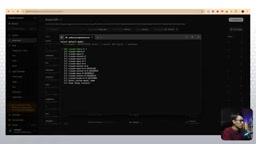
During configuration, you'll be asked whether to install additional components (such as text-to-speech), which the author skipped, keeping only core chat functionality. After setup is complete, Hermes shows a "Healthy" status.
Connecting Telegram
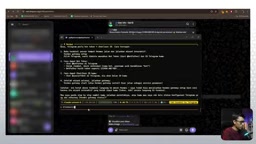
The initial configuration did not ask for a Telegram Bot setup, so the connection must be completed manually. The Agent provides guidance:
- Search for BotFather in Telegram, create a new Bot, and obtain the Token
- Get your own user ID via userinfobot
- Fill the Bot Token and user ID into the Hermes configuration
- Run
hermes gateway installto register the gateway as a system service, ensuring automatic recovery after container restarts
After configuration is complete, sending a message to the Bot in Telegram will prompt that pairing approval is required. After running the approval command in the terminal, normal conversation becomes possible. The author tested having the Agent play the role of a "new employee Andrea" to manage the server, and the Agent smoothly accepted the role setting.
A Telegram Bot is an automated interaction interface provided by the Telegram platform. Developers create a Bot through BotFather (Telegram's official bot management bot) and obtain a unique HTTP API Token. Any program with that Token can send and receive messages on behalf of the Bot. Hermes Agent uses this mechanism to make Telegram the message channel between the user and the Agent: the user sends natural language commands in Telegram, Hermes receives them and calls the AI model for processing, then returns the result to Telegram. The gateway acts as middleware here, responsible for listening to messages, routing requests, and maintaining session state. Registering the gateway as a system service (such as a systemd service) ensures the Bot automatically resumes running after a server restart without manual intervention, which is standard practice for production deployments.
MCP Integration: Letting the Agent Truly Take Over the Server
After Telegram is connected successfully, the Agent can still only chat and cannot operate the server. Only by integrating MCP tools can it actually manage resources.
Obtaining the API Key and Installing MCP
Create an API Key on the "Access" page of the IdCloudHost console, then run the MCP installation command in the Hermes terminal, passing in both the URL and Token.
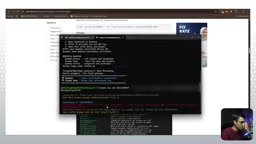
There is a key pitfall here: the video author initially tried installing MCP through a regular server terminal, but it failed with a violation warning. Switching to Hermes's own installation command succeeded on the first try. It is recommended to run the MCP installation directly within the Hermes environment.
After installation is complete, the Agent confirms that all 87 MCP tools are enabled (100% enable).
Feature Verification
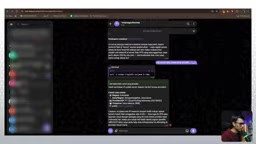
By sending natural language commands through Telegram, the Agent calls MCP tools and returns real data:
- Querying data center locations: returns available regions such as Jakarta and Singapore
- Viewing network list: displays subnet 10.53.175.0/24 and its creation time
- Querying account usage: returns a balance of 150,000 Indonesian rupiah, running costs of about 10,000, and an effective balance of 139,000
The author also discovered an interesting phenomenon: when using overly brief commands earlier (such as "list semua pm"), the Agent could not correctly invoke tools, but using complete phrasing (such as "use IdCloudHost's MCP to check current usage") succeeded on the first try. This shows that command clarity directly affects the success rate of MCP tool invocation.
The Practical Value and Limitations of This Approach
From the demonstration, this "AI assistant managing servers" setup performs reliably for query-type operations—viewing resource lists, billing balances, and network configurations all return accurate results. The Agent can also combine conversational context for role-playing, such as responding to commands as a "server administrator."
However, there are also clear limitations. Although the MCP tools list 87 items, actual usability depends on account permissions and resource status. During testing, the PM list was empty and some network queries returned container environment restriction prompts, indicating that what the Agent can do is ultimately limited by the capabilities exposed by the underlying platform.
Another point worth noting is the cost structure: VPS monthly fee (roughly the 100,000 Indonesian rupiah tier) + AI model API usage fee (billed by Token). For scenarios requiring continuous operation, this expense needs to be taken into account.
From a technology trend perspective, MCP is becoming a universal protocol for interaction between AI Agents and external tools. Frameworks like Hermes Agent lower the barrier for individual developers to build their own AI assistants—there is no need to write tool integration code from scratch, and through a standard protocol the Agent can gain the ability to operate real systems. This "conversation-as-operations" interaction model may gradually permeate more IT management scenarios.
One-line Summary
A complete tutorial on building a Telegram-based remote cloud server management assistant using Hermes Agent and the MCP protocol.
Paragraph Summary
Based on an Indonesian developer's hands-on video, this article details how to use Hermes Agent combined with the MCP protocol to build an AI assistant capable of remotely managing cloud servers via Telegram. The MCP protocol upgrades an AI Agent from simple Q&A to being able to invoke 87 tools to perform actual operations, including checking server status and managing networking, firewalls, storage, and billing. The article compares local and cloud VPS deployment methods, noting that only cloud deployment ensures 24/7 availability. The setup process covers creating an IdCloudHost account, deploying Hermes Agent, configuring the AI model, connecting a Telegram Bot, and installing MCP tools. The author also shares key pitfalls: MCP must be installed using Hermes's own command, and command clarity directly affects tool invocation success. Finally, it discusses the solution's stable performance in query-type operations and its permission and cost limitations.
Related articles

How Big Can Stars Really Get? The Physical Limits of the Largest Stars
Red supergiants are the largest stars by volume, with radii up to 2,000 times the Sun, engulfing the inner solar system. But there is no precise upper limit on stellar size—models predict up to 15,000 solar radii. The most massive blue stars are far smaller than red supergiants—biggest and heaviest are two different things.

Apple HomeView Smart Display Full Feature Breakdown: Wall-Mount or Desktop, $299
Apple launches HomeView, a $299 smart display with wall-mount and desktop options, 12MP camera for facial recognition, smart home control, music playback, and recipe step-by-step cooking. Full breakdown of watch faces, apps, privacy, and cooking integration.

Where Did the Promised New Studio Go? Craft Computing Answers After Five Years
Craft Computing's host responds to viewer questions: the new studio promised five years ago was shelved as construction costs soared from $30,000 to $75,000, and was replaced by a 168-square-foot garage conversion.