Building a Radar Image Color Scale Replacement Tool with DeepSeek: A Practical Guide

Using DeepSeek AI to build a tool that transforms NMC radar images into professional Rose 2.0 style visuals.
A Bilibili creator used DeepSeek AI to write a pixel-level color scale replacement tool that transforms China's NMC composite reflectivity radar images into professional-looking Rose 2.0 style visuals. The tool supports multiple base map styles, batch processing, and JETS color scale synthesis, demonstrating how AI programming empowers domain experts to solve niche problems without professional development skills.
The "Aesthetics" Pain Point of Weather Radar Images
The composite reflectivity radar images provided by the China Meteorological Administration (NMC) are essential daily data products for weather enthusiasts and professionals alike. Composite Reflectivity is one of the most commonly used radar products—it projects the maximum reflectivity values detected across different elevation angle scans onto a single plane, creating a comprehensive 2D image. Reflectivity is measured in dBZ (decibels of Z), where higher values indicate larger or denser precipitation particles. Typically, values below 20 dBZ represent weak echoes (drizzle or clouds), 35-50 dBZ indicates moderate precipitation, and values above 50 dBZ may correspond to hail or severe convective storms.
However, many users have complaints about the default color scale and base map style—the color scheme isn't intuitive enough, and the base map looks outdated, falling noticeably short compared to the polished styles of mainstream radar visualization tools like GR2Analyst and Rose 2.0. GR2Analyst is a professional-grade radar visualization software developed by Gibson Ridge in the United States, widely used for analyzing NEXRAD radar data from the National Weather Service (NWS). It supports advanced features like 3D volume scan rendering and storm tracking overlays, and its color scale design has undergone extensive human factors research, making it an industry benchmark. Rose 2.0 is a popular radar visualization tool in China's weather enthusiast community, featuring a dark-background color scheme inspired by GR2Analyst's design philosophy and renowned for its "high visual appeal" in Chinese meteorological circles. Both software packages follow color psychology principles—using cool tones for weak echoes and warm tones for strong echoes, with distinct color transitions at key thresholds to aid rapid interpretation.
A Bilibili content creator decided to solve this problem with AI: using DeepSeek to write a radar image color scale replacement program that can swap the base map and color scale of NMC radar images for a more visually appealing style, achieving results close to professional-grade Rose 2.0 quality. This case demonstrates the practical value of AI-assisted programming in the specialized field of meteorology.
Features and Design Philosophy of the Color Scale Replacement Tool
Core Feature: Pixel-Level Color Scale Mapping and Base Map Enhancement
The program's core logic isn't complex, but it's highly practical. It performs pixel-level color mapping to replace the original color scale in NMC radar images one-by-one with a custom new color scale, while simultaneously swapping the base map for a cleaner solid-color background.
From a technical implementation perspective, pixel-level color scale mapping works by establishing a Color Look-Up Table (CLUT). The program traverses every pixel in the original image, reads its RGB values, then looks up the corresponding target color in a preset mapping table and performs the replacement. This method falls under point operations in image processing, with a computational complexity of O(n), where n is the total number of pixels. Implementation typically uses Python's Pillow library or OpenCV for pixel manipulation, and NumPy's vectorized operations can significantly boost batch processing speed. It's worth noting that original images may have color shifts due to JPEG compression, requiring a color tolerance setting to match approximate colors and avoid "missed" pixels that go unreplaced.
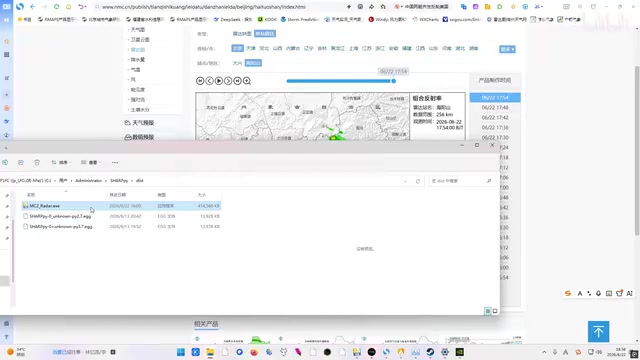
The program offers three base map styles for users to choose from:
- Black base map: Closest to Rose 2.0's classic style, with high contrast that makes radar echoes immediately visible
- White base map: Suitable for printing or embedding in report documents
- Gray base map: A middle ground between the two, visually softer
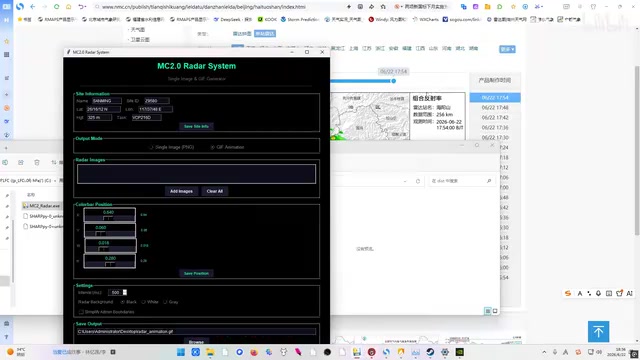
Batch Processing and JETS Color Scale Synthesis
Beyond single-image color scale replacement, the tool also supports batch importing multiple radar images and can synthesize output in the JETS (a common meteorological color scale scheme) style. The JETS color scale is a rainbow gradient scheme ranging from deep blue to red, with a long history of use in meteorological and scientific visualization. Its name derives from the color sequence resembling a jet engine exhaust flame transitioning from cold to hot. Although the academic community has criticized rainbow color scales in recent years—arguing they are perceptually non-uniform and may mislead data interpretation—in the weather radar field, the JETS color scale remains one of the most widely adopted schemes due to its high recognizability and established conventions. Users can process multiple frames of radar data from a given time period in one go, greatly improving workflow efficiency.
Practical Demonstration: Using NMC Beijing Radar Images as an Example
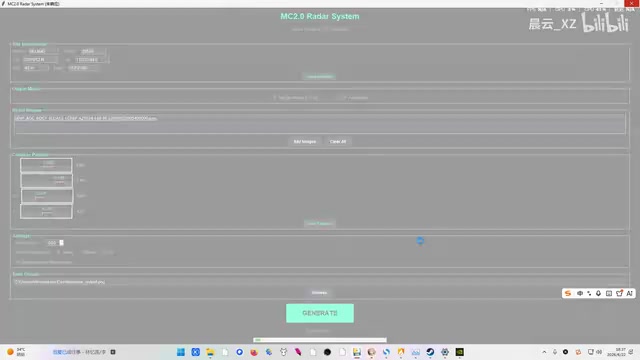
The content creator chose NMC Beijing station's composite reflectivity radar images as test material. The workflow is very straightforward: click "Import" to select the original radar image, then click "Generate" to output the enhanced result.
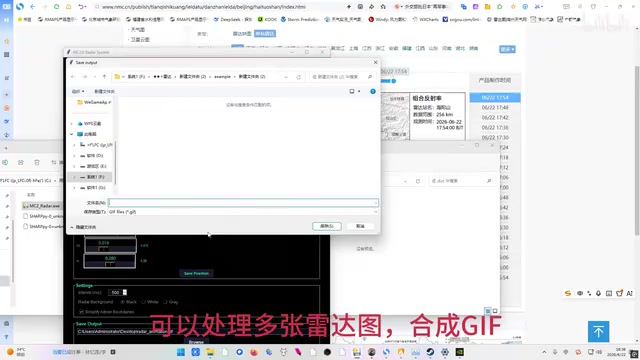
Looking at the final results, the replaced radar images show a qualitative visual improvement:
- The black base map makes the layering of radar echoes much more distinct
- Color scale transitions are more natural, with better differentiation between echoes of different intensities
- The overall style closely resembles Rose 2.0
For users who frequently need to take screenshots for sharing or create weather analysis reports, this visual enhancement is highly meaningful. Color scale design directly affects how efficiently users interpret echo intensity—a good color scale scheme enables forecasters to identify severe convective core areas within seconds, while a poor one may cause critical information to be overlooked.
Insights on AI Programming in Vertical Domains
Non-Professional Developers Can Now Solve Domain-Specific Pain Points
The technical difficulty of this project isn't particularly high—it's essentially color lookup and replacement at the pixel level. But its value lies in demonstrating an important trend: AI programming tools are empowering non-professional developers to solve specific pain points within their own domains.
Weather enthusiasts may not be proficient in Python or image processing libraries, but through AI conversational tools like DeepSeek, they can describe their requirements in natural language and have AI generate usable code. In this case, DeepSeek, as a large language model (LLM), can generate complete Python code based on the user's natural language description, including the GUI interface (possibly using tkinter or PyQt), image processing logic, and batch file operations. This capability stems from the LLM's pre-training on massive code corpora—the model has "seen" numerous similar image processing scripts and GUI program templates, enabling it to decompose high-level user requirements into concrete code implementations. The technical gap between "I want to change the colors of a radar image" and a working GUI program has been dramatically shortened by AI. For non-programmer users, the key interaction skill lies in clearly describing input/output formats, processing logic, and interface requirements, and iteratively correcting bugs or adjusting feature details through multiple rounds of conversation when necessary.
Applicable to Many More Vertical Scenarios
This "domain expert + AI programming" model can be extended to many other fields:
- Medical imaging: Customizing window width/level and pseudo-color schemes for CT/MRI images. Window Width/Level is a critical parameter controlling the grayscale display range in medical imaging—different settings can highlight bones, soft tissue, or lungs, while pseudo-color mapping can further enhance visualization of specific tissues.
- Geographic information: Batch processing color band mapping for satellite remote sensing images. Remote sensing images typically contain multiple spectral bands, and through different band combinations and stretching methods, features like vegetation coverage, water body distribution, and urban heat islands can be highlighted.
- Scientific data visualization: Replacing default matplotlib color schemes in papers with journal-recommended colorblind-friendly alternatives. Approximately 8% of males worldwide have some degree of color vision deficiency, and top journals like Nature and Science now explicitly require authors to avoid red-green contrast color schemes, recommending perceptually uniform colormaps like viridis and cividis.
The key point is that users understand their own domain's needs best, and AI programming tools mean they no longer need to wait for professional developers to build these "small but beautiful" tools.
Conclusion
This radar image color scale replacement tool written with DeepSeek, while focused in scope and modest in size, precisely solves a real pain point in the meteorological community. More importantly, it represents a typical application scenario for AI-assisted programming—enabling domain experts to take matters into their own hands, using AI to bridge the gap in programming skills and rapidly build practical tools. As AI programming capabilities continue to improve, these "small tools with big impact" cases from all walks of life will only become more common.
Related articles

The Truth Behind Codex 'Build a Website in 5 Minutes': AI Isn't Creating Sites—It's Helping You Copy Them
Exposing the truth behind viral Codex 5-minute website videos: creators aren't building original sites with AI—they're copying shared prompts or scraping others' work. Learn AI coding tools' real limits.

Getting Started with AI Agent Development: A Complete Guide from Concept to Practice
A comprehensive guide to AI Agent architecture and development, covering automated marketing, intelligent customer service, and investment analysis scenarios with single and multi-agent collaboration.

The Truth Behind Codex 'Build a Website in 5 Minutes': AI Isn't Creating Sites — It's Helping You Copy Them
Exposing the truth behind viral Codex 5-minute website videos: creators aren't building original sites with AI — they're copying shared prompts or scraping others' work.