Building a RAG Q&A Workflow with Dify: A 4-Step Guide to Enterprise Knowledge Base Chatbots

Build a traceable enterprise RAG Q&A chatbot with Dify in four practical steps.
This article explains the core principles of RAG (Retrieval-Augmented Generation) and provides a hands-on guide to building an enterprise knowledge base chatbot using the Dify platform. It covers the four key steps — data preparation, LLM configuration, knowledge base import with chunking strategies, and workflow orchestration — and highlights why traceable, hallucination-free answers make RAG the go-to architecture for enterprise AI applications.
RAG (Retrieval-Augmented Generation) has become one of the most practical and widely adopted techniques in AI application development. It serves as the core architecture for enterprise intelligent knowledge Q&A systems and is a frequently tested topic in technical interviews. This article provides a systematic breakdown of RAG's core principles and walks you through building a complete RAG Q&A chatbot from scratch in four steps using the popular AI development platform, Dify.
RAG: Giving LLMs an "External Brain"
RAG stands for Retrieval-Augmented Generation. The most intuitive way to understand it is to think of it as turning LLM-based Q&A from a "closed-book exam" into an "open-book exam" — look up the material first, then answer.
RAG was formally introduced by the Meta AI research team in 2020 in the paper Retrieval-Augmented Generation for Knowledge-Intensive NLP Tasks. The paper combined end-to-end training of a retrieval module with a generative model, demonstrating that external knowledge retrieval significantly improves performance on open-domain Q&A tasks. Since then, with the rapid adoption of large language models like GPT-4 and LLaMA, RAG has moved from academic research into engineering practice, becoming the standard solution for enterprise knowledge bases, intelligent customer service, and document Q&A.
The core workflow works as follows: when a user asks a question, the system first retrieves the most relevant information snippets from the knowledge base, then assembles them into a prompt and passes everything to the LLM. The model combines the retrieved external information with its own general knowledge to generate an accurate, evidence-backed answer.
Why do we need RAG? Because pure LLMs have two fundamental limitations:
- Knowledge cutoff: Training data has a time limit, so models can't access the latest or proprietary information.
- Hallucination: When uncertain, models tend to confidently fabricate plausible-sounding but incorrect answers.
RAG's value lies in grounding the LLM in real, continuously updatable knowledge sources rather than relying on imagination — it's essentially a bridge connecting LLMs to "everything they don't know."
Dify: The Go-To Platform for Rapidly Deploying RAG Applications
Dify is one of the most actively maintained LLM application development platforms, with frequent updates and a vibrant community. For developers looking to deploy RAG quickly, it offers several key advantages:
- Visual orchestration: Build and deploy AI application workflows by dragging and dropping nodes — no complex coding required.
- Flexible integration: Supports connecting to mainstream LLMs like DeepSeekAd, Tongyi Qianwen, Zhipu, and custom tools.
- Out-of-the-box capabilities: Bundles all RAG essentials — retrieval, vectorization, and prompt assembly — into a unified package.
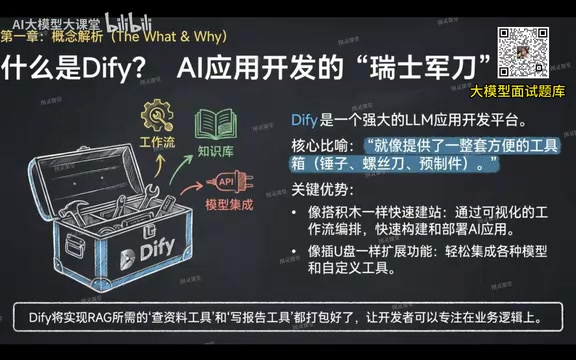
Think of Dify as an "AI toolbox" — the underlying infrastructure is already in place, so developers can focus purely on business logic, dramatically lowering the barrier to building RAG applications.
Four Steps to Build a Complete RAG Q&A Chatbot
Building a RAG Q&A workflow can be broken down into four clear steps.
Step 1: Data Preparation
Start by preparing the local knowledge documents to be used for Q&A and clearly defining the role and objectives of the AI assistant.
Take a product FAQ assistant as an example: the document should clearly describe the product's positioning, core features, and use cases, with the goal of enabling the AI to accurately answer any question about the product. Document quality directly determines the accuracy of the final answers — how you organize content at this stage is critical and should not be overlooked.
Step 2: Configure the LLM
This step connects the "core brain" to the workflow. First, obtain an API key from a model provider (such as SiliconFlow, Zhipu, or DeepSeek), enter the configuration in Dify's model settings, and the model status will display as "Available" upon success.
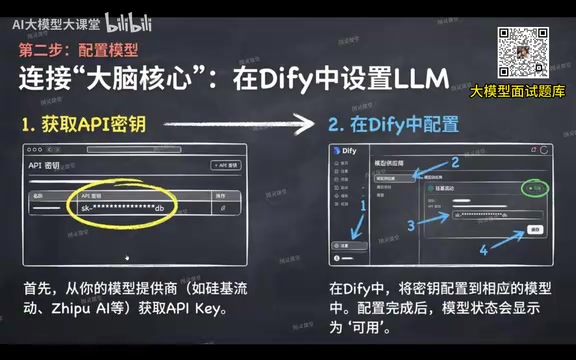
Note that RAG workflows typically involve two types of models:
- Embedding model: Converts text into vectors for similarity-based retrieval.
- Chat/completion LLM: Synthesizes retrieval results to generate the final answer.
Embedding models convert text into high-dimensional floating-point vectors. The core principle is mapping semantically similar texts to nearby positions in vector space. Popular embedding models include OpenAI's text-embedding-ada-002, Zhipu's Embedding-2, and the open-source BGE model series. The generated vectors are then stored in a vector database (such as Milvus, Chroma, Qdrant, or Pinecone) — databases purpose-built for efficient approximate nearest neighbor (ANN) search, capable of millisecond-level retrieval across massive vector collections. Both model types must be correctly configured; neither can be skipped.
Step 3: Import the Knowledge Base
Create a knowledge base in Dify and upload your business documents. The critical decision here is the chunking strategy:
- Chunk size: Approximately 1,024 characters is a good starting point. Chunks that are too small lose semantic integrity; chunks that are too large introduce noise. Balance based on your document's characteristics.
- Overlap length: Keep some overlapping content between adjacent chunks to prevent key semantics from being severed at split boundaries — essentially a trade-off of storage space for retrieval accuracy.
Text chunking strategy is one of the key determinants of RAG quality, directly affecting retrieval precision and context completeness. Beyond fixed-character chunking, there are advanced strategies such as semantic chunking (splitting at natural boundaries like paragraphs or sections), recursive chunking (splitting at large granularity first, then recursively subdividing oversized chunks), and Small-to-Big retrieval. These can be chosen based on the document structure. Overlap length is typically set to 10%–20% of the chunk size, striking an optimal balance between storage cost and semantic coherence.
Once documents are processed, Dify automatically splits them into logically coherent text chunks, converts each chunk into a vector, and stores them in the vector database. The knowledge base has now fully "digested" the documents and is ready to be called by the workflow.
Step 4: Orchestrate and Publish the Workflow
This is the step that ties everything together. In Dify, select "Create Blank App," choose "Workflow" as the mode, and start orchestrating nodes.
The workflow begins with a Start node, which defines the user input variables — by default, this includes the sys.query variable representing the user's question.
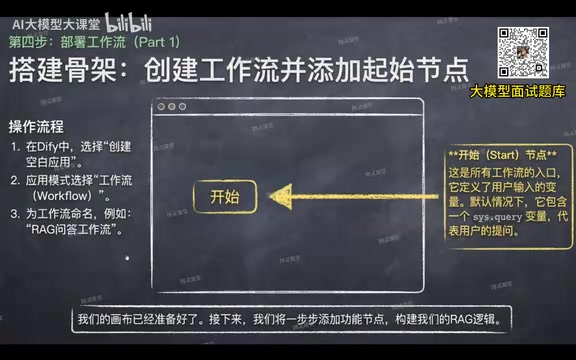
Add the following core nodes in sequence:
- Knowledge Retrieval node: Receives the user's question variable and binds the uploaded knowledge base. This is the core of RAG — it retrieves the most relevant text chunks from the knowledge base for the given query.
- LLM node: Synthesizes the retrieved results to generate an answer. Prompt engineering is critical here. A typical RAG prompt template has three parts: system role definition (scoping the AI's responsibilities and answer boundaries), context injection (structurally inserting the retrieved document chunks), and the user's question itself. It's recommended to explicitly instruct the model to "answer strictly based on the provided context without improvising; if the context contains no relevant information, clearly inform the user." This effectively suppresses hallucinations while ensuring the
contextanduser questionvariables are correctly injected. - Answer node: Outputs the final result, completing the full loop.
Once orchestration is complete, click "Publish" to make the application available.
Validating Results: "Traceable Answers" as the Core Advantage
When the workflow runs, the system calculates a similarity score for each document chunk — highly relevant chunks can score 0.9 or above, while less relevant ones score around 0.5, and results are returned ranked by score.
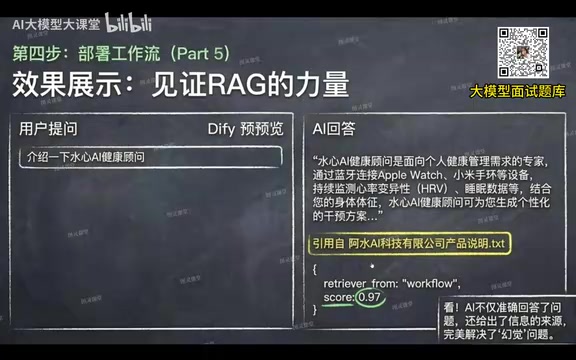
The AI not only answers questions accurately but also clearly marks the sources — users can see exactly which document chunks informed the answer and their corresponding relevance scores. This "traceable answer" characteristic is RAG's most compelling trust advantage over pure LLM-based Q&A.
The Fundamental Difference Between RAG and Pure LLM Q&A
A side-by-side comparison clearly illustrates the differences between the two approaches:
| Dimension | With RAG | Without RAG |
|---|---|---|
| Answer source | Real documents from the knowledge base | Model training parameters |
| Hallucination risk | Low — evidence-backed | High — prone to fabrication |
| Knowledge updates | Update the documents | Requires retraining the model |
| Answer traceability | Supported — sources trackable | Not supported |
The complete RAG application blueprint can be summarized as: vectorize user query → similarity search in vector database → return Top-K relevant document chunks → assemble original query with retrieved chunks → prompt-driven model generates answer.
Introducing RAG delivers four core benefits:
- Eliminates hallucinations: Answers are grounded in real data — no more fabrications.
- Updatable knowledge: Simply update the knowledge base documents — no model retraining needed.
- Traceable answers: Every response can be traced back to a specific source document.
- Lower cost: Avoids expensive model training; attaching a knowledge base resolves a large volume of specialized questions.
It's worth noting that basic RAG (Naive RAG) still faces challenges in engineering practice, such as insufficient retrieval precision and difficulty handling long documents. The industry has developed several advanced approaches: Advanced RAG introduces query rewriting, hybrid retrieval (combining keyword and vector search), and reranking mechanisms to improve recall quality; Modular RAG decouples retrieval, generation, and verification modules to support flexible composition. In addition, GraphRAG replaces pure vector retrieval with a knowledge graph, excelling at handling complex relational queries — a frontier direction attracting significant attention from both academia and industry.
Mastering the RAG workflow on Dify and understanding the three core components — retrieval recall, chunking strategy, and prompt engineering — will not only prepare you for high-frequency interview questions but also enable you to rapidly deliver valuable enterprise-grade AI applications in real-world projects.
Key Takeaways
Related articles

Vibe Coding Full-Stack in Practice: AI Programming from Beginner to Enterprise Deployment
From Cursor to Claude Code, this Bilibili AI programming course uses four progressive projects to cover full-stack development, open-source secondary development, and team collaboration. The article analyzes the shock to frontend roles, the efficiency shift from 50 people to 5, and the methodology required for enterprise-grade projects.

David Blaine's Global Quest for Real Magic: From South Africa to Japan and India
David Blaine travels to South Africa, Japan, and India in his Do Not Attempt special, documenting Spinning drivers, black mamba rescuers, iaijutsu masters, and ascetics—exploring the boundary between magic and real human极限 challenges.

Is a Touchscreen MacBook Coming? Vergecast Reveals Apple Executive's Response
Vergecast podcast reveals a conversation between a reporter and Apple executive John Ternus about a touchscreen MacBook and Apple Pencil support. Ternus says iPad is the best device for a stylus, while the reporter bets MacBook will eventually support Apple Pencil.