Building a Review Storm Analyzer with ToolJet MCP and Jev

Generate a working, RBAC-enabled Review Storm Analyzer from a single prompt using ToolJet MCP and Jev.
The article shows how to use ToolJet MCP with TypeSafe's decision model Jev to generate a working "Review Storm Analyzer" app from a single prompt. The workflow: 12 parallel workers send 100 reviews to Jev via RunJS, Jev returns sentiment, topic, urgency flags, and supporting sentences, and humans review final labels. The app includes a headline, topic tiles, a filterable review feed, and an urgent follow-up list, with server-enforced RBAC at both platform and app levels. Performance tests show 12 parallel Jev calls take only ~1.1 seconds, while the real bottleneck is queuing of ~700ms Postgres queries; bulk inserts and in-memory rendering cut runtime from 22.9s to 8.8s, with the recorded Jev time hitting 00:06.4.
What Is the Review Storm Analyzer?
On launch day, user reviews pour in all at once. A shared spreadsheet that only one person can use instantly loses its ability to scale. By combining ToolJet MCP with TypeSafe's decision model Jev, you can generate a working, permission-controlled application from a single prompt — that's the Review Storm Analyzer.
How it works isn't complicated: Jev reads each review and returns sentiment, topic, urgency, and the supporting sentence that justifies the judgment; a human makes the final labeling decision. The end product is a one-page briefing containing a headline, topic tiles, a filterable review feed, and an urgent follow-up list.
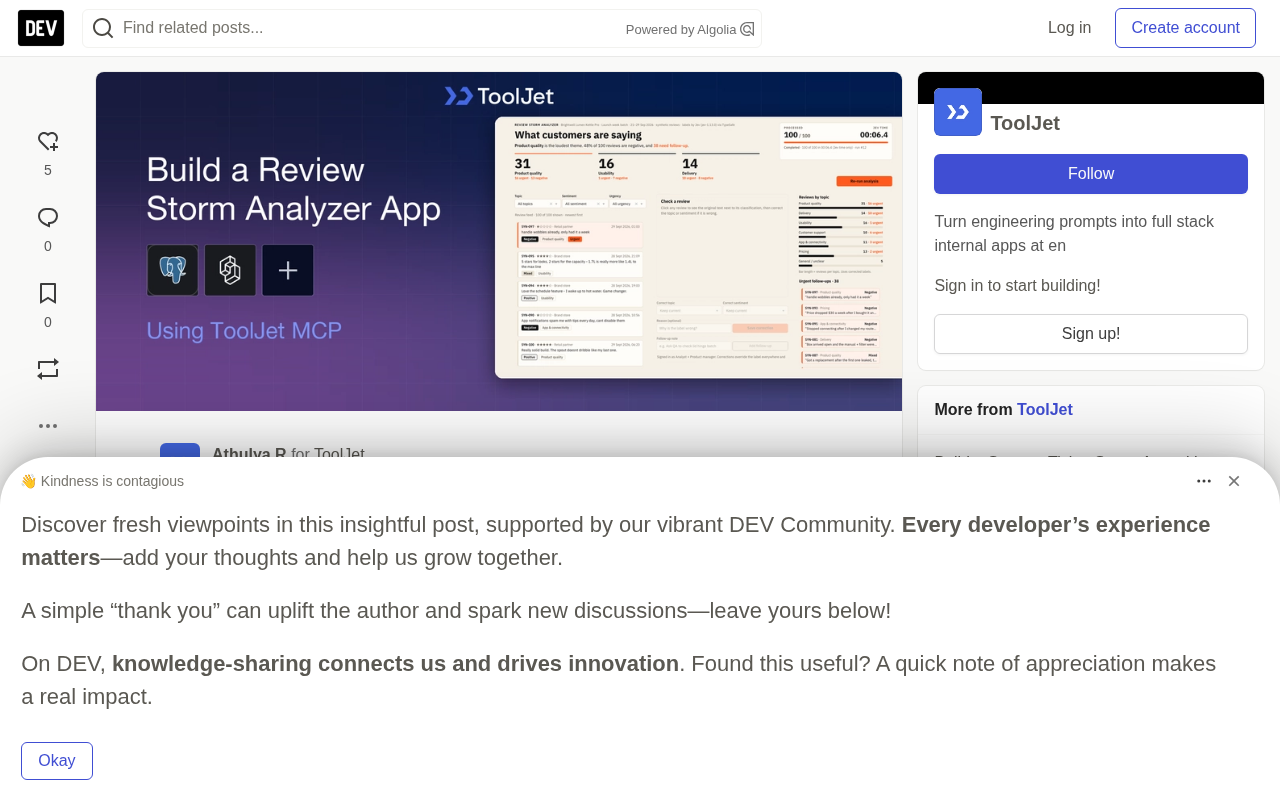
The fully-run Review Storm Analyzer: all 100 reviews labeled by Jev, Jev time 00:06.4, product quality is the largest topic, and 38 items are flagged as needing follow-up.
How Do You Triage a Flood of Reviews?
The triage logic for a review flood breaks down into three steps: label each review, surface the loudest topics, and push urgent follow-ups to the front. ToolJet MCP lets a coding agent build this workflow directly inside ToolJet as a usable app, with pages, queries, and data models all wired up automatically.
- Load: A single RunJS query dispatches batches to Jev via 12 parallel workers.
- Label: Jev returns sentiment, topic, an urgency flag (urgency probability of 50% or higher), and the sentence that supports the label.
- Review: The briefing updates live as results arrive. Analysts can correct labels with a rationale, and product managers can add follow-up notes.
Configuring the ToolJet MCP and TypeSafe Data Sources
First, connect your coding agent to the ToolJet MCP — see the official MCP overview docs and the GitHub repo for the specific steps. Then add the TypeSafe data source to the workspace and name it typesafe — that's the name used in the build prompt.
During the build phase, the agent handles app creation; during the run phase, the app sends typed questions to Jev through this data source. The key here is the separation of build time and run time: the agent gets involved once, at build time, and after that the app runs independently, without requiring the agent to be online.
MCP (Model Context Protocol) is an open protocol introduced by Anthropic in late 2024 to standardize how AI models connect to external tools and data sources. Think of it as a "USB-C port for AI": instead of writing a dedicated adapter for every service, a model exposes available tools, readable resources, and reusable prompts through a unified protocol, and a client (such as a coding agent) discovers and invokes them dynamically.
ToolJet MCP, in turn, exposes ToolJet's internal low-code platform capabilities — workspaces, data sources, queries, pages, permission groups — as a set of MCP tools. Once a coding agent is connected, it can create tables, wire up queries, lay out page components, and configure RBAC just like calling ordinary functions, instead of hand-writing ToolJet's JSON config files. This is precisely the technical prerequisite that makes "generate an entire app from one prompt" possible.
How Was the Prompt Converged?
This build went through several rounds of iteration before all requirements were converged into a single prompt. You can absolutely start with this prompt from the beginning and reproduce the same review briefing app in one shot.
Build a one-page ToolJet app called Review Storm Analyzer, aimed at a product team after a launch. Use the existing PostgreSQL data source (postgresql_fleet), with tables rs_batches, rs_reviews, rs_synthetic_labels, rs_runs, rs_analysis, rs_corrections, and rs_followups, preloaded with 100 fictional reviews. Use the existing typesafe data source (Jev) to return sentiment, topic, an urgency flag, and a supporting sentence for each review. Display a headline, three topic tiles, Analyze batch and pause/resume buttons, a processed counter and Jev timer, filters, a review feed, reviews grouped by topic, an urgent follow-up list, and a detail panel for corrections and notes. Run 12 Jev workers in parallel and save results with a single bulk insert. Create three groups — Review Storm - Analysts, Product Managers, Viewers: only Analysts can run Jev and save corrections, Product Managers add notes, Viewers can only view.
The separation of build time and run time is a key architectural principle for this kind of AI-generated app. At build time, the coding agent uses MCP to create table schemas, wire up queries, lay out pages, and configure permissions in one pass, producing a static, self-contained ToolJet app. At run time, the app only needs its already-configured data sources (here, PostgreSQL and the typesafe data source) to execute independently — no agent online, no model tokens consumed, and no dependence on the agent's session lifecycle.
This separation brings three direct benefits: the app runs reliably over the long term, costs are predictable (you only pay for Jev calls per analysis), and security improves (no need to grant the agent workspace write permissions at run time). It also means that once requirements change, you either regenerate the app or adjust it manually in ToolJet — it won't "automatically follow" prompt changes.
How Did ToolJet MCP Build It?
The agent first inspects the workspace, creates seven PostgreSQL tables, preloads 100 synthetic reviews, then wires up queries, RunJS analysis logic, pages, and permissions. It first ran the flow with placeholder labels, then switched to calling the real Jev through the typesafe data source.
The performance numbers deserve their own section. The first full run took 22.9 seconds, and Jev wasn't the bottleneck: 12 parallel Jev calls completed in about 1.1 seconds — the real drag was the Postgres queries at roughly 700ms each that had to be queued. After switching to a single bulk insert and rendering from memory, runtime dropped to 8.8 seconds. The recorded version ultimately hit a Jev time of 00:06.4.
This comparison illustrates a commonly overlooked fact: once AI calls are parallelized, the infrastructure layer's database round trips often become the real performance ceiling. Collapsing N queries into a single bulk operation yields far more than optimizing the model itself.
A 1.5x speed recording of the 100-review run: the counter climbs to 100, the Jev timer stops at 00:06.4, and one review is open in the detail panel.
The trade-off between parallel workers and bulk insert deserves elaboration. The traditional approach is for 12 workers to each write to the database after processing one review, producing 100 separate transactions, each requiring network round trips, transaction commits, and index updates — measured at roughly 700ms each and competing for the connection pool. Bulk insert aggregates 100 results into a single INSERT ... VALUES (...), (...) statement: one round trip, one commit, compressing N×700ms into a single operation on the order of tens of milliseconds.
Combined with rendering from memory — that is, the front end drawing the list directly from the loaded result array rather than querying the database once per row rendered — total runtime dropped from 22.9 seconds to 8.8 seconds. This reveals an often-overlooked performance rule: the bottleneck in AI applications is often I/O orchestration, not model inference. Parallelization only solves "waiting on multiple slow calls at once"; if the downstream is serial database round trips, higher parallelism makes queuing worse. Only by first collapsing N round trips into 1 does the benefit of parallelism truly get unlocked.
Who Uses Review Triage, and Who Can Open It?
Product teams at consumer hardware brands, platform sellers, and software teams can all use the same layout to handle any wave of text feedback after a release. Role division is clear: analysts run Jev and save corrections, product managers add follow-up notes, and viewers can only look.
Permissions aren't a declaration on paper. When a viewer calls a write query, they get a 401 rejection — showing that the server is actually enforcing the rule, not just hiding the button at the UI layer.
RBAC (Role-Based Access Control) works by binding permissions not directly to users, but to "roles," which are then assigned to users or groups. So when you have 200 analysts, you only maintain one Analyst role instead of configuring each person individually. The Analysts / Product Managers / Viewers mentioned in the article are three typical roles.
It's worth distinguishing RBAC from ACL: ACL is a per-resource whitelist (who can read this table), while RBAC is a functional abstraction layered by role (who belongs to which role). ToolJet's two-layer structure — platform permissions governing workspace resources, app permissions governing pages/queries/components — maps neatly onto this layering. The key criterion is "server-side enforcement": if permissions only hide buttons at the UI layer, a front end can bypass them by intercepting requests; but when a viewer calling a write query returns 401, the server is genuinely validating the role claim in the token — that's real access control.
Role-Based Access Control in ToolJet
ToolJet applies RBAC at two levels. Platform permissions determine who can reach a given workspace resource; app permissions determine which pages, queries, and components each group can open and run. Both layers are enforced server-side.
ToolJet's role-based access control: roles and groups, app-level page/query/component permissions, and server-side rules.
For customer feedback scenarios like review data, ToolJet also offers enterprise-grade capabilities such as SAML SSO, audit logs, Git Sync, and Docker self-hosting for teams that need them.
Key Takeaways
The key to turning a review storm into a one-page briefing is: Jev suggests, humans decide. In the recorded run, Jev labeled 100 reviews in 00:06.4, 38 of which were flagged as needing follow-up. Note that all reviews are synthetic data, and the app has not yet been tested with real analyst accounts. If you want to point the same layout at your own review table, you just need to change the PostgreSQL table that the queries point to.
One-line Summary
Generate a working, RBAC-enabled review storm analysis app from a single prompt using ToolJet MCP and Jev.
Paragraph Summary
The article explains how to use ToolJet MCP with TypeSafe's decision model Jev to generate a working "Review Storm Analyzer" app from a single prompt. The workflow has three steps: 12 parallel workers send 100 reviews to Jev in batches via RunJS, Jev returns sentiment, topic, urgency flags, and supporting sentences, and a human does final label review. The app includes a headline, topic tiles, a filterable review feed, and an urgent follow-up list, with RBAC enforced server-side at both platform and app levels. Performance tests show 12 parallel Jev calls take only about 1.1 seconds, while the real bottleneck is queuing of Postgres queries at roughly 700ms each; switching to bulk inserts and in-memory rendering cut runtime from 22.9 seconds to 8.8 seconds, with the recorded version hitting a Jev time of 00:06.4.
Related articles

How Big Can Stars Really Get? The Physical Limits of the Largest Stars
Red supergiants are the largest stars by volume, with radii up to 2,000 times the Sun, engulfing the inner solar system. But there is no precise upper limit on stellar size—models predict up to 15,000 solar radii. The most massive blue stars are far smaller than red supergiants—biggest and heaviest are two different things.

Apple HomeView Smart Display Full Feature Breakdown: Wall-Mount or Desktop, $299
Apple launches HomeView, a $299 smart display with wall-mount and desktop options, 12MP camera for facial recognition, smart home control, music playback, and recipe step-by-step cooking. Full breakdown of watch faces, apps, privacy, and cooking integration.

Where Did the Promised New Studio Go? Craft Computing Answers After Five Years
Craft Computing's host responds to viewer questions: the new studio promised five years ago was shelved as construction costs soared from $30,000 to $75,000, and was replaced by a 168-square-foot garage conversion.