Building a Zero-Touch Testing Agent with Claude Desktop: From Jira Ticket to Automated Bug Report

One Jira ticket ID triggers a full autonomous E2E test cycle with Claude Desktop, MCP, and a Skill file.
This article presents a zero-touch end-to-end test automation solution built on Claude Desktop: Atlassian's official MCP reads Jira requirements and writes back bug reports, Playwright MCP drives real browser execution, and a pre-written Skill file encodes the read-plan-generate-execute-report workflow into a reusable asset. Hard rules like "never fabricate test results" and "never create bugs when tests pass" prevent AI hallucinations from corrupting quality data. In the demo, the agent found 4 real bugs across 13 test cases, filing each with full reproduction steps and Jira links.
One Command to Run the Entire Testing Pipeline
Imagine this: you type a single Jira ticket number into Claude Desktop, then step away from your desk. A few minutes later, you come back to find a complete bug report already filed in Jira — the test plan was written by the agent, the Playwright scripts were generated by it, the tests were run by it, and the bugs were submitted and linked back to the original ticket by it. You didn't write a single line of code, nor type a single extra prompt.
This is exactly what YouTube creator JKC Tutorials demonstrated: a fully autonomous, zero-touch end-to-end testing agent built on Claude Desktop. The core idea is straightforward — if you're still manually prompting an AI to run tests and then manually logging bugs, you're wasting valuable engineering time. This solution aims to eliminate that repetitive work entirely with a single instruction file.
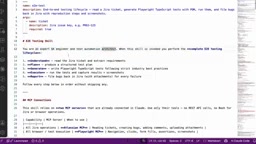
The Architecture: Two MCPs + One Skill
The entire system rests on just three components, and the setup is simpler than you might expect.
Atlassian Official MCP: Read Requirements, File Bugs
The first step is giving the agent direct access to requirements. This uses Atlassian's official remote MCP server (Model Context Protocol), which the author describes as "completely plug-and-play." After adding it in Claude, it prompts you to connect your Atlassian account and grant permissions. Once connected, the agent can access Jira ticket summaries, descriptions, acceptance criteria, issue types, labels, attachments, and comments. This bidirectional channel handles both reading requirements and writing bugs back to Jira at the end.
Model Context Protocol (MCP) is an open standard proposed by Anthropic in November 2024, designed to give AI models a unified interface for interacting with external tools, data sources, and services. Before MCP, every AI integration project required developers to build custom connection layers from scratch, leading to massive duplication of effort. MCP solves this through a standardized "server-client" model: MCP servers encapsulate the capabilities of a specific system (like Jira, GitHub, or a database), while MCP clients (like Claude Desktop) can dynamically discover and invoke those capabilities without knowing the underlying implementation details. Atlassian's official remotely hosted MCP server means users don't need to deploy anything locally — just add a remote URL to Claude Desktop's configuration, complete OAuth authorization, and the agent can directly operate Jira and Confluence. This "official plug-and-play" model dramatically lowers the integration barrier and is a key reason this solution can achieve complex automation with so little infrastructure.
Playwright MCP: Run Real Browser Tests
The second connection is Playwright MCP, which handles executing end-to-end tests in a real browser, capturing screenshots, and validating URLs and UI states. The two MCPs each have a clear role: Atlassian manages requirements and result write-back, Playwright handles actual execution.
Playwright is Microsoft's open-source modern end-to-end testing framework, supporting Chromium, Firefox, and WebKit. It's known for its native async support, auto-wait mechanism, and cross-browser consistency — and is now one of the mainstream alternatives to Selenium. Compared to traditional testing frameworks, Playwright's key advantage is stability: rather than polling CSS selectors, it directly listens to internal browser events, significantly reducing "flaky tests" caused by page load timing issues. Playwright MCP wraps Playwright's browser control capabilities as an MCP server, enabling AI models to drive browsers through standardized calls — navigate to URLs, click elements, take screenshots, read DOM state, assert page content — without generating and externally executing code. This "model directly controls the browser" pattern removes one intermediate layer compared to the traditional "model generates test scripts then executes them" approach, and is the technical reason the agent in this demo can capture screenshots and report results in real time.
Claude Skill: Encode the Workflow into a Single .md File
What actually chains all these capabilities into an automated pipeline is Claude's Skills feature. Rather than using the Skill Creator to build one on the spot, the author uploaded a pre-written skill file. Per the specification, skill files must be in .md format; if packaged as a zip, they must include a skill folder. Once uploaded, the skill appears in the list, and running it is as simple as selecting the E2E testing skill in the prompt box and entering a Jira ID.
Claude's Skills feature (also known as custom instruction files or Prompt Templates) lets users pre-write complex workflows, role definitions, and behavioral constraints as structured Markdown documents that can be activated with a single click — no need to manually type lengthy system prompts each time. This is conceptually similar to OpenAI's Custom GPTs or Gemini's Gems, but implemented as file uploads, making it easy to version-control and share across teams. The core value of skill files is the "reusability of prompt engineering" — once you've tuned an effective workflow description, it becomes a repeatable, standardized asset. Anyone can trigger the full pipeline by selecting the skill and entering a parameter like a Jira ID. For enterprise teams, this means QA workflows can be committed to a code repository, reviewed, and iterated on — rather than scattered across individual engineers' chat histories.
What's Actually Inside the Skill File
This skill file is the "brain" of the entire system. It assigns the agent the role of "senior QA engineer and test automation architect" and defines a clear four-step workflow:
- Read: Parse the Jira ticket's summary, description, acceptance criteria, labels, attachments, and comments.
- Plan: Generate a structured test plan based on the ticket, including scope, test cases, and explicitly marked out-of-scope items. Confirm the plan with the user before generating any tests — only proceed after approval.
- Generate: Write Playwright TypeScript scripts following the Page Object Model pattern, with clear layering for base pages, fixtures, and config. Each test carries a case ID and name, and captures screenshots.
- Execute & Report: Run tests via Playwright MCP, assert expected states, capture screenshots, then file any failures as bugs back in Jira.
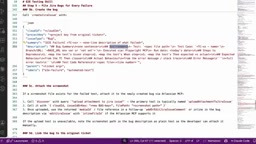
Particularly noteworthy are the "hard rules" defined in the skill file — guardrails to prevent AI from going rogue: only use MCP, never fabricate any test results, never create a bug when tests pass, plus several hard checks for code quality. These constraints directly address the biggest concern with AI agents: hallucinations and fabricated results. In a quality assurance context where there's zero tolerance for falsification, "no making things up" is a rule that must be explicitly hardcoded.
The Page Object Model (POM) is a widely adopted design pattern in end-to-end testing. The core idea is to encapsulate each page or component's UI interaction logic into a separate "page object class," so test cases only call methods on these classes rather than directly manipulating DOM selectors. When the UI changes, you only need to update the corresponding page object class rather than modifying every test case that references that element — dramatically reducing maintenance costs. Specifying POM in the skill file means the agent generates not a flat pile of scripts, but a well-layered test engineering structure: a base page class encapsulates common operations, individual page classes inherit and extend it, fixtures handle test environment setup and teardown, and config centrally manages environment variables and browser settings. This engineering requirement is the structural prerequisite for the solution to genuinely "plug into CI pipelines" rather than just serving as a demo.
A Real Run: 13 Test Cases, 4 Bugs
For the demo, the author used a "improve website navigation" Jira ticket (actually an Epic). The agent first generated a test plan listing scope, test environment, and various viewport sizes, identifying 13 test cases in total and marking out-of-scope items. After confirming the plan, it used Playwright MCP to navigate to the target website and began executing tests one by one.

Throughout the process, the agent requested permissions multiple times — to click snapshots, run Playwright code, take screenshots, create issues, and write — and the author selected "Always allow" to keep the pipeline uninterrupted. It also tested responsive scaling across different screen sizes, including mobile.
Final results: 4 of 13 tests failed, and the agent automatically created 4 bugs under the Jira Scrum board. The four issues were:
- Both the homepage and article pages were missing a navigation region.
- The "Watch Masterclass Video" button didn't navigate anywhere when clicked.
- Accessing a non-existent URL returned 200 instead of 404 — a bad practice.
- The homepage had no footer while the article page did, and fonts were inconsistent — a cosmetic issue.
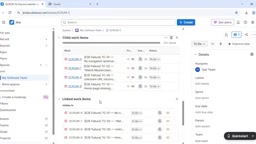
Each bug was fully structured: bug summary, environment, steps to reproduce, expected behavior, actual behavior, error messages, parent link, and labels — all linked back to the original ticket. The agent also left a test results comment on the original ticket (showing how many passed and how many failed).
The One Snag: Screenshots Weren't Auto-Attached
One thing didn't fully work in the demo — screenshots weren't automatically attached to the bugs. The cause was local environment permission restrictions preventing file saves. The author's solution is to configure a save storage file in Playwright MCP and specify a directory (covered in a previous video), which would enable automatic screenshot attachment. Alternatively, you can manually attach them for now.
This is a reminder that when actually deploying this kind of automated pipeline in a team environment, engineering details like permissions, storage paths, and maintaining authentication state all need to be carefully worked through. It's not quite plug-and-run.
What This Means
The value of this demo isn't the fact that "AI can write tests" — that's old news. What's significant is that it chains the complete pipeline — requirements understanding, planning, code generation, execution, and defect write-back — into a reusable, configurable, guardrailed closed loop using MCP and Skills. The engineer's role shifts from "manually running tests and logging bugs" to "reviewing test plans and focusing on test strategy," with execution handed off to the agent.
The author also mentioned the next step toward scaling: connecting these tests to CI pipelines via GitHub Actions. For teams looking to reduce repetitive QA work, this "single instruction file" approach provides a very concrete reference template. Of course, given that this is a single-source demo, you'll want to thoroughly validate its stability and reliability in your own environment before putting it into production.
Related articles

How Big Can Stars Really Get? The Physical Limits of the Largest Stars
Red supergiants are the largest stars by volume, with radii up to 2,000 times the Sun, engulfing the inner solar system. But there is no precise upper limit on stellar size—models predict up to 15,000 solar radii. The most massive blue stars are far smaller than red supergiants—biggest and heaviest are two different things.

Apple HomeView Smart Display Full Feature Breakdown: Wall-Mount or Desktop, $299
Apple launches HomeView, a $299 smart display with wall-mount and desktop options, 12MP camera for facial recognition, smart home control, music playback, and recipe step-by-step cooking. Full breakdown of watch faces, apps, privacy, and cooking integration.

Where Did the Promised New Studio Go? Craft Computing Answers After Five Years
Craft Computing's host responds to viewer questions: the new studio promised five years ago was shelved as construction costs soared from $30,000 to $75,000, and was replaced by a 168-square-foot garage conversion.