Building AI Agents in Excel: A Hands-On Tutorial for Task Planning and Decomposition

Using prompt engineering to give Excel-based AI agents task planning and decomposition capabilities.
This tutorial demonstrates how a single well-crafted system prompt can transform a simple AI agent into one capable of planning and executing complex multi-step tasks in Excel. By instructing the LLM to create numbered checklists, execute step-by-step, and track completion status, the agent gains the ability to autonomously decompose complex data analysis tasks—from reading unknown data structures to generating statistical summaries and charts.
Introduction: When AI Agents Face Complex Tasks
In building AI Agents, "reasoning and planning" is one of the core capabilities—breaking down a large goal into executable multi-step subtasks. An AI Agent is an autonomous system capable of perceiving its environment, making decisions, and taking actions to achieve specific goals. Unlike traditional single-turn Q&A-style AI, agents possess the ability for continuous interaction, tool invocation, and multi-step reasoning. In LLM-driven agent architectures, reasoning and planning serve as the bridge connecting user intent to actual execution—the theoretical foundation of this capability traces back to classical AI's STRIPS planner and Hierarchical Task Networks (HTN), while modern LLMs have acquired implicit planning abilities through massive text training, capable of decomposing complex goals into ordered subtask sequences under prompt guidance.
This article is based on a tutorial series for building AI Agents in Excel, providing an in-depth explanation of how to endow large language models with task planning capabilities through prompt engineering, enabling them to handle multi-step complex data analysis tasks.
In the previous installment, we implemented the agent's Skill layer, capable of performing simple operations like sum and average on specified cells. But when tasks become complex—such as needing to first open a specific sheet, read data row by row, perform statistical analysis, and finally create charts—the original agent falls short. This is exactly the problem that "task planning" aims to solve.
Why Simple Agents Can't Handle Complex Tasks
Let's look at a specific scenario. There's a worksheet named "Test" in Excel containing two columns of data: date and weight. We want the agent to:
- Automatically find and open the Test worksheet
- Read all the data inside
- Perform statistical analysis (sum, average, max, min, etc.)
- Create a data trend chart

This is a typical scenario requiring "decomposing a large goal into multi-step subtasks." When using the previous agent without planning capabilities, the result is: it can only read the content of cell A1 on the Test sheet, then gets stuck, prompting "need more details." Clearly, an agent lacking task planning capabilities cannot handle this type of work.
From a technical perspective, the root cause of this failure is that an agent without planning capabilities operates in a "stimulus-response" mode—it can only react immediately to current input and cannot maintain an execution plan spanning multiple steps. This is similar to the distinction between "System 1" (fast intuition) and "System 2" (slow reasoning) in cognitive science—complex tasks require "System 2" style deliberation.
Core Solution: A Single Prompt Gives AI Agents Planning Capabilities
The solution is surprisingly simple—add a task planning instruction to the System Prompt. This is the core content of this tutorial.
Prompt Engineering refers to the technique of guiding large language models to produce desired outputs through carefully designed input text. Its core principle lies in the fact that LLMs are autoregressive models based on conditional probability—given a prefix (prompt), the model generates the most likely subsequent token sequence. The System Prompt, as a system-level instruction, continuously influences the model's behavior patterns throughout the entire conversation. Common prompt engineering techniques include Zero-shot prompting, Few-shot prompting, Chain-of-Thought (CoT), and more. The task planning prompt used in this article is essentially a variant of structured CoT—it not only requires the model to demonstrate its reasoning process but also requires the model to organize its planning output in a specific format.
Key Prompt Design
In the agent's system role definition, in addition to specifying it as an "Excel assistant" and listing available tools, the following key prompt was added:
For complex tasks, first create a clear task checklist using a numbered list, and execute step by step. After completing each step, update the completion status of the task checklist in subsequent responses (e.g., mark completed items with [X]). Whenever possible, output a single-line plan and next step in one response, then call the corresponding tool.
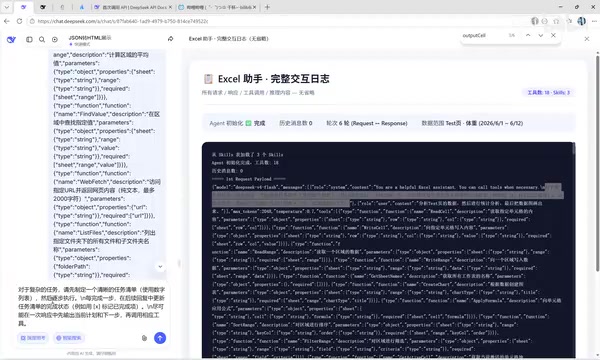
The essence of this prompt tells the large language model three things:
- Plan before executing: When facing complex tasks, list out the task checklist first—don't act blindly
- Progress step by step: Execute according to the checklist one step at a time—don't skip steps
- Track status: Mark completion status after each step to maintain traceability of the execution process
This design is highly consistent with the ReAct (Reasoning + Acting) framework proposed in academia. ReAct was proposed by Yao et al. in 2022, with the core idea of having LLMs alternate between reasoning (Thought) and acting (Action), then observing (Observation) action results before continuing to reason. Compared to pure reasoning or pure action approaches, ReAct makes the reasoning process explicit, enabling the model to dynamically adjust plans and handle exceptions. The task checklist mechanism in this article is precisely the concrete implementation of the Thought step in ReAct—the model clarifies the current plan before each action, updates status after observing results, forming a complete reasoning-execution loop.
API Call Chain Analysis
From the actual API request logs, we can see that the first request's payload includes the task planning prompt in the system role. After receiving this instruction, the large model will consciously do the following in each response:
- First output a task checklist
- Indicate which step is currently being executed
- Call the corresponding tool
- Update the checklist status after receiving results
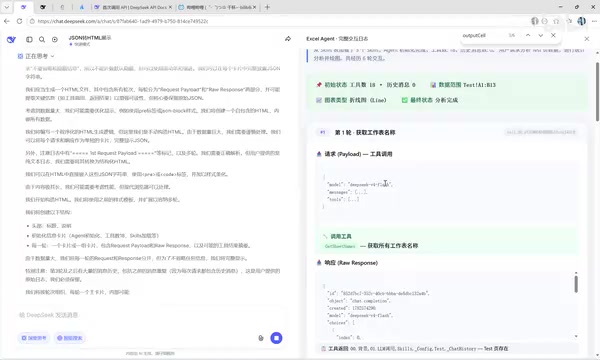
In the design of mainstream LLM APIs like OpenAI's, messages are divided into three roles: system, user, and assistant. System messages define the model's behavioral guidelines and capability boundaries, included in the context with every API call to ensure behavioral consistency. In multi-turn conversations, Context Window management is crucial—the model needs to maintain conversation history, task state, and tool call results within a limited number of tokens. In this article, the agent cleverly utilizes the context window for state persistence by updating the task checklist status ([X] markers) in each response, avoiding the complexity of requiring an external database to store execution state.
Function Calling is a key technical component in this process. Taking OpenAI's implementation as an example, developers define available tools' JSON Schema in API requests (including function names, parameter descriptions, and types). The model determines when to call tools during reasoning and generates structured parameters conforming to the Schema. After the API returns the tool_calls field, the application layer executes the actual function and passes results back to the model as tool role messages, forming a "reasoning-calling-observing-re-reasoning" loop. This mechanism combines LLM's language understanding capabilities with deterministic program execution, enabling agents to both flexibly understand natural language instructions and precisely operate external systems.
This design cleverly leverages the large language model's contextual understanding ability, making the model itself a "project manager" that manages its own execution flow.
Practical Results: Validating Task Planning Across Multiple Scenarios
Scenario 1: Basic Statistical Analysis and Chart Generation
Input instruction: "Analyze the data in the Test sheet, perform statistical analysis, and display the data chart."
The agent's execution process:
- Step 1: Get worksheet names, confirm the Test sheet exists
- Step 2: Read the data content of the Test sheet
- Step 3: Perform statistical analysis on the data (sum, average, max, min, median)
- Step 4: Create a weight trend line chart
After each step is completed, the agent updates the task checklist, marking completed items with [X]. The final output includes not only complete statistical results but also a line chart generated in the worksheet.
Scenario 2: Dynamic Adaptation to Unknown Data Structures
More interestingly, when we add a "height" column to the Test sheet, the agent can automatically identify and analyze all columns without prior knowledge of the data format.
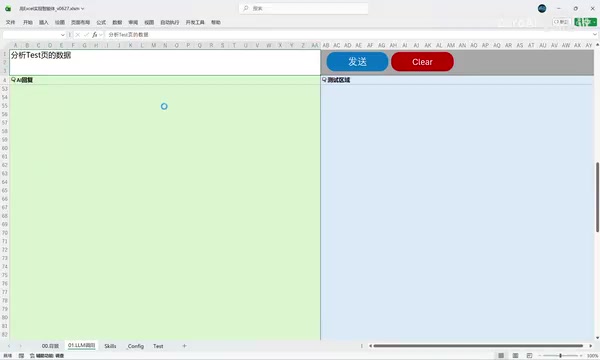
After inputting "Analyze the data in Test1," the agent automatically discovered three columns—date, weight, and height—performed statistical analysis on each, and even proactively created charts—a step not explicitly required in the instruction.
This adaptive capability demonstrates an important characteristic of LLMs: they can not only execute explicit instructions but also infer users' implicit intent based on context. When the model reads numerical time-series data, it "understands" that visualization is a natural extension of data analysis, thus proactively adding the chart generation step. This behavior would be impossible to achieve in traditional hard-coded workflows.
Scenario 3: Multi-dimensional Data Analysis
Further testing with name and region columns added to the table (Beijing, Changsha, Shanghai, etc.), the agent can also:
- Identify numerical data (height, weight) and perform statistics
- Identify categorical data (name, region) and perform summaries
- Report statistics such as 4 people total, 3 cities, etc.
This demonstrates that task planning capability gives the agent adaptive analysis ability for unknown data structures. During the planning phase, the agent first "explores" the data structure, then dynamically adjusts its analysis strategy based on data types—this is essentially data-driven adaptive planning rather than a preset fixed workflow.
Scenario 4: Demonstrating Capability Boundaries
When attempting to have the agent "create a new Sum sheet and copy Test sheet data to it," since there's no "create new sheet" method in the tool list, the agent understands the intent and formulates a plan, but encounters errors during execution. This also demonstrates an important principle of agents: capability boundaries are determined by tools—planning capabilities cannot exceed tool capabilities.
This principle has significant implications in AI safety. In terms of safety and controllability, this design follows the Principle of Least Privilege—the agent can only perform operations allowed by predefined tools and cannot arbitrarily extend its capability scope. This is similar to sandbox mechanisms in operating systems, ensuring AI systems don't execute unauthorized operations. In practical engineering, tool granularity design requires trade-offs: too fine-grained leads to excessive planning steps and low efficiency; too coarse-grained lacks flexibility. Ideal tool design should consist of atomic yet meaningful operational units, with each tool completing a clear, verifiable subtask.
Design Principles of AI Agent Task Planning
From this case study, we can distill the core design principles of AI agent task planning:
| Design Element | Specific Implementation |
|---|---|
| Planning Trigger | Explicitly require "list checklist first for complex tasks" in System Prompt |
| Execution Strategy | Numbered list + step-by-step execution + status marking |
| State Management | Mark completed items with [X] to maintain contextual coherence |
| Tool Invocation | Each planned step corresponds to one tool call |
| Error Handling | Provide manual operation suggestions when tools don't exist |
Essentially, this task planning capability is not achieved through complex code logic, but through carefully designed prompts that guide the large language model to leverage its inherent reasoning and planning abilities. This is also a highly practical technique in current AI Agent development—using prompt engineering to replace hard-coded process control.
It's worth noting that this approach is consistent with the core philosophy of other industry agent frameworks (such as LangChain's Agent, AutoGPT, etc.), but with a more lightweight implementation. Frameworks like LangChain manage execution flow through code-level loop control and state machines, while this article's method relies entirely on the LLM's own contextual understanding ability to maintain state. This "light framework" approach is easier to understand and debug in simple scenarios, but for scenarios requiring complex error recovery, parallel execution, or long-term memory, it may need to be combined with external state management mechanisms.
Conclusion
Task planning is the critical step for AI agents to go from "usable" to "useful." By adding clear planning instructions to prompts, we can enable large language models to autonomously decompose, sequence, execute, and track complex tasks. This method is simple yet effective, particularly suitable for handling multi-step data analysis tasks in scenarios like Excel.
For users with data analysis needs, the practical value of such an Excel agent should not be underestimated—you only need to describe the analysis results you want, and the agent can automatically plan the execution path, completing the entire workflow from data reading to chart generation.
From a broader perspective, this case demonstrates an important trend: AI agent capability improvements increasingly depend on optimization of the "software layer" (prompt design, tool orchestration) rather than the "hardware layer" (model parameters, training data). For developers, mastering prompt engineering and tool design techniques may offer more immediate value than waiting for the next generation of more powerful foundation models.
Key Takeaways
Related articles

Vibe Coding Full-Stack in Practice: AI Programming from Beginner to Enterprise Deployment
From Cursor to Claude Code, this Bilibili AI programming course uses four progressive projects to cover full-stack development, open-source secondary development, and team collaboration. The article analyzes the shock to frontend roles, the efficiency shift from 50 people to 5, and the methodology required for enterprise-grade projects.

David Blaine's Global Quest for Real Magic: From South Africa to Japan and India
David Blaine travels to South Africa, Japan, and India in his Do Not Attempt special, documenting Spinning drivers, black mamba rescuers, iaijutsu masters, and ascetics—exploring the boundary between magic and real human极限 challenges.

Is a Touchscreen MacBook Coming? Vergecast Reveals Apple Executive's Response
Vergecast podcast reveals a conversation between a reporter and Apple executive John Ternus about a touchscreen MacBook and Apple Pencil support. Ternus says iPad is the best device for a stylus, while the reporter bets MacBook will eventually support Apple Pencil.