Building an AI Agent from Scratch in Python: Generate a Complete Scripted Video from Voice

Chain five AI steps with one OpenRouter key in Python to build an agent that turns voice into video.
This article presents a from-scratch Python AI agent that generates a complete short video with visuals, voiceover, and subtitles from a single voice command. Using one OpenRouter API key, it orchestrates text, image, video, and speech models across five steps: transcription, script generation, cover image generation, voiceover synthesis, and video generation. Key techniques include Whisper Large V3 Turbo, JSON Schema structured output, polling for async video, and model cascading for failover. Video generation accounts for over 90% of cost (~$3.20 per 8s 720P video).
Building an AI Agent from Scratch in Python: Generate a Complete Scripted Video from Voice
Imagine saying to your computer, "Generate a video of a programmer drinking coffee and being tormented by a tough bug," and a few minutes later, a complete short video with visuals, voiceover, and subtitles appears in front of you. This sounds like a scene from a sci-fi movie, but a Bilibili creator turned this idea into reality using Python and OpenRouter. The core idea of the entire project isn't complicated: chain five steps—speech-to-text, script generation, image generation, speech synthesis, and video generation—into a pipeline, and use a single API key to orchestrate all AI models.
Overall Design Philosophy of the Pipeline
This pipeline consists of five clear steps: record voice and transcribe it to text, generate a structured script from the text, generate a cover image based on the script, synthesize voiceover audio, and finally turn the images and script into a dynamic video. Each step calls a different AI model, but all are completed through OpenRouter's unified interface.
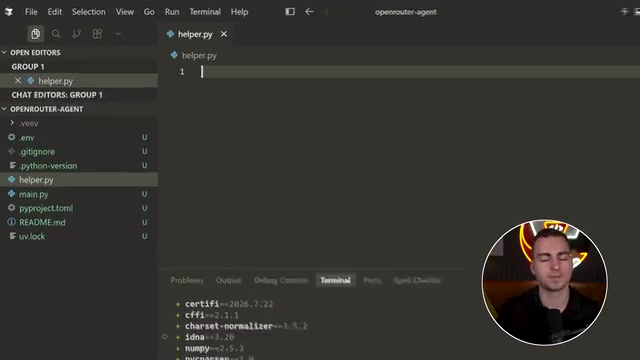
The cleverness of this design lies in decoupling—each step is an independent Python file that can be run and debugged separately, or combined into main.py for one-click execution. The creator emphasized in the video that once you understand this flow, you can apply it to almost any multimodal AI project.
The Engineering Philosophy Behind a Single API Key
In traditional approaches, to call text, image, video, and speech models simultaneously, you often need to register on multiple platforms, integrate different SDKs, and manage seven or eight API keys. This project chose OpenRouter as a unified entry point, using just one key to cover all models.
The benefit isn't just convenience. OpenRouter allows specifying multiple fallback models in the same request—for example, primarily using GPT-series models and automatically falling back to Gemini-series on failure. For production systems that need stable operation, this "model cascading" capability avoids manually writing failover logic. The dashboard shown by the creator also provides cost breakdowns by request and by model, letting you clearly see where every cent is spent.
Step 1: From Microphone to Text
Speech transcription is the data entry point of the entire chain. The project uses the OpenAI Whisper Large V3 Turbo model, with extremely low cost—the creator measured that transcribing one sentence costs less than a thousandth of a cent.
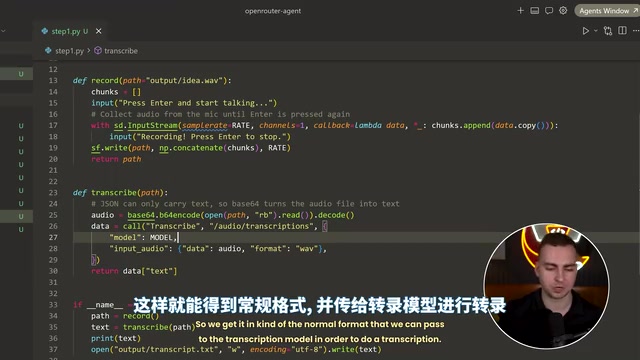
At the code level, this step is divided into two functions: recording and transcription. The recording part creates an input stream via the sounddevice library, captures audio data chunks at a fixed sample rate, and merges them into a WAV file after pressing Enter to stop. The transcription part converts the audio file to Base64 encoding and sends it to the /audio/transcriptions endpoint. The creator intentionally kept the two-step design of "save file first, then read it"—though slightly redundant, it makes it easy to replay the original recording for debugging.
Whisper is a series of automatic speech recognition (ASR) models open-sourced by OpenAI in 2022, and Large V3 Turbo is a distilled and accelerated version released in late 2023. Traditional Whisper Large V3 uses an encoder-decoder Transformer architecture with about 1.5 billion parameters, while the Turbo version reduces the number of decoder layers (from 32 to 4) to speed up inference several times while maintaining recognition accuracy close to the original—especially suitable for latency-sensitive real-time transcription scenarios. The model supports nearly a hundred languages, including Chinese, and has some robustness to background noise and accents. On aggregation platforms like OpenRouter, Whisper is billed by audio duration, so the cost is extremely low—this is why the creator measured transcribing one sentence at less than a thousandth of a cent.
Step 2: Constraining Script Output with JSON Schema
After obtaining the transcribed text, the next step is to have the large model generate a structured output containing the script, image prompt, and video prompt. The technical highlight here is Structured Output—using JSON Schema to force the model to return only data in a predetermined format.
The schema defines three fields: script (40-60 word voiceover with emotion tags), image_prompt (detailed description of a 16:9 cover image), and video_prompt (description of an 8-second dynamic clip). It also sets additionalProperties: false to prevent the model from improvising. The request also specifies a fallback model list and require_parameters: true, ensuring that only providers supporting the schema are routed to.
The value of this approach lies in the stability of downstream steps—subsequent image and video generation can directly extract fields from the JSON, without needing regular expressions to "guess" the model's output format.
JSON Schema is a declarative language for describing and validating JSON data structures, often used as a "structured output" contract in AI application development. By passing a schema object conforming to the JSON Schema specification to a large model API and setting strict: true or similar parameters, you can force the model's generated response to strictly conform to the schema; otherwise, the request is rejected or automatically retried. additionalProperties: false is a keyword in the schema that prohibits undefined extra fields in an object, thereby preventing the model from "improvising" redundant information. require_parameters: true is a routing parameter specific to OpenRouter that ensures only model providers fully supporting all parameters in the request (including the schema) are selected, avoiding structured output failures due to insufficient provider capabilities. This mechanism moves data format validation from downstream code forward to the model invocation layer, significantly improving the stability of multi-step pipelines.
Step 3: Model Selection and Parameter Discovery for Image Generation
Image generation seems simple, but different models support vastly different parameters. The project calls the /images endpoint, passing the model name, prompt, and aspect ratio. The returned image is embedded in the response as Base64 JSON; after decoding and writing to a file, you get a PNG.
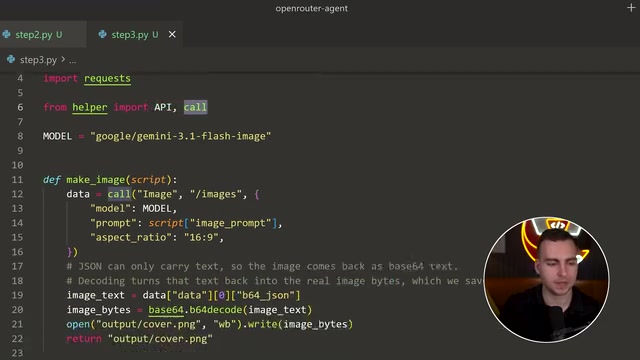
The creator demonstrated a practical trick in the video: sending a request to the /images/models endpoint to query all parameters and value ranges supported by a given image model. He compared Recraft and Gemini—Recraft is fast and cheap, but the image format it generates caused compatibility issues in the subsequent video step; Gemini has higher quality but also higher cost. This detail reminds us that in multi-model pipelines, upstream output format compatibility needs to be validated in advance.
Step 4: The Independent Value of Voiceover Synthesis
Speech synthesis is an "optional" step in this project—the final video model has built-in audio generation capability, but the creator still implemented text-to-speech separately to demonstrate how to call OpenRouter's speech models.
This step uses Gemini's TTS model, sending the script content and voice parameters to the /audio/speech endpoint. There's an engineering detail worth noting: some speech models' responses don't directly return the cost; you need to query the cost via the /generation endpoint using the response ID. This cost tracking mechanism runs through the entire project, ultimately aggregated into a complete "bill."
Step 5: Video Generation and Polling Mechanism
Video generation is the most complex and expensive step in the entire pipeline. The project adopts a "start with an image" strategy—passing the cover image generated in step 3 as the first frame of the video, ensuring visual style consistency.
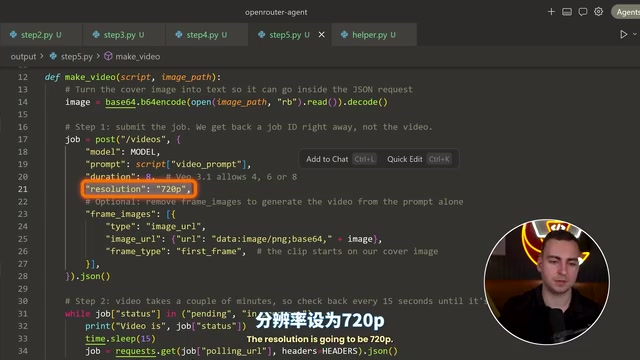
After the request is sent to the /videos endpoint, the finished product isn't returned immediately. The response provides a polling URL, and the status transitions between pending, in progress, and completed. The code queries every 15 seconds until the video is ready, then downloads the MP4 content from unsigned_url. The creator measured that one 8-second 720P video costs about $3.20, the largest expense in the entire flow.
During testing, he also encountered a surprise: one video request was rejected with a message saying "cannot be submitted due to third-party content provider restrictions." He speculated that the prompt might have involved copyright-related elements. This exposes the uncertainty of video models in content moderation; in actual deployment, retry or fallback strategies need to be designed for this.
Polling is a common pattern for handling asynchronous tasks: the client sends a request and immediately receives a task ID or status query URL, then repeatedly queries that URL at fixed intervals until the task status becomes completed or failed. In this project, video generation is a computationally intensive long task that cannot return results within a reasonable timeout of a single HTTP request, so the server uses asynchronous processing. The code queries the status every 15 seconds, with the status going through three stages: pending (queued), in progress (generating), and completed (finished). The polling interval needs to be balanced: too short increases server pressure and request costs, while too long extends the overall waiting time. For an 8-second video, generation usually takes several minutes, so a 15-second interval is a reasonable compromise. Additionally, production environments should set a maximum number of polls and timeout backoff strategies to prevent infinite waiting.
Cost Breakdown and Practical Advice
After running through several complete cases, the creator provided a cost overview: transcription is almost negligible, script generation costs less than a cent, image generation ranges from a few cents to a few dimes, speech synthesis is very cheap, and video generation consistently accounts for over 90% of total cost.
If you plan to reproduce this project, you can reduce costs in several ways: choose a cheaper video model, shorten the video duration, or lower the resolution. The creator suggests starting with a $1 top-up for experimentation, but you'll need more credit if you seriously want to generate videos. All code is available for free via the link in the description.
What This Pipeline Demonstrates
The significance of this project isn't how exquisite the produced videos are—the creator himself admits the results are "not the best in the world." What it truly demonstrates is a reusable engineering paradigm: using a unified API gateway to shield differences between multiple models, using structured output to guarantee data contracts between steps, using a polling pattern to handle asynchronous long tasks, and using cost tracking to control budgets.
When you break down these five steps, each is a standard API call; but when chained together, they form the prototype of an agent that can understand human language and automatically produce multimodal content. For Python developers looking to get started with AI application development, this is a clear, easy-to-follow practical example.
One-line Summary
Using Python and a single OpenRouter key to chain speech transcription, script generation, image generation, speech synthesis, and video generation into a five-step pipeline, building an AI agent.
Paragraph Summary
This article introduces an AI agent project built from scratch in Python that can automatically generate a complete short video with visuals, voiceover, and subtitles from a single voice command. The project uses a unified OpenRouter API key to orchestrate text, image, video, and speech models, splitting the flow into five independent steps: speech transcription, script generation, cover image generation, voiceover synthesis, and video generation. Core techniques include low-cost transcription with Whisper Large V3 Turbo, enforcing structured script output with JSON Schema, handling asynchronous video generation with a polling mechanism, and implementing failover with model cascading. Cost analysis shows video generation accounts for over 90% of total expense, with an 8-second 720P video costing about $3.20. The project demonstrates a reusable multimodal AI engineering paradigm.
Related articles

WorkBuddy Full Guide: How an AI Coworker Takes Over Workplace Automation
What is WorkBuddy? This article analyzes the core capabilities of this full-scenario AI agent: autonomous execution with deliverable results, local file processing, multi-agent parallelism, and workplace automation workflows, helping you judge its essential difference from ordinary AI chat tools.

The Truth About AI Agents: A Hundred Lines of Code + an LLM, Deconstructing the Agent's Underlying Logic
AI agents aren't a new AI species—just a language model plus tools, a loop, and a goal. Here's the underlying logic: how 100 lines of Python hit a 75% fix rate, why the harness beats the model, and Gartner's "agent washing."

AI Agent Deployment: Three Things Developers Should Do
AI Agent deployment doesn't require rushing into multi-agent systems. This article outlines an actionable deployment path and engineering acceptance thresholds for developers, covering human baselines, bounded single-agent scope, and a controlled code-modification loop.