Building an AI Multi-Model Hub with Windsurf in One Afternoon — Plus a Seedance Video Creation Review

Built a full AI multi-model web app in one afternoon with Windsurf, plus a Seedance video generation review.
This article documents how a developer used Windsurf Web to build a complete web application — featuring multi-model AI integration (Gemini, Qwen, DeepSeek, Doubao), database persistence, and Google OAuth login — in a single afternoon. It also covers a hands-on experience with ByteDance's free AI video generation tool Seedance, highlighting how AI tools are transforming both software development and content creation.
Introduction: What Does It Mean to Ship a Complete Web App in One Afternoon?
One person, one afternoon, zero to a fully functional web application — complete with multi-model AI integration, database persistence, and Google account login. Two years ago, this would have been nearly unthinkable. This article documents one developer's experience building an AI model aggregation website using Windsurf, along with a hands-on look at Seedance, ByteDance's AI video generation tool.
Building the AI Model Hub with Windsurf: Features and Implementation
Core Feature Design
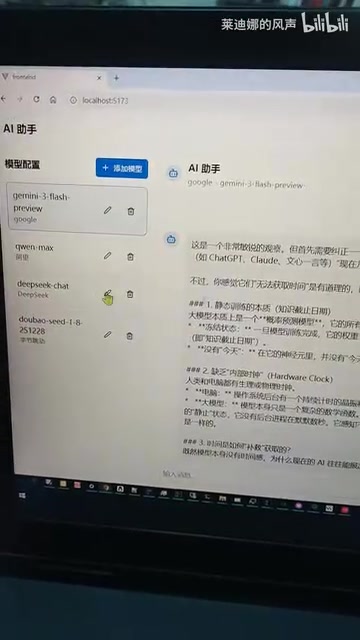
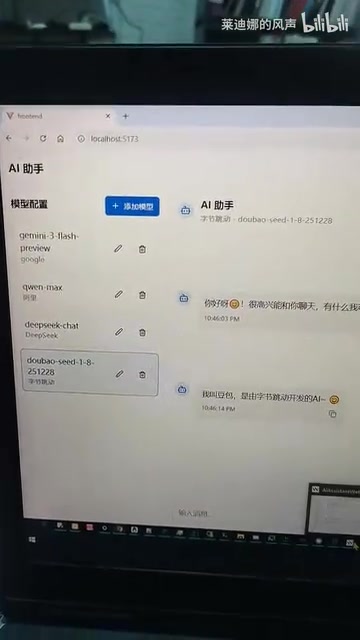
The site solves a straightforward problem: users add model configurations (provider name, model name, API URL, and API Key), and can then call different AI models from a single unified interface. Models currently integrated include:
- Gemini
- Qwen (Tongyi Qianwen)
- DeepSeekAd
- Doubao
Most major AI model providers have adopted an OpenAI-compatible REST API format — sending a message array via POST to a /chat/completions endpoint and receiving streaming or non-streaming text responses. DeepSeek, Qwen, Doubao, and other Chinese models all offer this compatible interface, which dramatically lowers the development cost of a multi-model aggregation site. In essence, you only need to maintain one request logic and swap models by changing the API URL and Key. The site acts as a unified entry point for managing and using multiple AI services from one place.

The Two Most Time-Consuming Technical Challenges
Two features consumed the most development time:
Database Integration: Adding persistent storage so that users' model configurations and conversation history survive page refreshes and re-logins.
Google OAuth Login: Implementing a standard OAuth authentication flow so users can sign in with their Google accounts. Screenshots confirm that profile pictures from different Google accounts display correctly, indicating the user system is fully functional.
Google OAuth 2.0 is the industry-standard authorization framework that allows third-party apps to access user resources without ever handling passwords. The core flow involves: the app requesting an authorization code from Google → the user consenting → Google returning the authorization code → the app exchanging it for an access token → finally retrieving basic user info. For developers, the tricky parts are handling callback URL configuration, token refresh logic, and securely storing sessions — exactly the kinds of details where AI coding tools can dramatically lower the barrier.
State Management for Independent Multi-Model Conversations
One noteworthy detail: conversations across different models are completely independent and don't interfere with each other. You can ask a question in one model's chat window, switch to another model, and continue a separate conversation — each maintaining its own context history.
This sounds simple but requires careful session state management in practice. Each model needs its own independent message queue and context. Since all model APIs use a messages array to pass context, the frontend must maintain a separate history list per model and inject the correct queue into the request body when the user switches models. This places clear demands on the design of frontend state management (e.g., React's useState or useReducer).
Windsurf Web Version in Practice: Why Choose It?
Windsurf's Technical Architecture
Windsurf is an AI-assisted development environment built by Codeium, powered by large language model capabilities for code understanding and generation. Unlike tools such as GitHub Copilot, Windsurf uses a "Cascade" architecture that can perceive the context of an entire codebase — not just the current file. The core technology combines RAG (Retrieval-Augmented Generation) with code semantic understanding, enabling the AI to grasp project structure, dependencies, and developer intent, and generate code that fits the overall architecture rather than isolated snippets.
Web Version vs. Desktop Version
The developer specifically chose the Windsurf Web version over the desktop version, citing these reasons:
- Better frontend development experience (React + CSS feels more fluid)
- Smoother page writing and preview workflow
- Higher overall development efficiency
How Fast Is the Real-World Development Speed?
The entire website was built almost entirely with Windsurf. In one afternoon, the developer went from zero to a complete product — frontend UI, backend API, database design, and third-party login all included. By traditional development estimates, even an experienced full-stack engineer would need at least 3–5 days to deliver the same feature set.

The value of AI coding tools like Windsurf isn't just raw code generation speed — it's the ability to help developers rapidly cross into unfamiliar technical territory. Tasks like OAuth integration and database schema design, which used to require hours of documentation diving, can now be described in plain language and yield a working implementation. The underlying logic: AI models have already digested massive amounts of technical documentation, Stack Overflow threads, and open-source code during training, allowing them to map a developer's natural language intent directly to concrete implementation code — effectively compressing the "read docs → understand → write → debug" cycle.
Seedance AI Video Generation: A Hands-On Look at ByteDance's Free Tool
Beyond the Windsurf development experience, the video also showcases Seedance, an AI video generation tool released by ByteDance. The tool is currently in a free open-access phase — anyone can sign up and try it.
Seedance is built on ByteDance's video generation foundation model, combining diffusion models with temporal modeling. Unlike image generation, video generation must maintain temporal consistency between frames — which is the core technical challenge. Current leading approaches include DiT (Diffusion Transformer)-based video generation, which introduces attention mechanisms along the time dimension to ensure motion coherence. The emergence of tools like Sora, Kling, and Seedance signals that AI video generation is moving from "usable" to "commercially viable."
From the demo footage, Seedance's generated video clips are already remarkably close to real human performance — natural character movement and fine visual texture. For short-video creators, this means high-quality video assets can be generated from text descriptions alone, without professional filming equipment or a production team.
Conclusion: AI Tools Are Reshaping Development and Creative Workflows
From Windsurf enabling a single developer to ship a complete web app in one afternoon, to Seedance making video creation independent of professional equipment — the pace of AI tool evolution in 2024–2025 is genuinely remarkable.
For developers and creators, the best move right now isn't to wait and watch — it's to start using these tools. Windsurf is ideal for developers with a coding foundation who want to dramatically boost their productivity. Seedance is a natural fit for content creators who need video assets but lack filming resources.
The more powerful the tools, the greater the advantage for people with ideas — and that principle has never been more evident than in the AI era.
Key Takeaways
- Built a complete web app with multi-model AI integration, database persistence, and Google login in one afternoon using Windsurf Web
- Windsurf's Cascade architecture perceives the entire codebase context, delivering a smooth experience for React + CSS frontend development
- The site enables unified access and independent conversation management across multiple AI models (Gemini, Qwen, DeepSeek, Doubao), made possible by each provider's OpenAI-compatible standard API
- Google OAuth 2.0 integration was one of the project's key challenges; AI tools significantly lower the barrier for this type of third-party authentication
- ByteDance's Seedance is built on a DiT architecture and produces video output approaching real human performance — currently free to use
- AI tools are simultaneously revolutionizing productivity in both software development and content creation
Related articles
 Product Reviews
The Programmer's Desk Setup Guide: Building a Workspace That Feels Like Home
Discover how programmers build productive, comfortable workspaces. From multi-monitor setups to ergonomic design, explore the desk philosophy that drives focus and flow.
 Product Reviews
Qoder vs Cursor Real-World Comparison: Which $20/Month AI IDE Is Better?
Hands-on comparison of Qoder vs Cursor AI IDEs: Agent autonomy, human interaction count, and architecture decisions. Qoder needed only 2 interactions vs Cursor's 8.
 Product Reviews
Cursor Cloud Agent Demo: Eliminating Bottlenecks Across the Entire Software Development Lifecycle
Deep analysis of Cursor's Cloud Agent demo showing how cloud VMs, automated test artifacts, and a full-chain control plane systematically eliminate human bottlenecks across the software development lifecycle.