Building an AI Voice Appointment System with n8n: A Workflow Breakdown
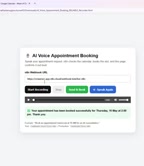
How to build an AI voice appointment booking system with n8n, from speech input to calendar confirmation.
This article breaks down a demo of an AI voice appointment booking system built on n8n, covering six stages: frontend voice capture, Webhook reception, AI natural language parsing, calendar authentication, event writing, and result feedback. Users simply speak their desired appointment time, and the system handles the rest automatically. The article also highlights the demo's limitations — it doesn't address time conflict handling, speech recognition error tolerance, concurrent stability, or which specific service powers the voice and NLP components — and recommends a phased approach for anyone looking to replicate the system.
When Voice Meets Automation: An AI Booking System Demo
As voice interaction technology matures, integrating speech recognition into business automation workflows has become an increasingly popular direction for many teams. A demo video from YouTube showcases how to build an AI Voice Appointment Booking system using n8n, an open-source automation platform. The entire process requires no human intervention — users simply state their booking request in natural language, and the system automatically handles calendar scheduling and appointment confirmation.
The core value of such a system lies in transforming what would otherwise be a manually handled booking process into an automatically triggered, automatically responsive workflow. For industries heavily reliant on appointments — clinics, beauty services, consulting firms — this translates to lower staffing costs and faster response times.
Breaking Down the Core Components
From the demo, we can see that this workflow is built from several key modules connected in sequence. First is the Webhook node, which serves as the entry point for the workflow, receiving requests from external sources — in this case, the browser. The presenter mentions that "the voice node is pushed from the browser," indicating that the user's voice input is captured on the frontend and then passed into the n8n workflow via Webhook.
Next comes the Calendar Authentication module. To enable automatic booking, the system must obtain authorization to access the calendar service — this step answers the question of "how the system earns the right to write events to your calendar." Only after authentication passes can the workflow proceed with the write operation.
Finally, there's the Booking Notes module, which saves and confirms the specific appointment details, including the person's name, date, and time. The complete chain — Webhook reception, identity authentication, calendar write, and result feedback — forms a closed loop.
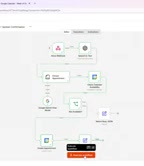
n8n is a node-based open-source workflow automation platform built around the concept of "nodes as functions": each node represents an independent operation (such as an HTTP request, database write, or sending an email), and nodes pass data between each other via directed connections, ultimately forming a visual automation workflow. Compared to SaaS competitors like Zapier and Make (formerly Integromat), n8n supports self-hosted deployment so data never has to pass through third-party servers — making it well-suited for scenarios with data compliance requirements. Its Fair-code license allows free self-hosting, while the commercial cloud version is billed per execution. For building a voice booking system that handles sensitive personal information (names, times, contact details), the advantages of self-hosted deployment are especially significant.
How a Complete Booking Actually Happens
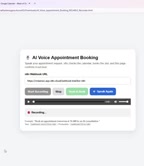
The most tangible part of the demo is a real booking interaction. The presenter (who introduces himself as Manjunatha) says via voice: "I need to book an appointment on October 7th at 10 AM." After the system receives this natural language input, it begins executing the workflow.
The key question is how the system interprets this sentence. It needs to extract structured information from unstructured voice text: the appointment date (October 7th), the appointment time (10 AM), and the identity of the person booking. This step typically relies on an AI model's natural language parsing capabilities to convert conversational expressions into fields that the calendar system can recognize.
Once parsed, the workflow creates a calendar event at the corresponding time slot. At the end of the demo, the system returns a clear response: "Your appointment has been successfully booked." From voice input to confirmation, the entire process had almost no perceptible delay — demonstrating the efficiency advantages of automated workflows when handling standardized tasks.
Extracting structured fields from unstructured voice text is typically achieved through one of two approaches: using a large language model's (LLM) Function Calling or Structured Output capabilities to have the model return parsed results directly in JSON format; or using traditional Named Entity Recognition (NER) models to identify entity types like dates, times, and names within the text. The former is more flexible and can handle relative time expressions like "next Monday morning," but depends on external API calls with associated latency and cost. The latter is faster and can be deployed locally, but has weaker generalization when dealing with conversational ambiguity. The near-imperceptible latency shown in the demo suggests the system may use a relatively lightweight parsing approach, or that some preprocessing was completed on the frontend.
The Value and Real-World Limits of This Approach
Using low-code/open-source automation tools like n8n to build a voice booking system offers several clear advantages. An open-source platform means lower licensing costs and greater customizability; node-based visual orchestration lowers the barrier to entry, allowing non-professional developers to understand and adjust workflows; and integrating AI voice capabilities makes the interaction feel more like a natural human conversation.
However, based solely on this brief demo, many details remain unexplored. For example: how does the system handle scheduling conflicts (what happens if the requested time slot is already taken)? How does it cope with ambiguous or incorrectly recognized voice input? And what is its stability under concurrent multi-user scenarios? In real production environments, these edge cases are often far more telling of a system's maturity than successfully completing a single smooth booking.
The demo also doesn't specify which service handles speech recognition and natural language understanding — whether it's the browser's built-in speech API or a third-party large language model. This is precisely where the "AI" capability lives, and it's the most critical missing piece of information for anyone trying to replicate this setup.
Calendar authentication is typically implemented using the OAuth 2.0 protocol. Taking Google Calendar as an example: the system first needs to register an application in the Google Cloud Console to obtain a Client ID and Client Secret. After the user grants authorization, these are exchanged for an Access Token and Refresh Token. Access Tokens generally expire after just one hour, requiring silent renewal via the Refresh Token. n8n has built-in OAuth nodes for major services like Google Calendar and can automatically handle token refreshes — but the initial authorization still requires a human to complete the authorization redirect in a browser. For appointment systems serving multiple users, there's also an important architectural distinction between "system account calendar" (single authorization, all bookings written to one calendar) and "individual user calendars" (requiring authorization from each user) — these two models differ fundamentally in permission management and data isolation.
Takeaways for Those Who Want to Try It
The real value of this demo lies in providing a clear conceptual framework: voice frontend → Webhook entry → AI parsing → service authentication → business execution → result feedback. Any team looking to integrate conversational interaction into their business workflows can design their own solution along this chain.
If you're planning to give this a try, here's a recommended approach: start by getting the most basic Webhook-to-calendar-write pipeline working in n8n, making sure authentication and permissions are solid; then gradually introduce voice recognition and NLP parsing; and finally add exception handling and conflict detection logic. Rather than chasing full functionality from the start, validating in stages will make the entire build process much more manageable.
Related articles
LangGraph Crash Course: Building Enterprise-Grade AI Agents and Workflows from Scratch
LangGraph crash course: learn its independence from LangChain, MIT license, FastAPI high-concurrency deployment, human approval, and memory storage for enterprise AI agents.
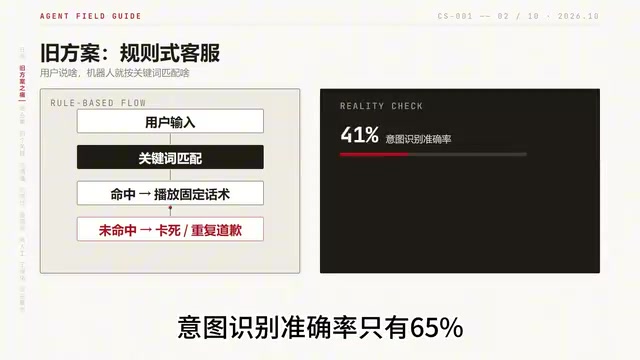
Building an AI Customer Service Agent from Scratch: A 92% Intent Recognition Case Study
A Bilibili case study: building an AI customer service agent from scratch with BERT intent recognition, dialogue state tracking, hybrid vector retrieval, and a weighted handoff model—raising intent accuracy from 65% to 92%, 78% conversation completion, handling 100K conversations daily.
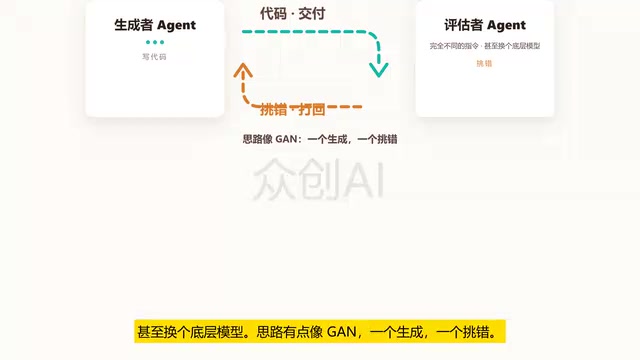
Loop Engineering: An Engineering Paradigm for AI That Writes Code and Merges PRs Autonomously
Loop Engineering is transforming AI development pipelines: Stripe's Minions system merges over 1,300 machine-generated PRs weekly. This article breaks down Loop Engineering's five core actions, six components, five failure modes, and three safety disciplines, explaining why independent evaluators, state files, and budget caps matter more than full automation.