Building an Automated Sales KPI Daily Report with n8n and Google Gemini

Automate daily sales KPI reports with n8n and Google Gemini: code calculates, AI writes, schedules deliver.
Data analyst Adedeji Oluwasegun demonstrates a fully automated sales reporting workflow built on n8n and Google Gemini. Each morning, it reads raw sales data from Google Sheets, runs a custom JavaScript KPI engine to compute revenue, average order value, and day-over-day changes, passes the structured results to Gemini for an executive summary, and delivers a formatted HTML report via Gmail — all in seconds. Key design highlights include a centralized config node for cross-company reuse, code-based calculations to ensure numerical accuracy, prompt constraints to prevent AI hallucinations, and automatic retries for production reliability.
Every morning, a sales report lands in the manager's inbox right on schedule: revenue, order volume, average order value, new customers, top-selling products, best and worst-performing regions, and an AI-written analytical summary with recommendations. The interesting part — no one manually prepared this report. The entire process is fully automated.
Data analyst Adedeji Oluwasegun demonstrated in a walkthrough how he used the automation tool n8n paired with Google Gemini to completely automate what used to be a time-consuming and error-prone daily reporting task. Here's a breakdown of how this workflow operates and what it means for frontline data teams.
From Raw Data to Finished Report
The pipeline starts with a raw sales data spreadsheet: over 500 orders spanning different countries, products, and sales channels. At most companies, someone opens a sheet like this every day, manually filters and calculates, then writes a summary. It's time-consuming and highly prone to errors.
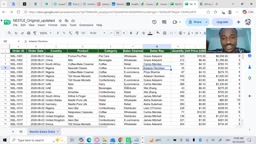
The author points out that the core pain point of manually producing daily reports isn't the calculation itself — it's the repetition and the risk of error. Doing the same thing every day leads to fatigue and mistakes, and if even one number is off, the decisions made based on it will be skewed. Automation is designed precisely for this kind of low-value but high-frequency work.
n8n is an open-source workflow automation platform, similar in concept to Zapier or Make (formerly Integromat), but with support for self-hosted deployment — making it particularly appealing to organizations with strict data privacy requirements. It uses a visual node-based approach to build workflows, where each node represents an action (like reading a spreadsheet, running code, or calling an API), and nodes are connected by data flows. Compared to pure SaaS automation tools, n8n allows users to write JavaScript directly within nodes, giving it much greater flexibility for handling complex calculation logic without relying entirely on pre-built templates.
A Reusable Configuration Design
The workflow runs left to right. The first step is a Schedule Trigger that kicks off the process automatically every morning — no manual intervention required.
What truly makes this solution reusable is the Settings Node that follows immediately after. Company name, spreadsheet URL, column names, currency, email recipients — all configurable parameters are stored centrally in this single node.
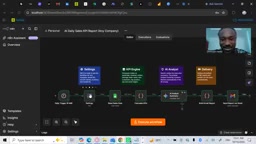
This design philosophy is worth adopting: when you need to deploy the same reporting system for another company, you only need to update this one node — you never have to touch the underlying calculation logic. Decoupling "configuration" from "logic" is the key to scaling and reusing automation workflows, and it dramatically reduces maintenance overhead.
The KPI Calculation Engine
Once configured, the workflow pulls sales data from Google Sheets. What comes next is the core of the entire solution — a JavaScript KPI engine written by the author himself.
This code filters today's and yesterday's orders, then calculates key metrics: revenue, order volume, average order value, new customers, and rankings for top products and regions.
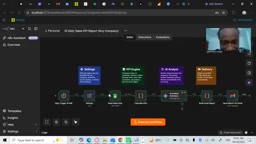
A particularly practical feature is the calculation of day-over-day percentage changes, giving managers an instant read on whether trends are moving up or down. Looking at absolute numbers alone often lacks context — adding period-over-period comparisons is what gives a report real decision-making value. Using code rather than AI for this math also guarantees numerical accuracy, a deliberately considered division of labor.
Letting Gemini Write the Analysis
The calculated figures are then passed to Google Gemini, which writes an executive summary in the style of a sales analyst.
The author was particularly careful in crafting the prompt here: the AI is explicitly instructed never to fabricate numbers, and every data point appearing in the summary must come directly from the calculated results. This constraint addresses the most common "hallucination" problem with large language models — in scenarios involving financial figures, having the AI handle only "language and insight" while leaving "numerical accuracy" to deterministic code is a sound architectural choice.
He also added an automatic retry mechanism to this step: if the AI service is busy or a request fails, the workflow automatically retries rather than terminating. This kind of fault-tolerance design is often overlooked in production-grade automation, yet it's what determines whether a system can run reliably over time.
Hallucination is a technical term in the large language model space, referring to a model confidently generating content that doesn't match reality — including fabricated numbers, invented citations, or incorrect inferences. This risk is especially pronounced in financial reporting scenarios, where a model might "estimate" a revenue figure that sounds plausible from context but doesn't actually exist. The "code calculation + prompt constraints" architecture used in this workflow essentially limits the model's input to pre-verified structured results, then uses explicit instructions to prevent it from inferring beyond the data — compressing hallucination risk to the level of language organization rather than numerical accuracy. This is widely recognized as a best-practice direction for AI-assisted data reporting.
Generating and Sending the Email
In the final step, the workflow assembles the results into a formatted HTML email with a KPI table and sends it via Gmail.
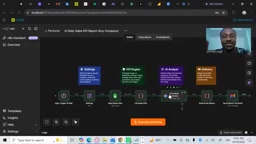
Once the full pipeline runs, raw data is read, KPIs are calculated, insights are written, and the report is delivered — all within seconds, with zero human involvement. The author noted that this workflow was built and extended during his data analytics training at Tenalytics, designed so that any company can adopt it.
Takeaways for Data Teams
The value of this case isn't in how technically complex it is — it's in how it demonstrates a pragmatic automation mindset:
- Clear division of labor: Deterministic calculations go to code; natural language generation goes to the LLM — each doing what it does best
- Reusability first: A centralized configuration node lets a single logic layer serve multiple organizations
- Anti-hallucination design: Prompt constraints prevent the AI from inventing numbers, keeping financial reports trustworthy
- Fault tolerance: Automatic retries make the pipeline more reliable in production environments
For teams still producing daily reports by hand, low-code automation solutions like this are already quite mature. Hand the repetitive reporting work to a workflow, and people can spend their time on the decisions that actually require human judgment.
Related articles

Hands-On with the Gemini 4 Argon API: Thinking Levels and Background Mode Explained
A Free Code Camp crash course on the Gemini 4 Argon API: from getting a key and sending your first request to controlling reasoning costs with thinking levels, enabling multi-turn chat with previous_interaction_id, and generating a Breakout game in background mode—plus a Google engineer's take on the model's capabilities.

Reinforcement Learning Takes On Getting Over It: Distributed Training Strategies Behind 63% Progress
A developer uses deep reinforcement learning to tackle Getting Over It. The agent climbs from the bottom to 63% progress but gets stuck at the anvil. The project is open-sourced, using divide-and-conquer training and CPU-only training, seeking community collaboration to break the bottleneck.

Sigma FP2 Released: The World's Smallest Full-Frame Camera Gets Sensor and Screen Upgrades
Sigma launches the FP2 full-frame camera, retaining its smallest-and-lightest design with three key upgrades: improved sensor, articulating LCD screen, and longer battery life—built for portable video creators.