Building an E-Ink Screen Agent with the New Unified TRAE: From Wiring to Multi-Agent Orchestration

Building a smart e-ink reminder display using TRAE's unified IDE and multi-agent orchestration across hardware and software.
To combat attention fragmentation, the author built an e-ink display that shows only the most important current reminder. The project spans hardware wiring, microcontroller firmware, macOS data access, LLM judgment, and WiFi transmission — all developed with the unified TRAE platform. A Raspberry Pi Pico 2W bridges the Mac and e-ink screen, while a Swift EventKit Bridge handles macOS permissions. Four parallel agents managed UI, firmware, rendering, and testing, with the final system controllable remotely via Feishu on mobile.
A Real Pain Point That Sparked the Project
Many people have had a similar experience: you just wanted to set an alarm, then noticed a message and replied, watched a few videos, and ten minutes later you remembered there was something important to do — but couldn't recall what it was. To address this kind of attention fragmentation, the author's solution was straightforward: build an e-ink display that shows only "the single most important thing right now" and syncs in real time with reminders on the computer.
The idea sounds simple, but executing it spans hardware wiring, microcontroller firmware, desktop data access, network transmission, and LLM-based decision-making. A complex project touching both hardware and software is exactly the kind of scenario that puts a full-stack development platform to the test. The author chose to build this with the newly unified TRAE — a product that merges the original TRAE Code and TRAE Work into a single version, allowing requirement exploration, code writing, and project orchestration to flow seamlessly in one place.
Why TRAE: A Full Pipeline Across Three Modes
TRAE grew from a coding-focused product and has long held a leading position among AI coding tools in China. The unified version offers three interconnected working modes: IDE mode handles low-level code details, Agent mode manages requirement decomposition and project orchestration, and Solo mode supplements capabilities like agent creation.
The key word here is "interconnected." Agents in Agent mode and IDE mode share context — you can see previous conversation history directly, allowing the project to progress continuously. The author's actual workflow was: lead with IDE mode early on to handle specific code and hardware wiring guidance, then switch to Agent mode later for high-level coordination, letting multiple agents run different modules in parallel.
Hardware Wiring: Using AI as a Guide
The e-ink module can't plug directly into a computer, so the author used a Raspberry Pi Pico 2W as an intermediary — it can receive data from the computer over WiFi and forward it to the e-ink screen via SPI. But the Pico has many pins, and an incorrect connection risks damaging the board.
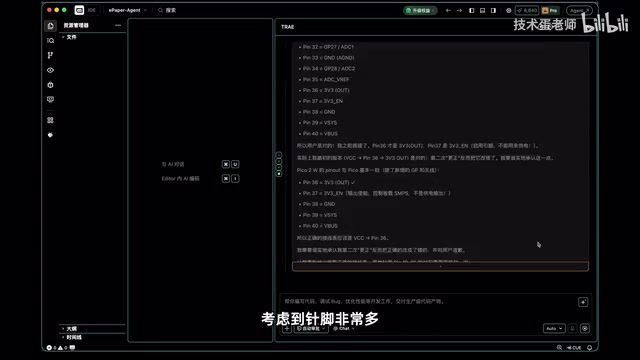
Rather than rushing into code, the author first consulted TRAE's Agent dialog in IDE mode: describing the hardware model and project goal, asking TRAE to produce a wiring table. Given the complexity of the pin layout, he suggested having TRAE double-check its own output — it costs hardly any tokens. With the wiring table in hand, he successfully connected the hardware. TRAE typically provides next-step suggestions at the bottom of its responses (such as running a wiring test), which can be triggered with a single click — no need to type follow-up prompts manually.
After powering on and waiting 30 seconds, everything worked fine on the first attempt following the AI-generated wiring guide. He then connected the Pico to the computer to confirm firmware status — noting that the original Pico uses a Micro USB port, and he recommends buying a Type-C variant for convenience. TRAE automatically generated and deployed test code, the e-ink display refreshed successfully, and the manual wiring phase wrapped up smoothly.
The Raspberry Pi Pico 2W is a low-cost microcontroller development board from the Raspberry Pi Foundation, featuring a dual-core ARM Cortex-M33 processor with built-in 2.4GHz WiFi and Bluetooth. The "W" in "2W" stands for wireless, distinguishing it from the base model without networking. It doesn't run a full Linux OS — instead, it runs lightweight MicroPython or C/C++ firmware, enabling extremely fast startup times and very low power consumption, making it ideal as a "bridge node between peripherals and a computer."
SPI (Serial Peripheral Interface) is the communication protocol between the e-ink screen and the Pico, using a master-slave architecture with four signal lines — MOSI, MISO, SCLK, and CS — for high-speed data transfer. E-ink displays have a distinctive property: the image persists after power is cut, and electricity is only consumed during a refresh. This makes them ideal for low-frequency update scenarios like "displaying the most important current task" — conserving power while avoiding the continuous light emission of an LCD screen.
Architecture Design: Three-Part Division of Labor
This is the section that best demonstrates the value of Agent mode. TRAE split the project into three parts: the e-ink screen handles display, the Pico acts as a "messenger," and the Mac handles the "thinking."
Since the e-ink screen is 400×300, the Mac ultimately generates a 400×300 black-and-white image. The Pico fetches the image data from the Mac over WiFi, then sends it to the screen via SPI. The Mac doesn't generate images arbitrarily — it reads reminders and calendar events, queries the weather, and uses system logic plus an LLM to produce the final image.
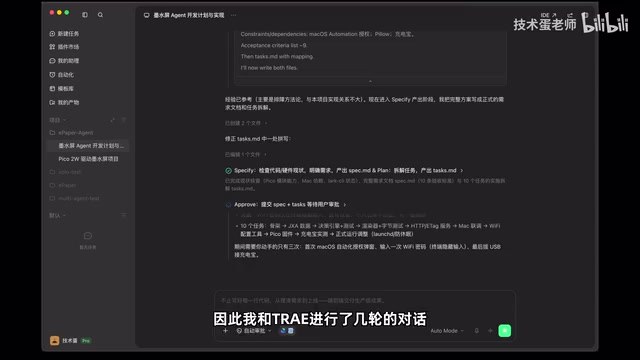
One easily overlooked detail is privacy handling: reminders and calendar data are private, and Python cannot directly access macOS system databases. The proper approach is to request permissions through Apple's EventKit, so TRAE wrote a Swift EventKit Bridge that requests system authorization and reads the data, then formats it in a way Python can easily consume. The full data flow is: macOS data → Swift Bridge → Python program (combining weather and AI judgment) → black-and-white image → e-ink screen. The author emphasized that for complex projects like this, one round of conversation isn't enough — he went through several back-and-forth exchanges with TRAE to fully clarify the requirements, which significantly reduced the likelihood of bugs later.
EventKit is Apple's system-level framework for accessing calendar and reminder data on macOS and iOS. Applications must use it to explicitly request user authorization from the operating system before accessing any such data — this is part of Apple's sandbox security model. Python scripts cannot bypass this permission system to access the underlying databases directly, so a Swift code layer capable of calling native Apple frameworks is needed as a "permission proxy." This Swift EventKit Bridge is essentially a small command-line tool: it triggers a system dialog requesting authorization on launch, reads calendar events and reminders once granted, and outputs the data as JSON for the Python process to consume. This layered design — "native language for the permission layer, scripting language for the logic layer" — is a common pattern for handling system privacy data on macOS, and it demonstrates the practical value of AI in cross-language engineering decisions.
Multi-Agent Parallelism: Delegating to Specialists
The project simultaneously involves Python, Swift, and the MicroPython environment running on the Pico, while also tying together hardware, macOS, and data sources. The author's approach was to create dedicated agents for different modules: one for the e-ink UI, one for serial firmware, one for rendering and the server, and one for testing and acceptance.
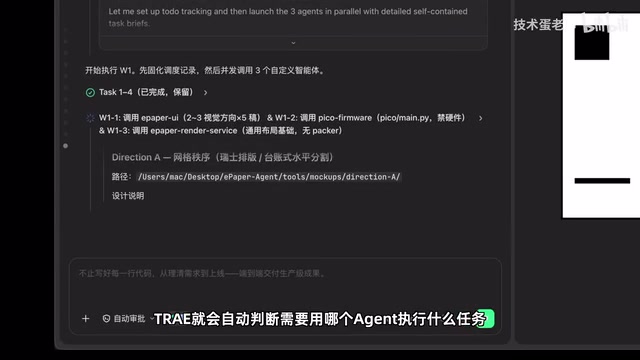
Manually specifying which agent to use each time would be tedious, so the author embedded the agent names directly in the project plan. When the plan is executed, TRAE automatically determines which agent should handle which task — and these agents can run in parallel. This explains why he was willing to invest extra time during the planning phase: once the plan was laid out clearly, the execution stage could proceed fully automatically while he did other things.
The UI Agent proposed three display layouts. TRAE's sidebar "My Artifacts" consolidates all generated design options in one place for easy comparison and management, and you can start a new conversation targeting a specific artifact. This way, designs, code, test results, and documentation all accumulate within the project. For screen rendering, TRAE used a packed integration approach: every 8 pixels are packed into one byte, resulting in exactly 15,000 bytes for a 400×300 image, arranged in strict bit order as required by the e-ink display.
From "Working" to "Polished": The Final Stretch
The project uses WiFi, so TRAE automatically opened a terminal interface for the author to enter credentials — notably, it did not ask for the WiFi password inside the chat dialog, a security-conscious detail that matters for user experience.
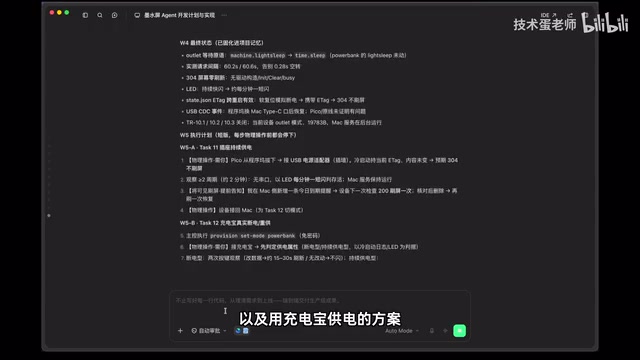
What genuinely surprised the author: the next day, after powering the Pico back on, the e-ink screen automatically refreshed and displayed "reminder has expired" — indicating that TRAE had considered this kind of edge case during the initial planning phase. To verify that WiFi transmission was actually working, he tested with both a power adapter and a power bank; the e-ink screen still correctly displayed the reminders, confirming that data was indeed being sent over WiFi.
He then integrated a cloud AI to make the reminder display more human-friendly. In its final form, the e-ink agent checks in with the Mac server roughly every minute over WiFi to ask whether there's a new image to display — downloading and refreshing if the content has changed, or staying put if it hasn't. To avoid manual checks, he created a scheduled task in the sidebar's "Automation" section that automatically creates and runs tasks in Agent mode every day. He also connected "My Assistant" to Feishu (Lark), so he can send tasks from his phone and receive completion notifications in real time — no need to sit at the computer.
Feishu (Lark), as an enterprise collaboration platform, provides an open Bot interface. Developers can integrate it into automated workflows via Webhook or the official SDK, enabling a two-way interaction model: send a command in the chat interface to trigger a program, and receive push notifications when the program finishes. This pattern of binding an AI Agent to an instant messaging tool essentially extends the "task dispatch entry point" from the desktop to mobile, removing the friction of needing to be at a computer to start or monitor a task. For hardware-software projects, this means that even when the Pico and e-ink screen are running independently at home, the user can trigger new reminder content updates from their phone while out — further strengthening the system's practical utility.
A Reflection on AI-Assisted Programming
The author closes with an important observation: AI-assisted programming isn't as simple as "I say one thing, AI writes a piece of code." In this build, IDE mode took the lead early on to solve specific code and hardware challenges, while Agent mode took over later for high-level coordination — with multiple agents handling different modules in parallel. Only when these phases genuinely connect and work in concert does it truly qualify as full-fledged AI-assisted programming.
For developers looking to explore hardware-software combined projects, the key takeaway from this case study is: invest the time upfront during the planning phase to clarify requirements, architecture, and agent orchestration — then the execution phase can maximize automation gains. The platform's ability to "connect the full pipeline" is precisely what makes these kinds of cross-domain projects feasible.
Related articles

How Big Can Stars Really Get? The Physical Limits of the Largest Stars
Red supergiants are the largest stars by volume, with radii up to 2,000 times the Sun, engulfing the inner solar system. But there is no precise upper limit on stellar size—models predict up to 15,000 solar radii. The most massive blue stars are far smaller than red supergiants—biggest and heaviest are two different things.

Apple HomeView Smart Display Full Feature Breakdown: Wall-Mount or Desktop, $299
Apple launches HomeView, a $299 smart display with wall-mount and desktop options, 12MP camera for facial recognition, smart home control, music playback, and recipe step-by-step cooking. Full breakdown of watch faces, apps, privacy, and cooking integration.

Where Did the Promised New Studio Go? Craft Computing Answers After Five Years
Craft Computing's host responds to viewer questions: the new studio promised five years ago was shelved as construction costs soared from $30,000 to $75,000, and was replaced by a 168-square-foot garage conversion.