Building an EmDash CMS Custom Theme with AI: A Full Devin Walkthrough

Claude Sonnet and Devin Desktop build a full EmDash/Astro theme in minutes — but prompt quality decides architecture quality.
This article documents a creator's hands-on experience building an EmDash CMS custom theme using two AI coding assistants — Claude Sonnet and Devin Desktop. EmDash is a block-based CMS built on Astro and deployed on Cloudflare Workers, with themes composed of Astro configs, style tokens, seed files, and dynamic components. Claude Sonnet built the M-HQ theme smoothly in one shot, while Devin Desktop independently generated 21 files and 277 lines of code in about 15 minutes. However, Devin dumped all content into a single block rather than creating separate content collections, making future editing painful — not because of AI limitations, but because the prompt lacked architectural specificity. The core conclusion: the stronger the AI tool, the more critical your ability to express architectural decisions in the prompt becomes.
EmDash (often spoken as "M-Themes" or "M-Dash") is a modern CMS built on Astro that organizes page content using "blocks." This article documents how a YouTube creator used AI coding assistants — first Claude Sonnet, then Devin Desktop — to build an EmDash custom theme from scratch, while exploring the boundaries and design trade-offs of AI-assisted site building.
What Is EmDash CMS: A Block-Based Content System Built on Astro
EmDash is a content management system running on top of Astro, deployed on Cloudflare Workers, and designed for speed and flexibility. The author had already used AI the day before to build a site called "M-Themes HQ" as a central hub for all EmDash-related content.
The site structure is fairly comprehensive: the homepage features a prominent Hero block, followed by sections for tutorials, YouTube videos, plugins, themes and services, and an FAQ. There are also standalone pages for videos, themes, plugins, services, and contact. In the admin dashboard, you can see added pages, a Content Hub with tutorials and videos, a media library, menus, widgets, and sections management.
Notably, the author also developed a plugin for injecting custom scripts — such as adding visitor tracking scripts like Plausible in the page head, or inserting custom HTML in the header/body. This demonstrates the extensibility that EmDash makes possible.
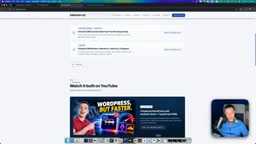
Astro is a static site generation framework built around a "content-first" philosophy, with its core feature being the "Islands Architecture" — outputting zero-JavaScript pure HTML by default, with JS loaded on demand only for components that genuinely require interactivity. This makes Astro-built sites typically far superior in performance scores compared to fully rendered React or Next.js solutions. EmDash chose Astro as its foundation precisely for this reason: content pages are output statically, dynamic data is pulled from a local database, and distributed via Cloudflare Workers' edge network — the combination of these three factors delivers extremely fast initial load times. Cloudflare Workers is essentially a serverless runtime running on global edge nodes, where requests are routed to the data center closest to the user, eliminating the geographic latency of traditional servers.
Theme File Structure: Understanding What the AI Is Working With
To understand how AI builds a theme, you first need to understand what EmDash theme files are made of. The author broke down the "M-HQ" theme completed the day before — these files form the entire theme's skeleton:
- Astro configuration: Includes base configs like live config — the "don't touch after generation" parts;
- Style tokens: Carries design-related variables and style definitions;
- Seed files: Critically important — they determine how blocks are created in the database, enabling all blocks to be correctly added to each page;
- Content Model: Contains sample content and menu settings;
- Components and blocks: Such as Site CTA and resource service components, all pulling data dynamically from the database;
- Base Layout and lib: Foundation layout and library files, including an AI-generated icon set and a YouTube link component.
The author emphasized that the style files are the most complex part, while most other components simply "connect to the database and pull data." This dynamic design means page content and templates are completely separated — pages are matched by slug, and all specific content comes from the database.
Seed files play the role of "database initialization scripts" in the EmDash theme system and are worth understanding in depth. When a theme is installed on a new site, the seed file automatically writes predefined block types, default content, and page structures to the database, allowing the theme to present a complete demo state from the start rather than a blank framework. This is similar to WordPress's "import demo data" feature, but declared in code form — making it more version-control-friendly and automation-ready. Style tokens are the variable layer in a design system, used to centrally manage visual attributes like colors, fonts, and spacing. By modifying token values rather than directly editing component styles, you can globally switch visual themes without touching any component code — this is also the technical foundation that enables elegant light/dark mode implementation.
Two AI Tools Head-to-Head: Sonnet vs. Devin
The author used two AI approaches for theme building, creating an interesting comparison.
Claude Sonnet: Smooth One-Shot Build
The M-HQ theme from the previous day was built entirely by Claude Sonnet. The author rated it as having "created everything without any issues, running smoothly," and it even helped with deployment. The only manual intervention was a redesign afterward — the author wasn't satisfied with the initial look and made manual adjustments to reach a satisfying result, also adding light/dark mode support.
Devin Desktop: Full Theme Generated in 10 Minutes
The main focus of this video was testing Devin Desktop (in CLI mode, using Sonnet as the underlying model), which the author hadn't used before. The author took advantage of the free credits Devin was offering to EmDash users at the time, and issued a clear directive: modify the default marketing theme, have Devin reference the design of another existing site, write content details to the database, and use Astro Icons to make it easy to add icons from the UI.

After enabling "bypass mode," Devin worked independently for about 10–15 minutes, ultimately generating/modifying 21 files and 277 lines of code, with content populated and tested in the local database. Devin also used the ego browser — designed specifically for AI agents — to verify the running results.
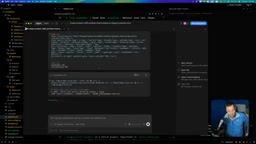
The result successfully replicated the author's original site structure, generating a portfolio theme that preserved Hero, project showcase, and other blocks with high visual fidelity to the reference site. Devin also added a light mode and some animations not present in the original. The author openly stated that Devin "really knows Astro" and performed excellently with the EmDash + Astro combination.
Key Takeaway: How Well You Ask Determines What AI Delivers
Despite the polished output and impressive speed (powered by the local database-driven architecture), the author identified a core design flaw — and the most valuable insight in the entire piece.
Devin built the entire page as "one complete block containing all content," cramming everything into the same editable page. This meant that when the author wanted to add a new project, the operation became hard to track — content was all piled together rather than organized by category.
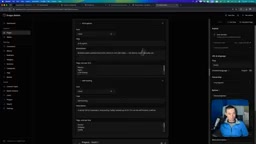
What the author actually wanted was for the AI to create separate content collections / content types for each section (like tech stack, projects), so that project entries could be added individually and flexibly in the future, rather than dealing with one massive monolithic block.
"This is a design decision," the author concluded. "This is exactly why you need to know how to ask these AIs the right questions." In other words, AI is fully capable of implementing a more sensible structure — the key is whether the human clearly articulates the requirements in the prompt. With the same tool, the granularity of instructions makes the difference between maintainable and unmaintainable output.
Content Collections are a core concept in modern Headless CMS platforms and static site frameworks — referring to the unified categorized management of the same type of content entries (such as "projects," "articles," or "team members"), where each entry has its own independent data record and schema definition. The opposite approach is the "single large block" model — hardcoding all project information into one rich text or JSON field. Initial generation looks identical, but once you need to add or remove entries, filter by tags, or reuse content across pages, maintenance costs skyrocket. Devin's choice of the "single block" approach wasn't due to lack of capability, but rather taking the "shortest path" when instructions didn't explicitly constrain the architecture — this is the typical behavioral pattern of AI code generation: complete the surface-level task, not the implied architectural goal. Explicitly requesting "create a separate content type for each category of content, referenced through relational fields" is an effective prompt strategy for eliminating this class of problems upfront.
Speed and Next Steps: Cloudflare Workers Deployment Preview
Throughout the process, the local running speed was impressive — thanks to EmDash's dynamic architecture where all content comes from a local database. The author started the dev server with npm run dev and used a bypass URL to access the admin panel without logging in.
The author previewed the next step of deploying this theme to Cloudflare Workers to verify performance in a live environment. For developers wanting to get started with EmDash, he also recommended reviewing the official documentation on theme overview and seed file sections — pairing the docs with hands-on practice accelerates the learning curve.
Summary
This real-world walkthrough clearly demonstrates the genuine capabilities of AI coding assistants in site-building scenarios: both Sonnet and Devin can produce structurally complete, professionally designed Astro/EmDash themes in about 15 minutes, with satisfying speed and baseline quality. But AI won't make architectural decisions for you — how to structure your content model, which parts should become independent collections — these still require the developer to think through clearly and express precisely. The more powerful the tool, the more your ability to ask the right questions becomes the true differentiator.
Related articles

Python 3.15 New Feature: Is the sentinel Type Better Than None?
Python 3.15 adds the sentinel type, using named unique sentinel objects to replace None and bare object(), resolving confusion among missing values, explicit emptiness, and invalid input while avoiding type hint failures.

Deep Learning's Three Architectures and the Universal Approximation Theorem: A Complete Guide to MLPs, CNNs, and Transformers
Explaining the inductive bias differences among MLP, CNN, and Transformer, the existence meaning of the Universal Approximation Theorem (UAT), and the role of Taylor expansion in approximation analysis, while clearing up common misconceptions.

GitLab Emergency Patch Release: Analysis of Critical Security Fixes
GitLab releases critical patch 19.5.1, sparking 355 points of discussion on Hacker News. This article analyzes the background, upgrade steps for self-hosted instances, and verification points to help DevOps teams respond quickly to security updates.