Building and Deploying MCP Servers on Azure: A Python Hands-On and Security Guide

KMC publishes an implementation guide for building remote MCP servers on Azure, covering architecture, security, and operations.
KMC Technologies Group has published a developer-oriented implementation guide that walks through building a remote MCP server on Microsoft Azure, enabling AI agents to access business systems in a controlled manner. The guide first clarifies the boundaries between MCP, REST APIs, and RAG: APIs carry business rules, RAG provides document context, and MCP provides a discoverable tool-invocation interface. The reference architecture uses ITSM as an example, integrating Entra ID, API Management, and managed identity to achieve end-to-end accountability and least privilege. The Python hands-on section presents four strongly typed tools, emphasizing read/write separation and human approval. The security section covers OAuth discovery and negative testing, while the operations section provides quality gates and a 90-day roadmap. The core recommendation is to start with read-only tools for a single workflow and gradually expand to controlled write operations.
MCP (Model Context Protocol) is becoming the key interface layer connecting AI applications to external systems. KMC Technologies Group has published a developer-oriented implementation guide that walks through building a remote MCP server on Microsoft Azure, enabling AI agents to access business systems in a controlled manner. The value of this guide lies not in a conceptual demo, but in the repeatable path it lays out from business scenario to a secure, operable implementation.
MCP, REST APIs, and RAG: Clarifying the Boundaries First
Many teams introducing MCP tend to conflate it with REST APIs and RAG. The guide draws a clear distinction: REST APIs implement business operations, RAG retrieves information to support answers, and MCP provides a tool interface that AI applications can discover and invoke. The three are collaborative, not substitutes for one another.
Specifically, the AI host discovers the tools, resources, and prompts exposed by the server through an MCP client; the server publishes descriptions and input schemas in JSON-RPC form, then executes authorized calls. What the model receives is the tool contract—it never directly touches application code, database credentials, or secrets. Business rules should remain in the API layer; MCP exposes only narrowly defined operations, leaving documentation-context needs to the retrieval layer.
The guide specifically warns: do not treat tool annotations as a substitute for authorization or explicit approval. Annotations merely convey intent to compatible hosts—backend permissions are the final arbiter.
JSON-RPC is a lightweight remote procedure call protocol that uses JSON as its data format. In MCP, all interactions between client and server (tool discovery, invocation requests, responses) are transmitted as JSON-RPC messages. This design makes MCP independent of the transport layer—it can be used over local standard input/output as well as remote channels like HTTP. JSON-RPC's request-response pattern naturally supports asynchrony and batching, though MCP typically uses simple request-response interactions. Understanding this helps developers debug protocol-layer issues, such as message format errors or method-not-found.
Converging the Integration Surface: 4 AI Apps × 6 Business Systems
An intuitive architectural comparison illustrates MCP's reuse value. Suppose 4 AI applications need to connect to 6 business systems—building a separate connector for each combination could require 24 integrations. With shared MCP capabilities, the AI engine faces a small number of reusable servers, significantly reducing the overall integration surface.
The guide stresses that this is an illustrative architectural comparison, not a guaranteed cost reduction. The actual benefits manifest in four ways: reuse, a unified control point, faster pilots, and narrower tool scope. For teams evaluating AI integration approaches, this perspective offers more decision-making value than a purely technical demo.
Reference Architecture: Identity, Gateway, and Observability
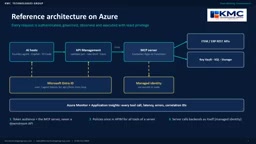
The reference architecture uses IT Service Management (ITSM) as a running example. The AI host connects via Azure API Management to an MCP server running on Container Apps or Functions, with Microsoft Entra ID providing user or agent identity. API Management validates tokens, enforces rate limits, and captures request traces. The server uses managed identity to access backend APIs and Azure resources, while Azure Monitor and Application Insights record latency, failures, and correlation identifiers.
The goal is end-to-end accountability and least privilege. Four deployment paths are available: hosting a custom SDK-based MCP server on Container Apps for maximum flexibility; using Azure Functions with the MCP extension to expose function-based tools; a self-hosted SDK approach; and using API Management to publish selected REST operations as MCP tools or govern existing MCP services. The choice should be based on code ownership, hosting requirements, authentication, and current service support status—not the shortest deployment command.
Managed Identity is a Microsoft Entra ID feature that automatically provides identity for Azure resources (such as Container Apps and Functions), eliminating the need to store credentials in code. When an MCP server accesses backend APIs or Azure resources, managed identity can obtain access tokens, enabling the principle of least privilege. It comes in two types—system-assigned and user-assigned—and supports fine-grained role assignments. Using managed identity eliminates the risk of key leakage and simplifies rotation management. In the reference architecture, the MCP server proves its identity to backends via managed identity without hardcoding connection strings or passwords.
Python Hands-On: Four Strongly Typed Tools
The demo server is defined in Python and exposes four tools around the ITSM scenario. The incident model describes structured output, the list tool uses a priority enum and bounded limits, and the detail tool uses an incident identifier pattern. Descriptions help the model select tools, while schemas let the server reject invalid parameters.
The key design decision is the separation of reads and writes. Listing incidents, getting details, and drafting escalation messages are all read-only steps; sending an escalation message, however, produces external effects—notifying real people—so it is marked as a write operation, and the invocation workflow must pause for human approval. This split lets teams safely test information-gathering capabilities first without granting automatic notification permissions.
The server also exposes a health endpoint, supports remote access via Streamable HTTP, is configured for stateless behavior, and restricts allowed hosts. The guide cautions: before reproducing the code, verify that SDK version and protocol behavior match your installed dependencies.
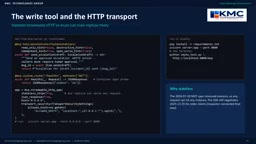
Before connecting any autonomous agent, use MCP Inspector to connect to the local endpoint and inspect the exact contract and responses. The screenshot shows a successful tool call and structured incident result—the server returns both human-readable content and JSON conforming to the declared output schema. The recorded example completed in 57 milliseconds, but actual performance depends on network and backend conditions. The guide recommends keeping result sets small and paginated, so the agent only handles the information needed for the next decision.
Guardrails Must Be Demonstrable, Not Just Documented
The demo sends a malformed incident identifier containing SQL-like text. Schema validation rejects it before the backend API is called, and the client receives an error. This confirms an easily overlooked distinction: input validation, authorization, approval, and backend validation are four different control mechanisms—all are indispensable.
Three Azure Deployment Paths
Path A packages the Python server as a container. The Dockerfile installs dependencies, copies code, runs as a non-root account, and starts on port 8000. An Azure CLI workflow handles building and deploying, configuring HTTPS ingress, setting the public hostname, and assigning managed identity. After deployment, test the unauthenticated response first, then an authenticated tool call.
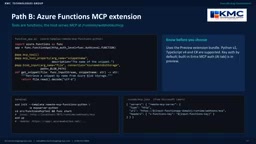
Path B uses the Azure Functions MCP extension, where a single Python function is decorated as an MCP tool with bindings that can retrieve data such as Azure Blob Storage. The MCP endpoint is hosted under the Functions runtime webhook path. The guide explicitly notes the need to assess the extension's current authentication and runtime support, and to be aware of preview-related limitations.
Path C places API Management as the MCP front door, selecting operations from existing REST APIs to publish as MCP tools, or placing governance policies in front of an MCP server. Example policies validate Entra tokens for the target audience. This path is especially suitable when business APIs already exist and you don't want to duplicate core logic.
Secure Connections: OAuth Discovery and Negative Testing
A working tool endpoint does not yet equal a secure enterprise integration. The design principles are straightforward: authenticate the caller, authorize the requested operation, and retain human involvement for consequential actions.
The MCP server acts as an OAuth protected resource, with Entra ID as the authorization server. A client accessing a protected endpoint without a token receives an authentication challenge and discovers the resource's authorization metadata; the user or agent obtains a token scoped to the MCP resource and retries. The server must validate issuer, audience, expiry, and appropriate scope or role. The guide emphasizes: a token scoped to a downstream API should not be automatically accepted as a token for accessing this MCP server.
CI tests should prove both successful access and expected denials—missing token, wrong audience, expired token, insufficient permissions. Negative testing is critical, because an endpoint that only passes the happy path may still be dangerously permissive.
When connecting to a Microsoft Foundry agent, the example registers the MCP server and allows only the four ITSM tools the scenario requires. When the agent requests to send an escalation, the workflow pauses for a human decision. The approval experience should show the intended recipients and message content, and approval must be enforced by the execution path—not merely suggested in a prompt.
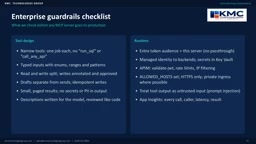
The pre-launch enterprise guardrail checklist includes: tools perform narrow tasks and accept bounded, typed inputs; reads and writes are separated; consequential actions require explicit approval; retries are safe where possible; identity checks, backend least privilege, secret protection, rate limiting, and audit logging are enforced; personal data in tool responses is minimized; and prompt-injection resistance and error handling are included in security review.
OAuth 2.0 Protected Resource Metadata is an extension specification of the OAuth framework (RFC 8414) that allows clients to automatically discover authorization server endpoint information. In MCP scenarios, when a client accesses a protected endpoint without a token, the server returns a 401 challenge and includes the resource metadata URL in the response header. From this, the client obtains the authorization server address, token endpoint, and supported grant types, then guides the user or agent through the authorization flow. This discovery mechanism reduces manual configuration but requires the server to correctly declare its audience and scopes. Security testing should verify that the metadata endpoint does not leak sensitive information and that the challenge response conforms to the specification.
Operations and Scaling: Quality Gates and a 90-Day Roadmap
The pipeline starts on commit: run unit and authentication tests, build the container image, deploy a new revision, and run live MCP smoke tests before switching traffic. Smoke tests should verify discovery capability and safe read-only responses, and confirm the expected authentication behavior. If any gate fails, do not promote the revision—use revision-based rollback and retain deployment logs.
Troubleshooting is diagnosed layer by layer: client transport and protocol negotiation, host or origin configuration, token issuer and audience, tool schema validation, API Management policies, downstream access. Reproduce failures with a minimal client, check correlated logs, and change only one variable at a time. Preview feature behavior and SDK version compatibility should be explicit verification items.
The 90-day roadmap has three phases: the first 30 days to select the workflow, inventory APIs and data, do threat modeling, and build read-only tools; days 31–60 to deploy to Azure, add Entra authentication and governance policies, connect agents, and establish CI gates; days 61–90 to carefully expand to approved write operations, improve observability, and refine documentation. The guide's advice: start with a single workflow and deliver it securely.
Smoke testing is a preliminary quick-verification test aimed at confirming that a system's basic functionality works after deployment, without deeply covering all edge cases. In MCP server deployment pipelines, smoke tests typically run before traffic switching, verifying tool discovery, read-only calls, and authentication behavior. Unlike unit or integration tests, they focus more on real-time health checks of the deployed environment. Smoke tests should be fast, stable, and repeatable, and failure should block revision promotion. Combined with revision-based rollback, smoke testing becomes a key quality gate in continuous delivery, ensuring that only versions with working basic functionality reach production.
One-line Summary
KMC publishes an implementation guide for building remote MCP servers on Azure, covering architecture, security, and operations.
Paragraph Summary
KMC Technologies Group has published a developer-oriented implementation guide that walks through building a remote MCP server on Microsoft Azure, enabling AI agents to access business systems in a controlled manner. The guide first clarifies the boundaries between MCP, REST APIs, and RAG: APIs carry business rules, RAG provides document context, and MCP provides a discoverable tool-invocation interface. The reference architecture uses ITSM as an example, integrating Entra ID, API Management, and managed identity to achieve end-to-end accountability and least privilege. The Python hands-on section presents four strongly typed tools, emphasizing read/write separation and human approval. The security section covers OAuth discovery and negative testing, while the operations section provides quality gates and a 90-day roadmap. The core recommendation is to start with read-only tools for a single workflow and gradually expand to controlled write operations.
Related articles

Grok Bot vs ChatGPT Agent: Which AI Agent Is More Powerful?
How does Grok Bot differ from ChatGPT Agent? This comparison examines how they work: Grok Bot has a cloud computer and runs persistently inside tools to execute multi-step tasks automatically; ChatGPT Agent operates web pages in a browser and is more mature at general tasks. Includes selection advice.

Walmart Agent Gateway: AI Shops for You Automatically—Why Is Amazon Going the Opposite Way?
Walmart's Agent Gateway lets ChatGPT, Gemini and other AI assistants access its product catalog to search, compare and add to cart, with spending limits and per-purchase approval. Amazon blocks external AI agents—two retail giants, opposite paths. Currently US-only, India may follow.

Walmart Opens Shopping to AI Agents: ChatGPT and Gemini Can Place Orders
Walmart launches Agent Profiles, allowing AI agents like ChatGPT, Gemini, and Meta Muse to shop for users with spending limits, per-transaction approval, and isolated orders—no Walmart Plus required. This article analyzes how it works and its industry impact, in stark contrast to Amazon's blocking of AI agents.