Building Full-Stack Apps with Lovable from Scratch: From First Prompt to Production

A complete guide to building production-ready full-stack apps with Lovable and Supabase, no coding required.
Using a "Feedback Hub" app as an example, this article walks through turning natural language into a production-ready React app with a full backend using Lovable. The central argument: connect your own Supabase account before starting — not Lovable's hosted cloud — to retain data portability. The guide covers prompt structure, Google OAuth, database schema generation, Row Level Security, real-time sync, file storage, AI edge functions, GitHub integration, multi-environment management, and Stripe payments. The entire flow can be deployed in under an hour with a custom domain and SEO-friendly output.
What Is Lovable: Building Web Apps with Natural Language
Lovable is an AI web app builder whose core capability lets you have a natural language conversation with an AI model, which then automatically generates a complete React-based web application — including HTML, JavaScript, CSS, and other frontend code. In other words, you don't need to know how to code. You don't even need to look at the code. Just describe what you want in a chat box, and the app gets built for you.
Lovable excels at highly visual pages, like landing pages and other low-data sites — which is also where most tutorials stop. But what truly brings an app to life is a fully functional backend. This article demonstrates how to connect Lovable to a complete backend, enabling user accounts, data persistence, file storage, AI features, and even payment processing.
For developers, Lovable is equally accommodating: you can push the entire project to GitHub and migrate it to a more specialized platform for deeper customization. A common workflow is to use Lovable to quickly scaffold the foundation, then switch platforms for fine-tuning. Lovable has also recently added support for server-side rendering (SSR), which means the generated apps will rank better in search engines than before.
On pricing: Lovable uses a credit-based system. The free starting credits can get you through some basic content, but they run out quickly. Building more complex projects requires upgrading to Pro, Business, or other plans to receive monthly credits, or purchasing additional credits directly.
The Critical First Step: Connecting Your Own Supabase Backend
It's important to understand the division of labor between frontend and backend. The frontend is the visual layer users see and interact with; the backend runs in the cloud and handles all the data — recording who liked what, populating feeds, handling login authentication, and so on. The backend is the core of the app, and it needs to be secure and robust. If it goes down, the entire app goes with it.
Lovable uses Supabase as its backend by default. But there's a critical decision here — one that cannot be changed after the fact: whether to use Lovable's hosted "Lovable Cloud," or connect your own Supabase account.
Lovable Cloud is essentially Supabase running in Lovable's cloud environment — you can't access it directly, can't migrate it, and can't reuse it for future projects. The safer approach is: before typing a single prompt, click the plus button to access database options, add your own Supabase organization, and authorize Lovable. This way, Lovable still has full control over the database, but you retain the ability to export it and reuse it elsewhere.
The concrete steps are: create a free Supabase account, create a new project under your organization, set a password, enable auto-RLS, select a nearby region, then select this database in Lovable. Once connected, you're ready to write your first prompt.
Writing Your First Prompt: Describing the App, Users, and Boundaries
For your first prompt, follow a clear structure: what the app is, who will use it, what you want Lovable to build, what you don't want it to build, and the goals and purpose of the build.
The example in the video is building "Feedback Hub" — a feedback board app for product teams: team admins create feedback boards for products, users visit those boards, post feedback, and upvote ideas they agree with. The prompt explicitly scopes things to "only build the UI structure for now," with no comments, payments, or AI features yet, and asks for a "clean, modern SaaS aesthetic."
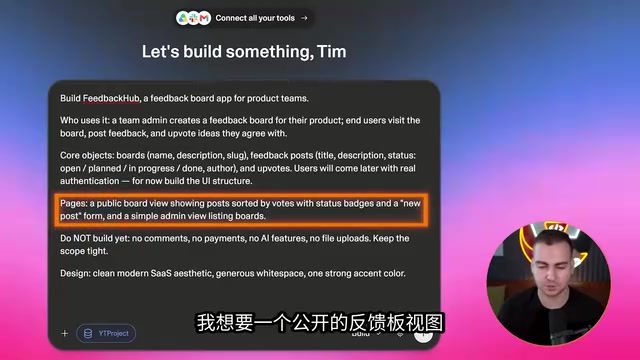
The output won't be 100% what you envisioned, but the framework gets built and you can iterate from there. Lovable's interface provides a preview window, file and code viewing, and the ability to roll back to previous versions. The history feature is particularly useful — when a prompt produces a terrible result, you can revert to a previous version with one click.
The visual widgets on the interface are also worth mentioning: you can draw circles directly on the page to annotate things, edit text, select a button or component, and then send your modification intent back to Lovable to adjust the code. For small changes, this WYSIWYG editing experience is quite efficient. Lovable also has built-in "skills" (reusable prompt templates) — for example, the /redesign skill to quickly redo a design style, or SEO and accessibility skills for specialized optimization.
Adding Authentication and Database Schema
An app with only a UI can't save data — submitted feedback disappears on refresh. The next step is to integrate authentication and design the database schema. For significant changes like these, it's recommended to first switch to "plan mode," let Lovable outline its implementation approach, review it, and then execute.
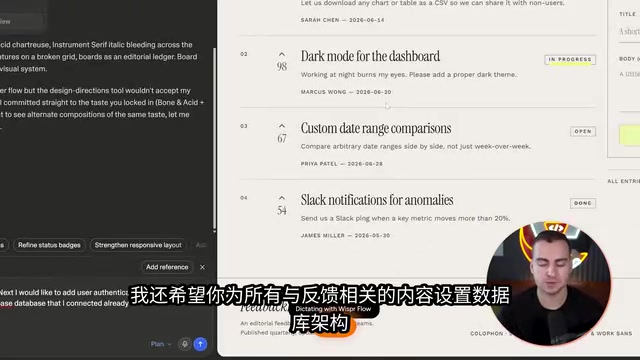
The example requests Google login via the connected Supabase instance, while simultaneously building the database schema for feedback-related data (tables for boards, likes, feedback content, etc.). Even if you don't know jargon like "database schema," describing things in reasonable natural language will get the model to understand; using more technical vocabulary (schema, tables, models) will guide the AI more precisely.
Setting up Google login requires creating an OAuth client ID in the Google Cloud Console, configuring authorized domains and callback URLs, then entering the client ID and secret into Supabase's authentication provider settings. If you get stuck, just ask Lovable to "walk me through this step by step" and it will provide detailed guidance. Once configured, Lovable automatically creates the complete table structure in Supabase — Boards, Posts, Profiles, User Roles, Votes, and more — which you can view directly in Supabase. This transparency and portability is exactly what comes from connecting your own backend.
Note that Google login within the preview window may fail due to popup mechanics — just pop the preview out into your main browser to log in normally. Admin permissions can also be set by telling Lovable your Google email address.
Data Security: Row Level Security (RLS)
Once an app has users and mutable data, security becomes a priority. Supabase's core mechanism is Row Level Security (RLS) — which is exactly why we enabled "auto-RLS" at the start.
In any data table, you can see the corresponding RLS policies, automatically created by Lovable and Supabase. For example, on the Profiles table, one policy allows "everyone to view profiles" (Select command), while another restricts "users to only update their own profile" (Update command, which verifies whether the currently logged-in user is the owner of that profile).
Even if you don't understand SQL, you don't need to worry too much about the details — but do understand that this is the mechanism protecting your data and controlling who can read, write, add, and delete. For more complex policies, you can have Lovable handle them.
RLS (Row Level Security) is a native PostgreSQL feature, and Supabase provides a visual management interface on top of it. The core idea is that security policies are attached directly to data tables, rather than relying on application-layer code to filter data. This means that even if the frontend code has a vulnerability, or someone calls the database API directly, RLS policies will still intercept unauthorized access at the database level.
Each RLS policy is essentially a SQL expression — for example, auth.uid() = user_id means "the currently logged-in user's ID must equal the owning user ID of this data row." Supabase automatically appends this expression to the WHERE clause on every query, ensuring users only see rows that belong to them. Newly created Supabase tables have RLS enabled by default but contain no policies, meaning all requests will be rejected. The "auto-RLS" option generates reasonable initial policies at table creation time, preventing data exposure due to missing policies during development.
Real-Time Data, File Storage, and Edge Functions
Supabase's built-in real-time functionality can sync updates across multiple pages — for example, upvoting on one page is immediately reflected on another. Enabling it is simple: just tell Lovable to "enable real-time for post votes," and it's implemented under the hood via WebSocket subscriptions. When testing, open the same page in two browser tabs — canceling a vote in one will instantly update the other.
File uploads can be set up just as easily: the example asks for "up to three files per feedback item, with per-file size limits, and to create a storage bucket in Supabase." Once configured, users can attach images when submitting feedback, the frontend can display previews directly, and files are stored in Supabase Storage.

The most powerful feature is Edge Functions — operations that run on the backend and are triggered by specific actions, suitable for tasks that require backend compute like AI summarization, calling LLMs, or generating images. The example builds a "board AI summary" feature: pressing a button generates a comprehensive summary of all board changes and highlights points worth attention, with support for automatic weekly scheduled runs.
Worth noting: Lovable injects a default API key connected to Google Gemini (using Lovable's AI credits), so you can use it out of the box without configuring external services like OpenAI. Edge function call logs and response content can all be viewed in Supabase.
Edge Functions run on distributed nodes close to users (Supabase is based on Deno Deploy) rather than on centralized servers. This architecture provides two key advantages: first, low latency, as functions execute in the data center nearest to the user; second, secure isolation, as sensitive operations (like calling third-party AI services with an API key) are completed on the backend, keeping keys out of the browser. For scenarios that require calling OpenAI, Gemini, or other LLM APIs, Edge Functions are the standard implementation path — the frontend only sends requests to the edge function, which holds the real key, completes the call, and returns results to the frontend. Edge Functions in Supabase also support scheduled triggers (Cron Jobs), which is the underlying mechanism for the "weekly automatic AI summary" feature described in this article.
Advanced Capabilities for Developers: GitHub, Environments, and Payments
For those building serious projects, a few advanced capabilities are worth adopting:
- Connect GitHub: Export your project code to your own repository. When you make changes elsewhere, Lovable can automatically sync them, enabling two-way collaboration.
- Knowledge Tags: Similar to an
agent.mdfile, these store project-specific guidelines, tech stack details, style themes, and more for the AI to reference at any time. - Multi-Environment Management: Create development, staging, and production environments via Supabase branches. Production holds real user data; staging is for testing before deployment; development is for free experimentation. When building a larger app, always separate at least development from production to avoid test data directly affecting real users.
- Payments: Tell Lovable to "set up Stripe," follow the prompts to create a Stripe account, add API keys and connect them, and payment functionality will be automatically integrated into the app.
Multi-environment management is a fundamental engineering practice. Supabase's "branching" feature allows you to create isolated database instances for the same project: the Production environment holds real user data and any changes should be thoroughly tested before being pushed; the Staging environment simulates the production environment for final acceptance testing and is typically integrated with CI/CD pipelines; the Development environment lets developers experiment freely with data that can be wiped and rebuilt at any time. Each environment has its own database connection string and API keys, and Lovable automatically switches configurations via the corresponding Supabase branch. For apps with paying users, separating production from development is nearly mandatory — running tests and serving real users on the same database means a single mistake can directly compromise paying customers' data integrity.
Security Scanning and One-Click Deployment
Before deploying, it's worth running Lovable's new built-in security scan, which lists issues such as password protection not being enabled or risks from security definer functions, with one-click fix attempts available. Deep scanning is a Pro feature.
Thanks to server-side rendering support, deployed apps perform better in search results, and SEO and AI search analytics (mostly Pro features) can also be reviewed.
Deployment is done via the "Publish" button: free accounts receive a Lovable-generated URL that is publicly accessible; Pro accounts can bind a custom domain you've purchased, and once connected, visitors have no way of knowing the app was built with Lovable.
The entire process — from start to deployment — can produce a production-ready app with a complete backend in under an hour. More importantly, because the backend is your own Supabase project, even if you decide to stop using Lovable later and migrate elsewhere, your data and project configuration remain fully intact. That's the long-term value of the "connect your own backend" decision made at the very beginning.
Related articles

How Big Can Stars Really Get? The Physical Limits of the Largest Stars
Red supergiants are the largest stars by volume, with radii up to 2,000 times the Sun, engulfing the inner solar system. But there is no precise upper limit on stellar size—models predict up to 15,000 solar radii. The most massive blue stars are far smaller than red supergiants—biggest and heaviest are two different things.

Apple HomeView Smart Display Full Feature Breakdown: Wall-Mount or Desktop, $299
Apple launches HomeView, a $299 smart display with wall-mount and desktop options, 12MP camera for facial recognition, smart home control, music playback, and recipe step-by-step cooking. Full breakdown of watch faces, apps, privacy, and cooking integration.

Where Did the Promised New Studio Go? Craft Computing Answers After Five Years
Craft Computing's host responds to viewer questions: the new studio promised five years ago was shelved as construction costs soared from $30,000 to $75,000, and was replaced by a 168-square-foot garage conversion.