Building World of Warcraft Addons with Codex: An AI-Powered Guide for Non-Coders

A non-coder built two working WoW addons using only natural language conversations with AI agent Codex.
This tutorial shows how AI agents have effectively eliminated the barrier to WoW addon development. A veteran player who had never written Lua used Codex to complete the full workflow — from environment setup and UI prototyping to functional implementation and auto-deployment — producing two working addons: a Diablo-style health orb display and a rage monitor. The entire process required just two real "prompts" for tool installation and project initialization; everything else was conversational. The same approach applies to macros, WeakAuras configs, and WCL combat log analysis.
In the age of AI agents, building a World of Warcraft addon no longer requires you to master a programming language. This tutorial comes from a Bilibili creator with over 20 years of WoW experience and 16 years in software development — who, interestingly, has never written a single line of Lua code or built an addon himself. He handed the entire process over to the AI agent Codex.
We'll walk through two real-world projects, covering the complete workflow from environment setup to in-game testing. The two addons are: a Diablo IV-style orb display showing health and resource (rage/mana/etc.) at both ends of the action bar with class-colored indicators, and a center-screen rage and health monitor.
Why the Barrier to Entry Has Basically Disappeared
WoW addons and macros are fundamentally written in Lua. In the past, that meant you had to learn a programming language and familiarize yourself with the game's sprawling official API. Now, the entire development process has essentially become "chatting with an AI" — describe what you want, and the agent handles the coding, debugging, and deployment.
The author noted that from project initialization to deploying both finished addons, the token usage didn't even reach one week's quota (based on a $20 ChatGPT subscription). In other words, installing the tools and building the addons isn't a particularly token-heavy task.
It's worth emphasizing that this method isn't limited to addons. Macro commands, WeakAuras (WA) configurations — Codex can handle those too. Even more advanced tasks like analyzing WCL combat logs, running SimulationCraft simulations, and identifying DPS improvements can all be delegated to an AI agent. The author also mentions that current plugin interfaces support the new World of Warcraft: Classic Unlimited version announced at BlizzCon.
Context: WeakAuras (WA) is one of WoW's most popular third-party addon frameworks, letting players create highly customized HUD elements — cooldown timers, buff/debuff trackers, resource bars — through a visual editor. It's built on Lua scripting under the hood. WCL (Warcraft Logs) is the leading raid combat log analysis platform; players record fight data and upload it to review each member's damage breakdown, ability usage, and downtime. SimulationCraft (SimC) models character output mathematically outside the game, helping players make optimal talent and gear choices. All three tools have historically had steep learning curves for non-technical players — AI agents dramatically lower that barrier.
Step 1: Environment Setup and Project Initialization
Throughout the tutorial, the author repeatedly emphasizes that the most important and critical step is the very first one: environment setup and project initialization. Once this is done, everything else is essentially natural-language conversation.
The process is straightforward: create a new folder on your local machine and open it with Codex. If your WoW client and Codex are on the same machine, even better — Codex can directly read your game version and related data.
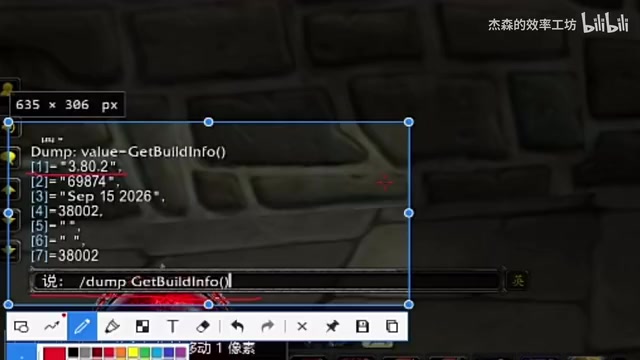
If, like the author, you game on Windows and work on a Mac, that's fine too. Just type /dump GetBuildInfo() in the game's chat box, press Enter, and save the output version string to share with Codex.
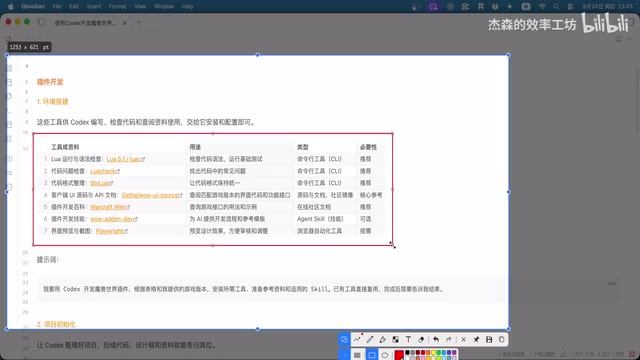
Next comes installing Lua-related tooling and preparing the official WoW API documentation. The author's advice: don't be intimidated by a list of unfamiliar tool names. He compiled everything into a reference table and sent it to Codex along with a prompt, letting it automatically install the required tools and resources based on the table and game version.
Once the tools are ready, send the initialization table to Codex and have it complete the project setup — including creating the agents.md project document, building the folder structure, and writing the addon deployment script. At this point, the author notes that everything up to here only required two real "prompts"; everything after is conversational.
Context:
agents.mdis a common project context file in AI agent workflows, used to describe the project's background, goals, technical constraints, and directory structure. Each time you start a new conversation, Codex reads this file first to "restore its memory," ensuring development continuity across sessions — this is the core mechanism that keeps multi-session development coherent./dump GetBuildInfo()is a built-in WoW debug command that outputs the current client's version number and patch string in the chat window. Since different game versions have different APIs, providing this information to Codex ensures the interfaces it calls match your actual client version, preventing errors from API version mismatches.
Step 2: Screenshots and UI Prototyping
Once setup is complete, take a screenshot of your in-game UI and save it to the project folder. Also provide Codex with the path to your WoW addons directory so it can deploy directly after development — no manual file copying needed. You can then log into the game and test immediately.
Since most addons have a graphical interface — health orbs, rage monitor progress bars, loot queries, ability trackers — the first step is designing a UI prototype. There are two approaches:
- Natural language description: For the two rage monitor progress bars, the author simply described them in text and had Codex render them.
- Reference image generation: For the Diablo-style health orbs, he first generated high-quality assets in the ChatGPT web interface using Diablo IV screenshots as reference, then handed the images to Codex to cut out the graphics and convert them to the
.tgaimage format required by addon systems.
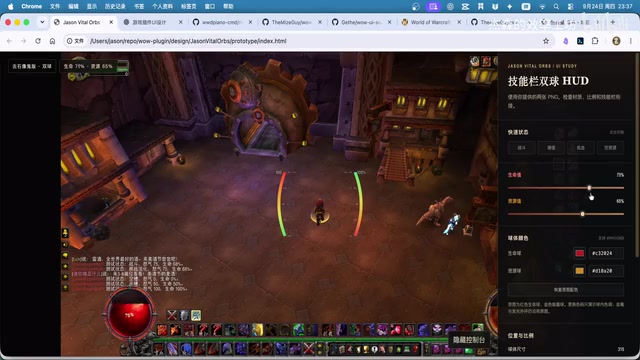
Codex generates an HTML page using your in-game screenshot as a background, overlaying the addon UI prototype on top of it, with a sidebar menu for adjusting size and spacing. These parameters can later become configurable options in the addon's settings panel. You can keep telling Codex what you don't like and have it revise until you're satisfied.
Context:
.tga(Truevision TGA) is one of the image formats natively supported by WoW's addon system. Compared to PNG or JPG, TGA has better compatibility in the game engine and supports full alpha transparency channels, making it ideal for UI assets with irregular edges (such as circular health orb icons). WoW's addon rendering system has strict format requirements and cannot use common web image formats directly, so the conversion step from reference image to usable asset is non-negotiable. Codex here handles what would normally require image editing software like Photoshop — removing backgrounds and converting formats — further eliminating the technical barrier to UI asset creation.
Step 3: Implementation, Deployment, and Testing
Once the UI prototype is finalized, have Codex implement the functional code and automatically deploy everything to the WoW addons folder — no manual file copying required.
Codex typically works in stages: implement the core functionality first, let you test it, receive your feedback, fix any issues, then implement the settings panel, and test again. The author's orb addon supports configuring orb size, spacing, and color, with class-specific resource colors (e.g., blue for mana).
For testing, the author headed to a city training dummy to enter combat, and both the rage monitor and health orb addons worked as expected. You can even ask Codex to give your addon a name and an icon — the author's two finished addons are called "Jason's Rage Monitor" and "Jason's Life Orbs."
Extension: Macros, WeakAuras, and Data Analysis Work the Same Way
This "table-based initialization + conversational development" approach transfers to many other scenarios. The author provides two additional tables for macro and WeakAuras project initialization — the logic is identical: build the project first, then have Codex write your macros or WA configurations.
For players overwhelmed by WCL's dense data dashboards, you can dump the data directly into the agent and have it diagnose issues in your rotation, offer improvement suggestions, and help you take on more challenging raid content.
The real takeaway from this case study may not be about the addons themselves, but rather the signal it sends: when you can fluently work with AI agents, many forms of hands-on creation that once required specialized expertise become dramatically more accessible. A veteran player who has never written a line of Lua built two functional, deployment-ready addons using two prompts and a handful of conversations.
Related articles

Workbuddy for Absolute Beginners: How a Desktop AI Agent Fits Into Real Workflows
A beginner's guide to the Workbuddy desktop AI agent: installation, claiming credits, file management, and building automated workflows—compared with CodeX for fit and cost, helping professionals shift from AI question-askers to AI managers.

OpenAI's New Agent Stack: Computer Use, Decisions API, and Ultra-Fast Workflows
OpenAI Dev Day unveiled a new agent stack: Computer Use outperforms humans, Decisions API delivers ultra-low-latency classification via Luna, Agents API opens the same Computer Use capabilities, and GPT-6.1 Sol costs only one-seventh of Astra. Core updates, benchmark data, and developer insights.

Liang Wenfeng Open-Sources DeepInfo Inference Framework, Takes On U.S. Ban
DeepSeek open-sources its DeepInfo inference framework after its models, featuring GPU/CPU cross-pipelining, small-model prediction with large-model verification, and full Huawei Ascend and NVIDIA chip support—facing the U.S. federal ban head-on. This article analyzes its significance for AI deployment and open-source strategy.