Workbuddy for Absolute Beginners: How a Desktop AI Agent Fits Into Real Workflows

Workbuddy desktop agent tutorial: shift from asking AI questions to managing AI work—ideal for zero-background professionals.
The article covers a Bilibili creator's Workbuddy tutorial, whose core point is that prompts are just suggestions while execution is what's valuable. Traditional chat-box AI only outputs answers, leaving organizing and archiving to humans; Workbuddy, as a desktop AI agent, takes natural-language commands to directly operate the local computer for office tasks, requiring a mindset shift from "asking AI questions" to "managing AI work." Compared with CodeX, Workbuddy needs zero configuration, integrates with Feishu, DingTalk, and other domestic ecosystems, and offers daily check-in credits—better for zero-background professionals to get workflows running first before advancing to CodeX. The tutorial also clears up three misconceptions (wrapping GPT, learning CodeX directly, and features being hard to learn) and showcases hands-on scenarios like batch file management, data processing, collaboration messaging, and AI comic-drama production.
Many people have learned a pile of AI prompts, yet their salary hasn't gone up. The reason is simple: prompts are just suggestions, and suggestions aren't worth much—execution is what's valuable. This point, raised by a Bilibili creator in a recent tutorial, hits the core pain point of how we use AI tools today: most of the time we're just "working for AI" rather than letting AI work for us.
From Chat Box to Desktop Agent: A Paradigm Shift in How We Use AI
Open a chat box, type a question, copy the answer—this is the fixed routine for the vast majority of people using AI.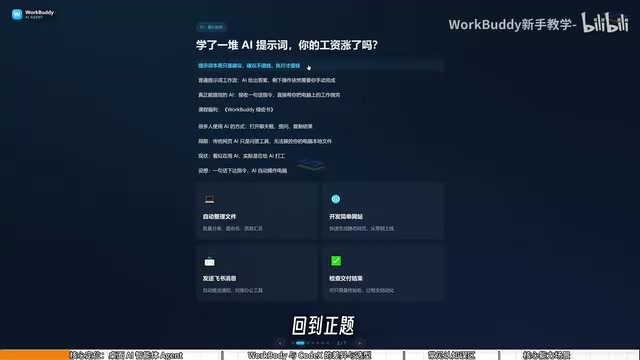
In the tutorial, the creator says plainly that this doesn't really count as using AI. Traditional web-based AI is essentially a Q&A tool with no permission to operate local files. It looks like we're using AI, but the subsequent organizing, pasting, and archiving still has to be done manually—the whole process remains cumbersome.
WorkbuddyAd positions itself as a desktop AI agent. Users issue tasks in natural language, and it automatically dispatches research, execution, and delivery. Its core value lies in directly operating the local computer to complete real office tasks. The mindset needs to shift from "asking AI questions" to "managing AI to get work done"—you're the manager, Workbuddy is the employee, and your computer is the company. The analogy is simple, but it accurately describes the essential difference between agent-type tools and traditional chatbots.
AI Agent refers to an AI system capable of perceiving its environment, planning autonomously, and executing multi-step tasks to achieve a goal. Unlike traditional chatbots that merely generate replies based on single-turn input, agents typically have tool-calling capabilities (such as reading and writing files, executing code, and accessing the network) and can adjust subsequent actions based on execution results. Its technical foundation is the large language model's function calling and task-planning capabilities. Desktop agents like Workbuddy package model capabilities into a local application, letting users direct AI to operate their computer without any programming. The key to understanding agents is distinguishing "generating suggestions" from "executing actions": the former outputs text, while the latter changes system state—and that's where the efficiency value comes from.
Workbuddy vs CodeX: Which Should You Learn First?
The tutorial uses an analogy to distinguish the two: CodeX is like a special forces soldier—highly capable but requiring an officer to draw up a detailed battle plan. You have to tell it specific file paths and execution parameters, which demands professional knowledge and accumulated experience. Workbuddy, by contrast, is like an obedient college student—it can't handle particularly complex tasks, but it's more than enough for everyday chores like organizing archives and sending files.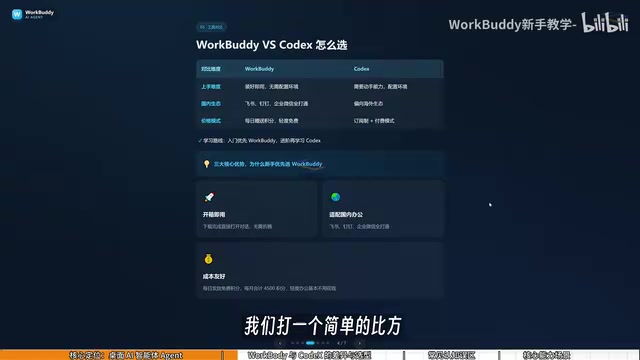
In terms of practical barriers, Workbuddy works right out of the box—no environment configuration, no command line required; CodeX demands stronger hands-on skills. On ecosystem fit, Workbuddy is deeply integrated with Feishu, DingTalk, WeCom, and Tencent Docs, while CodeX leans toward overseas ecosystems with limited support for domestic office software. The cost difference is even more obvious: Workbuddy gives out daily credits, which combined with promotional bonuses add up to at least three thousand credits a month; CodeX is subscription-based, requiring real money from the learning stage onward.
The learning path the creator suggests: ordinary professionals should prioritize Workbuddy to get work done, and only advance to CodeX when they feel it's no longer enough. For most users without a technical background, this advice is pragmatic—getting one complete task running is more valuable than getting stuck on environment setup for three days.
CodeX in this context refers to a class of developer-oriented AI coding assistants or code-execution agents (such as the OpenAI Codex series of models and their derivative tools), typically invoked via the command line or IDE plugins, requiring users to have some programming foundation and environment-configuration ability. These tools excel at structured, highly complex development tasks, but have a steep learning curve and weak integration support for domestic office software (such as Feishu and DingTalk). By contrast, Workbuddy is positioned as a low-barrier general-purpose office agent, emphasizing out-of-the-box usability and local ecosystem fit. The two are not substitutes but cover different user groups and task complexities; the choice should be based on your own technical background and actual workflow needs.
Claiming Credits and Common Misconceptions
After logging into Workbuddy, click the avatar in the lower-left corner to enter the "Body Gas Station" and check in to claim credits. Credits accumulate, and unused ones remain available the next day.
The tutorial also clears up three common misconceptions. First, "Workbuddy is just a desktop chat panel wrapping GPT"—inaccurate. It can read local files, call tools, and execute tasks automatically, far beyond the boundaries of conversation. Second, "CodeX is more powerful, so just learn CodeX directly"—the barriers differ, as do the target users; skipping Workbuddy doesn't necessarily save money or time. Third, "too many features make it hard to learn"—the interface is similar to common large language models, and the focus of learning isn't interface operation but a shift in questioning mindset: from asking questions to issuing commands.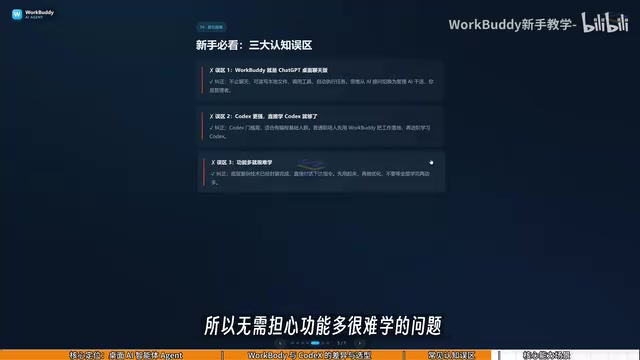
"Wrapping GPT" is a common criticism in the AI application space, referring to a product that merely does a simple wrapper around a general-purpose large model API without offering additional capabilities. Judging whether something is a wrapper comes down to three points: whether it has tool-calling and local system permissions, whether it has done task orchestration and workflow optimization for specific scenarios, and whether it has accumulated proprietary data or interaction design. Workbuddy can read local files, call office software interfaces, and automatically execute multi-step tasks—going beyond the scope of a pure conversational wrapper. Note, however, that the underlying reasoning of most desktop agents still relies on general-purpose large models; their differentiated value lies mainly in the execution layer and ecosystem integration, not the model itself.
What It Can Do: From File Management to Automated Tasks
The capabilities shown in the tutorial span several levels: at the file-management level, batch categorization, batch renaming, and multi-document information aggregation; at the data-processing level, weekly reports and Excel spreadsheet handling; at the collaboration level, sending Feishu and DingTalk messages and generating periodic work reports; at the development level, building simple websites.
One concrete scenario illustrates the point well: when recording a course, files are named 01, 02, 03, and midway through, one lesson's duration is too short and needs to be merged into the previous one. After merging, the sequence numbers become 1, 3, 4, and manually renaming each folder one by one is a real hassle—such tasks can simply be handed to Workbuddy for batch renaming.
The course will later feature AI comic-drama production as its core hands-on case, breaking down the complete workflow from script writing and art asset generation to video clip production, voice-consistency control, and post-production editing, then migrating the workflow to scenarios like copywriting, character costume changes, advertising production, and personal websites.
Who Should Learn This
The target audience for this tutorial is clear: professionals with zero background who want to use AI to boost efficiency or explore side-hustle opportunities. Its value isn't in listing features but in the idea of combining "individual features" into a "complete workflow"—exactly what most current AI introductory content lacks. If you already know how to ask questions in a chat box, the next thing you should learn is indeed how to let AI operate your computer for you.
Related articles

REA: Reverse Engineer Any App with AI, No Coding Required
REA is a viral open-source AI reverse-engineering tool that lets Claude, Codex, and other AI agents analyze any app and generate functional clones—no coding required. This article covers how it works, installation, a hands-on test, and legal risks.
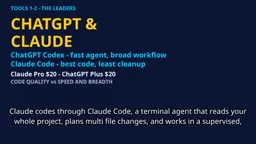
2026 AI Coding Tools Comparison: Claude, ChatGPT, Gemini — Which Is the Best?
A 2026 comparison of five mainstream AI coding tools — Claude Code, ChatGPT Codex, Gemini, DeepSeek, and GitHub Copilot — on real projects, pricing, and code quality, to help you decide where that $20/month should go.

ChatGPT Codex Can Clone Any Software? Testing the Risks and the Truth
YouTube shorts claim ChatGPT Codex or Claude Code can clone Adobe, Excel, and Figma for lifelong free use. We break down the feasibility, legal risks, and DM-funnel tactics—and explain what AI coding tools are truly good for.