Building Your Own WhatsApp AI Agent with the API: A Practical MCP Guide

Build a custom WhatsApp AI agent with Wassenger's API, MCP server, and minimal code.
The final lesson of Wassenger's AI course focuses on building a custom WhatsApp agent for when answers only exist inside your own systems. It breaks the architecture into three blocks — sending messages via POST, receiving them via webhooks, and writing decision logic (especially when not to reply) — then shows how an MCP server gives you 20+ ready-made WhatsApp tools compatible with both Anthropic and OpenAI APIs. Security best practices and three clear completion criteria round out the guide.
WhatsApp isn't just a messaging app — it can become an AI system that automatically replies, routes conversations, and even handles bookings on your behalf. The final installment of Wassenger's AI course series tackles one central question: when the answers only live inside your own systems, how do you use the API to build an intelligent agent that's truly yours?
The first eleven lessons barely touched any code, proving that "most use cases don't require you to touch the API at all." This lesson explores the other half — when replies depend on information only your systems know: your inventory, your appointments, your rules. This article breaks down the three foundational building blocks and two integration approaches behind this architecture.
Why Write Code at All
Wassenger's official developer page is upfront about it: "You don't need to touch the API at all." Most of the course backs that up. So when do you actually need to get your hands dirty? The answer is the flip side — when responses depend on data that's unique to your business systems.
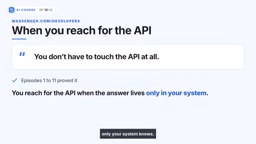
The help center is clear: on any platform plan, you can use the API plus webhooks to build your own chatbot. Wassenger even provides a public Node.js tutorial that wires up the entire loop — including webhooks — for you. In other words, you're not building from scratch; you're customizing on top of a mature foundation.
Three Building Blocks: Send, Receive, Decide
The logic behind a self-built agent breaks down into three clear parts.
Sending Messages
Send a POST request to api.wassenger.com/v1/messages. Your API key goes in a request header named token — no prefix needed. The request body only requires two fields at minimum: phone and message. A successful request returns a 201, and the message enters the send queue. Add a deliverAt field to schedule the message for a later time instead of sending it immediately.
Receiving Messages
The receiving side works through registered webhooks. You'll need four things: a name, your phone number, your URL, and the events you want to listen for. The most important event here is the new incoming message.

Return a 200 on receipt and you're done. If that fails, the system retries; after 20 consecutive failures, the webhook automatically shuts down and sends you an email alert. This fault-tolerance mechanism ensures the system doesn't fail silently when something goes wrong.
Webhooks are a "reverse API" mechanism: traditional APIs have you actively pulling data from a server, while webhooks have the server push data to your URL the moment an event occurs. For chat scenarios, this means you don't need to poll every few seconds asking "any new messages?" — you get notified the instant a user sends something. Your server needs to expose a publicly accessible HTTPS endpoint and return HTTP 200 to acknowledge receipt. If your endpoint is running in a local development environment, you'll typically need a tool like ngrok to expose it to the public internet. Wassenger's 20-retry mechanism mirrors common industry practice — platforms like Stripe and GitHub use similar exponential backoff retry strategies to prevent events from being permanently lost due to network hiccups.
Decision Logic
Message comes in, your logic runs, response goes out. Interestingly, a large portion of this logic is actually about when not to reply. The official tutorial demonstrates a few principles of restraint: skip group chats, skip conversations that have been taken over by a human agent, skip contacts with tags you've blacklisted. This restraint is precisely the part nobody else can write for you — it depends entirely on your business boundaries.
Using MCP to Cut Down on Code
You don't have to write a separate function for every WhatsApp action. Simply point your model at the MCP server introduced in Lesson 10, and it gains immediate access to 20+ ready-made WhatsApp tools.
The API key is the same one you already have, but the header is different — here you use Authorization: Bearer. Keep in mind that MCP is still in beta, so it's best to use it for prototyping before committing it to mission-critical workflows.

Integration with both major APIs is straightforward:
- Anthropic API: Declare the server under
mcp_servers, fill in your API key and authorization token, enable tools with an MCP toolset, and add the beta flag. Claude will automatically execute tool calls and return the results to you. - OpenAI Responses API: Just add one item to the
toolsarray with type set tomcp, plus a label, server URL, and your key. Four lines and you're done.
One server, one set of tools — works as a drop-in with both frameworks.
MCP (Model Context Protocol) is a standard protocol Anthropic proposed and open-sourced in late 2024, designed to solve the fragmentation problem in integrating AI models with external tools and data sources. Before MCP, connecting a new tool meant writing separate adapter code for each model. MCP standardizes this into a server-client architecture: a tool provider (like Wassenger) publishes a single MCP server, and any model client that supports the protocol can automatically discover and call all its tools — no extra adapters needed. This is why both Anthropic's Claude and OpenAI's Responses API can use the same Wassenger MCP server: both implement the client side of the protocol. The beta status means the spec and interfaces may still be evolving, so watch for version change announcements before deploying to production.
Minimum Viable Build and Security Practices
Start smaller than you think you need to. One webhook, one event, one reply determined by your code — and it must run server-side. The documentation is explicit about this. Start by grabbing your key from the API keys page and successfully sending a message from your own machine before writing anything else.
From there, a few security housekeeping rules worth following strictly:
- Store keys in environment variables — never in your code repository
- Use the
tokenheader for the API,Authorization: Bearerfor MCP - Keys never belong in a URL

If anything ever feels off, delete the key immediately — access is revoked that very second.
There are three hard criteria for knowing you're done: a message sent from your code that successfully delivered; a webhook that returned 200; and your key stored in a variable, not in any file you've ever pushed. All three must be true before you're finished.
Wrapping Up
This is the end of the full course arc: from a single number and a single inbox, to a copilot that answers, routes, sells, and recovers abandoned carts — to letting Claude read your chat history — and finally to an agent that's genuinely yours. For small teams doing sales and customer support on WhatsApp, this journey from "no-code" to "fully custom" offers a clear framework for leveling up.
Related articles

FastAPI: A High-Performance Python Framework and a Production-Ready API Development Powerhouse
FastAPI is a high-performance web framework based on Python type hints, supporting async and automatic OpenAPI docs. With over 100k GitHub stars, this article analyzes its core strengths, production readiness, and selection advice.

Tesla Optimus Begins Mass Production: Can the Goal of 20,000 Units Per Week Be Achieved?
Tesla Optimus officially begins mass production as Musk sets a target of 20,000 units per week. This article analyzes the supply chain challenges behind mass production, the real gap in capacity ramp-up, and the competitive landscape for humanoid robots.

PCL: A Minecraft Launcher with 8.5k Stars — Why Was It Written in VB.NET?
An in-depth analysis of PCL, the GitHub Minecraft launcher with 8,500+ stars: why it chose VB.NET, its features and China network advantages, and the limits of Windows-only.