Burning 500 Trae AI Credits in a Day? A Real-World Guide to Cutting Token Costs

Why one dev burned 500 Trae AI credits in a day — and how to avoid the same mistake.
A Bilibili creator burned over 500 credits completing a single packaging task in Trae Code — equal to five days of free check-ins. The culprits: a massive accumulated context, full build log submissions, and verbose error output. The AI itself offered four tips to cut costs: avoid long single sessions, don't submit entire log files, trim error messages, and atomize tasks. Manually selecting a lower-cost model instead of using auto mode can also reduce spending by more than 3x.
AI-powered coding tools are becoming increasingly mainstream — but many users only discover one unavoidable problem after they start: credit (essentially Token) consumption far exceeds expectations. A Bilibili content creator shared their real bill from completing a single project in Trae Code: over 500 credits burned in a single day, equivalent to five days' worth of free daily check-in rewards. This article breaks down their spending in detail and distills several practical tips for reducing credit consumption.
The Real Bill: 500 Credits Gone in One Day
The creator's goal was clear: clean up, package, and publish their subtitle editing tool so more people could use it. It sounds like a routine engineering task — but broken down step by step, the credit cost at each stage tells an interesting story.
Reorganizing the directory structure, removing redundant files, and adding version information — this relatively "heavy" task cost around 161.79 credits. The creator considered this reasonable, given the large number of files involved. What actually surprised them was a much smaller operation: simply deleting a few lines about tech stack and model sources from a document ended up costing 24.56 credits. By comparison, they recalled similar small tasks costing under 10 credits in the past.
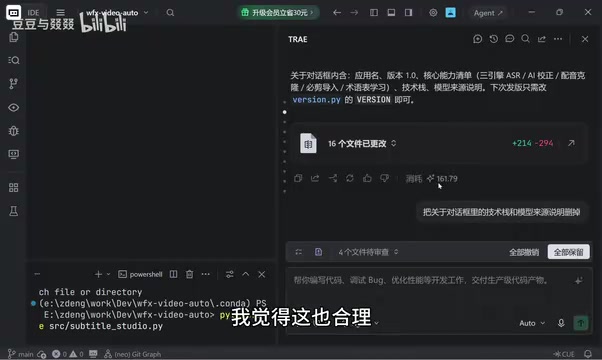
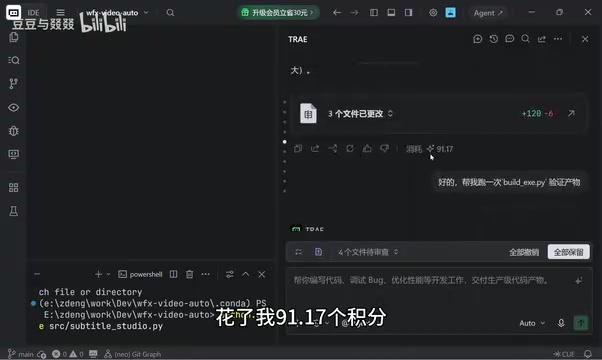
Generating a release notes document cost 10.49 credits, and packaging everything into an exe cost 91.17 credits — both felt acceptable, since generating docs and bundling files involve touching a lot of content.
The Hidden Credit Sinkholes: Verification, Logs, and Error Messages
What truly drained the credits dry were the seemingly minor steps: verification and debugging.
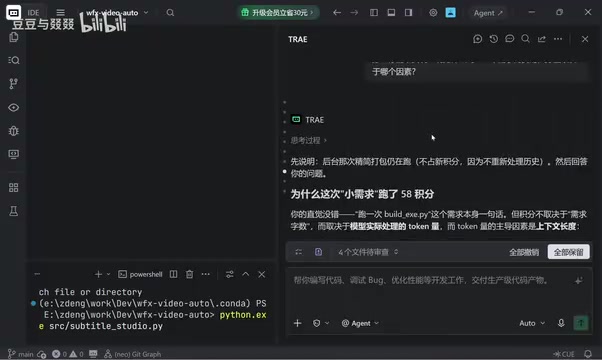
The creator ran a build to verify the exe output, expecting minimal cost since it was just a local execution — but it cost nearly 30 credits. When the build threw errors and they asked the AI to read the log and diagnose the issue, that cost another 39.59 credits. Then, after discovering the packaged exe was nearly 1GB, they asked the AI to reduce the file size — a step that consumed 58 credits on its own.
At this point, they couldn't stay quiet and directly asked the AI why a "simple task" was burning so many credits. The AI's explanation is well worth quoting: credit consumption depends on Token volume, and their session was a "single, very long continuous conversation" — context was piling up with every exchange. The full text of the build log and tsc compiler output contained enormous amounts of text. Worst of all were the error logs — XML files and stack traces running thousands of lines can instantly spike Token usage.
Token is the basic unit of measurement that large language models use to process text. Rather than handling complete words or characters directly, models split text into smaller segments — in English, one word is roughly 1–2 tokens; in Chinese, each character is typically 1–2 tokens. Every request to the model incurs two types of charges: input tokens (everything you send to the model, including the full conversation history) and output tokens (what the model returns). In continuous conversation mode, the system packages the entire prior conversation and sends it to the model each time so it can "remember" what came before — meaning input token volume compounds with every exchange. A build log or XML error file thousands of lines long could easily contain tens of thousands of tokens in a single submission, which is the root cause of why a "small task" can burn through a large number of credits.
Four Token-Saving Tips from the AI Itself
The most valuable part of this exchange was the AI's own summary of cost-saving strategies. These apply to anyone using a Token-based billing model with any coding assistant:
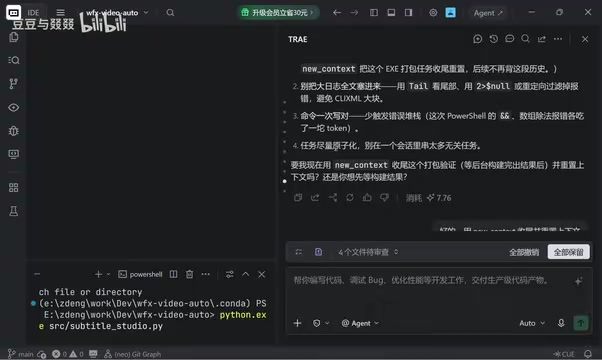
- Avoid overly long single conversations: Long conversations repeatedly carry the full conversation history into every request — you're paying for past content on every turn.
- Don't feed the AI entire large log files: Build logs and runtime logs can run tens of thousands of lines. Filter them before passing them to the model.
- Trim error logs down: Error blocks typically contain a lot of redundant text. Submitting them in full wastes tokens — keep only the key error information.
- Break tasks into atomic units: Don't chain multiple unrelated tasks in a single session. Unrelated earlier content continuously occupies context.
The AI also suggested using new context (create a new context / reset the session) to stop old context from accumulating — for extended collaborative sessions, starting fresh is significantly cheaper than continuing the same conversation indefinitely.
Model Selection: The Cheapest vs. Most Expensive Differ by 3x
Another easy-to-overlook cost lever is model selection. The creator noticed that the tool defaults to auto mode, which selects a model automatically — but its selection logic is opaque. Looking at the manually selectable model list, the cheapest option costs around 0.06 per unit while the most expensive costs around 0.20, a difference of more than three times.
Their conclusion: for routine tasks that aren't particularly complex, there's no reason to let the system route you to an expensive model. Manually selecting the lowest-cost tier is usually sufficient. After all, every model on the platform has been tested and comes with a baseline level of capability. This is directly actionable advice for any budget-conscious user — turn off auto, and manually pick a model that matches the complexity of your task.
AI coding platforms typically integrate multiple language models of varying sizes, priced according to capability tier. Flagship models (such as GPT-4-class or Claude Opus-class) have more parameters, stronger reasoning, and a higher per-unit cost. Lightweight models (such as GPT-3.5-class or mini/haiku variants) perform comparably on well-structured, logically straightforward tasks at a fraction of the price. "Auto" mode usually lets the platform dynamically assign a model based on perceived task complexity or traffic load — meaning users have no visibility into which model is actually being called, and risk being routed to a high-cost option. For clearly defined, routine tasks like code formatting, documentation generation, or file renaming, manually specifying a lower-cost model is the most direct way to keep costs under control.
Takeaways for AI Coding Tool Users
This firsthand experience highlights a common pain point across AI coding tools today: billing is tightly tied to Tokens, but users lack any intuitive sense of how Tokens are being consumed. Deleting a few lines costing 24 credits, compressing a file costing 58 credits — these outcomes are completely unpredictable by conventional reasoning, because what actually drives cost isn't the "size" of the task, but the length of the context and the volume of text being processed.
For everyday developers, rather than lamenting the credit bill after the fact, it's better to build cost-awareness into your workflow from the start: keep conversations short, atomize your tasks, trim your logs, and pick your models manually. These habits don't just save money — they often lead to more focused and accurate AI output, since an excessively long context dilutes the model's attention to the task at hand.
As more people integrate AI coding into their daily workflows, finding the right balance between capability and cost will become a challenge every user has to work through.
Related articles

How Big Can Stars Really Get? The Physical Limits of the Largest Stars
Red supergiants are the largest stars by volume, with radii up to 2,000 times the Sun, engulfing the inner solar system. But there is no precise upper limit on stellar size—models predict up to 15,000 solar radii. The most massive blue stars are far smaller than red supergiants—biggest and heaviest are two different things.

Apple HomeView Smart Display Full Feature Breakdown: Wall-Mount or Desktop, $299
Apple launches HomeView, a $299 smart display with wall-mount and desktop options, 12MP camera for facial recognition, smart home control, music playback, and recipe step-by-step cooking. Full breakdown of watch faces, apps, privacy, and cooking integration.

Where Did the Promised New Studio Go? Craft Computing Answers After Five Years
Craft Computing's host responds to viewer questions: the new studio promised five years ago was shelved as construction costs soared from $30,000 to $75,000, and was replaced by a 168-square-foot garage conversion.