Burnstate: The AI Coding Quota Manager in Your Menu Bar

Burnstate uses a Mac menu bar app to aggregate usage quotas from multiple AI coding services and predict depletion time.
Burnstate is a native Mac menu bar app for developers using multiple AI coding services. It aggregates quota status from Claude Code, Codex, Cursor, and Vercel AI Gateway, showing remaining quota and elapsed window proportion to predict when you'll run out, upgrading "how much is left" to "how long can I last." It also supports in-card Claude Code permission approvals, session-level token and cost tracking, off-screen-only break reminders, and shareable yearly usage links. It's local-first with no account or analytics, currently Mac-only, with limited community traction.
AI coding tools are becoming part of developers' daily workflow, but the usage limits of services like Claude Code, Codex, and Cursor hang overhead like a sword of Damocles—you never know when you'll suddenly hit the cap. Burnstate, ranked #16 on Product Hunt, aims to solve this problem with a tiny Mac menu bar app.
What It Is: A Persistent AI Usage Dashboard in Your Menu Bar
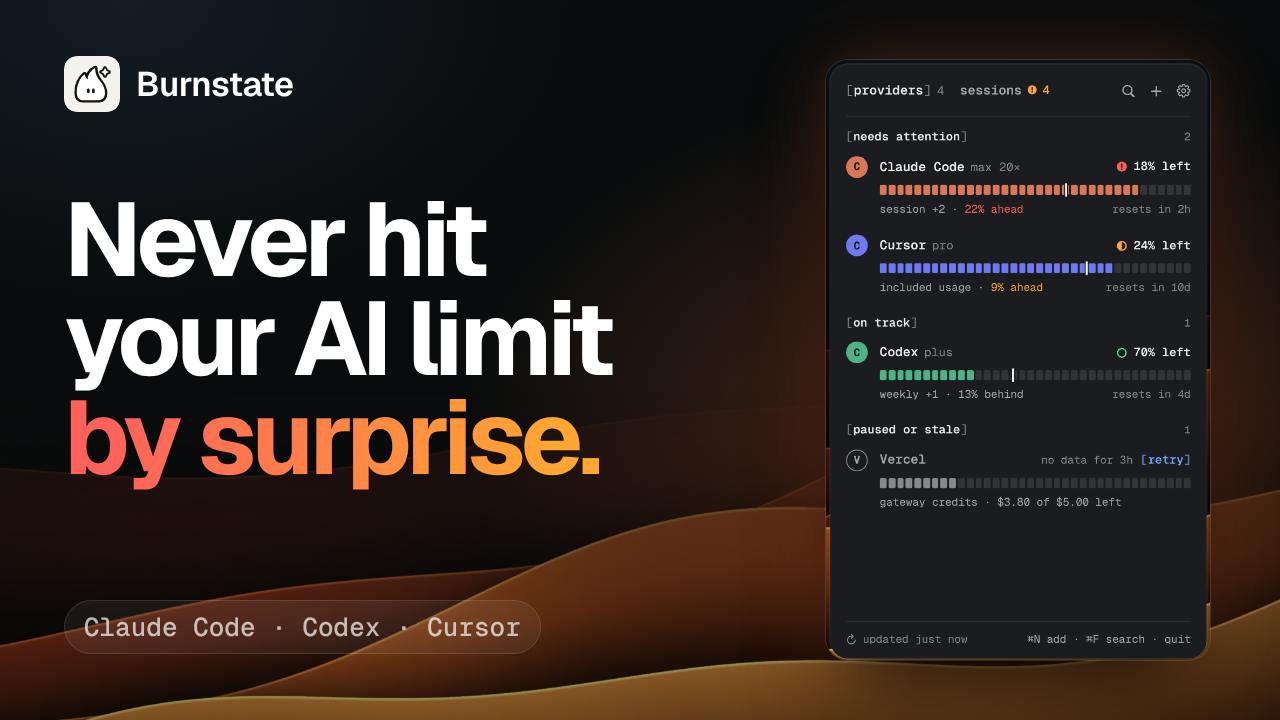
Burnstate is a native Mac menu bar app with a very clear positioning: it serves people who write code with AI. It aggregates the quota status of Claude Code, Codex, Cursor, and Vercel AI Gateway, marks how much of each usage window has already elapsed, and predicts when you'll run out based on your current consumption rate.
The clever part of this design is the "pace" dimension. Most quota tools only tell you how much is left, but what really causes anxiety is "how long can I last at this rate." Burnstate combines time and usage so developers can judge in advance whether they need to slow down or switch tools.
Vercel AI Gateway is a unified AI model access layer launched by Vercel. Developers can call models from OpenAI, Anthropic, Google, and others through a single API key, with usage metering, rate limiting, and cost aggregation handled at the gateway level. Unlike end-user-facing applications such as Claude Code and Cursor, AI Gateway quotas are API quotas tied to developer accounts. Burnstate including it in its aggregated view means it serves not only individual subscribers but also engineering teams that use models indirectly through the gateway—such users often have quotas scattered across multiple vendor bills, making them even harder to perceive intuitively.
Core Features Breakdown: More Than Just Quota Display
Time Scale of Usage Windows
Burnstate doesn't just show remaining quota; it also marks the proportion of each quota window that has already elapsed. This two-dimensional presentation makes the relationship between "time and usage" immediately clear, rather than leaving developers staring at an isolated percentage number.
Services like Claude Code and Codex generally use rolling usage windows (such as 5-hour windows or weekly windows) rather than simple monthly quotas: quota resets at the end of the window, and consuming too quickly within the window causes you to hit the cap early. Therefore, "remaining percentage" alone carries limited information—the same 30% remaining is quite comfortable if 90% of the window has elapsed, but will run out soon if only 10% has passed. Juxtaposing the elapsed time proportion with remaining quota essentially lets users calculate "whether my consumption rate is ahead of or behind the time progress," which is precisely the data foundation for the pace prediction feature.
Respond Directly to Claude Code Prompts from the Card
The app supports answering Claude Code permission requests and questions directly within the menu bar card. This eliminates the need to switch to the terminal or IDE, reducing context-switching costs for workflows that frequently trigger permission confirmations.
Before performing operations involving file writes or command execution, Claude Code issues permission prompts to the user, which by default require the user to approve each one in the terminal. These interactions are frequent and disruptive—a typical source of context switching in agentic coding tools. By monitoring local session state, Burnstate surfaces the same request in the menu bar card and allows direct responses, effectively moving the approval entry point from the terminal to an always-visible location. Note that such features depend on access to local processes or configuration files, and their reliability may change with Claude Code version updates.
Session-Level Token and Cost Tracking
Burnstate can see the token consumption and cost of each session. For teams or individuals who need to control AI coding expenses, this granularity is more useful as a reference than monthly bills.
Break Reminders That Only Count Off-Screen Time
The break feature only accumulates time when you're actually away from the computer, rather than simply running a timer. This detail reflects the product's understanding of the "Health" category—it aims to address fatigue from the high-intensity pace of AI coding, not to mechanically pop up reminders.
Share a Year of Usage as a Link
Users can generate a shareable link from a year's worth of usage data. This feature is suitable for publicly sharing your AI coding habits and could become a new kind of "year in review"-style social content in developer communities.
Privacy and Positioning: No Account, No Analytics
Burnstate explicitly states that it requires no account and does no data analytics. At a time when AI tools commonly require login and cloud sync, this local-first approach appeals to privacy-conscious developers. Combined with its "Health" category tag, the product seems to signal that AI coding efficiency tools can also care about people's well-being.
Who Needs It
Developers who use multiple AI coding services simultaneously are Burnstate's core audience. When you switch between Claude Code, Codex, and Cursor, scattered quota information creates cognitive load. An aggregated menu bar view can reduce that burden. Additionally, individual developers and teams sensitive to AI coding costs will also value session-level cost tracking.
However, Burnstate is currently a Mac-exclusive native app, so Windows and Linux users can't use it for now. It's also a relatively young product, with 68 votes and 7 comments on Product Hunt—community discussion is still limited.
Summary
Burnstate targets a real pain point: AI coding tool quota management currently relies mostly on users estimating on their own or frequently checking each platform's dashboard. Making it a persistent menu bar app with pace prediction and break reminders is a reasonable productization direction. Whether it can become a standard part of AI coding workflows will depend on future support for more services and its cross-platform strategy.
One-line Summary
Burnstate uses a Mac menu bar app to aggregate usage quotas from multiple AI coding services and predict when you'll run out.
Paragraph Summary
Burnstate is a native Mac menu bar app for developers who use multiple AI coding services. It aggregates quota status from Claude Code, Codex, Cursor, and Vercel AI Gateway—showing not only remaining quota but also the proportion of each usage window that has elapsed, and predicting when you'll run out at your current rate, upgrading "how much is left" to "how long can I last." It also supports responding directly to Claude Code permission requests within the card, tracking session-level tokens and costs, providing break reminders that only count off-screen time, and generating a shareable link for a year's usage. The product sticks to a local-first, no-account, no-analytics approach, currently supports only Mac, and has limited community buzz so far.
Related articles

RePlan-VLA: Progress-Aware Replanning Breakthrough for Long-Horizon Robotic Manipulation
The RePlan-VLA framework converts VLA models' short-horizon capabilities into reliable long-horizon execution through progress-aware adaptive replanning, improving success rates by 21.9% and 10.4% on RoboCasa365 and CALVIN, and validating real-world deployment on a Franka Research 3 robot.

Geometric Bridge Flow Matching: A New Breakthrough in Blind Rigid Motion Correction
Geometric bridge flow matching enables blind rigid motion correction in head CBCT, achieving 37.1 dB PSNR and 0.27 mm RPE on simulated data in ~9.1 minutes, outperforming existing methods.

Google Releases Gemini 4 Hydrogen: 2.5x Faster Without Sacrificing Intelligence
Google releases the lightweight Gemini 4 Hydrogen: 2.5x faster task completion, AA Intelligence Index of 54 beating its flagship sibling, 7.3s single-step on Agent Arena faster than Claude and GPT rivals, four thinking levels with pay-as-you-need pricing, now available across AI Studio and more.