ByteDance Open-Sources Bernini Video Editing: Local Deployment Guide for Character Replacement

ByteDance's open-source Bernini model enables local character replacement and video editing via ComfyUI.
Bernini is ByteDance's open-source video editing model built on Wan 2.2's DiT architecture. It supports character replacement, outfit swapping, video blending, and more — all running locally via ComfyUI at no cost. This guide covers model installation, workflow configuration, task modes, and prompt writing tips for best results.
ByteDance's Latest Open-Source Release: The Bernini Video Editing Model
Character replacement, outfit swapping, scene element editing, video blending — these capabilities once required professional software or commercial APIs. Now they can be run locally, for free, using a single open-source model. Meet Bernini, a model trained by ByteDance on top of Wan 2.2 (1R2).
About Wan 2.2 and the DiT Architecture: Wan 2.2 is ByteDance's foundational video generation model, built on the Diffusion Transformer (DiT) architecture. DiT was introduced in 2022 by Meta AI researchers William Peebles and Xie Saining, with the core idea of replacing the traditional U-Net backbone with a Transformer — video frames are split into fixed-size patches, serialized, and fed into the model, where self-attention captures long-range dependencies across frames. This matters enormously for video generation: maintaining consistent character appearance and continuous lighting across motion requires the model to "remember" surrounding frame context, something U-Net's convolutional structure handles poorly due to limited global modeling capacity and inefficiency with variable-length sequences. Since its introduction, DiT has become the dominant architecture for video generation — OpenAI's Sora and Stability AI's Stable Video Diffusion both draw from it. The Wan series achieves a balance between generation quality and inference speed by separating weights for high-denoising and low-denoising stages, a feature Bernini inherits and extends.
Unlike AnimateBernini, another Wan 2.2-based model, Bernini does not rely on pose-driving, which results in significantly improved character consistency. More importantly, Bernini is a multimodal model — it handles not just video generation but also video editing and image generation, covering a broad range of use cases.
Traditional video editing tools (such as Adobe Premiere plugins or dedicated face-swap APIs) operate as single-function pipelines: face detection → feature extraction → compositing render. Each step is independent, passing only pixels or geometric coordinates between modules, making it difficult to handle complex scenarios requiring high-level semantic understanding — things like lighting changes, occlusion, or style transfer. The multimodal generative editing paradigm that Bernini represents works entirely differently. During pre-training, the model aligns image, video, and text representations into a shared latent space. "Editing" is essentially constrained sampling within a conditional diffusion framework: the Source Video provides motion trajectory and scene structure; the Reference provides appearance constraints via reference image conditioning; the prompt specifies the blending strategy via text conditioning. All three condition types are injected simultaneously into the diffusion process via cross-attention — cross-attention allows each spatial position in the video latent to "query" text and reference image feature vectors, dynamically focusing on the most semantically relevant conditioning information during generation. This enables the model to satisfy multiple constraints in a single forward pass, which is why end-to-end approaches fundamentally outperform modular pipelines for complex editing tasks. That said, this design does place greater demands on VRAM.
Thanks to its strong video handling capabilities, Bernini has been dubbed "the open-source C Dance" in the community — a nod to its competitive standing in open-source video editing.
Bernini's Core Capabilities
Bernini supports a wide range of use cases covering the most in-demand video generation and editing workflows:
Diverse Editing Modes
- Character replacement: Supports single, dual, and multi-character replacement, including precise targeting of one specific individual in a multi-person scene.
- Outfit replacement: Modify a character's clothing independently while keeping everything else unchanged.
- Anime character replacement: Swap between real-world and animated characters in either direction.
- Video blending (iv2v): Embed one video's content into another.
- Multi-reference image input: The official workflow supports two reference images; with the plugin, up to 10 reference images and reference videos are supported.
What's particularly impressive is how precisely Bernini respects your editing intent — it changes exactly what you specify and leaves everything else untouched. In character replacement tests, for instance, if the original character is barefoot, the model preserves that detail. Character consistency remains stable throughout.
Local Deployment: Environment and Resource Preparation
Bernini runs on ComfyUI. The deployment process is straightforward, though you'll need to prepare the models, plugins, and supporting assets in advance.
ComfyUI is a Stable Diffusion frontend built around a node graph paradigm, drawing inspiration from Blender's Geometry Nodes and the compositing workflows of professional VFX tools like Nuke. Users visually connect components — model loaders, samplers, VAE decoders — into a complete inference pipeline. Each node encapsulates an atomic operation, and the connections between nodes represent tensor data flow rather than fixed UI elements. This design allows advanced users to compare different sampling parameters in parallel on the same canvas, or fork intermediate results into separate post-processing branches for fine-grained inference control. The node graph paradigm is not a novelty invented for AI — it has been validated over decades in professional VFX tools like Houdini and Nuke for managing complex data flows. ComfyUI's adoption of this paradigm dramatically lowered the barrier for researchers to explore and reproduce paper methods. custom_nodes is ComfyUI's official plugin specification: place a Python package containing __init__.py in that directory, and ComfyUI will automatically scan and register new node types on startup. The Bernini Studio plugin leverages this mechanism to wrap complex task mode prefix strings into dropdown menus while maintaining full interoperability with native nodes, making the tool far more accessible to general users.
Two Workflow Options Compared
- Official native workflow: No plugins required — select your model, enter your prompt, and run. The downside is that only two reference images are supported.
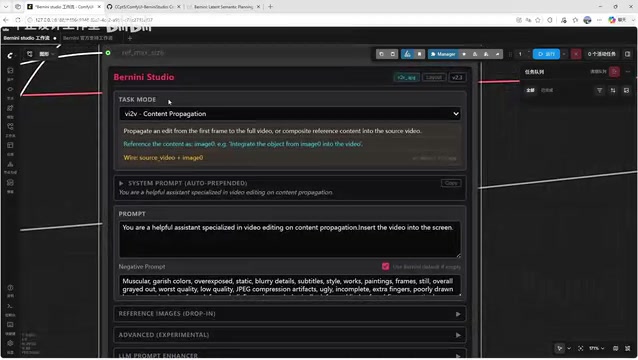
- Bernini Studio plugin workflow: Supports up to 10 reference images and reference videos, and automatically applies the appropriate prompt prefix for each task mode, offering much greater flexibility.
Model and Plugin Installation
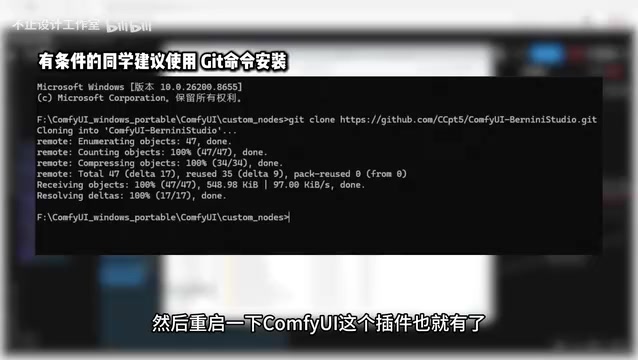
Plugin installation is simple: unzip the archive, place it in the custom_nodes folder under your ComfyUI root directory, and restart ComfyUI to load it.
For models, the Wan 2.2 Bernini folder contains both the Diffusion Model and LoRA components. Download them and place them in ComfyUI's models folder, then restart. The VAE is reused from Wan 2.1, and the text encoder uses the classic UMT5-XXL model.
About VAE and UMT5-XXL: In diffusion models, the VAE (Variational Autoencoder) acts as a compression-decompression bridge — it encodes high-resolution video frames into low-dimensional latent representations. The diffusion process then performs denoising in this compressed latent space, and the decoder reconstructs the final pixel-level output. Reusing Wan 2.1's VAE means both model generations share the same spatial compression representation, reducing storage and compatibility costs. T5 (Text-to-Text Transfer Transformer) is a unified text framework proposed by Google Brain in 2019, treating all NLP tasks as sequence-to-sequence problems with text input and text output. UMT5 is its multilingual upgrade, with the XXL variant carrying approximately 11 billion parameters. Compared to CLIP-based encoders, T5 supports sequences up to 512 tokens — a decisive advantage for complex prompts like "replace the person in the red outfit on the left with the character from Reference Image 1, while keeping the person on the right unchanged," which require understanding referential relationships and spatial positioning. CLIP text encoders are typically limited to 77 tokens and are primarily trained on image-text contrastive objectives, limiting their ability to model complex semantic structures. This is the core reason why next-generation high-quality video generation models — including Wan, CogVideoX, and Mochi — have broadly migrated from CLIP to T5-based encoders. In multi-character, multi-attribute editing scenarios, UMT5-XXL helps the model maintain more accurate semantic alignment.
Workflow Walkthrough and Prompt Tips
Model Loading Configuration
Bernini is based on the Wan 2.2 architecture, and the main model is split into high-denoising and low-denoising components. The Speed LoRA for acceleration is likewise divided into two groups — just select all of them.
LoRA (Low-Rank Adaptation) is a parameter-efficient fine-tuning technique proposed by Microsoft Research in 2021, originally designed to address the VRAM bottleneck of full fine-tuning for large language models. Mathematically, it decomposes the fine-tuning update ΔW into the product of two low-rank matrices, ΔW=BA. When rank r is much smaller than the original matrix dimensions, trainable parameters drop from d×k to r×(d+k) — typically just 0.01%~0.1% of the original count, while achieving performance close to full fine-tuning. This property has made LoRA enormously popular in the video model community: creators can fine-tune custom character LoRAs on consumer GPUs (such as RTX 3090/4090) using a few hundred reference images, injecting specific appearance styles without modifying the base model weights. Bernini's Speed LoRA is an engineering implementation of the "consistency distillation" concept — it guides the model to approximate multi-step diffusion results in far fewer sampling steps, compressing the original 50-step sampling down to under 20 steps, in the same vein as Latent Consistency Model (LCM) and SDXL Turbo. Loading them separately for high-denoising and low-denoising stages precisely matches the feature distribution differences at each phase of the diffusion process, preventing a single LoRA applied throughout from overfitting to a specific noise level and degrading output quality.
Understanding the Input Structure: Source vs. Reference
Understanding the input structure is key to using Bernini effectively. Here's a practical rule of thumb:
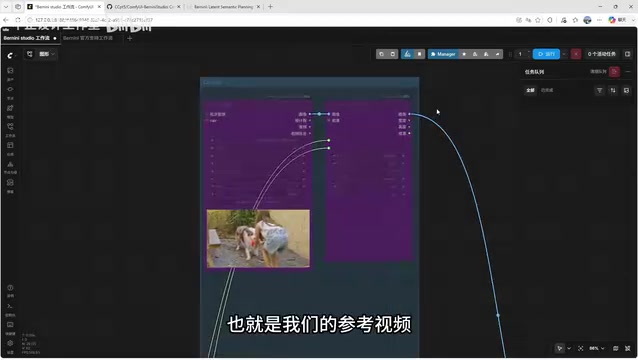
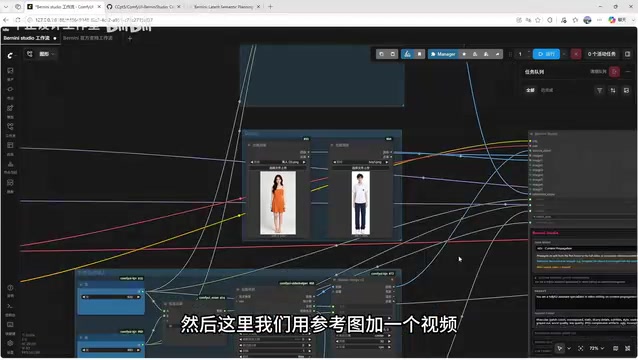
Source Video is the original footage — the video you want to edit. Everything else is a "reference" — reference images connect to image inputs, reference videos connect to video inputs.
Video dimensions and frame count recommendations: Use standard frame counts supported by the model, such as 81 or 121. These numbers aren't arbitrary — DiT-based video models process frames as patches along the temporal dimension, and frame counts must satisfy the factorization structure corresponding to the model's temporal downsampling rate (typically of the form "4n+1", where n is an integer, corresponding to the boundary condition when the VAE's temporal compression ratio is 4x). Non-conforming frame counts trigger internal alignment operations that can cause motion jitter or VRAM overflow. It's recommended to pre-process your footage into 2–3 second clips at 24–30fps using a video editor; bypassing ComfyUI's internal video decoding can save an additional 15–25% of peak VRAM usage on memory-constrained systems. For resolution, 1080p will be auto-scaled; if VRAM is insufficient, drop to 480p or lower.
Prompt Prefixes: The Key to Selecting Task Mode
Bernini's task mode determines how the model interprets your input. Common modes include:
- v2v: Pure video editing (no external reference material)
- rv2v: Reference + Video — the most common mode for character replacement
- iv2v / vi2v: Video blending modes
Each mode has a corresponding prompt prefix that must be copied to the beginning of your prompt, followed by a natural language description of your editing intent. This prefix mechanism is conceptually similar to a System Prompt in large language models — it embeds structured markers into the text conditioning to inform the model of the current input modality combination and task type, allowing the same set of weights to support multiple distinct inference behaviors through conditional switching, without needing a separate model per task. The Bernini Studio plugin automatically applies the appropriate prefix, eliminating the need to look it up manually.
Prompt writing tips: For multi-character replacement, clearly describe both the "target to be replaced" and the "replacement source." For example: "Replace the woman in the pink dress in the video with the character from Image 1, and replace the man in the video with the character from Image 2." Do not mix Chinese and English — translating your prompt entirely into English produces more consistent results. This is because the UMT5-XXL encoder is trained with a heavier weight on English text data; mixed-language input creates token boundary ambiguity. When Chinese word segmentation and English space-based tokenization coexist in the same sequence, the model's ability to resolve character references degrades noticeably, which directly impacts the accuracy of multi-character editing.
Real-World Performance and Efficiency
In practice, Bernini processes 80–100 frame videos in approximately 5–6 minutes. For a fully local, free, open-source solution, this is within an acceptable range. For context: commercial cloud-based solutions like RunwayML or Kling typically take 2–5 minutes for equivalent tasks and incur credit costs, whereas Bernini's marginal cost after initial setup is nothing more than electricity — a clear economic advantage for creators who use it frequently.
If you're unsure which mode to use, head to the official project page to browse demo examples. The site provides a wide range of ready-made examples covering video editing, reference-guided generation, video blending, and more. Finding a similar example will quickly confirm the right mode to use.
Summary
Bernini's open-source release further lowers the barrier to high-quality video editing and character replacement. Compared to older pose-driven approaches, it delivers a meaningful improvement in character consistency, and its multimodal capabilities make it one of the most compelling choices in the open-source video editing landscape today.
For creators who have decent GPU resources and want flexible local video editing, Bernini offers a free, feature-complete solution. Beyond the headline use cases of character replacement and video blending, it also supports text-to-image and image-to-image generation — worth exploring once you've got it running.
Key Takeaways
- Bernini is trained on ByteDance's Wan 2.2 (DiT architecture) and is a multimodal open-source model supporting video editing and image generation
- Compared to pose-driven approaches, Bernini delivers significantly better character consistency and supports precise multi-character replacement
- Deployment is ComfyUI-based, with core dependencies including the Diffusion Model, Speed LoRA, Wan 2.1 VAE, and the UMT5-XXL text encoder
- Task modes (v2v / rv2v / iv2v, etc.) are switched via prompt prefixes; pure English prompts are recommended for best results
- Processing 80–100 frames takes approximately 5–6 minutes, which is acceptable for a free local deployment
Related articles

Android ML Kit On-Device AI: Performance Optimization and Quality Breakthroughs
A full breakdown of Google Android ML Kit on-device AI: Gemini Nano cuts memory via 2-bit quantization and shared KV cache, a 2B model rivals last year's 27B, plus speech translation, function calling APIs, and an end-to-end scam detection demo.

Firebase AI Logic + Gemini Nano 4: A Practical Guide to Android AI Development
How Firebase AI Logic and Gemini Nano 4 help Android developers ship generative AI: App Check and prompt templates ensure security, hybrid routing cuts latency and cost, Spend Caps control budgets, and AI monitoring provides observability.

Microsoft AI Agent Breakthroughs: More Efficient, Better at Code and Weather Forecasting
Microsoft Research Focus Issue 97: ForkPilot cuts agent inference costs, Cabra reveals coding agents' code-understanding gap, Teletune learns workflows from logs, PBC improves extended forecasts, BioEMU-2 opens preview.