ByteDance Trae Work Getting Started Guide: 11 Use Cases Explained
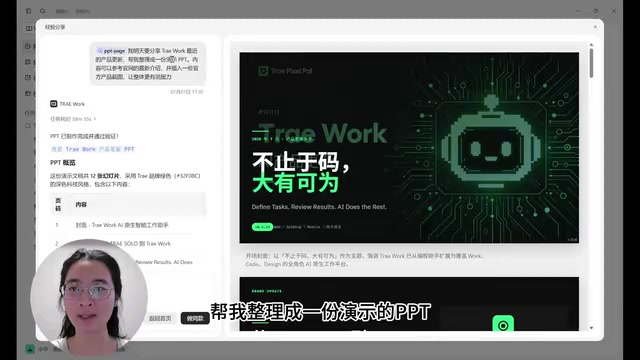
ByteDance's Trae Work brings AI agents to everyone with 11 use cases across PPT, data, code, and design.
ByteDance's general-purpose AI agent Trae Work replaces the command line with a familiar software interface, marking a shift from developer-only tools to mainstream accessibility. Its three sections — Work, Code, and Design — cover PPT generation, data dashboards, deep research, document writing, platform development, code analysis, game building, scripts, UI restoration, and design generation. Plugins connect external tools like DingTalk and Xiaohongshu, while skills provide preset workflows; combined with automation triggers, they enable fully hands-off scheduled tasks. The article also flags AI hallucination risks and encourages readers to start with one core use case rather than trying to learn everything at once.
AI tools keep coming faster than ever, and many people feel a creeping anxiety: has everyone else already figured this out while I'm still falling behind? That anxiety is worth setting aside. Here's why: most AI tips and techniques are products of a specific moment in model capability — once models improve, things that once required effort to learn often become irrelevant. The long-term direction of AI products is always toward greater simplicity and usability, and the tools that survive will keep getting easier to pick up.
ByteDance's general-purpose agent product Trae Work is a prime example of this trend. Based on hands-on demonstrations from a Bilibili creator, this article breaks down its three main sections and 11 typical use cases, helping you quickly decide whether it can solve the problems in front of you.
From Developer Tool to Mainstream Tool
When you open Trae Work, you're greeted with an interface that looks like ordinary software — a large conversation window at the center, no coding knowledge required to use it naturally. That's worth highlighting on its own.
When coding agents like Claude Code and Codex were taking off, some non-developers did start experimenting with them. But opening up an IDE or a command-line interface for the first time was enough to put many people off. Now, more general-purpose agent products like Trae Work and Workbody have completed the shift — by design — from "built for developers" to "built for everyone."
This may be a signal that AI agents are finally going mainstream. In other words, starting now is not too late.
The left sidebar reveals that Trae Work is organized into three sections: Work, Code, and Design — covering everyday tasks, coding, and design needs respectively.
The classic interaction pattern of early coding agents like Claude Code and Codex was entering commands in a terminal or IDE, which required users to understand file paths, environment variables, dependency installation, and similar concepts. The barrier came from the very nature of "how you talk to a computer." The difference between an agent and an ordinary AI chat window is this: a regular chat only returns text, while an agent can autonomously plan steps, call tools, manipulate files, and chain multiple actions into a single complete task. Trae Work packages this capability into a graphical interface, replacing the command line with natural language. In essence, it changes the admission ticket for "getting a computer to do work for you" from "knowing technology" to "knowing how to talk."
Work Section: PPT, Data Analysis, and Deep Research
The Work section handles everyday tasks. The official examples themselves are great learning material — they help you quickly understand what the product can do.
PPT generation is the most common use case. It calls a built-in PPT skill. For example, input "I need to share Trae Work's recent product updates tomorrow — help me organize this into a presentation, referencing the latest info from the official website and including official product screenshots," and it generates a 12-slide deck in a branded green style. You can keep refining it in natural language: "Change the cover title to 'Beyond Code, Built for More' and place it in the bottom-left corner" — and it adjusts precisely. Click "Use this template," swap in your own description, and you get your own PPT.
Data analysis lets you upload sales, inventory, and order data, then call the Dashboard skill to generate a business dashboard showing key metrics, anomalies, and recommended actions. It's more user-friendly than Excel — you can toggle between 30-day and 7-day views with dynamic refresh, and hovering over a metric shows the exact value for a specific date.
Deep research uses the Doc skill. For example: "Research dexterous hands in humanoid robots and write a 20-page industry report." One detail worth praising: it attaches source citations, making verification easier. AI hallucination is a real problem, and any generated content should be double-checked before use.

Document generation is demonstrated with three examples: resumes, event planning, and brand proposals. One practical tip: if you actually want AI to help write your resume, make your prompt as detailed as possible — don't follow the minimal examples shown in demos. The formatting, however, is worth borrowing. The brand proposal demo shows "design a trendy water bottle for young women, research relevant brand color palettes and materials," and it collects reference materials from multiple brands.
"Hallucination" is a known flaw in large language models: when generating text, the model produces information that sounds fluent and confident but is factually inaccurate — including fabricated citations, incorrect data, or nonexistent events. This is especially dangerous in scenarios that require factual accuracy, like deep research or resume writing. Trae Work's practice of including source citations in research reports is a widely accepted mitigation in the industry, but it doesn't fully eliminate hallucinations — source links themselves may be incorrectly associated or fabricated by the model. Therefore, verifying key facts one by one before using AI output in any formal context remains a non-negotiable step.
Code and Design Sections: Development and Design in Practice
The Code section is more focused on writing code, debugging, and delivering concrete outputs. Use cases include: building an online education platform with multi-language learning support; analyzing an existing code repository's overall architecture, module responsibilities, and function documentation; game development, such as building a pixel-art mech battle game; and writing small utilities and scripts, like scraping product names, prices, and sales figures from major e-commerce platforms and displaying them in a web page.
The Design section handles design-related work: you can do design restoration — converting an image into a UI mockup — or generate a design draft from a text description, and even replicate a specific style of page.
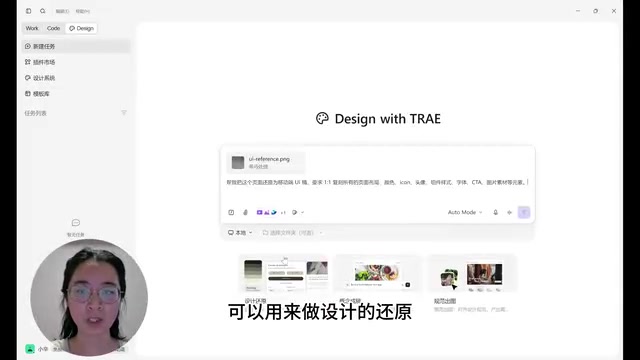
Within the chat interface, you can also specify plugins, skills, and choose from different models. The creator mentioned trying voice interaction, but noted that the experience isn't great at this stage.
Plugins, Skills, and Automation: Combining Capabilities
The plugin marketplace in the sidebar lets you search for and install plugins and skills. Don't overthink the distinction — install one of each and you'll understand immediately.
In simple terms, plugins give Trae Work access to external tools — like letting it operate DingTalk or Xiaohongshu (Red). Skills are a set of working methods for the AI. The two work together to form complete capabilities: once Trae Work can operate Xiaohongshu, pair it with a "publish viral posts" skill and you can actually automate posting on the platform.
Automation is used to create scheduled tasks — for example, automatically sending a daily AI news digest at 8:30 AM every morning. You can set these up manually or create them through natural language in conversation.
The template library is another source of inspiration. Click a Xiaohongshu copywriting template to use it, and it automatically calls the corresponding skill or plugin. In the demo, the identity is changed to "AI app blogger" and the generated copy reads: "A friend asked me what I'm actually doing spending all this time on AI. Honestly, I used to think AI was just a chatbot — but then it finished in ten minutes what would've taken me two hours…"

Additionally, under account settings in "Rules & Memory," you can enable memory so Trae Work retains context from previous conversations, reducing the need to re-explain things every time. The creator also admitted honestly: they don't use AI to create content from scratch — they prepare what they want to say first, then use AI to polish it.
The "plugins + skills" architecture here corresponds to what's called "Tool Use / Function Calling" in the AI agent field. The model itself can only generate text, but through predefined interfaces, it can trigger external programs to perform real operations — reading and writing files, calling APIs, controlling browsers, and so on. Plugins open a door between the agent and external systems; skills are preset prompts or workflows that tell the agent what steps to follow once it's through the door. Automated scheduled tasks introduce a further concept — the
Related articles
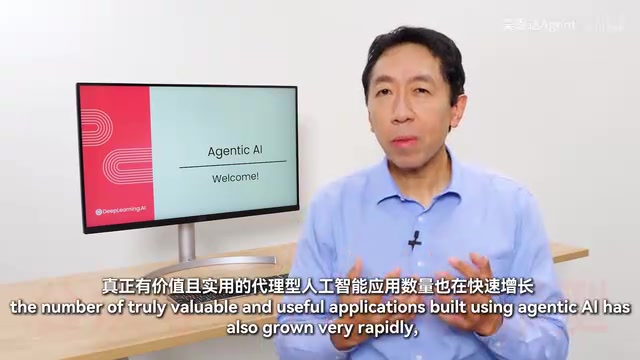
Andrew Ng on Agentic AI: Cutting Through the Hype to Find Real Value in Agent Development
Andrew Ng's Agentic AI course intro: separating hype from real value, exploring agent workflows in customer service, research, law, and healthcare, and why evals and error analysis define expert-level agent development.
The Netflix Microservices Myth: An Architecture Migration Misunderstood by an Entire Industry
The real story behind Netflix's cloud migration and microservices transformation — and why the entire industry copied the solution while missing the actual problem.

Java 27 Deep Dive: How Default Changes Are Quietly Reshaping Production Environments
Java 27 has just 9 JEPs but changes key defaults: compact object headers on by default, G1 as unconditional default GC, Flight Recorder redaction, and built-in post-quantum TLS 1.3.