Cadence MCP in Action: AI Reads PDF and Auto-Generates Schematics

AI Agent reads PDF schematics via MCP and auto-generates Cadence OrCAD drawings with multi-agent verification.
This Cadence MCP project demonstrates a viable path for integrating AI into hardware design: an LLM connects to Cadence OrCAD via MCP, automatically identifies components and connections from a TI application note PDF, and completes pin numbering, placement, and routing while avoiding overlaps with annotation text. After drawing, four parallel sub-agents run predefined rule checks on the circuit. The current version still has gaps in wire aesthetics and overlap avoidance, requiring human feedback for iterative refinement. The creator plans to add more rules to reduce manual intervention and ultimately automate reference circuit porting.
Bridging the Last Mile of Schematic Design with AI
One of the most tedious tasks for electronics engineers is manually redrawing reference circuits from chip datasheets or application notes inside an EDA tool — stroke by stroke. The work looks mechanical, but it's time-consuming and error-prone. A Bilibili creator's Cadence MCP project aims to automate this process using an AI Agent: let a large language model read a PDF document directly, then control Cadence OrCAD to complete the schematic drawing automatically.
The demo scenario is straightforward — on the right side of the screen is an amplifier application circuit PDF downloaded from TI's website; on the left is a blank OrCAD workspace. The goal is to have the AI identify the complete circuit from the PDF and reproduce it in OrCAD, including chip pin numbers, component placement, and auto-routing.
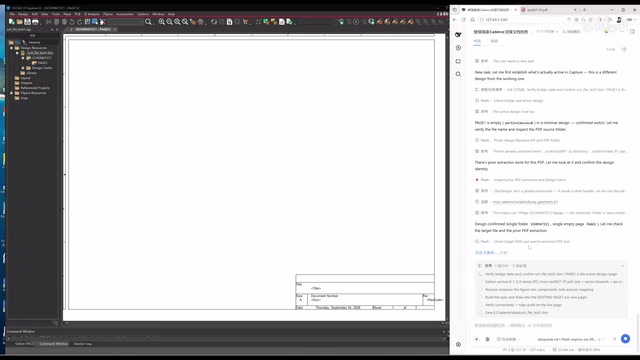
MCP (Model Context Protocol) is an open protocol proposed and championed by Anthropic, designed to provide large language models with a standardized "tool-calling" interface, enabling models to connect to external systems, databases, or applications in a unified way. In simple terms, MCP acts like a "USB interface between AI and software" — as long as a target application implements an MCP server, the AI can invoke that application's functionality through the protocol without needing to build a custom integration layer for each tool. In this project, Cadence OrCAD is wrapped as an MCP server, and the LLM calls OrCAD's schematic editing API through the protocol to place components, draw wires, and adjust layouts. The key advantage of this architecture is reusability — in theory, the same MCP framework can interface with MATLAB, SPICE simulators, or other EDA tools without rewriting integration code each time.
The Complete Pipeline: From PDF Parsing to Auto-Routing
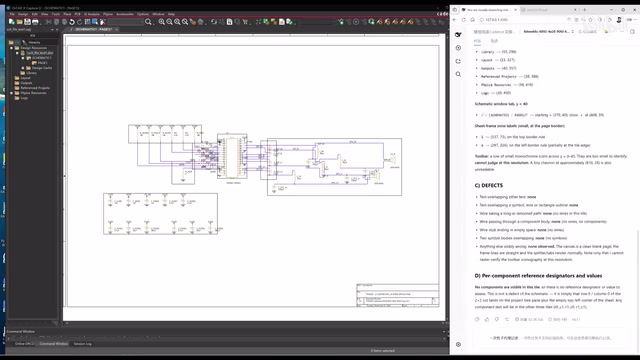
According to the creator's demo, this system connects the LLM to Cadence via MCP, giving the AI the ability to directly operate the EDA tool. The workflow breaks down into several stages: parse the circuit structure from the PDF, identify all components and connections; then place components on a blank OrCAD page with numbered pins; and finally perform auto-routing.
One noteworthy detail is the intelligent layout adjustment. During the initial drawing, some components and traces overlapped with the annotation text at the bottom of the drawing. After a moment of "thinking," the AI automatically moved the entire circuit as a unit. The creator noted it "literally took one second," and afterward the layout no longer conflicted with the annotation text. This shows the Agent isn't just blindly copying connections — it has some capacity for spatial layout judgment.
Cadence OrCAD is a widely used schematic and PCB design suite whose schematic editor (Capture) supports programmatic operations via scripts or API interfaces. Schematic capture sits at the very top of the EDA flow: engineers define logical connections at this stage, generate a netlist, and pass it downstream to PCB layout and routing tools. Manual reproduction of reference circuits is time-consuming because engineers must identify each component's part number and pin functions from the datasheet, then search the component library, place symbols, and connect net labels one by one — a moderately complex application circuit can easily take several hours. If an AI Agent can reliably handle this step, the efficiency gains for early-stage design exploration would be substantial.
Multi-Sub-Agent Parallel Rule Checking
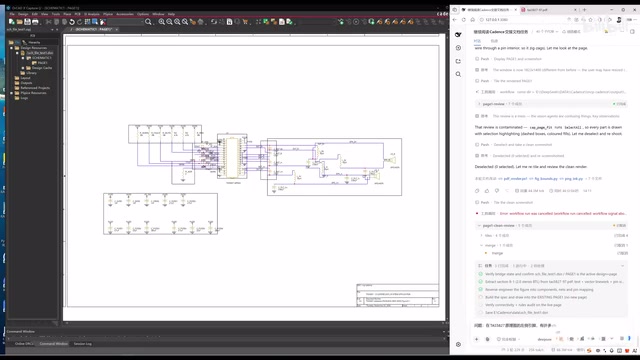
After drawing is complete, the system enters a connection rule verification phase. The design here reflects solid engineering thinking — instead of single-threaded execution, the AI dispatches four sub-agents to perform checks in parallel. The checks are based on predefined rules, such as limits on the number of routing bends and component placement density.
This "primary Agent + multiple sub-agents" architecture breaks a complex schematic quality-check task into parallelizable subtasks, improving both efficiency and rule enforcement. The creator randomly clicked into one sub-agent to show its checking process, demonstrating that each sub-agent operates independently according to its assigned rules.
The parallel multi-sub-agent design draws from the "decompose-parallelize-aggregate" paradigm in the AI Agent field. Traditional single-threaded agents handling complex tasks often lose early context as the context window grows, or suffer speed bottlenecks from serial execution. Splitting the quality-check task across multiple specialized sub-agents — each responsible for a single rule category (routing bend count, component spacing, net completeness, etc.) — enables concurrent speedup and keeps each sub-agent operating within a shorter context window for higher accuracy. This architecture, known in software engineering as a Multi-Agent System, already has mature applications in code review and document analysis. Applying it to hardware design verification is a valuable cross-domain experiment.
Human-AI Collaboration: Feedback and Iterative Refinement
The first-pass result completed the drawing but had noticeable shortcomings. The creator honestly pointed out two issues: excessive overlapping that made the schematic hard to read (such as overlapping test point labels like TP), and some component leads (like GND networks) overlapping with the drawing's annotation area.
The fix illustrated a classic human-AI collaboration approach — the creator fed the issues back to the Agent with examples and hints, letting it identify and locate the problems itself. A new "Configuration 2" was then created, asking the AI to redraw an optimized version while preserving the existing work.
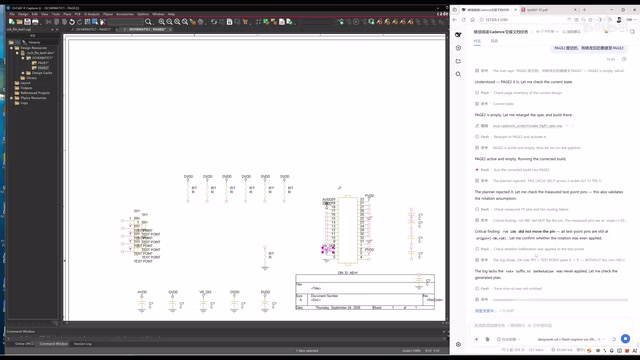
Since the components from Configuration 1 were already placed, generating Configuration 2 was noticeably faster. The optimized version primarily repositioned the TP-related components (moved to the far left) and made several layout improvements. The creator also candidly admitted this version "still isn't quite complete."
Technical Value and Existing Limitations
The significance of this project lies in validating a viable path: an AI Agent really can start from reading a PDF document and automatically complete schematic drawing inside an EDA tool. For the large volume of repetitive reference circuit porting work, this has real efficiency-improvement potential.
But the limitations are equally clear. The current version still falls short on wire aesthetics and avoiding overlaps, and typically requires human feedback before iterating toward a better result. The creator mentioned that the next step is to add more rules (scale/rule) to the entire workflow, enabling more automated handling of routing optimization and reducing manual intervention.
From a broader perspective, projects like this represent one direction for AI deployment in vertical engineering domains — not chasing general-purpose conversation, but connecting the LLM's comprehension capabilities to the operational interfaces of professional tools, forming Agents that can actually get work done. Automated schematic drawing is just the starting point. As rule systems mature and multi-agent architectures become more robust, AI-assisted circuit design still has tremendous room to grow.
Related articles

Felix Rieseberg Personal Homepage
Felix Rieseberg's personal homepage sparks attention on Hacker News. This article covers the Slack engineer's technical background, the rise and fall of nativefier, and the value of a developer homepage as a tech calling card.

@ai-sdk/vue 3.0.306 Patch Release Syncs with [email protected] Update
@ai-sdk/vue 3.0.306 released, synced with [email protected]. A routine patch release for the Vercel AI SDK ecosystem with no public API changes; the Vue adapter layer stays version-aligned with the core package.

Gemini 4 Argon API Launches: The Era of Million-Token Output Begins
Google launches Gemini 4 Argon with sparse MoE architecture, up to 1M output tokens, and a 68.90% Vals Index score, available across API, AI Studio, and the Gemini app.