Can AI Antivirus Cure the Chronic Pop-Up Problem? An In-Depth Hands-On Review of Wukong Security

An in-depth hands-on review of how Wukong Security uses AI to solve Windows' chronic pop-up problem.
Traditional antivirus relies on signature detection and can't handle constantly mutating rogue pop-ups. This article, through five repair shop visits and a hands-on test of Wukong Security, reveals how AI behavior detection, LLM semantic understanding, and crowdsourced iteration offer a new solution to Windows' chronic pop-up problem.
A Computer Overrun by Pop-Ups: The Fate of Windows Users
Many people have had this experience: it takes forty or fifty seconds to boot up, and the moment you reach the desktop, a desktop pet pops up first, immediately followed by a screen full of pop-ups—the classic trio of "Sexy dealer live-dealing cards," "Congratulations, you've won an iPhone 17 Pro Max," and "Your computer is infected, please clean it immediately." Clicking your browser never opens the homepage you want, and Task Manager is full of "distant relatives of SVCHOST," cloaked in the guise of system processes—invisible, incomprehensible, and impossible to kill.
The nine-year-old laptop tested by a Bilibili content creator is a textbook case: it takes two minutes for the screen to light up after booting, and less than 30 seconds after reaching the desktop, pop-ups blanket the screen, the aging CPU gets maxed out instantly, and the mouse can barely move—a true case of "cyber psoriasis." Interestingly, the author's newly purchased computer was hit even harder—this almost confirms a cruel reality: the invasion of junk ads and bundled software has nothing to do with whether a computer is new or old; it's a chronic disease of the Windows ecosystem.
This chronic problem has deep historical roots. Bundleware has been an issue in the Windows ecosystem for a long time, rooted in Windows' open software distribution system. Since 1995, Windows has adopted an open software distribution model where any developer can publish executable files without review. This design was originally intended to lower the barriers to a software ecosystem, but it laid the groundwork for the subsequent bundling chaos. Unlike the strict code signing and Notarization review mechanisms of the iOS App Store or macOS, Windows has historically allowed any third-party software to install freely, bypassing platform controls. It wasn't until Windows 10 introduced the SmartScreen filter that warnings began to pop up for programs from unknown sources—but this remains powerless against compliant "rogue software" that has already obtained digital signatures. SmartScreen is essentially a cloud-based reputation-scoring "app reputation system"—it judges trustworthiness by tracking how frequently a program is downloaded by users worldwide and its report rate. New or low-frequency programs trigger warnings, but established "old rogues" that have accumulated enough downloads can easily slip past this checkpoint.
During the rapid growth of the internet in China (2005–2015), the domestic software ecosystem further formed a unique "traffic monetization chain": download platforms represented by Huajun Software Park and Tiankong Software Station embedded promotional programs by repackaging software installers. Software developers licensed their installers to download sites, which slipped promotional software into the installation process, earning anywhere from 0.1 to 0.5 yuan for each successfully installed bundled program. This business model essentially cashed in on users' "attention" and "system resources" as hidden currency, growing wildly in the early internet environment before regulation was mature. At the time, PC internet device installations expanded at a rate of tens of millions per year, so even an extremely low per-install commission multiplied by the vast user base could generate considerable revenue, giving rise to the high-speed operation of this entire gray industry chain. Mainstream software represented by Xunlei and certain input methods often relied on ad pop-ups and bundled promotions behind their free versions to sustain their business model, forming a distorted ecosystem of "free software, users pay with attention." This business model is called an extreme variant of the "Attention Economy" in economics—when users can obtain software without payment, their attention itself becomes the commodity to be monetized, and bundleware is the crudest implementation of this logic on the PC side.
The scary thing about this kind of rogue software is its ability to disguise itself: a pop-up calling itself "Windows Optimization Master" prompts you to pay when you click in, and pops up in a loop when you close it; the lock screen wallpaper gets replaced with randomly switching casino ads—"Macau in the morning, Hong Kong in the afternoon." Traditional methods are almost helpless.
On-Site Repair Shop Records: Real Experiences at Five Shops
The author took this old laptop to five offline repair shops, and the result reads like an industry observation documentary.
The first shop changed its tune upon seeing the desktop, specializing in "system reinstalls"—the most expensive charged 50 yuan, the cheapest reinstalled the system for free while pushing antivirus software and PC managers on the side. The technician at the second shop was very meticulous, checking the BIOS and installing "exclusive software" from a USB drive, but even after running "Huolong Antivirus" in person, he couldn't fix it. The third shop was more direct—without a word, they reinstalled the system and charged one hundred yuan, twice as much as the first two shops, prompting the author to complain, "This isn't fixing a computer, this is robbery."

The fourth shop recommended installing Tencent PC Manager, scanned for nearly twenty minutes, and after restarting, the pop-ups remained. And the last shop, next to the university town, was the most impressive: the technician first ruled out mechanical hard drive lag as the cause, then went through the recently downloaded folders one by one in Quick Access, actually digging out several pop-up sources.

But even this most reliable technician ultimately recommended "reinstalling once and for all." He said a plain truth: "PC Manager says there's no problem, 360 also says there's no problem, but on what basis?"—this computer actually has a kind of "cyber cancer," and you either "do chemotherapy" by reinstalling the system or "transplant an organ" by replacing the hard drive.
The Dead End of Traditional Antivirus Software: Catching New Criminals with Old Wanted Posters
Why could so many professional repair technicians only resolve this by reinstalling? The root cause lies in how traditional antivirus software works.
The core technology traditional antivirus software relies on is Signature-based Detection: security researchers reverse-engineer malware to extract unique fragments from its binary sequence as signatures—usually 16 to 32-byte hash values stored in a virus database. During detection, a match triggers an alert, combined with a prebuilt software blacklist to block pop-ups. The core advantage of this mechanism is determinism—extremely high accuracy for known viruses, low false-positive rates, and minimal resource consumption because it requires no complex computation. This is the fundamental reason it has persisted since John McAfee commercialized it in 1987. It's worth noting that the threat environment signature detection faced at its inception was far simpler than today's—from the late 1980s to the early 1990s, the number of known viruses worldwide was only a few hundred, and researchers could entirely maintain the signature database manually. By 2023, however, the AV-TEST Institute registered over 450,000 new malware samples daily, and the "passive defense" nature of signature detection increasingly falls short against the massive number of variants.
However, this mechanism has a fundamental "Zero-day" blind spot—newly emerging malware is completely transparent to signature detection before it's analyzed and cataloged. From when a new malicious sample appears in the wild to when a security vendor captures the sample, reverse-engineers it, extracts the signature, and pushes a virus database update, there is typically a window of several hours to several days, which the industry calls the "Detection Gap." This is like using last year's wanted poster to catch this year's criminals—for those new rogue programs that disguise themselves and constantly mutate, the recognition mechanism is inherently lagging, and can only passively wait for the vendor to update the virus database.
Rogue software developers know this well, using techniques like code Obfuscation and Polymorphic Code to automatically generate installers with different signatures each time they're distributed, completely evading signature detection. Polymorphic transformation refers to malicious code that keeps its functionality unchanged while making each copy's binary characteristics different through means such as automatically rewriting instruction sequences, inserting meaningless junk code, and encrypting core payloads. Modern polymorphic engines can even generate millions of variants in milliseconds. This technology can be traced back to the "1260" virus written by Mark Washburn in 1990—the first truly polymorphic virus in history. Polymorphic technology subsequently spread rapidly throughout the underground market and eventually evolved into a standard tool in today's pop-up software industry chain. More critically, many domestic ad pop-up programs are not "viruses" in a legal sense—they have user agreements (even if the font is only size 6), have legitimate corporate entities, and antivirus software that rashly blocks them faces legal risks. When encountering ad programs cloaked in the guise of system processes, traditional antivirus software is often completely stumped.
More ironically, many "manager" type programs are themselves major pop-up offenders. The author's testing found that both Tencent PC Manager and 2345 have startup pop-ups telling you "this takeoff took X seconds," and they also push upgrade tutorials, add desktop shortcuts, and gift you floating balls—"the thief crying stop thief." This also explains why, even with complete professional equipment and virus databases, repair technicians still tend to reinstall: because under the old paradigm, this really is the lowest-cost solution.
A New Approach to AI Antivirus: Wukong Security's "Virus Database + Real-Time AI Monitoring"
Since AI can even generate code and videos, why can't we make a tool that can identify and automatically clean up ad pop-ups in real time? The author originally planned to build an agent themselves, but discovered someone had already done it—Wukong Security, whose core idea is exactly "virus database + AI collaboration."
Its blocking logic has two layers: ordinary junk software is caught wholesale by the traditional virus database; for new disguised pop-ups, AI monitors every pop-up in real time—judging "who launched it" and "whether it popped up on its own without user action." This technical path of Behavior-based Detection is fundamentally different from signature detection: it doesn't ask "who is this program," but rather "what is this program doing."
The principle of behavior detection technology can be traced back to the "Anomaly Detection" theory proposed by academia in the 1990s. Its core assumption is: no matter how malicious code mutates, its malicious behavior patterns (such as unauthorized creation of startup items, injecting into other process memory, monitoring sensitive APIs) can still be statistically distinguished from normal programs. Unlike signature detection, which focuses on "program identity," behavior detection focuses on "program actions," judging threats by monitoring runtime behaviors like API call sequences, registry modifications, and network connections. At the Windows system level, this relies on the ETW (Event Tracing for Windows) framework provided by Microsoft and kernel-level callback mechanisms, allowing security software to Hook key system calls at the driver layer. ETW is a high-performance event tracing infrastructure built into the Windows kernel, capable of recording hundreds of types of system events in real time with extremely low performance overhead—its design philosophy is similar to an airplane's "black box," continuously and silently recording a running log of key operations during normal system operation, and providing complete behavior replay capabilities when anomalies occur. Modern EDR (Endpoint Detection and Response) products almost invariably use ETW as their data collection backbone. Specifically in pop-up blocking scenarios, AI needs to monitor window creation events (WM_CREATE) in the Windows Message Queue in real time, identifying the window's parent process, trigger timing (whether triggered by a user click), window hierarchy (whether forced to top), window style (whether it's a borderless full-screen overlay), and other multidimensional features, constructing a high-dimensional feature vector describing the "pop-up behavior."
Furthermore, the introduction of Large Language Models (LLMs) gives the system true semantic understanding capabilities—traditional behavior detection can identify that a window was illegally created, but cannot understand the deceptive difference in phrasing between "Congratulations, you've won an iPhone" and a "system warning." During pre-training, LLMs have seen a massive amount of online fraud scripts, marketing copy, and technical documents, thus possessing an internalized understanding of "high-risk semantic patterns"—a capability no rule engine can replicate. In the field of natural language processing, this capability is called "contextual semantic understanding"—the model can not only identify individual keywords but also understand the intent and emotional tone conveyed by a complete sentence, distinguishing the essential difference between "Your account has a security risk, please click here to verify" (phishing script) and "Your account has logged in successfully" (normal notification). Combined with the LLM's semantic analysis, high-risk semantic patterns like "congratulations you've won," "clean immediately," and "sexy dealer" can be precisely identified and jointly judged with process behavior features, achieving dual cross-validation from both the "program dimension" and the "content dimension." Once the AI determines that a pop-up may be an ad or rogue program cloaked in the guise of a system process, it directly cleans and blocks it. Microsoft has already introduced a GPT-4-assisted threat analysis module in its Defender for Endpoint product, and Wukong Security's approach is highly consistent with this enterprise-level direction, only bringing it down to the ordinary consumer scenario.

The testing results are quite impressive: consulting ads and event benefit pop-ups disappeared directly; software download recommendations and bundled promotion pop-ups were handled in one shot; even those hard-to-clean input methods and decompression software "deadbeats" from Tencent and Huolong could be dealt with.
For "regular armies" like Ludashi and CCleaner that bear the title of "system and applications," and even the cleaning reminders and blocking notifications that Microsoft officially secretly pushes, Wukong's default mode can't control them, but manually enabling Strong Mode in the pop-up blocking settings can cut them off.
Product Design Details: Do Not Disturb Mode, Handling False Positives, and "Guaranteed Compensation"
For the most stubborn software update reminders and download completion reminders, Wukong offers a Do Not Disturb Mode, which can achieve near-100% blocking—"letting the computer become a monk with pure senses." But this also brings a side effect: even WeChat friend messages and Steam game launch prompts may be killed by mistake.
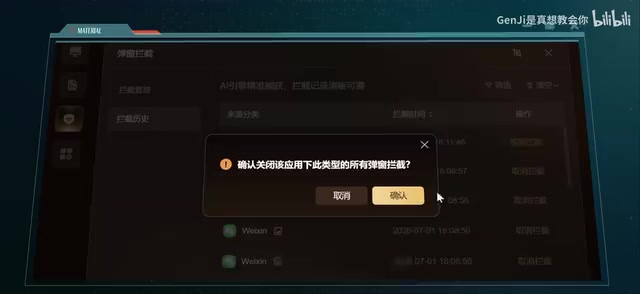
Fortunately, the design leaves a way out: in the blocking status details, you can see all blocked applications, and upon discovering a false positive, you can select the application or specify a window to allow it individually, equivalent to "reissuing a pass." This "whitelist exemption" mechanism is a classic solution for balancing usability and security in security product design, and its design philosophy is consistent with the firewall's "Default Deny, Explicit Allow" principle—extending the Principle of Least Privilege to notification management scenarios, returning final control of blocking decisions to the user, and avoiding trust erosion caused by over-automation. The Principle of Least Privilege was first systematically articulated by Jerome Saltzer and Michael Schroeder in their classic 1975 paper "The Protection of Information in Computer Systems," and has since become one of the cornerstone principles of information security architecture design. Its core idea is: any program, user, or system component should only have the minimum privileges necessary to complete its legitimate tasks, and excess privileges themselves constitute a potential attack surface. A typical manifestation of this principle in practice is the "runtime permissions" mechanism introduced in Android 6.0—applications can no longer obtain all permissions at once during installation but must request them item by item from the user when actually needed, and users can grant or deny each permission individually. This is philosophically consistent with Wukong Security's "per-application allow" whitelist design.
In terms of resource usage, Wukong is restrained—Huolong's memory usage when running is twice that of Wukong, "eating more than it works." Behind the lightweight design is a reliance on Cloud Offloading architecture—placing heavy AI inference tasks on cloud servers, with the local client responsible only for data collection and result execution, thereby compressing local resource consumption to a minimum without sacrificing detection capabilities. This architectural approach originates from the "edge-cloud" collaboration model in mobile computing, and in recent years, as network bandwidth has improved and cloud computing costs have declined, it is rapidly penetrating endpoint security products, forming what the industry calls the "thin client" mainstream trend—traditional security software places the massive virus database and detection engine entirely locally, easily occupying hundreds of MB of memory; while cloud-native security architecture minimizes local resource consumption while leveraging cloud computing power to achieve model scale and detection accuracy far exceeding what's possible locally. This architecture also brings a trade-off worth noting: cloud inference means some behavioral data needs to be uploaded to servers, and against the backdrop of increasing emphasis on privacy protection, how to find a balance between detection efficacy and minimizing user data is a design challenge faced by all cloud-native security products. Clicking "One-Click Run" on the homepage completes trojan removal, junk cleaning, system repair, and comprehensive detection. This nine-year-old machine's health recovered by 90%, and with a little optimization, it was rejuvenated.
Worth mentioning is its "Guaranteed Compensation" campaign: after installing it, if you encounter a rogue pop-up that wasn't blocked, uploading a screenshot for verification rewards you with 100 yuan. This mechanism draws on the idea of a "Bug Bounty Program" in its business logic, but innovatively brings it down to the ordinary user level.
Bug bounty programs originated with Netscape's "Bugs Bounty" campaign launched in 1995, after which Google, Microsoft, and Apple successively established standardized bounty systems. Their essence is to shift the marginal cost of security research from a fixed internal team to a flexible external network, using market mechanisms to incentivize "white hat hackers" to proactively find and responsibly disclose vulnerabilities, rather than using them for attacks or cashing them out on the black market. According to statistics from the HackerOne platform, the number of high-risk vulnerabilities discovered by top tech companies through bounty programs has exceeded three times that found by their internal security teams, achieving broader attack surface coverage at a cost far lower than building an internal red team.
Traditional security companies' threat intelligence mainly relies on professional researchers and Honeypot systems, with limited coverage and high costs. Wukong Security's crowdsourcing model turns millions of ordinary users into a distributed sensor network. The difference is that professional bounty hunters discover technical vulnerabilities, while ordinary users report real adversarial sample data—these pop-up samples that slip through the net in real-world usage scenarios are often the long-tail cases hardest to reproduce in laboratory environments. In the field of machine learning, such "Hard Negatives" contributed by real users are regarded as precious material for model iteration: it is precisely those samples that existing models judge incorrectly that can most efficiently push the decision boundary in the correct direction, with a value far exceeding a large number of repeated "easy samples." Every pop-up that slips through becomes training material—after each user report is learned by the AI, the cloud rule database is updated in real time, forming a "crowd-contributed" dynamic protection network. The 100-yuan reward is enough to drive users to proactively report rather than silently tolerate, and the reporting behavior in turn feeds AI model iteration, forming a positive flywheel—this is an ingenious closed-loop design that integrates user pain points, incentive mechanisms, and data accumulation.
Conclusion: In the AI Era, Who Should You Turn to When Your Computer Gets Infected?
The experience of visiting five repair shops exposed two major dilemmas of the traditional model: you either get ripped off or you reinstall, and blacklist-style antivirus is powerless against new pop-up threats. The "AI + lightweight" approach represented by Wukong Security offers another possibility—its core blocking capability is no worse than established software, yet it better fits the current product form, and is especially friendly to ordinary users who don't want to fuss.
Of course, it's not omnipotent; issues like handling Microsoft's official-level pushes and false positives in Do Not Disturb mode still require trade-offs. But it points to a clear trend: as AI agents gradually permeate everyday tools, the first choice when a computer has a problem may no longer be sending it for repair or reinstalling, but rather handing it over to an intelligent protection tool that can learn in real time and continuously evolve—this may be more effective than visiting ten repair shops. From a more macro perspective, the trinity model of "behavior perception + semantic understanding + crowdsourced iteration" represented by Wukong Security may be sketching out the basic form of the next generation of consumer-grade security products: no longer a "digital vaccination station" that passively updates the virus database, but a "cyber immune system" that stays online and proactively evolves.
Key Takeaways
Key Takeaways
Key Takeaways
Key Takeaways
Related articles

Will Outdated LLMs Become Nostalgia Symbols? The Cultural Value and Era Memory of AI Technology
Will ChatGPT and GPT-4 from 2023 become nostalgia symbols like retro game consoles? Exploring old LLMs' historical value, emotional significance, and how open-source models preserve AI history.

GPL vs MIT License: The Copyleft Philosophy Debate in the Open Source Community
An in-depth analysis of the core divide between GPL and MIT/BSD permissive licenses, exploring the pros and cons of Copyleft's viral clauses, the Rust rewrite movement's impact on license ecosystems, and how developers can choose the right open source license.

Seed7 Language Memory Safety Mechanisms: A Unique Path Through Value Semantics and Deterministic Reclamation
Deep dive into Seed7's memory safety mechanisms including bounds checking, value semantics, null pointer elimination, and deterministic reclamation, compared with Rust's ownership model.