Can AI Really Write Code on Its Own? A Hands-On Analysis of Three Major Tools

AI coding tools have evolved from code completion to agents that can modify across files, run tests, and take on projects—but humans still need to gatekeep.
Using a Hindi video as a starting point, the article discusses the qualitative leap in AI coding tools' capabilities: from single-line completion to understanding multi-file context, proactively modifying code, running tests, and even building projects from scratch. It names three representative tools—Cursor, Cloud Code, and OpenAI Codex—forming a layered landscape of editor, Agent, and task layers rather than substitutes. The article emphasizes AI won't replace programmers, since giving instructions, checking security, and verifying results still require humans.
From "Code Completion" to "Taking Over Projects": The Qualitative Leap of AI Coding Tools
A Hindi video circulating on YouTube recently posed a direct question: can AI really write code on its own now? The answer given in the video is blunt—it's not just writing code. Today's AI tools can identify errors and even build complete projects from scratch.
This judgment deserves serious consideration. Over the past two years, the capability boundary of AI coding tools has expanded from "completing your next line" to "understanding multi-file context, making proactive modifications, and running tests." The evolution of tool forms says more about the state of the art than the growth in model parameters.
Three Named Tools, and the Problems Each Solves
The video lists three representative tools, and the differences in their positioning are actually more informative than their names.
Cursor: A Multi-File Parallel AI Code Editor
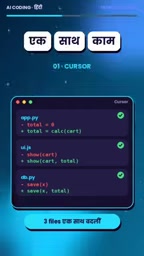
According to the video, Cursor is positioned as an "AI Code Editor," with the core capability of working on multiple files simultaneously. This is the key distinction from traditional IDE completion plugins—in real projects, a single feature change often spans the model layer, the interface layer, and test files, and single-file completion can't handle this kind of cross-file coordination.

The key to understanding Cursor lies in distinguishing its technical approach from VS Code completion plugins. Traditional completion plugins (like early Copilot) mostly use single-file context, with the model seeing only the code near the cursor; Cursor, by contrast, builds codebase indexing within the editor, vectorizing the entire project's file structure, symbol references, and dependencies and providing them to the model, thereby enabling cross-file retrieval and editing. On this foundation, it enables simultaneous multi-file rewriting through modes like "Composer" and allows developers to review each change in diff form. This approach of introducing retrieval-augmented generation (RAG) into the IDE is the fundamental reason it can handle scenarios like "a single feature spanning the model layer, interface layer, and test files."
Cloud Code: A Coding Agent That Runs Tests
The second tool is Cloud Code, which the video classifies as a "Coding Agent." Its behavior pattern is closer to that of a junior engineer: understanding file structure, modifying code, and running tests to verify whether changes hold up.
The detail about "running tests" is crucial. It means the tool's output is no longer a suggestion requiring manual verification, but an execution process with a built-in feedback loop.
The watershed between a Coding Agent and traditional code generation tools lies in the "feedback loop." Ordinary generative models output code once and end the task, with correctness entirely dependent on manual verification; the Agent form autonomously plans steps: reading repository structure, locating relevant files, proposing changes, executing commands (such as running tests or builds), and then iteratively correcting based on error information returned from the terminal until verification passes. This pattern relies on the model's tool-calling (function calling) capabilities and access to the execution environment, typically running in an isolated sandbox or container to control risk. For this reason, the Agent's output is no longer a "suggestion" but a change result that has been self-verified, and the human role shifts upward from "checking code line by line" to "reviewing the final diff and design intent."
OpenAI Codex: Undertaking Large-Granularity Software Tasks
The third is OpenAI Codex, which the video describes as handling "large software tasks," covering new feature development, bug fixes, and testing, among other areas.

Looking at the three tools together reveals a clear layering: the editor layer (Cursor) handles context coordination for daily coding, the Agent layer (Cloud Code) handles execution with verification, and the task layer (Codex) handles large-granularity feature delivery. They are not substitutes for one another but cover different depths of the software development chain.
OpenAI Codex's capabilities have undergone a clear morphological shift: the early Codex model (2021) was a code completion model powering GitHub Copilot, essentially a code-specialized large language model; in the current Agent-oriented context, Codex refers more to an intelligent agent form capable of autonomously executing long-cycle tasks—it can be assigned an Issue or feature requirement, independently complete coding in the background, run tests, and submit a Pull Request. The difference between this "task-level" positioning and in-editor assistance lies in delivery granularity: the former faces "get this feature done," while the latter faces "help me write this line/this function." The larger the task granularity, the higher the demands on the model's long-range planning, context retention, and self-correction capabilities.
Why AI Won't Replace Programmers
The video gives a negative answer to the question of whether AI will replace humans, and the reasoning deserves elaboration.
It lists three things that must be done by humans: giving correct instructions, checking security, and verifying results. These three things correspond precisely to three weak points in AI coding—deviations in requirement understanding, judgment of security boundaries, and final endorsement of output quality.
AI can write code that runs, but between "it runs" and "it should go live" lie security review, business logic correctness, and long-term maintenance costs. These judgments depend on understanding business context and weighing risks, and for now they still fall on the human side.
The video sums up this collaborative relationship in one sentence: human creativity plus AI capability equals new technology. This formula isn't novel, but it accurately describes the current state of human-machine division of labor—humans set direction and acceptance criteria, and AI bears the execution density.
From a software engineering perspective, AI coding tools still touch on the "code production" link, while the complete chain of software delivery includes requirement clarification, architecture design, security compliance, regression testing, and online operations, among many other links. A commonly cited observation in the industry is that writing code accounts for only a small portion of a developer's time, with a great deal spent on understanding legacy systems, aligning requirements with others, and troubleshooting online issues. In addition, AI-generated code introduces supply chain risks—dependency version selection, license compliance, potential injection vulnerabilities—all of which require people with domain knowledge to gatekeep. Therefore, a more accurate judgment is not "replacement" but a shift in the center of gravity of division of labor: human effort moves from producing code to defining problems, setting acceptance criteria, and bearing ultimate responsibility.
An Open Question Worth Pondering
The video ends with an interactive question: which of these three tools is the strongest?
There's no standard answer, because "strongest" depends on the task type. For daily business code, the editor's context coordination experience matters more; for changes requiring automated verification, the Agent form is more suitable; for large-granularity feature development, task-level tools are more on point.
What's truly worth noting isn't the ranking, but that such tools are changing how developers work: from writing line by line to describing intent, reviewing output, and controlling quality. This shift doesn't lower the demands on developers but changes their direction—architectural judgment and acceptance capability become more important than typing speed.
One-line Summary
AI coding tools have evolved from code completion into agents that can modify across files, run tests, and take on projects—but humans still need to gatekeep.
Paragraph Summary
Using a Hindi video as a starting point, the article discusses the qualitative leap in AI coding tools' capabilities: from single-line code completion to understanding multi-file context, proactively modifying code, running tests, and even building projects from scratch. It names three representative tools—Cursor positioned as a multi-file parallel AI code editor, Cloud Code as a Coding Agent that understands file structure and runs tests to verify changes, and OpenAI Codex undertaking large-granularity tasks such as new feature development, bug fixes, and testing. Together they form a layered landscape of editor layer, Agent layer, and task layer, rather than substitutes for one another. The article also emphasizes that AI won't replace programmers, because giving correct instructions, checking security, and verifying results still require humans; the actual state of human-machine division of labor is that humans set direction and acceptance criteria while AI bears the execution density.
Related articles

From 0 to 1: Vibe Coding an AI Knowledge Base — A Practical Retrospective and Tech Stack Breakdown
A retrospective on building the AI knowledge base OilBook from scratch with Vibe Coding: Next.js+Neon stack, Oil Dev Skill workflow, Stripe paywall security, interview-style writing, AI-flavor control, and Vercel deployment.

GLM-5.4 Hands-On: Native Vision Meets a New Vibe Coding Workflow
Hands-on with Zhipu GLM-5.4: native vision tested across a 3D product demo, pure-code video generation, and remote-control Vibe Coding, compared with GPT-6.2 and Gemini Neon.

AI and Humans Claim to Prove the Riemann Hypothesis: Machine-Verified, Yet Nobody Can Understand It
Anthropic mathematician and AI Claude claim to prove the Riemann Hypothesis with 17 million lines of Lean code, machine-verified but unreadable by humans. This article analyzes the event, the zero proportion record from 41.6% to 67.2%, and the gap between machine verification and human understanding.