Can You Build AI Workflows Without Writing Code?

Visual tools make building AI workflows possible without programming, but engineering thinking remains the key to the ceiling.
Visual AI workflow tools use a "node + connection" model to let non-technical users combine AI capabilities, applications, and data flows like building blocks to accomplish real business tasks. A typical automation flow starts with a trigger, goes through AI nodes for content processing, connects to data spreadsheets for storing results, and ends with a notification. However, no code doesn't mean zero configuration—users still need to configure, test, and maintain, and understand engineering concepts like inputs/outputs and exception handling. This pattern is best suited for medium-complexity business automation such as email classification and form extraction.
Can You Build AI Workflows Without Writing Code?
When people hear "AI automation," their first reaction is often: doesn't that require programming skills? But that's not always the case. Visual tools are making it increasingly feasible to build AI workflows.

A business user with no programming background can combine AI capabilities, application connections, and data flows like building blocks to accomplish real business tasks. This article breaks down how visual AI workflows actually operate, what they can do, and where their boundaries lie.
How Visual Tools Build AI Workflows
The core logic behind visual workflow tools isn't complicated. They abstract each operational step into a "node," and you connect nodes with lines to form an automated pipeline.
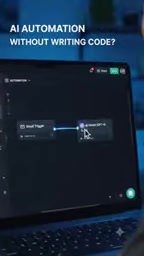
The whole process typically starts with a trigger—such as receiving a new email, a form being submitted, or a scheduled task being activated. After the trigger, you can connect an AI node that lets the model classify, summarize, generate replies, or extract structured information from content. Then you connect a spreadsheet or other data store to write or read results. Finally, you wrap up with a notification (email, Slack message, SMS, etc.).
The typical value of this pattern: a new email arrives, triggering the entire pipeline to run automatically—AI analyzes the content, updates the spreadsheet, sends a notification, all without manual step-by-step operation.
Trigger is the starting point of any automated workflow, essentially an "event listener." It continuously waits for a preset condition to be met, and once that condition is satisfied, it launches the entire pipeline. Common trigger types include: event-driven (such as receiving a new email, form submission, file upload, Webhook being called), time-driven (such as daily scheduled execution, running at a fixed time each week), and state-change-driven (such as a new row being added to a spreadsheet, a database field being updated). The key difference between a trigger and an ordinary node is that it doesn't require upstream input—instead, it's "awakened" by external events. Understanding trigger types and trigger conditions is the first step in building any automation flow, because it directly determines when and how frequently the workflow runs.
Nodes and Connections: The Operating Logic of Workflows
To understand visual workflows, the key is understanding the division of labor between "nodes" and "connections."

Each node is responsible for just one step. Trigger nodes listen for events; AI nodes call models for reasoning or generation; data nodes read and write spreadsheets and databases; notification nodes push results to relevant people. Node design follows the "single responsibility" principle, which makes each part easy to understand and replace.

Connections define the flow of data and control. It's these connections that make independent nodes work together, forming a complete business logic chain. From another angle, connections are the visual representation of "call relationships" and "data passing" in traditional programming.
Field Mapping is the substance of the connections between nodes. When we say "connect the output of node A to the input of node B," what's actually happening is mapping a specific field produced by A (such as email body text or a customer name extracted by AI) to the position B requires (such as a particular column in a spreadsheet). Visual tools typically provide dropdown menus or drag-and-drop to complete the mapping, but field type mismatches (such as putting text into a date column) or inconsistent field names can directly cause the flow to fail. This is also why "no code" still requires configuration—mapping relationships must be judged and specified by humans; tools can only execute, not understand semantics.
"No Code" Doesn't Mean "Zero Configuration"
This is the most easily misunderstood point. Visual tools do save you from hand-writing traditional code for every step, but that doesn't mean building and maintaining workflows comes at zero cost.
You still need to do three things:
- Configure: Set trigger conditions, AI node prompts or parameters, and data field mappings. These configurations determine whether the workflow executes correctly.
- Test: Run it with real data to check whether AI output meets expectations, whether fields are misaligned, and whether edge cases cause errors.
- Maintain: When business logic changes, APIs update, or data formats adjust, the workflow needs to be updated accordingly.
In other words, visual tools lower the barrier of programming syntax, not the barrier of engineering thinking. You still need to understand inputs and outputs, exception handling, and data flow—it's just that a graphical interface replaces the code editor.
Prompt Engineering plays a critical role in AI nodes, and its importance is no less than that of core logic in code. The output quality of an AI node depends almost entirely on prompt quality, including: whether instructions are clear, whether sufficient context is provided, whether output format is specified (such as "return in JSON format"), and whether examples are given. In visual workflows, despite the friendly interface, prompt debugging is still meticulous work requiring repeated experimentation. A poorly worded prompt can cause unstable AI output, which in turn causes downstream nodes to error out due to data format mismatches. Therefore, mastering basic prompt-writing principles is a necessary prerequisite for using AI nodes.
Who This Pattern Suits—and Who It Doesn't
The sweet spot for visual AI workflows is medium-complexity business automation: email classification and auto-replies, form data extraction and storage, content summarization and distribution, simple cross-application data synchronization. These tasks have clear logic and limited steps, making them very intuitive to express through node connections.
But if the flow involves deeply nested conditional branches, large-scale data processing, custom algorithms, or high-concurrency scenarios, visual tools often fall short—the node graph becomes extremely bloated, debugging becomes difficult, and performance is less than ideal. In these cases, traditional code remains the more appropriate choice.
A practical rule of thumb: if you can sketch out the entire logic in a flowchart within a few minutes, visual tools will probably suffice; if halfway through you find branches tangled and you need to keep backtracking, that might be a signal to consider writing code.
Summary
AI workflows don't necessarily require writing code—visual tools turn "connecting apps + adding AI + automating business tasks" into drag-and-drop and configuration work. But what they liberate you from is the syntax burden, not the thinking burden. Configuration, testing, and maintenance still exist, and understanding the operating logic of nodes and connections remains a fundamental skill. Tools lower the barrier, but engineering thinking determines the ceiling.
One-line Summary
Visual tools make building AI workflows possible without programming, but engineering thinking remains the key to determining the ceiling.
Paragraph Summary
Visual AI workflow tools use a "node + connection" model to let non-technical users combine AI capabilities, applications, and data flows like building blocks to accomplish real business tasks. A typical automation flow starts with a trigger, goes through AI nodes for content processing, connects to data spreadsheets for storing results, and ends with a notification. However, no code doesn't mean zero configuration—users still need to configure, test, and maintain, and understand engineering concepts like inputs/outputs and exception handling. This pattern is best suited for medium-complexity business automation such as email classification and form extraction; for complex branches, large-scale data processing, or high-concurrency scenarios, traditional code remains the more appropriate choice. What visualization lowers is the syntax barrier, while engineering thinking determines the workflow's ceiling.
Related articles

Chain of Thought Isn't Just for AI: How Humans Can Use CoT to Improve Thinking Quality
Chain of Thought isn't just a prompt trick for large models. Starting from a Hacker News discussion, this article analyzes why CoT works for human thinking too, breaks down actionable ways to transfer it, and highlights the key differences between human CoT and machine CoT.
Cloudflare Teams Up with OpenAI: Closi…
Cloudflare Teams Up with OpenAI: Closing the Loop from Vulnerability Discovery to Defense with AI
Cloudflare uses OpenAI Daybreak to investigate security vulnerabilities and generate reviewable remediation plans, while developers use Codex to boost coding efficiency and quality.

Orca Multi-Agent Orchestration in Practice: A Guide to Parallel Collaboration with Claude and Codex
Orca is Stable AI's free open-source agent workbench supporting 34 agents like Claude Code and Codex in parallel. Learn its Git worktree isolation, multi-model orchestration, and mobile management.