CC Switch Hands-On: One-Click Switching Between Claude Code, Codex, and More API Providers

CC Switch lets developers one-click switch API providers across Claude Code, Codex, and Gemini CLI from a single GUI.
CC Switch is an open-source desktop app designed for developers who use multiple command-line AI coding tools like Claude Code, Codex, and Gemini CLI. It consolidates API endpoints and credentials into a single GUI for one-click provider switching, eliminating manual JSON editing. It also syncs MCP servers, skills, and prompts across agents. As it manages API keys and rewrites local configs directly, backing up configurations and practicing good key hygiene are essential.
When working with command-line AI coding tools like Claude Code, Codex, and Gemini CLI, many developers end up connecting to multiple API providers simultaneously — official channels, third-party proxies, or locally deployed models. Constantly switching between them means repeatedly editing config files and environment variables, where a single formatting mistake can break the tool entirely. CC Switch is an open-source desktop application built specifically to solve this pain point.
What Is CC Switch
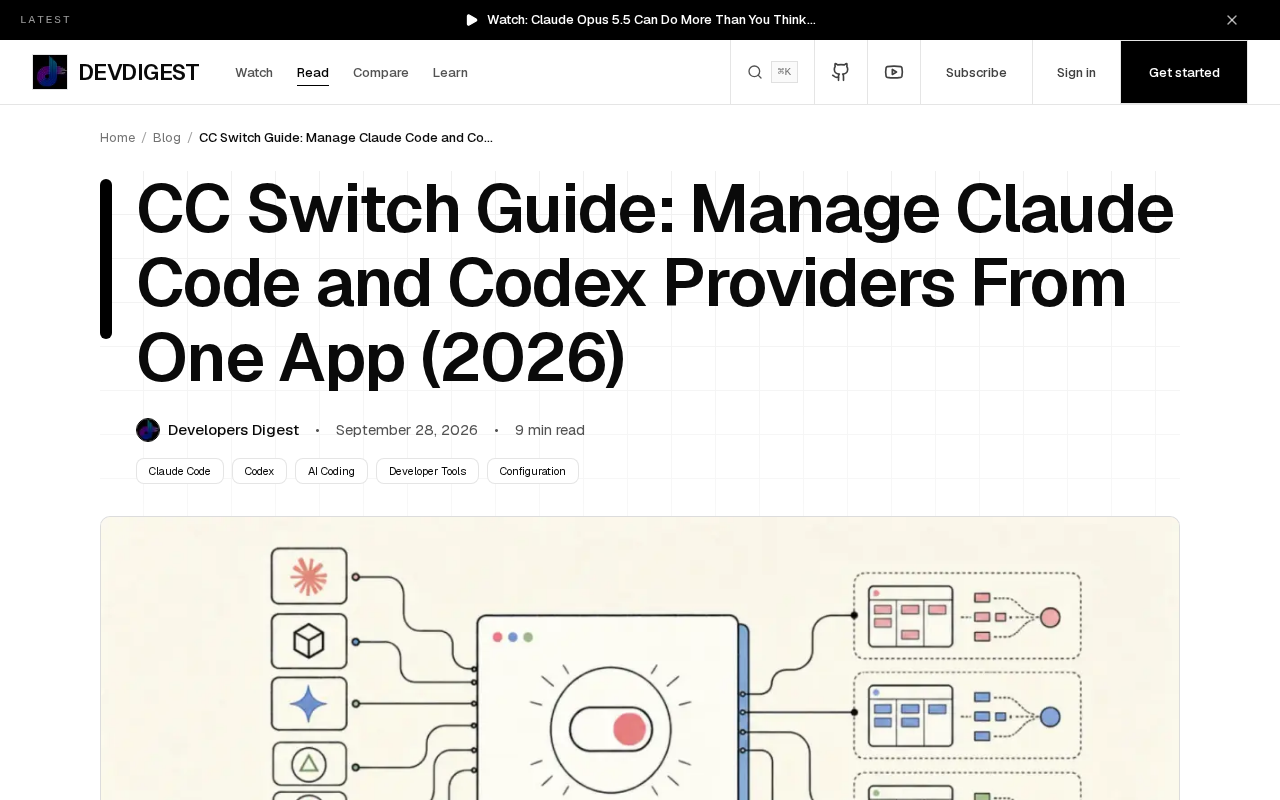
CC Switch is an open-source desktop application whose core capability is one-click API provider switching. It supports ten mainstream AI coding agents, including Claude Code, Codex, and Gemini CLI — covering the majority of today's command-line agent ecosystem.
For developers managing multiple provider accounts, it consolidates credentials and endpoint information that would otherwise be scattered across various config files into a single graphical interface. Switching from the official Anthropic endpoint to a third-party proxy service requires just one click in the app — no need to open a terminal and manually edit settings.json or export environment variables.
Beyond provider switching, CC Switch also syncs MCP servers, skills, and prompts across different agents. This means the MCP toolset you've configured in Claude Code can be reused directly in Codex or other agents, eliminating the need for redundant configuration.
MCP (Model Context Protocol) is an open protocol proposed by Anthropic that standardizes how AI models interact with external tools and data sources. In short, an MCP server acts like a "skill plugin" attached to an AI agent, enabling it to access the file system, query databases, execute code, and more. As major AI coding tools increasingly adopt MCP as the standard for tool integration, a configured MCP server set can theoretically be reused across tools — and CC Switch's sync feature is built on exactly this interoperability.
What Problem Does It Solve
Configuration for command-line AI coding tools tends to be fragmented and inconsistent in format. Claude Code has its own config structure, Codex has another, and Gemini CLI differs yet again. When you need to switch between multiple providers, manual editing comes with several common pain points:
- Error-prone: JSON format is sensitive — a single misplaced comma or quote can cause the tool to crash.
- Inefficient: Every switch requires remembering the config paths and field names for each different tool.
- Hard to reuse: Assets like MCP servers and prompts can't be shared across agents, leading to repeated work.
CC Switch abstracts all of this behind a unified interface. Switching providers becomes a button click, and syncing configuration across tools no longer requires manual file copying. For power users mixing multiple agents, this kind of tool can significantly reduce maintenance overhead.
How to Install and Use It
As an open-source desktop application, CC Switch offers cross-platform installation. Once installed, it reads the existing configuration from Claude Code, Codex, and other tools on your machine, importing the current provider information into the management interface.
The basic workflow is three steps:
Step 1: Add Your Providers
Enter your API provider details in the app, including endpoint URLs and keys. CC Switch creates a separate configuration profile for each provider.
Step 2: One-Click Switching
For your target agent (such as Claude Code or Codex), select the provider you want to activate and click switch. The app automatically rewrites the underlying configuration for that tool — no manual file editing required.
Step 3: Sync Shared Assets
To reuse MCP servers, skills, or prompts across multiple agents, use the sync feature to push them out in one go, keeping all your tools' configurations consistent.
Security Considerations
Since CC Switch directly manages API keys and rewrites local configuration files, security is an aspect that shouldn't be overlooked.
As an open-source tool, its code is available for audit — a trust advantage over closed-source alternatives, since you can verify exactly how keys are stored and used. That said, in practice it's still advisable to: back up your existing configuration before using it, to avoid accidental overwrites during a switch; keep the API keys you enter secure, especially credentials for third-party proxy services; and do a quick validation after switching to confirm the target agent can successfully connect to the new provider before putting it into real use.
Third-party proxy services (also known as API proxies or relay APIs) are forwarding layers set up by unofficial parties that route requests to original endpoints like Anthropic or OpenAI. They're typically used to work around regional access restrictions or to offer usage credits at lower prices. When using such services, the full content of your API requests — including the code and prompts you send to the model — passes through the proxy operator's servers, creating potential data privacy risks. Before entering proxy service credentials into any third-party management tool (including CC Switch), it's worth assessing the trustworthiness of that proxy service itself, and creating separate keys with minimal permissions for different providers to limit the fallout from any single key being compromised.
Overall Assessment
CC Switch has a clear focus: solving the configuration switching and asset sync challenges that arise when working with multiple agents and multiple providers. For users who stick to a single tool and a single provider, its value is limited — but for developers who regularly use Claude Code, Codex, and Gemini CLI while tapping into multiple API channels, it compresses tedious manual configuration work into a few clicks, making it a worthwhile addition to any power user's toolkit.
Its open-source nature also makes it a better fit for teams that require transparency in how their configurations are managed. As command-line AI coding agents continue to multiply, the practical value of unified management tools like this will only grow more apparent.
Related articles

How Big Can Stars Really Get? The Physical Limits of the Largest Stars
Red supergiants are the largest stars by volume, with radii up to 2,000 times the Sun, engulfing the inner solar system. But there is no precise upper limit on stellar size—models predict up to 15,000 solar radii. The most massive blue stars are far smaller than red supergiants—biggest and heaviest are two different things.

Apple HomeView Smart Display Full Feature Breakdown: Wall-Mount or Desktop, $299
Apple launches HomeView, a $299 smart display with wall-mount and desktop options, 12MP camera for facial recognition, smart home control, music playback, and recipe step-by-step cooking. Full breakdown of watch faces, apps, privacy, and cooking integration.

Where Did the Promised New Studio Go? Craft Computing Answers After Five Years
Craft Computing's host responds to viewer questions: the new studio promised five years ago was shelved as construction costs soared from $30,000 to $75,000, and was replaced by a 168-square-foot garage conversion.