Chatbots vs. AI Agents: Key Differences and How to Choose

Chatbots give advice, agents deliver results; choosing wrong wastes time or creates risk.
The article clearly distinguishes chatbots from AI agents: chatbots only produce text, while agents add tools, memory, and workflow on top of the language model and can actually execute tasks. Through four scenarios—inbox cleanup, meeting scheduling, expense filing, and research—it shows how agents save clicks rather than just thinking time. It also stresses that agent errors have real consequences and may occur before you notice, so follow least-privilege principles, require confirmation before irreversible actions, and start with a chatbot before gradually delegating. The criterion is simple: need an answer—chatbot; need it done—agent.
Many people conflate chatbots and AI agents—both use a text input box as their interface and both are called "AI assistants." But choose the wrong tool, and you'll either waste hours copying and pasting, or hand over your email and calendar permissions too early to a system that isn't ready to shoulder the responsibility.
The Essential Difference in One Sentence
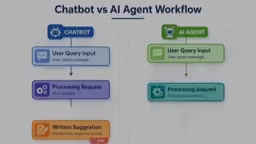
A chatbot is a conversationalist: you type, it answers, and the process ends there. Its output is always text. Even if it says "I've scheduled your Thursday meeting for you," that's just a sentence in the chat window—nothing has happened on your calendar. You're still the one who actually executes: copy, paste, click send.
An agent adds three things on top of that: tools ("hands" like email, calendar, browser, spreadsheets), memory (remembering your preferences and what's already been done), and workflow (accept a goal, make a plan, call tools, check results, decide the next step—looping until done or until it asks you for help).
The way you communicate exposes the difference: with a chatbot you ask "How should I write this reply to the client?", with an agent you say "Reply to this client, suggest Thursday 2 p.m., and add it to my calendar." The former gives advice, the latter gives results. As the video's analogy puts it: a chatbot is a smart advisor sitting across from you offering ideas; an agent is an assistant who takes your instructions, runs off to another computer, gets the job done, and comes back to report.
Four Scenarios That Show the Gap
Cleaning up your inbox. With a chatbot, you have to paste twenty emails into the chat box; it tells you which are urgent and drafts a few replies, but you still have to copy and process each one. An agent connected to your mailbox can read new emails directly, tag them, archive subscription mail, prepare replies in your writing style, and then give you a summary—by the time you open your inbox, the sorting is already done.
Scheduling a meeting. A chatbot gives you three polite phrasings. An agent checks your availability, sends the invitation, automatically adjusts when the other party changes the time, and confirms at the end.
Filling out expense reports. A chatbot organizes your receipts into a table, but you still have to enter each item into the system. An agent opens the form, fills in each expense, attaches the receipts, and then stops before submitting for you to check.
Researching information. A chatbot answers from its training knowledge, which may be outdated. An agent can search multiple sources, open web pages, compile key data into a table, and record the source of each piece of information so you can verify it yourself.
The pattern is clear: chatbots save you thinking time; agents save you clicks.
Greater Capability, More Tangible Risk
This is the part most tutorials skip. When a chatbot errs, the worst outcome is a bad piece of text—just delete it. When an agent errs, it might be an email already sent, a file already deleted, a purchase you didn't want.
There are three main types of risk. First, errors have real consequences: the model may misunderstand instructions or misread a web page; with a chatbot you can see the error before any action occurs, but an agent may have already finished before you notice. Second, permissions are too broad: every tool you connect is a capability it may use—and may be abused—so grant only what's necessary, prefer read-only access, give a single folder rather than the whole drive, and use a separate account for testing. Third, untrusted content: instructions hidden in web pages or emails may induce the agent to follow them.

Hence a golden rule: an agent must ask before performing irreversible operations—messaging people outside the team, spending money, deleting data, submitting forms with legal or financial consequences. A good system gives you a preview first and executes only after you confirm. If a tool doesn't offer this step, think twice before entrusting it with anything important.
The practical advice is to proceed step by step: first have it sort subscription emails rather than reply to clients for you; check manually for a few weeks, then gradually delegate more. Trust must be earned incrementally.
Prompt Injection is a type of attack specific to agents: untrusted content (such as web pages or email bodies) may embed carefully crafted instructions that induce the model to execute them as legitimate commands. Unlike traditional chatbots, agents have tool-calling capabilities; once hijacked by injected instructions, an attacker may thereby get the agent to read sensitive data, send emails, or perform other actions. Defenses include: treating external content as untrusted input, limiting tool permissions, requiring user confirmation before sensitive operations, and validating outputs. Understanding prompt injection is a key prerequisite for assessing an agent's security boundary.
Which One Should You Choose

If your work is mainly thinking and writing—drafting documents, learning, brainstorming, explaining concepts—choose a chatbot. You'll have to review the results yourself anyway, and it's simpler, cheaper, and safer. If you have repetitive, multi-step tasks spanning multiple apps—organizing messages, scheduling, entering data, weekly routines that follow a fixed checklist—an agent is the better fit.
A practical signal: when you keep copying and pasting between a chat window and other programs, that task is probably one you should hand to an agent.
For most people, the honest answer is you need both, but in the right order. Start with a chatbot, practice giving good instructions and judging output quality; then pick a dull, repetitive task to hand to an agent, and be sure to enable confirmation for important operations. The self-check question from the video is simple: do I need an answer, or does this thing actually need to get done? Need an answer—use a chatbot; need it done—use an agent.
Principle of Least Privilege is a fundamental principle in information security: any entity should have only the minimum permissions necessary to complete its task. In the agent context, this means preferring read-only access when connecting tools, limiting the scope of access (such as a single folder rather than the whole drive), using a separate account for testing, and avoiding granting permanent permissions for high-risk operations like deletion or payment. Following this principle can significantly reduce the damage caused when an agent misunderstands instructions, is hit by prompt injection, or behaves unexpectedly.
Related articles

Anthropic's IPO Crisis: Why $16.8B in Revenue Can't Buy a High Valuation
Anthropic posted $16.8B in Q3 revenue with 85% gross margin yet faces a cut to its IPO valuation. A deep dive into halved growth, the token price war, circular financing, and the clash between safety ideals and capital reality.

Anthropic Races Toward the Largest IPO in History: Can a $100 Billion Raise Ignite the AI Investment Boom?
Anthropic may file its prospectus as early as October 23, aiming to raise up to $100 billion at a valuation of up to $2 trillion, potentially the largest IPO ever. Q3 revenue hit $16.8 billion, up nearly 50% quarter over quarter, with adjusted profitability, but slowing growth has led some investors to cut valuation to $1.5 trillion. The IPO is a key test of whether the AI investment boom can continue.

Bessemer Partner on Anthropic IPO: The Public's First Direct Investment in AI Software
Bessemer partner Byron Theta on the Anthropic IPO: why it's called the moment everyone's been waiting for, the $650M four-round investment, the LP liquidity bind, and expectations of a 2027 IPO wave—plus open-source model pricing pressure, existential risk disclosures, and what the founders' 50.1% voting structure means for ordinary investors.