Chatbox Open-Source AI Client: A Comprehensive Review of the Multi-Model Aggregation Tool with Nearly 40K Stars
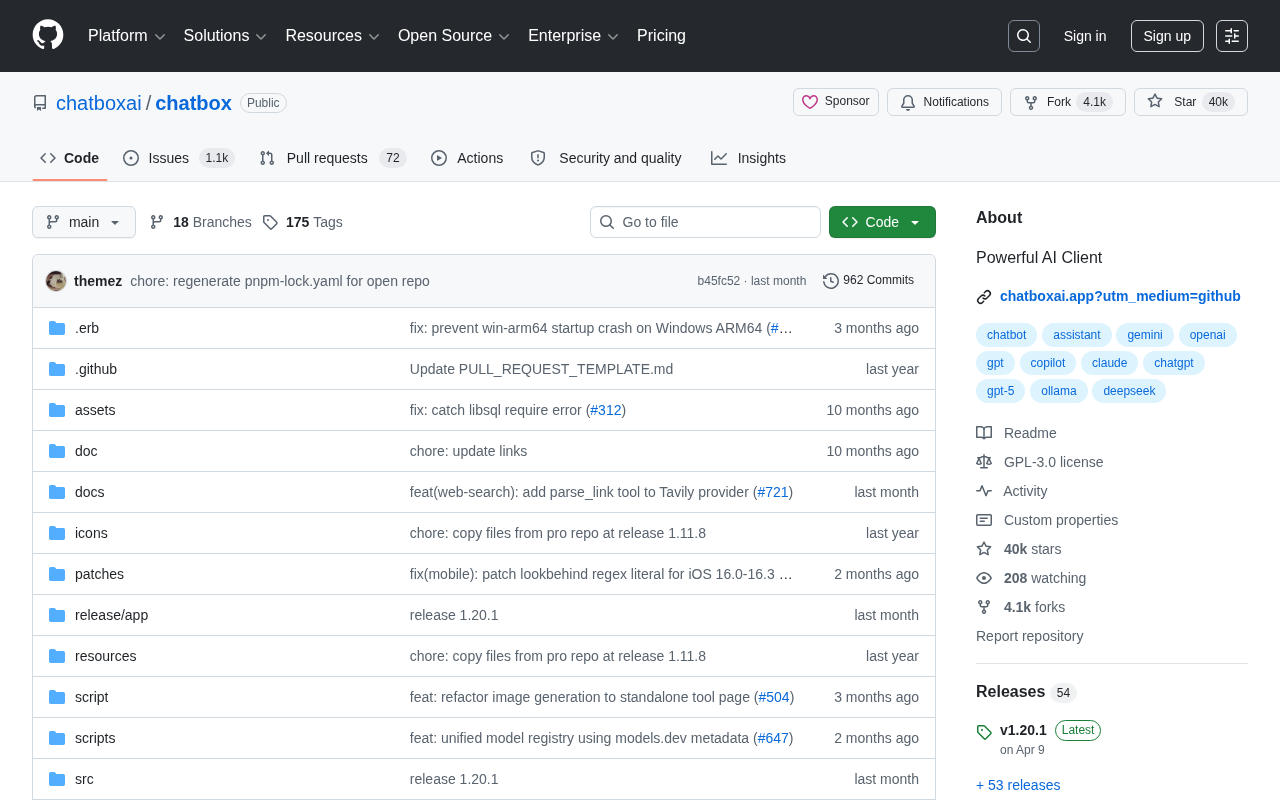
Chatbox is an open-source multi-model AI desktop client focused on local-first design and privacy protection.
Chatbox is an open-source AI desktop client with nearly 40K GitHub Stars, built with TypeScript and Tauri framework, supporting Windows, macOS, and Linux. It integrates cloud models like OpenAI, Claude, and Gemini alongside local models via Ollama into a unified interface, solving the pain point of AI model ecosystem fragmentation. With fully local data storage ensuring user privacy, it serves diverse use cases for developers, content creators, and enterprise users.
What is Chatbox: Project Overview
Chatbox is an open-source AI client desktop application hosted on GitHub that has earned nearly 39,800 Stars and over 4,000 Forks, firmly establishing itself among the most popular AI desktop clients. Built with TypeScript, it offers cross-platform capabilities and a rich feature set, providing users with a unified, efficient AI interaction interface.
In an era where large language models are flourishing, users face an inescapable pain point: different AI service providers have different web interfaces, different API endpoints, and different user experiences. Chatbox was created to solve exactly this problem — it integrates multiple AI models into one elegant desktop application, allowing users to freely switch between and centrally manage them, eliminating the hassle of constantly jumping between multiple browser tabs.
The Fragmentation of the AI Model Ecosystem
To understand Chatbox's value, we first need to understand the current AI model market landscape. In 2024-2025, the AI large model market is highly fragmented. OpenAI's GPT series, Anthropic's Claude series, Google's Gemini series, Meta's Llama series, as well as Chinese models like DeepSeekAd, Qwen, and GLM each have their own strengths: GPT-4o excels in multimodal understanding, Claude 3.5 Sonnet leads in long-text processing and code generation, Gemini has unique advantages in multilingual and search integration, while open-source models are irreplaceable for cost control and private deployment. No single model dominates across all tasks, and users often need to choose the most suitable model for specific scenarios. This "battle of a hundred models" is precisely why multi-model aggregation clients like Chatbox exist.
Chatbox Core Features and Capabilities
Extensive Multi-Model Support
Chatbox's biggest highlight is its excellent model compatibility. Users only need to configure an API Key to access a wide range of AI services including OpenAI (GPT-4o, GPT-4, GPT-3.5), Anthropic Claude, Google Gemini, and various open-source models. If you've deployed large models locally through Ollama or LM Studio, Chatbox can seamlessly integrate with them as well.
About the API Key Mechanism: An API Key is a secret string used by AI service providers for authentication and billing. When a user configures an API Key in Chatbox, the application sends the user's prompts to the corresponding provider's API endpoint via HTTP requests, and the provider returns model-generated results after verifying the Key's validity. The advantages of this approach are: users pay based on actual usage (typically billed by Token count), avoiding the fixed costs of subscription plans; and they can finely control model parameters (such as temperature, top_p, max_tokens, etc.) for a more flexible experience than web interfaces. A Token is the basic unit by which large language models process text — a Chinese character typically corresponds to 1-2 Tokens, while English words average about 0.75-1 Token.
About Local Model Deployment: Ollama and LM Studio are currently the two most popular tools for running large models locally. Ollama is a command-line tool that supports one-click downloading and running of open-source models like Llama 3, Mistral, Qwen, and Phi, automatically handling complex configurations like model quantization and GPU acceleration, and launching a local service endpoint compatible with the OpenAI API format. LM Studio provides a graphical interface where users can browse, download GGUF format models from Hugging Face and run them directly. Both support running quantized models on consumer-grade hardware — for example, a 7B parameter model with 4-bit quantization requires only about 4GB of VRAM. Chatbox connects to these local services through OpenAI API-compatible standard interfaces, enabling a completely offline, zero-data-leakage AI experience.
In a nutshell: One client to handle all your AI conversation needs.
Cross-Platform Desktop Experience
As a desktop application built with TypeScript, Chatbox supports all three major operating systems: Windows, macOS, and Linux. TypeScript is a superset of JavaScript that adds a static type system, catching many potential errors at compile time, making it particularly suitable for building large, complex frontend applications. Chatbox uses the Tauri framework under the hood (earlier versions used Electron). Tauri is a cross-platform desktop application framework that has risen in recent years. Unlike Electron, it uses the operating system's native WebView rather than bundling a Chromium browser, resulting in much smaller package sizes (typically one-tenth of Electron apps), lower memory usage, and faster startup times. This technical choice allows Chatbox to achieve near-native performance while maintaining the development efficiency of web technologies.
Compared to web-based interfaces in browsers, desktop clients have clear advantages:
- Faster Response: Native applications launch and interact more smoothly without being dragged down by browser performance
- Stronger Privacy: API Keys are stored locally, and conversation data doesn't pass through third-party servers
- Offline Support: Combined with local models, fully offline usage is possible — AI works even without internet
- System Integration: Supports native features like global hotkeys and system notifications
Data Privacy and Local Storage
Chatbox adheres to a data localization principle by design. All conversation records, configuration information, and API keys are stored on the user's local device and are never uploaded to any cloud server. This is crucial for enterprise users and privacy-conscious individual users.
Data Localization refers to the practice of restricting data storage and processing to the user's local device or a specific geographic region. Globally, the EU's General Data Protection Regulation (GDPR), China's Personal Information Protection Law, and various U.S. state privacy laws all impose strict requirements on the collection, storage, and cross-border transfer of personal data. For enterprise users, conversation content when using cloud-based AI services may contain trade secrets, customer information, or internal strategies — once data passes through third-party servers, there are risks of leakage and compliance violations. Chatbox's local storage architecture means API Keys, conversation history, and user configurations are all saved as files on the local machine. Even when using cloud model APIs, only the current conversation content is sent to the model provider, and historical records are not retained by third parties.
In an environment where data security is increasingly valued, this "local-first" design philosophy sets Chatbox apart from many other AI clients.
Why Chatbox Has Earned Nearly 40K Stars
Precise Product Positioning
Chatbox addresses a real and widespread need: a unified AI interaction entry point. With the explosive growth in AI model numbers, users desperately need a "universal remote control" to manage and invoke different AI services, and Chatbox fills exactly this gap.
Active Open-Source Community
Over 4,000 Forks demonstrate a very high level of community participation. The open-source model brings continuous feature iterations and builds user trust — the code is completely transparent, anyone can audit its security, and there's no need to worry about backdoors or data leaks.
In the GitHub ecosystem, Stars and Forks are two core metrics for measuring an open-source project's influence. Stars are similar to "likes" or "bookmarks" on social media, reflecting the developer community's attention and approval; a project with nearly 40K Stars is already at the top tier on the entire GitHub platform (projects with over 30K Stars account for less than 0.01% of all GitHub projects). Forks mean users have copied the project's code to their own repositories, typically for secondary development, code contributions, or customization. Over 4,000 Forks indicates that a large number of developers are not only using Chatbox but actively participating in its ecosystem. The high Fork/Star ratio (approximately 10%) shows that the project's community engagement depth far exceeds that of typical "spectator-type" open-source projects.
Balance Between Features and Usability
In the AI tools space, many open-source projects are feature-rich but have rough interfaces and high learning curves. Chatbox strikes just the right balance between feature richness and interaction friendliness — even users without technical backgrounds can get started quickly.
Chatbox Use Cases
- Developers: Quickly test API responses from different models, compare model performance and quality side by side
- Content Creators: Leverage AI-assisted writing, translation, and brainstorming to boost creative productivity
- Enterprise Users: Access AI capabilities while ensuring data security and meeting compliance requirements
- AI Enthusiasts: Be the first to explore and experience the latest AI models as they're released
- Educators: Integrate AI into teaching scenarios as an intelligent assistant tool
Chatbox vs. Other AI Clients
In the AI client space, Chatbox's main competitors include the official ChatGPT client, Jan, Open WebUI, and others. Here's a comparison across key dimensions:
| Feature | Chatbox | ChatGPT Official | Jan |
|---|---|---|---|
| Multi-model support | ✅ | ❌ (OpenAI only) | ✅ |
| Local model integration | ✅ | ❌ | ✅ |
| Data localization | ✅ | ❌ | ✅ |
| Cross-platform support | ✅ | ✅ | ✅ |
| Community activity | Very High (~40K Stars) | N/A | High |
From an overall experience perspective, Chatbox leads among similar tools thanks to its more mature product polish and larger community scale.
Conclusion: Is Chatbox Worth Using?
Chatbox represents an important direction in AI tool evolution: from single-model lock-in to multi-model aggregation, from cloud dependency to local-first. Its achievement of nearly 40K Stars proves both the product's strength and reflects the market's strong demand for a unified AI client.
As the AI model ecosystem continues to expand, multi-model aggregation clients like Chatbox will only become more important. If you frequently use multiple AI models daily or have high requirements for data privacy, Chatbox is absolutely worth trying.
Key Takeaways
- Chatbox is an open-source AI client with nearly 39,800 GitHub Stars, supporting integration with multiple mainstream AI models
- Built with TypeScript on the Tauri framework for cross-platform desktop applications supporting Windows, macOS, and Linux, with fully local data storage to ensure privacy
- Supports cloud models like OpenAI, Claude, and Gemini as well as local models via Ollama, providing a unified AI interaction entry point
- Precisely addresses the core need for a unified management tool in the multi-model era, with extremely high community activity
- Represents the trend of AI tools evolving from single-model lock-in to multi-model aggregation and from cloud dependency to local-first
Related articles
 Product Reviews
The Programmer's Desk Setup Guide: Building a Workspace That Feels Like Home
Discover how programmers build productive, comfortable workspaces. From multi-monitor setups to ergonomic design, explore the desk philosophy that drives focus and flow.
 Product Reviews
Qoder vs Cursor Real-World Comparison: Which $20/Month AI IDE Is Better?
Hands-on comparison of Qoder vs Cursor AI IDEs: Agent autonomy, human interaction count, and architecture decisions. Qoder needed only 2 interactions vs Cursor's 8.
 Product Reviews
Cursor Cloud Agent Demo: Eliminating Bottlenecks Across the Entire Software Development Lifecycle
Deep analysis of Cursor's Cloud Agent demo showing how cloud VMs, automated test artifacts, and a full-chain control plane systematically eliminate human bottlenecks across the software development lifecycle.