ChatGPT Astra + Blender + Higgsfield: Testing an AI 3D Creative Workflow
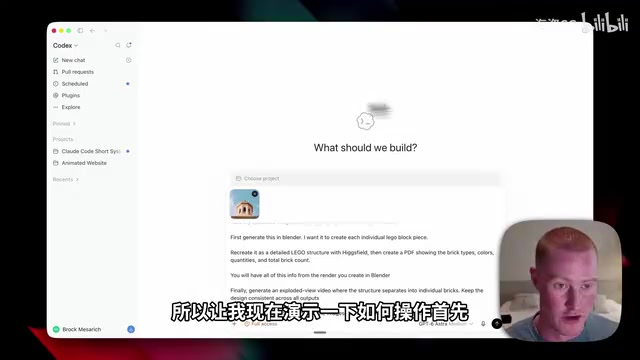
Astra orchestrates Blender and Higgsfield to turn concept images into interactive 3D models, PDFs, and walkthrough videos.
A Bilibili creator demonstrated a multi-step automated workflow using ChatGPT Astra as the central coordinator, linking the open-source 3D software Blender with the AI creative platform Higgsfield. Starting with a LEGO case study, Astra drives Blender to generate a 3D model where every brick is individually selectable, then uses Higgsfield to reconstruct visual detail — outputting an interactive 3D model, a PDF documenting parts and materials, and an exploded view video. An advanced case goes further, converting concept images into a browser-navigable interactive HTML scene and a 30-second real estate walkthrough video with professional transitions, all without leaving ChatGPT. The creator also introduced Zapier MCP as a bridge to connect 9,000+ apps. The article notes these demos lack third-party verification and should be viewed as workflow exploration rather than formal evaluation.
From Idea to Complete Workspace: An AI 3D Creation Demo
A Bilibili creator showcased a remarkably fresh AI creative workflow: starting from a simple idea and ending up with a finished product that includes a complete office space blueprint, an interactive 3D model, and a cinematic walkthrough video. The core of the entire pipeline is linking together OpenAI's ChatGPT Astra, the open-source 3D software Blender, and the AI creative platform Higgsfield.
Throughout the demo, the creator repeatedly emphasized one key point: previous image and video generation models have a fundamental limitation — they lack genuine "3D understanding" of objects. The images they produce look convincing on the surface, but are essentially just 2D pixel arrangements that can't be disassembled, measured, or interacted with. What this experiment set out to solve is exactly that problem.
Breaking Down the Workflow with a LEGO Case Study
To make the demo more intuitive, the creator used a photo of an object with the goal of converting it into a 3D structure built from LEGO bricks. He explained why Astra was essential for this: rather than generating the object as a single whole, the model generates each individual LEGO brick as a separate, independently selectable and manipulable 3D object.
The prompt itself was fairly concise: using an uploaded image, have Astra coordinate the entire workflow — first generate a model in Blender (with every individual brick separate), then reconstruct it into a detailed LEGO structure using Higgsfield, generate a PDF documenting brick types, colors, and counts, and finally output an "exploded view" video showing the structure separating into individual bricks. The pipeline also specified using OpenAI's newly released ChatGPT Image 2.5 as the image model.
The creator specifically noted that the reason he could know exactly how many individual parts the model contained was precisely because of Blender's rendering information — something pure generative models simply cannot provide.
Connecting to Higgsfield via Plugin
In practice, the first step was connecting ChatGPT to Higgsfield. The creator walked through the specific steps: go to "Plugins" in the left sidebar, search for Higgsfield, click its MCP link, select ChatGPT, then add the plugin and connect your account.
Once connected, users can call Higgsfield's image and video models directly within the ChatGPT interface without ever visiting the Higgsfield platform. The creator described Higgsfield as an "all-in-one AI creative platform" that aggregates top-tier image and video models, and through the MCP connection, Astra's intelligence can directly orchestrate these capabilities.
The total time required for the entire workflow is worth noting. The creator was upfront that these kinds of complex end-to-end pipelines aren't fast — the LEGO case took roughly 10 to 15 minutes to complete, since it needed to build the model in Blender, reconstruct the structure in Higgsfield, generate the PDF, and then output the exploded view video. This is a genuinely multi-step automated task.
MCP (Model Context Protocol) is a standardized protocol proposed and open-sourced by Anthropic in late 2024, designed to solve the integration challenges between AI models and external tools and data sources. Previously, every AI platform that wanted to connect to an external service had to develop custom API adapters — costly and difficult to maintain. MCP standardizes this process: as long as a service provider implements an MCP server, any MCP-compatible AI client (such as ChatGPT, Claude, Cursor, etc.) can invoke its capabilities through a unified protocol. When a user adds the Higgsfield plugin in ChatGPT, they're essentially telling Astra "there's an MCP server here, and you can use it to call Higgsfield's image and video generation features." Astra can then autonomously decide when and with what parameters to invoke these tools, without the user needing to switch platforms manually. This is the technical foundation behind "without leaving the ChatGPT interface" described in the article.
The Output: Interactive Model + Detailed PDF + Exploded View Video
The final output came in three parts. On the left was the original reference image; on the right was the Blender-generated 3D render — the creator could click to individually select each LEGO brick, proving this was a fully interactive 3D model rather than a static image. There was also a video output from Higgsfield showing each brick separating one by one.
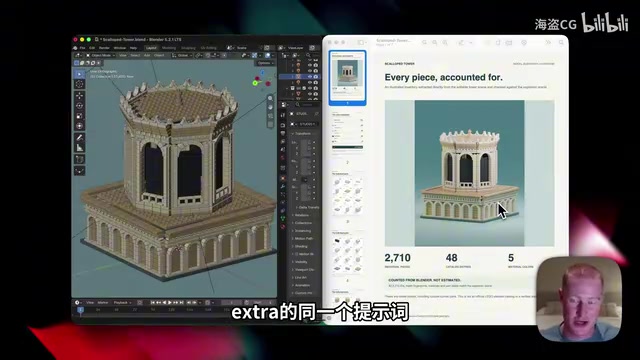
Even more interesting was the automatically generated PDF document. It meticulously broke down every individual component in the object, accurately showing part counts, materials, colors, and catalog entries — even specifying how many bricks of each color there were and the exact shape of each one. The creator argued that this ability to maintain "design consistency" across the entire output is something models before Astra couldn't achieve.
Expanding Connections: Zapier MCP for 9,000+ Apps
The creator further noted that if you can't find the app you want to connect in the plugins page, you can use Zapier MCP as a "bridge" to connect over 9,000 apps directly to ChatGPT, Codex, or even Claude.
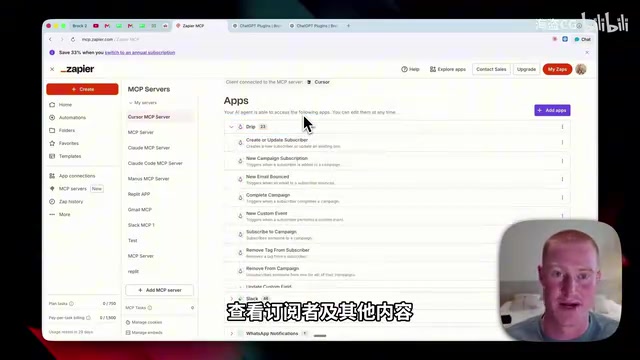
The setup process isn't complicated either: click "Add MCP Server," select ChatGPT, enable developer mode, copy the URL to create a plugin and name it, then paste the Zapier MCP URL to complete the connection. After that, adding any app is just a matter of searching and clicking a few buttons. The creator mentioned using it every day across Grok, ChatGPT, Claude, and other platforms — for things like account info and subscriber data in the email marketing tool Drip.
Zapier is a platform focused on app automation whose core capability is linking events and actions across different software through pre-built connectors (Zaps) — for example, "automatically update a spreadsheet when an email arrives." Its user base is primarily non-technical, and the platform has accumulated integrations with over 7,000 apps. Zapier MCP is its newer product form, launched amid the AI tools explosion: it wraps these existing integrations into an MCP server, allowing AI models to directly orchestrate the functionality of these apps rather than just triggering automations on fixed rules. Compared to traditional Zapier automation's linear "event-action" model, connecting through MCP to an AI lets the model dynamically decide which app to call and what parameters to pass based on context — dramatically increasing flexibility. For individual users without the engineering capacity to build their own tool integrations, Zapier MCP is currently one of the lowest-barrier paths to accessing long-tail applications.
Advanced Case: Building a Complete Creator Studio
The second half of the video showcased a more complex, comprehensive case that took roughly an hour in total. The creator first used Higgsfield to generate a concept image and a few reference images of a complete creator studio to establish the aesthetic style of the office.
Astra then called Blender to transform the concept image into an operable 3D world. The creator emphasized that Blender used to be professional software exclusive to designers, but now, with Astra's intelligence, ordinary users can generate not just individual 3D objects but entire scenes — the sofa cushions, chairs, cameras, and lighting setups are all independent objects rather than a single flat image. This kind of capability could be used for real estate blueprints, or simply for previewing what an "ideal office" might look like.
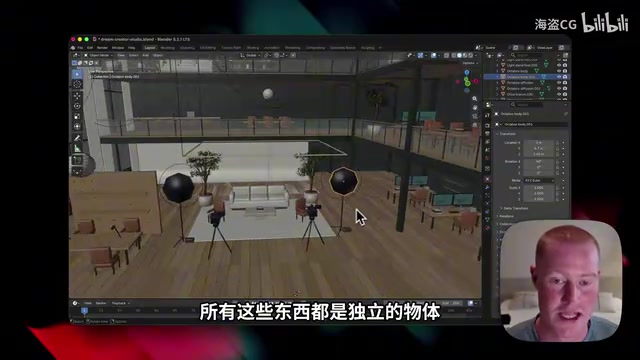
Things went even further from there: Astra converted the Blender file into an interactive HTML page. Users could click on different areas of the scene — such as the podcast corner or filming area — and the view would shift there, and they could even "walk around" and look around within this virtual world.
The final step was video generation. The creator provided a YouTube real estate walkthrough video as a style reference, hoping to replicate its transition effects. He specifically noted that Astra excels at computer operations, so it could "actually watch" the reference video and capture the desired style. Higgsfield then used Cadence 2.5 to generate a complete 30-second video with zoom and cut transitions — all without leaving the ChatGPT interface.
Blender is a free, open-source 3D content creation suite covering modeling, materials, animation, rendering, video editing, and more, maintained by the non-profit Blender Foundation. Its core strength is that every object in a scene is an independent "Object" with its own geometry data, materials, and transformation properties that can be individually selected, moved, modified, or exported. This data structure is fundamentally different from AI-generated 2D images — the latter are just pixel matrices with no semantic layer indicating "this is a chair" or "this is a wall." When Astra calls Blender, it is essentially creating scenes through scripted Python API calls: each instruction corresponds to creating a specific object and setting its properties. This explains why the article emphasizes that "the sofa cushions, chairs, cameras, and lighting are all independent objects" — this isn't describing a visual effect, but the direct expression of Blender's internal data structure, which makes subsequent click interactions, viewpoint switching, and exploded view animations possible.
A Few Observations
The value of this demo lies not in how powerful any single model is, but in the "orchestration" itself: Astra plays the role of coordinator, chaining together Blender's 3D precision, Higgsfield's visual generation capabilities, and document organization into a complete pipeline. The introduction of 3D understanding capability moves AI output from "looks right" toward "decomposable, measurable, and interactive."
One caveat worth noting: this article is based on a single creator's demo, and the product names and capability descriptions mentioned — including ChatGPT Astra, Image 2.5, and Cadence 2.5 — all come from that video and have not yet been cross-verified by third parties. Readers should treat this as a workflow exploration showcase rather than a rigorous evaluation. Real-world performance, stability, and costs still await broader testing.
Related articles

AI Coding Enters the Team Collaboration Era: Interpreting Three Major Moves from Meta, GitHub, and Mistral
Meta acquires Conductor, GitHub Copilot Fusion becomes available, Mistral opens Large 4 weights—three moves show AI coding shifting from code generation to organizing development workflows. This article explains task orchestration, model collaboration, and cost control for developers.

Building a RAG Assistant with Dify: A Practical Guide to Knowledge Bases, Workflows, and Agent Nodes
How should knowledge bases, workflows, and Agent nodes connect in a Dify RAG assistant? We break down the division of labor and wiring logic for a shippable app.
 Tech Frontiers
The AI Industry Doesn't Lack Marketing—It Lacks Good Products
AI faces market selloffs and public skepticism—is marketing really the problem? This analysis of market signals and product experience argues the core困境 is incomplete products and a gap between promises and experience; the only way to change perceptions is to ship better products.