ChatGPT Computer History Feature Explained: How AI Remembers Your Workflow

ChatGPT's Computer History captures desktop interaction events to build persistent AI memory of your workflow.
OpenAI's new Computer History feature for the ChatGPT desktop app captures interaction events like clicks and app switches—not screenshots—to build a persistent memory of your work. This enables context-free conversations, automatic daily summaries, and AI-suggested automations. With local storage, fine-grained access control, and full transparency, it balances utility with privacy as AI assistants evolve from passive tools to personalized work partners.
When AI Starts "Remembering" How You Work
OpenAI has introduced a new feature called Computer History for the ChatGPT and Codex desktop apps. The core concept is simple yet imaginative: instead of having to describe your context to the AI assistant every time, the AI can directly "see" your computer activity history and transform it into memories and a timeline that can be called upon at any moment.
In OpenAI's own words, simply toggling this feature on in the macOS desktop app settings allows Computer History to convert your ongoing desktop activities into "memories," enabling the AI agent to directly reference them the next time you ask a question or start a task. This marks a step forward for AI assistants—from "passive response tools" to "context-aware work partners."
To understand the significance of this step, it helps to review the evolution of AI memory systems. The earliest conversational AI had no cross-session memory—every conversation was a fresh start. In early 2024, ChatGPT introduced its Memory feature, allowing AI to extract user preferences from conversations and store them as text snippets, but this relied on users proactively sharing information. Computer History represents the third stage—passive observational memory, where AI continuously perceives the user's work environment to automatically accumulate context. This evolutionary path echoes the concept of "episodic memory" in cognitive science: humans don't just remember abstract knowledge—they remember the time, place, and context of specific events. It's precisely this kind of memory that allows us to omit vast amounts of background information in everyday conversation.
The Actual Experience of ChatGPT's Computer History
In the official demo, users can ask Codex highly context-dependent questions without providing any background information.
For example, asking "What was the last Google Doc I was looking at?" prompts Codex to search recent activity history and accurately locate "the video script computer history document you were editing earlier today."

Taking it further, the user can then say "Help me confirm this document is shared with Josh and Priya from the earlier group chat." Codex not only knows which document the user is referring to but also understands which specific conversation "the earlier group chat" refers to, then completes the sharing operation and provides confirmation.

This "context-free conversation" is the most intuitive value of the feature—the AI already knows what you've done and what you've seen, so you can communicate with it like talking to a colleague who understands your work, eliminating the need for repetitive background explanations. From a technical perspective, this involves the coordination of context windows and persistent memory: a large language model's context window is the amount of information it can process in a single inference pass, and even the most advanced models have limits (e.g., GPT-4o at approximately 128K tokens). Computer History is essentially a persistent memory system that compresses user activity history into structured summaries and timelines, retrieving relevant fragments and injecting them into the context window when needed. This "memory-retrieval augmented" architecture is similar to RAG (Retrieval-Augmented Generation) technology applied to personal knowledge management scenarios.
How Computer History Summarizes Your Day
Beyond executing specific tasks, Computer History can also review how you spent your work time. In the demo, when asked "Give me a brief summary of how I spent my morning," Codex generated a concise recap based on local activity history:
This morning you mainly worked on the computer history launch video, including drafting and polishing the script, and iterating on the framing and narrative flow with teammates. You also prototyped a 3D world builder in Codex and handled some usage quota-related feedback.

This capability is extremely practical for knowledge workers who need to write daily or weekly reports or manage their time—AI can automatically distill your work priorities without requiring you to recall and record them yourself.
Privacy Design: No Screenshots, No Audio Recording, Locally Controlled
For a feature that delves so deeply into user operations, privacy is naturally the biggest concern. OpenAI made several key design tradeoffs:
Capturing Interaction Events Rather Than Screen Content
Computer History does not rely on screenshots or audio recording—instead, it captures interaction events such as clicks, typing, and app switches. This means it can form memories more quickly and efficiently while avoiding the risk of sensitive information leakage that could come from directly capturing screen content.
This technical choice stands in stark contrast to Microsoft's previously launched Windows Recall feature. Windows Recall records user activity by taking screenshots every few seconds—an approach that sparked enormous privacy controversy because screenshots might contain passwords, private chats, banking information, and other sensitive content, and security researchers discovered vulnerabilities in its data storage. OpenAI's choice of interaction event capture is closer to the information provided by the operating system's Accessibility API—it records what users "did" (which button was clicked, which app was switched to, which input field received text) rather than what they "saw." This approach is more efficient in information density because a single screenshot contains vast amounts of redundant background pixels, while an interaction event precisely points to the user's intent and behavior.
The reason Computer History launched on macOS first is also closely related to Apple's operating system permission architecture. macOS provides an Accessibility API that allows user-authorized apps to read interface element information from other apps (such as button text, window titles, input field content, etc.). This API was originally designed for screen readers and other assistive tools, but in recent years an increasing number of productivity tools have leveraged it to enable intelligent cross-app interaction. macOS's sandbox mechanism and explicit permission-granting process provide a relatively secure framework for this kind of deep system integration—users must explicitly authorize in System Settings and can revoke access at any time.
Fine-Grained Access Control
Users have granular control over which apps and websites Computer History can access. You can quickly exclude certain websites or entire applications through the new menu bar entry, or explicitly list items to block in the desktop app settings.
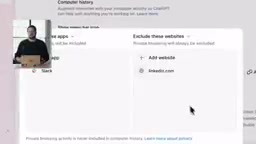
Memory Data Stored Locally, Reviewable and Deletable
All captured content can be reviewed in settings. Beyond viewing summaries, users can delete individual records, clear recent history, or even directly view the actual memory files. These memory files are always stored on the user's own file system, ensuring you can clearly see exactly what the AI has remembered. This "local storage + full transparency" design is key to alleviating user concerns.
From Memory to Automation: The Potential of AI Workflows
Computer History's ambition goes beyond just "remembering." It can also proactively suggest skills and automations based on your repetitive work patterns. These suggestions appear in the history section of settings.
Once an AI agent understands what you do and how you do it, the interaction paradigm undergoes a qualitative shift. The official examples include several typical scenarios:
- Based on an action you just completed, have the AI create a reusable skill;
- Set up an automation that runs automatically every morning to draft standup updates for your team;
- Have the AI align with your tool preferences, such as always using your preferred app to draft documents.
This direction essentially combines traditional RPA (Robotic Process Automation) with AI's comprehension capabilities. Traditional RPA tools (such as UiPath, Automation Anywhere) require users to manually record operation flows or write scripts to achieve automation—the barrier is high and the results are fragile, as even slight interface changes can cause automations to fail. AI-driven automation is different: it's based on understanding operational intent rather than precisely locating interface elements, giving it greater robustness and adaptability. This is also the core competitive direction in the current AI Agent field: Anthropic's Computer Use, Google's Project Mariner, and others are all exploring the ability for AI to directly operate computer interfaces, while OpenAI has chosen a more gradual path through Computer History—"observe and understand first, then take proactive action."
This effectively outlines the evolution of personal AI assistants: from general-purpose Q&A tools, gradually evolving into deeply personalized "digital co-pilots" that can proactively share the burden of repetitive work.
Conclusion: An Important Step Toward Personalized AI Assistants
The launch of Computer History reflects a new focal point in AI product competition—context and personalization. While improvements in model capabilities are certainly important, making AI truly "understand you" without needing repeated explanations of background is often what determines the day-to-day user experience.
Through the technical approach of "capturing interaction events rather than screen content" and the privacy design of "local storage, reviewable and deletable," OpenAI is attempting to find a balance between convenience and security. Of course, whether this type of deep user behavior sensing will be widely accepted ultimately depends on the level of trust users place in privacy controls. The feature is now available in the macOS desktop app and is worth trying firsthand for anyone following personalized AI trends.
Key Takeaways
Related articles

Chain of Thought Isn't Just for AI: How Humans Can Use CoT to Improve Thinking Quality
Chain of Thought isn't just a prompt trick for large models. Starting from a Hacker News discussion, this article analyzes why CoT works for human thinking too, breaks down actionable ways to transfer it, and highlights the key differences between human CoT and machine CoT.
Cloudflare Teams Up with OpenAI: Closi…
Cloudflare Teams Up with OpenAI: Closing the Loop from Vulnerability Discovery to Defense with AI
Cloudflare uses OpenAI Daybreak to investigate security vulnerabilities and generate reviewable remediation plans, while developers use Codex to boost coding efficiency and quality.

Orca Multi-Agent Orchestration in Practice: A Guide to Parallel Collaboration with Claude and Codex
Orca is Stable AI's free open-source agent workbench supporting 34 agents like Claude Code and Codex in parallel. Learn its Git worktree isolation, multi-model orchestration, and mobile management.