ChatGPT for PowerPoint Hands-On Review: Complete AI Presentation Workflow & Effectiveness Assessment

ChatGPT deeply integrates with PowerPoint to enable AI-driven automated presentation creation
OpenAI showcased a deeply integrated ChatGPT and PowerPoint workflow that transforms scattered materials into professional presentations through four steps: multi-source information integration (RAG technology), AI-generated structured outlines (Structured Output), front-loaded quality standard checks (System Prompt skills), and slide-by-slide construction with optimization—representing a new paradigm in embedded AI for office productivity.
From Scattered Materials to High-Quality Presentations
OpenAI recently showcased a deeply integrated workflow between ChatGPT and PowerPoint. This feature fundamentally transforms the traditional presentation creation process—taking company materials, meeting notes, and client information scattered across various sources and rapidly converting them into executive-level professional presentations through an AI-driven guided workflow.
This integration represents a new paradigm known as Embedded AI or "AI-native workflows." Unlike earlier approaches that required switching back and forth between standalone AI tools and office software, this type of integration embeds large language models directly into the user's work environment through plugin APIs or native integration. Microsoft laid the groundwork for this direction with its Copilot strategy back in 2023, while OpenAI's deep integration with PowerPoint represents a competitor's direct push in the same arena. This "context-aware" AI integration can access the current state of documents users are working on, rather than merely responding to isolated text prompts, enabling truly collaborative creation.
The pain points of traditional PPT creation need no elaboration: time-consuming material organization, laborious structural planning, tedious formatting adjustments, and inefficient repetitive revisions. ChatGPT for PowerPoint was designed to systematically address these problems.
Core Workflow for Creating PPT with ChatGPT
Step 1: Integrating Multi-Source Information
After opening the ChatGPT panel in PowerPoint, users can organize their thoughts before building any slides. ChatGPT supports importing contextual information from multiple channels:
- Connected apps: Google Drive, Microsoft 365, internal communication channels
- Local files: Upload documents directly from your computer
- Mixed materials: Meeting notes, client account information, other raw materials
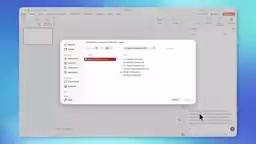
Behind this multi-source integration capability lies a Retrieval-Augmented Generation (RAG) technical architecture. The core concept of RAG is: when the large language model generates content, it doesn't rely solely on parametric knowledge learned during training but also retrieves user-provided external documents in real-time as contextual evidence. This solves two inherent LLM limitations—knowledge cutoff dates and hallucination problems. When users upload internal company materials, meeting records, or client data, the model vectorizes and stores these documents, prioritizing references to this "grounded" private knowledge when generating presentation content rather than fabricating information. This is why AI-generated PPTs can contain specific business data and brand information, rather than just generic template content.
This means you no longer need to manually switch between multiple apps to copy and paste—all materials can converge in a single conversation for unified processing.
Step 2: AI Auto-Generates Structured Outlines
After sending materials to ChatGPT, it recommends a detailed presentation structure. This structure is broken down slide by slide, including:
- Suggested key points for each slide
- Table and data presentation approaches
- Formatting recommendations
- Overall narrative flow
The AI's ability to auto-generate "slide-by-slide breakdowns" reflects the maturity of modern Prompt Engineering and Structured Output techniques. Early ChatGPT interactions were primarily free-form text, while current versions support constraining model output to specific data structures through JSON Schema or Function Calling. For PPT generation scenarios, this means the model must not only understand the content but also map it to structured fields like "slide titles, bullet point lists, data tables, and narrative order." OpenAI significantly enhanced this structured reasoning capability in the GPT-4o series, making a "plan the outline first, then execute step by step" generation strategy possible, rather than outputting a complete document in one shot that might lack coherence.
Users can quickly review the outline and confirm the direction is correct before having ChatGPT start building. This "plan first, execute later" approach avoids the inefficient cycle of making changes on the fly that plagues traditional PPT creation.
Step 3: Applying Quality Standards to Ensure Professional Output
Before formal generation begins, users can provide additional guidance. The demo showcased a skill called "Executive Readiness Quality Pass," which can:
- Apply unified quality standards
- Ensure consistent formatting
- Maintain a cohesive communication style throughout
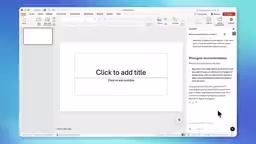
From a technical perspective, the "Executive Readiness Quality Pass" is essentially a preset System Prompt or custom instruction set—a specific application of OpenAI's "Custom GPT Skills" functionality. It regulates the model's output behavior by injecting specific quality constraints into the generation pipeline—for example, "avoid passive voice," "data must have source citations," "no more than 5 bullet points per slide." This quality gating mechanism borrows from CI/CD pipeline thinking in software engineering: front-loading quality checks into the generation process rather than relying on post-hoc manual review. For enterprise users, this means company brand guidelines and communication style guides can be encoded as reusable AI skills, achieving output consistency across teams.
This is equivalent to having a built-in "quality reviewer" during AI content generation, rather than manually checking each slide at the end.
Step 4: Slide-by-Slide Construction and Real-Time Optimization
ChatGPT creates the presentation slide by slide, automatically applying formatting polish. The first draft typically provides a solid starting point.
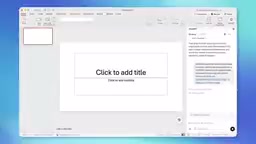
However, AI-generated content isn't flawless. In the demo, users noticed areas needing improvement, including imprecise positioning language and some "meta commentary" that crept into the formal content.
Meta commentary is a typical systemic flaw in current large language models, referring to the model mixing in descriptive language about its own generation behavior—for example, "Here is a slide about..." or "This slide aims to demonstrate..."
Related articles
 Product Reviews
The Programmer's Desk Setup Guide: Building a Workspace That Feels Like Home
Discover how programmers build productive, comfortable workspaces. From multi-monitor setups to ergonomic design, explore the desk philosophy that drives focus and flow.
 Product Reviews
Qoder vs Cursor Real-World Comparison: Which $20/Month AI IDE Is Better?
Hands-on comparison of Qoder vs Cursor AI IDEs: Agent autonomy, human interaction count, and architecture decisions. Qoder needed only 2 interactions vs Cursor's 8.
 Product Reviews
Cursor Cloud Agent Demo: Eliminating Bottlenecks Across the Entire Software Development Lifecycle
Deep analysis of Cursor's Cloud Agent demo showing how cloud VMs, automated test artifacts, and a full-chain control plane systematically eliminate human bottlenecks across the software development lifecycle.