ChatGPT Mac's New Version Is a Step Backward: Feature Bloat Is Ruining AI Products

ChatGPT Mac's new update frustrates users with forced complexity, highlighting AI's feature bloat problem.
A user's viral complaint about ChatGPT's Mac desktop update—calling it a "strict downgrade" due to forced project selection and a cluttered interface—exposes a broader industry problem. As AI companies race to build comprehensive platforms, feature creep is undermining the simplicity that made these tools popular. The article explores how progressive disclosure and restraint in design can help AI products balance power-user needs with casual users' desire for frictionless interaction.
A Controversial Update
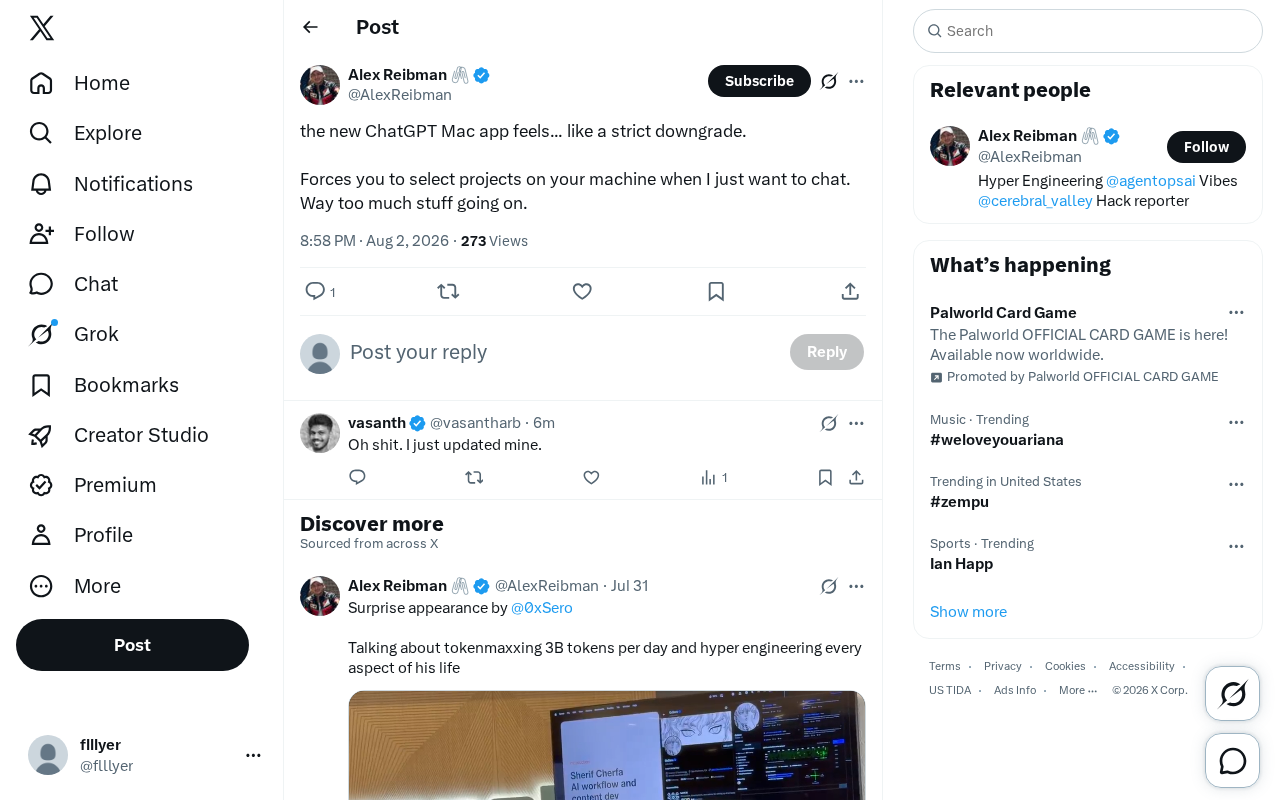
Recently, a user publicly complained on X (formerly Twitter) about ChatGPT's latest Mac desktop app, calling the update something that "feels like a strict downgrade." The comment quickly gained traction because it touched on an increasingly common tension in AI product design: Is the constant piling on of features undermining the core user experience?
The user's frustrations boiled down to two points: first, the new app "forces you to select a project on your machine" when all they want to do is "just have a simple chat"; second, the overall interface has "way too much stuff going on," with the density of information and entry points turning what was once a lightweight conversation tool into something bloated.
From "Chat Box" to "Work Platform": ChatGPT's Product Transformation
Behind this complaint lies a deeper evolution in ChatGPT's product positioning.
OpenAI's Ambition: Beyond Conversation
The original ChatGPT desktop app was extremely simple—open it up, start typing in a single input box, have a conversation, with virtually no learning curve. This "zero barrier to entry" was a key reason for its viral spread.
ChatGPT's Mac desktop app was first released in May 2024, initially available only to Plus subscribers before gradually opening up to all users. Unlike the web version, the desktop app achieved a lightweight "ask anything, anywhere" experience through system-level integration (such as the Option+Space shortcut to summon it). This design philosophy was similar to Spotlight search on macOS—press a shortcut, type your query, and dismiss when done. It was precisely this minimalist interaction model that quickly made it a frequently used tool among Mac users.
However, as OpenAI has tried to transform ChatGPT into a comprehensive "AI work platform," more and more features have been crammed into the same interface: Projects management, file uploads, custom GPTs, Canvas, code execution, deep search, and more. For power users, these features genuinely boost productivity; but for casual users who just want to "ask a quick question," they become distractions.
This pressure to expand features is inseparable from the white-hot competition in the AI assistant market. Anthropic's Claude launched Projects and Artifacts, Google's Gemini deeply integrates with the Workspace ecosystem, and Microsoft's Copilot is embedded throughout the entire Office suite. Every company is trying to prove their AI can do more than just "chat"—it can become a "platform for getting work done." This competition has led to a "feature arms race"—if a competitor has file management, I need it too; if a competitor supports project organization, I can't fall behind. According to industry observations, top-ranking AI products have added numerous major features over the past year on average, but user retention rates haven't grown proportionally with feature count—in fact, they've shown a somewhat negative correlation.
Why "Forced Project Selection" Is So Irritating
The "forced project selection" the user specifically mentioned is a textbook case of "designed for power users but hurting regular users." The Projects feature was intended to help users categorize and organize related conversations, files, and context—suited for professional scenarios with well-defined workflows. But when this step becomes a prerequisite for starting a conversation, it violates the intuitive "open and chat" nature of a chat tool.
From a product design perspective, the Projects feature draws inspiration from the "project" concept in IDEs (Integrated Development Environments). Users can associate multiple conversation threads under a single Project, upload reference files, and set Custom Instructions so the AI maintains contextual consistency within that project. For example, a "Product Requirements Document" project could include requirements files, discussion history, and specific output format requirements. This is genuinely valuable for complex workflows that need coherence across multiple sessions, but the implementation—particularly whether it serves as a prerequisite step for conversation—directly impacts how ordinary users feel about the experience.
All users want is to open the app and start asking. They don't want to solve a multiple-choice problem of "which project should I file this conversation under?" first. This additional cognitive burden is the direct source of the experience regression.
The "Feature Creep" Epidemic in AI Products
This minor complaint is actually a microcosm of the entire AI product industry.
Feature Stacking Under Growth Pressure
In a fiercely competitive environment, AI companies are rapidly iterating and continuously adding new features to prove they're "ahead" or "not falling behind." But the number of features doesn't equal product value. When every update adds new entry points, new buttons, and new workflows to the interface, a product easily falls into the trap of feature creep—each feature seems reasonable in isolation, but together they make the whole thing chaotic.
Feature creep has a long and inglorious history in the software industry. The most classic case is the evolution of Microsoft Office in the early 2000s—Word went from a word processor to a behemoth with hundreds of menu items, ultimately forcing Microsoft to completely redesign it with the Ribbon interface in Office 2007. Similarly, Evernote continuously added chat, presentations, workspaces, and other features between 2015-2018, diluting the core note-taking experience and causing users to flee to simpler competitors like Bear and Notion. In the AI space, this risk is even more pronounced because AI products iterate far faster than traditional software—just over a year after GPT-4's release, ChatGPT evolved from a conversation interface into a composite platform integrating over a dozen major features.
Who Is Your Core User?
The key question here is: who does the product actually serve?
- For enterprise and professional users, Projects, file management, and collaboration features are essential;
- For the massive base of ordinary users, simplicity, speed, and freedom from distraction are the core needs.
Stuffing both sets of needs into the same default interface typically pleases neither group. Good product design should use progressive disclosure—keeping the default simple while allowing advanced features to expand on demand—to balance this tension, rather than dumping everything in front of the user at once.
Progressive disclosure is a classic design principle in human-computer interaction, proposed by IBM researchers John M. Carroll and Mary Beth Rosson in 1984. Its core idea is that interfaces should present information in layers based on frequency of use and complexity—the most commonly used features get the most prominent placement, while advanced features are hidden behind secondary or tertiary entry points. Apple's product design exemplifies this principle: the iPhone's Settings app places common options at the top, while developer options require specific actions to unlock. In AI products, Google's Gemini employs a similar strategy—the default interface is minimal, but users can invoke specific extension capabilities through the "@" symbol (like @Google Maps) rather than having all capabilities spread across the main interface.
Design Lessons for AI Application Developers
While this is just one person's complaint, the product philosophy it embodies deserves deep reflection from every AI application developer.
First, the default path must be extremely simple. The thing users do most often when they open the app (for ChatGPT, that's starting a conversation) should be frictionless. Any additional choices, configurations, or onboarding should be optional and skippable. "Frictionless" here isn't mere rhetoric—cognitive psychology research shows that each additional decision step increases the probability of task abandonment by approximately 15%. In the mobile internet era, this is called "funnel drop-off"; in the AI product context, it means a conversation that should take only 0.5 seconds to begin might trigger a "never mind, I won't bother asking" thought due to an extra project selection step.
Second, features should be discoverable but not mandatory. Powerful features can exist, but they shouldn't become a required gateway for completing basic tasks. Let users who want to go deeper discover them on their own, rather than forcing everyone to learn first. This is the practical application of the "progressive disclosure" principle—guiding the discovery of advanced features through visual hierarchy, interaction depth, and contextual triggers, rather than through mandatory flows.
Third, value the power of subtraction. In an era when everyone is adding more, having the restraint to hold back, to hide, and to preserve a simple pathway for ordinary users is actually a competitive differentiator. The first thing Steve Jobs did when he returned to Apple was eliminate 70% of the product line; Google's homepage still has just a single search box; even in the AI space, Perplexity carved out its niche in the search-based AI market precisely with its minimalist design of "one question box + direct answer."
Conclusion
A complaint of "strict downgrade" may seem offhand, but it precisely hits the core tension in AI product design. As ChatGPT gradually evolves from a revolutionary conversation tool into a feature-rich "platform," how to expand capabilities while preserving the simplicity that originally captivated users is a question that OpenAI—and all AI product teams—must continuously answer.
This problem isn't unsolvable. Historically successful platform products—from macOS to Slack to Figma—have all found their balance point: keeping the core experience restrained while carrying ecosystem capabilities through plugins, extensions, or optional modules. ChatGPT may need similar architectural thinking: treating "conversation" as an inviolable first-class citizen experience, while viewing Projects, Canvas, GPTs, and other features as pluggable capability layers that users can progressively unlock based on their own needs, rather than facing a feature-overloaded interface all at once.
After all, sometimes users really just want to "have a chat."
Related articles

DeepCell: One-Click AI Generation of Documents, Spreadsheets, and Slides
DeepCell tops Product Hunt with one-click generation of documents, spreadsheets, and slides, using the .deepcell format for linked updates, designed for System 2 tasks like modeling and sales reviews.

Doneas: 15-Minute Daily Accountability Calls That Keep Indie Developers From Procrastinating
Doneas is a daily accountability tool for indie developers: plan tasks on Monday, join a 15-minute call with five builders each day, and log deliveries on a public progress page. This article analyzes its core mechanics, effectiveness, and potential issues around retention and matching.

Fastlane 2.0: Fully Automated AI Ad Campaigns, From Creative to Optimization
Fastlane 2.0 is an AI ad automation tool: enter your website and it learns your brand, generates video and image ads, and runs and optimizes them on Meta, TikTok, Instagram, and YouTube.