ChatGPT Membership Subscription Plans: Plus vs. Pro Tiers Explained with Activation Guide

Comparing three ChatGPT membership activation methods, detailing website self-service top-up process with risk warnings.
The article compares three ways for domestic users to activate ChatGPT membership: website self-service top-up, credit card top-up, and mobile app top-up, pointing out that website self-service is recommended as the first choice due to low barriers and cost. It details the self-service top-up process, including logging into the official website, obtaining and pasting Session information, selecting plans, and verifying the Plus badge. It also explains the tier logic of Plus, Pro 5X, and Pro 10X based on compute multiples, and warns about risks such as Session credential exposure, third-party top-up compliance, and promotional nature.
Comparing Three Main Activation Methods
According to a tutorial shared by a Bilibili creator, domestic users currently have three main ways to activate ChatGPT membership: self-service top-up via website, credit card top-up, and mobile app top-up. In terms of practical difficulty and cost, website self-service top-up is described as "currently the most popular, mainstream, and cost-effective" method.
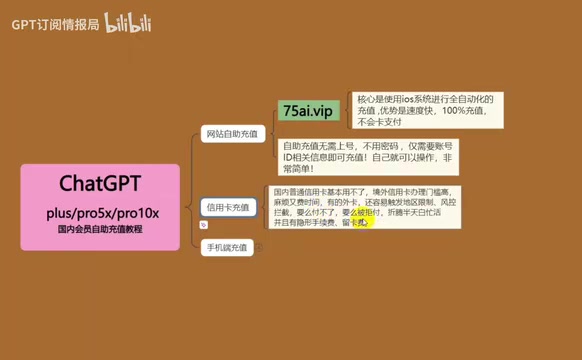
The problem with credit card top-up is that ordinary domestic credit cards basically cannot be used, while overseas credit cards have high application thresholds, cumbersome processes, and additional fees and card retention costs, making the overall cost not worthwhile. Mobile top-up splits into two scenarios: iPhone requires a US region ID plus gift cards, with complicated steps that beginners struggle to complete in one go; Android phones use Google Play in-app purchases, which have very strict payment environment requirements and will most likely get stuck at the environment verification stage.
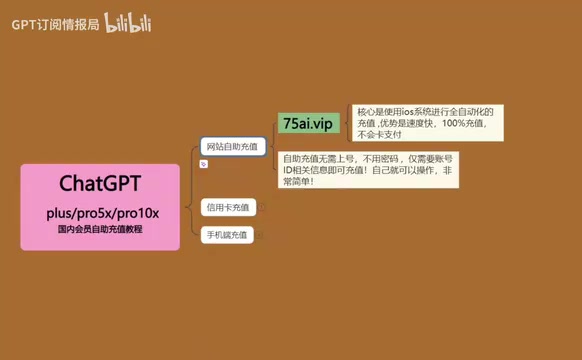
Overall, the tutorial author recommends website self-service top-up as the preferred solution.
How Website Self-Service Top-Up Works
The logic behind these platforms is not complicated: users don't need to provide account passwords—they only need to enter their email for order tracking, then obtain the account's Session information to complete the top-up.
The specific steps are: first log into the ChatGPT official website in your browser and confirm the current account status—the tutorial screenshot shows a free version in the lower left corner. Then return to the top-up website, click the link to obtain the Session, and the page will display a piece of code. Here's a tip: if the code is relatively short, it means you haven't logged in correctly; if it's longer, copy it completely from start to finish (including parentheses), paste it back into the top-up website, and confirm again whether it's the GPT account you want to top up.
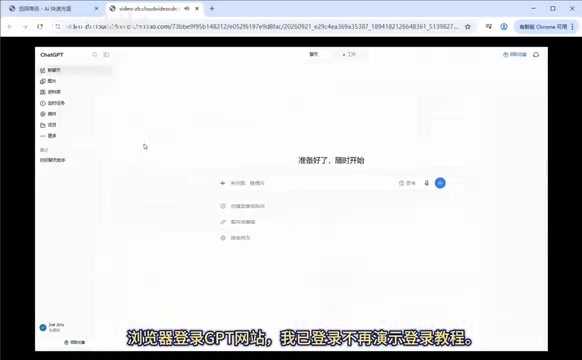
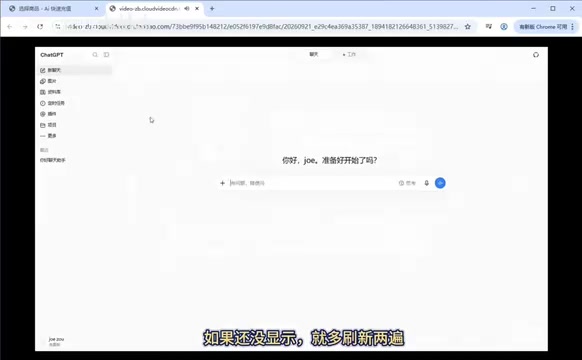
Select the corresponding plan and payment method, submit the order, wait for processing to complete, and the page will show a success message. Return to the ChatGPT website and refresh to see the Plus badge—if it doesn't appear, try refreshing a couple more times.
Session information (session credentials) is a token data used by websites to maintain user login status, typically existing in the form of Cookies or Tokens. When a user logs into ChatGPT in a browser, the server issues this credential, and subsequent requests carrying it will be recognized as a logged-in user without needing to re-enter account credentials. Because of this, a Session within its validity period is equivalent to temporary access permission to the account—once obtained by others, they can operate the account without a password. This is also why third-party top-up platforms only need the Session rather than account passwords to complete operations, and it means users need to carefully assess the security boundary issues brought by credential exposure.
Compute Tiers: How to Choose Between Plus, Pro 5X, and Pro 10X
The top-up tiers mentioned in the tutorial include GPT Plus, GPT Pro 5X, and GPT Pro 10X. From the naming logic, Pro 5X and Pro 10X represent compute multiples relative to the base tier—the higher the multiple, the larger the corresponding usage quota or resource allocation.
It should be noted that the original material does not elaborate on the specific quota differences between tiers, and this article cannot provide precise numerical comparisons. For ordinary users, Plus is the lowest-barrier entry option; for users with higher compute consumption and more frequent usage, Pro 5X and Pro 10X provide room for upward expansion. Video generation features like Sora have corresponding top-up entries in the tutorial screenshots, indicating that higher compute tiers are associated with such resource-intensive features.
The "compute multiple" here does not refer to the actual computational power of GPU hardware, but rather a relative description of user-available resource quotas at the product level, typically covering message call counts, advanced model access permissions, context length, and quotas for resource-intensive features like video generation. 5X and 10X represent quota amplification ratios relative to the base tier—the higher the multiple, the more resources can be called within a unit period, though specific numbers vary with official policy adjustments. For ordinary users, clarifying your own usage frequency and feature needs before deciding whether you need a higher tier is often more economical than blindly pursuing higher multiples.
Key Judgments and Risk Warnings
The core selling point of these third-party top-up methods is fully automated operation and round-the-clock delivery. The tutorial claims the platform uses automated systems to process orders and provides online customer service, after-sales support, and invoice support.
However, several issues need objective consideration. First, Session information is sensitive credential data, and handing it to third-party platforms carries account security risks that users should assess themselves. Second, the stability and compliance of third-party top-ups are not officially guaranteed—the platform's claimed "warranty" is essentially a commercial promise rather than platform endorsement. Third, the tutorial repeatedly emphasizes the website domain, carrying obvious promotional intent—readers should maintain independent judgment when referencing it and avoid making decisions based solely on promotional information from a single source.
From a practical perspective, understanding the compute differences between Plus and Pro tiers has more long-term value than simply memorizing a particular top-up channel.
One-line Summary
Comparing three ChatGPT membership activation methods, detailing website self-service top-up process with risk warnings.
Paragraph Summary
The article compares three ways for domestic users to activate ChatGPT membership: website self-service top-up, credit card top-up, and mobile app top-up. It points out that website self-service is recommended as the first choice due to low barriers and low cost, while credit cards are limited by domestic card unavailability and cumbersome overseas card applications, and mobile is constrained by US region ID processes or Google Play environment verification. The article details the website self-service top-up process, including logging into the official website to confirm account status, obtaining and pasting Session information, selecting plans and payment, and refreshing to verify the Plus badge. It also introduces the tier logic of Plus, Pro 5X, and Pro 10X distinguished by compute multiples, and warns about risks including Session credential exposure, third-party top-up compliance, and promotional nature.
Related articles

Prompt Engineering for Beginners: From Writing Prompts to Engineering Thinking
Starting from the essence and four functions of prompts, this article systematically explains the six-step process, four success criteria, learning value, and practical limitations of prompt engineering to help you build a complete understanding.

Anthropic Launches Nasdaq IPO: AI Giant's Listing and Risk Disclosures
Anthropic officially launches its Nasdaq IPO under ticker ANT, with market valuation expected to potentially exceed SpaceX's record. The prospectus devotes nearly 100 pages to AI risks, while first-half revenue grew over 14x but net losses widened sharply, reigniting the AI bubble debate.

Rust cURL Clone Uses 4,832 unsafe Blocks—Is the Memory Safety Myth Broken?
A Rust cURL clone uses 4,832 unsafe keywords, challenging Rust's memory safety narrative. We analyze what unsafe really means, compare Fil-C, and examine rewrite motives.