ChatGPT Philippines Region Subscription Guide: Registration, Setup, and Getting Plus at a Lower Price

Step-by-step guide to subscribing to ChatGPT Plus at ~108 RMB by switching to the Philippine region via Google Play.
This article outlines a complete workflow for reducing ChatGPT Plus subscription costs through region switching: registering a clean Google account, enabling Advanced Account Security to eliminate one-time SMS dependencies, switching to the Philippine region, and using a tax-free address to bring costs down to around 108 RMB. It compares physical cards, virtual cards, and exchange-based payments, and warns against ultra-cheap top-up services that risk account bans or subscription loss.
The same ChatGPT Plus subscription can display very different prices depending on your region. In the US, it costs around $19.99 per month (roughly 135 RMB), while in the Philippines it shows as 1,100 pesos — approximately 108 RMB at current exchange rates. That price gap is exactly why many users choose to switch to the Philippine region through official channels: it keeps the account stable while reducing costs.
This article follows a complete walkthrough tutorial from a Bilibili content creator, covering everything from registering a Google account from scratch, installing Codex, securing your account, and subscribing to ChatGPT Plus at the lower Philippine price. A word of caution: this process involves cross-border payments and region switching, which carries certain risks. Readers should assess the compliance and stability implications for themselves.
Step 1: Register a Google Account
The foundation of this entire process is a brand-new Google account. The creator recommends preparing three things: a phone number that has never been used to register Google (+86 Chinese numbers work fine), a regular email address (QQ or 163 mail works, for receiving verification codes), and an Android device that hasn't been linked to Google authentication before. If you don't have an Android phone, you can install a mobile emulator on your computer — the steps are identical.
The registration process itself isn't complicated: download Gmail from the app store, open it, tap "Create account," select personal use, and fill in your personal details. One key point — your birth date must show you're at least 18 years old, otherwise you'll hit a wall when registering ChatGPT later. The system will suggest several usernames, or you can create a custom one. Set a password, enter your phone number, and complete the verification.
It's worth noting that newly registered Google accounts often trigger a risk warning upon first login. The creator's approach is to tap "Submit an appeal" directly, using a template provided in the tutorial (just swap in your email and last name), enter the email address where you want to receive the result, and submit. Appeals are typically approved within 12 hours, and you'll receive an unblock notification in your QQ mailbox.
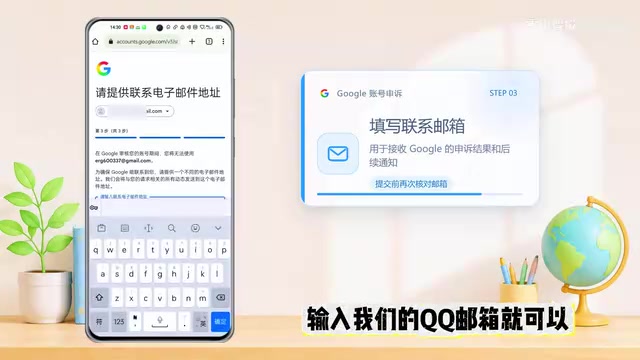
If the appeal fails or you'd rather not deal with the hassle, you can purchase a ready-made Google account. But the creator emphasizes that a purchased account ultimately doesn't truly belong to you — self-registration is recommended for reliability.
Step 2: Register ChatGPT and Install Codex
With a Google account in hand, registering ChatGPT is straightforward. Go to the ChatGPT website, click "Sign up for free" in the top right, choose "Continue with Google," and log in with your newly registered Google account. Follow the prompts to enter your name and age (again, must be 18 or older). When the success page appears, your account is ready.
Codex can be downloaded directly from the Microsoft Store. If the download fails, you can also get the installer from a mirror site and install it with one click based on your operating system. The first time you log into Codex, you may need to complete an SMS verification step, which typically requires using a third-party SMS receiving service to get a verification code.
Codex here refers to a client tool used to manage AI subscriptions or assist with accessing ChatGPT — not the code generation model of the same name previously released by OpenAI. "SMS receiving service" refers to third-party platforms that provide temporary phone numbers. Users can rent these numbers to receive one-time SMS verification codes, which expire after use. Common platforms include SMS-Activate and 5sim, typically charging a few cents to a couple of yuan per use. Since these numbers belong to shared number pools and may be used by multiple people over time, OpenAI and similar platforms are increasingly able to identify and block them. They're only suitable for one-time registration use — which is exactly why the next step, "Advanced Account Security," is so important.
Step 3: Set Up Advanced Account Security (Critical Anti-Ban Step)
This is a step many tutorials skip, but it's critically important. Phone numbers from SMS receiving services can only receive a verification code once. If your environment changes and triggers a second verification — or you accidentally get logged out — you could permanently lose access to your account. The creator's solution is to set up "Advanced Account Security," replacing phone verification with passkeys.
Here's how: open ChatGPT in a browser, go to Settings → Account Security & Login → Advanced Account Security, and click to register and join. The system will send a verification code to your Gmail. After entering it, you'll reach the passkey setup page. You need to add two keys: one passkey and one security key.
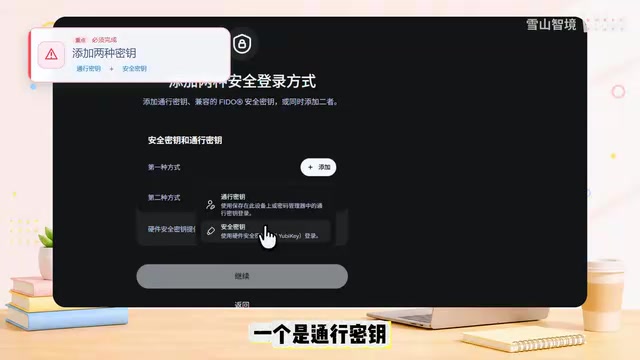
For the passkey, choose Google Password Manager and set a six-digit PIN (take a screenshot to avoid forgetting it). For the security key, select "Use a phone, tablet, or security key," then use Google Chrome on your phone to scan the QR code on screen. Once the device is linked, register your fingerprint. Your fingerprint becomes the second key — easier to use and more private. After setup, whether you're switching devices or completing a second verification, you can log in with your PIN or QR scan, completely eliminating your dependence on one-time SMS numbers.
Step 4: Payment Options for the Philippine Region Subscription
Before subscribing, you'll need three things: your registered Google account, a ChatGPT account without Plus or Pro, and a virtual card (VISA or Mastercard) capable of international payments. The creator covers three payment methods and objectively compares their costs and risks.
Option 1: Apply for a physical card in person. Mastercard is available through China Merchants Bank; VISA cards can be obtained from ICBC or China Merchants Bank. Since these are credit cards, there are eligibility requirements — check with a branch beforehand. If you already have a China Merchants Bank Mastercard that works for overseas payments and your account region and billing details are in order, this is the lowest-cost option.
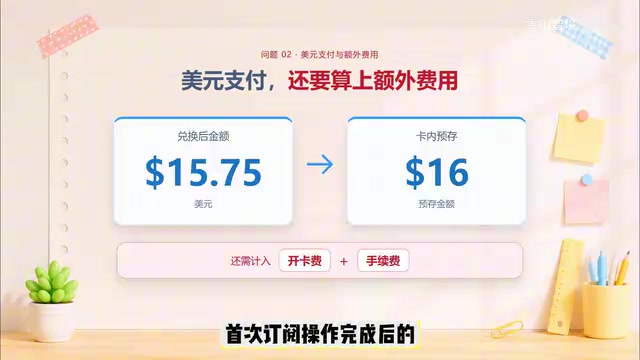
Option 2: Buy a virtual card on Xianyu (闲鱼). The creator is frank about two problems with this approach: first, the virtual card market is a mixed bag — card sources and reliability are hard to verify, cards may have been used by multiple people, have insufficient balance, or suddenly stop working; success on the first payment doesn't guarantee next month's renewal. Second, virtual cards typically settle in USD, so 982.14 pesos comes to about $15.75. With card activation fees and handling charges, the initial subscription often ends up around 150 RMB — not much of a saving.
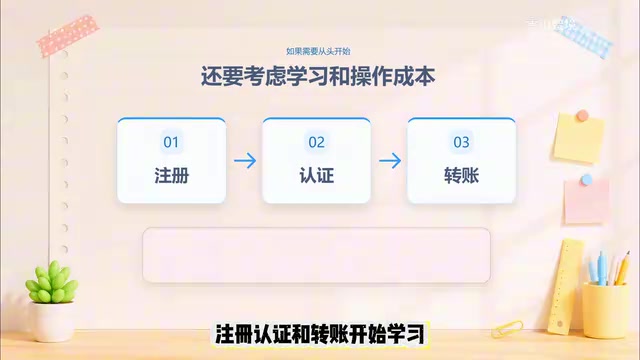
Option 3: Top up via an exchange (such as OKX or Bybit) using Alipay or WeChat Pay. This method requires no extra card activation fee, and real-world tests show the subscription costs around 122 RMB. However, it involves cryptocurrency processes that the video doesn't go into detail about. If you're already using these platforms and know the workflow, the cost is reasonable — but if you'd have to start from scratch with registration and verification, the process becomes quite involved, and you'd need to repeat it every month.
Google Play plays a key role as a payment intermediary in this flow. Chinese-issued bank cards often get rejected when paying directly on the ChatGPT website (typically because the card's issuing country doesn't match the subscription region, or due to OpenAI's risk controls). Routing through Google Play gets around this — Google Play has relatively lenient payment method requirements and supports local payment channels from more regions. Once a bank card is linked to a Google Play account, the Philippine region ChatGPT subscription is priced in pesos and settled through Google Play, with the actual charge converted to RMB or USD at the day's exchange rate. This also explains why the entire process starts with registering a Google account — the Google account and Google Play are the infrastructure that makes this payment chain work.
Tax-Free Address: The Key to Reducing Taxes
When entering card details, the billing address is crucial. The creator uses a "Philippines address generator" to find a usable address, enters it, and saves the card. Then, using a VPN to switch ChatGPT to the Philippine region, logging in and clicking Upgrade shows the Plus cost as 1,100 pesos (982.14 pesos subscription + 117.86 pesos in taxes).
When selecting Card payment and filling in card details, this step can use any card information (since Chinese credit cards get rejected when paying directly on the site anyway) — the real goal here is to enter the address. Use a regular email for the email field. For the billing address, enter a US tax-free state address — use a "US tax-free address generator" to create an address in a tax-exempt state (avoid Alaska), and the tax rate will successfully drop to 0.
At this point, click Subscribe. You'll see a payment failure notification in the top left — this is normal. Then switch to Google Pay as the payment method. Since you've already linked a working bank card to Google Play earlier, as long as there's sufficient balance, simply select Continue to complete the subscription.
Several US states don't levy sales tax and are commonly used for cross-border subscriptions to avoid additional tax charges. These typically include Oregon, Montana, New Hampshire, Delaware, and Wyoming. Alaska has no state-level sales tax but some localities impose local taxes — which is why the tutorial specifically advises against selecting it. Both the "Philippines address generator" and "US tax-free address generator" are online tools that randomly generate formatted virtual addresses. It's worth noting that entering fictitious addresses to avoid taxes may be considered a violation in many jurisdictions — assess the risks before proceeding. In this payment flow, the Card information step's primary purpose is to input the tax-free billing address; the actual charge is made through the bank card linked to Google Play. The two serve different functions.
On Top-Up Services: Cheap Isn't Always Better
For users unfamiliar with international payments who want a quick solution, using a top-up service (代充) is an option. But the creator specifically warns: cheaper isn't always better. Prices significantly below the normal payment cost should raise red flags — they may involve payment reversals, subscription cancellations, or even account restrictions.
He shares a real example: a friend bought a GPT Pro subscription on Xianyu for over 500 RMB looking for a deal, and ended up getting officially restricted — limited to the mini model and out the money entirely. Some rock-bottom resellers use unofficial channels for illegal top-ups. Even if it goes through temporarily, the subscription may later be dropped, the account banned, or usage downgraded.
Therefore, if this is your first subscription or account stability and after-sales support matter to you, choosing a legitimate top-up service that offers guarantees and live customer support is more reliable than saving a few yuan. Overall, there's a trade-off between cost and stability/support: users who can handle the process themselves will save the most with a physical card, while those who prefer convenience might consider a reputable top-up service with a warranty.
Final Thoughts
The core logic of this entire process comes down to three things: start with a clean Google account, use Advanced Account Security to eliminate dependence on one-time SMS numbers, and use region switching combined with a tax-free address to reduce subscription costs. Each step has its own risk points — especially cross-border payments and region switching. Readers should thoroughly understand the potential account risks and compliance issues before proceeding, and choose the approach that best fits their situation.
Related articles

Felix Rieseberg Personal Homepage
Felix Rieseberg's personal homepage sparks attention on Hacker News. This article covers the Slack engineer's technical background, the rise and fall of nativefier, and the value of a developer homepage as a tech calling card.

@ai-sdk/vue 3.0.306 Patch Release Syncs with [email protected] Update
@ai-sdk/vue 3.0.306 released, synced with [email protected]. A routine patch release for the Vercel AI SDK ecosystem with no public API changes; the Vue adapter layer stays version-aligned with the core package.

Gemini 4 Argon API Launches: The Era of Million-Token Output Begins
Google launches Gemini 4 Argon with sparse MoE architecture, up to 1M output tokens, and a 68.90% Vals Index score, available across API, AI Studio, and the Gemini app.