ChatGPT Plus Self-Service Recharge in China: Full Process and Risk Analysis

The video-recommended website recharge agent is convenient but requires handing over Session credentials, posing higher account security risks than credit card and mobile app recharge.
The article analyzes three paths to activating ChatGPT Plus in China: website recharge agents, overseas credit card recharge, and mobile app recharge. The video tutorial strongly recommends website recharge agents for low prices and simple operation, but the article points out that recharge agents require Session credentials — equivalent to handing over temporary login authorization — with risks of third-party account access. Credit card and mobile app recharge have higher barriers but keep payment and login credentials in users' hands. The article provides a beginner checklist: verify redirect domains, log out of all devices after recharge, and start with small test orders. Core conclusion: low operational barrier does not equal guaranteed subscription; convenience can be quantified, but account security cannot be gambled.
Three Paths to Activating ChatGPT Plus in China
Key takeaway: The video tutorial strongly recommends "website recharge agents," but from an account security perspective, the risks are higher than credit card and mobile app recharging.
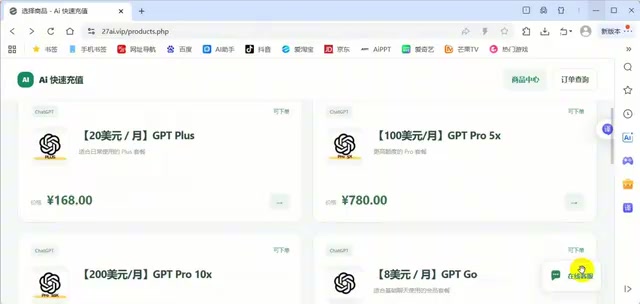
According to a Bilibili UP host in a video tutorial, Chinese users currently have three main ways to subscribe to ChatGPT Plus and other mainstream AI services: website recharge agents, overseas credit card recharge, and mobile app recharge. The UP host uses 27ai.vip as an example to demonstrate the full process of completing a recharge using account Session information, claiming this method offers "price advantages and simple operation."
This judgment has some merit in terms of "convenience," but the "security" aspect needs to be examined separately. Below, we analyze the operational logic and real risks of each of the three paths.
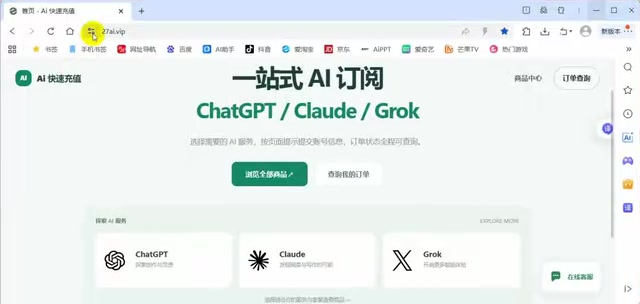
The Real Mechanism of Website Recharge Agents: You Don't Give Up Your Password, But You Hand Over the "Key"
The video repeatedly emphasizes a selling point: recharge agents "don't need account login, don't need a password, only account ID-related information." Specifically, users who are already logged into ChatGPT in their browser obtain a Session code through a link provided by a third-party website, copy and paste it into the recharge site, and the other party completes the payment on their behalf.
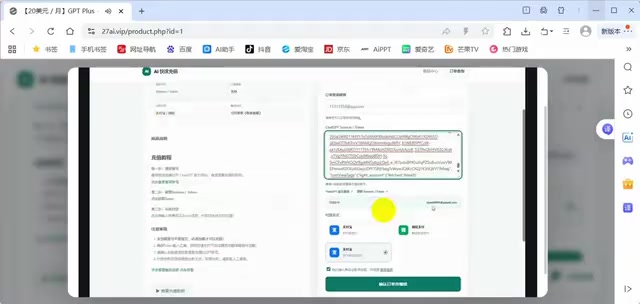
Here's a detail that gets glossed over: The link to obtain the Session itself comes from the recharge website. When users click it, the content they're redirected to copy contains login state credentials. A Session is essentially equivalent to a temporary login authorization — whoever obtains it doesn't necessarily need your password to access your account during its validity period. In the UP host's video tutorial, this step is dismissed with just "copy everything including the brackets," with no prompt for users to verify whether the redirect domain is legitimate.
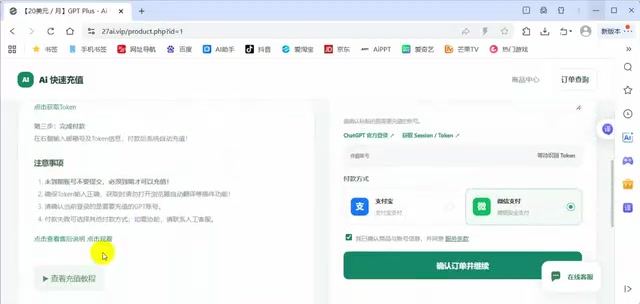
Two Hidden Risks Not Mentioned in the Tutorial
The video demonstrates steps like "enter your email as order query" and "confirm whether this is the GPT account you want to recharge," but the entire process is built on users completely trusting the platform. Once the Session is intercepted or resold, users have no way to verify whether their account remains accessible to others after a successful recharge.
Additionally, the video ends with statements like "if it hasn't shown up yet, just refresh a couple more times" and "contact customer service if there are issues with recharging or invoices," implying that recharge failures are not uncommon. This precisely shows that the stability of the recharge agent process depends on the platform side — all users can do is refresh and wait.
Technical Background on Session and Cookie
In web applications, a Session is a mechanism used by servers to track user login states. After a user successfully logs in, the server generates a unique Session ID and returns it to the browser via Cookie or URL parameters. Thereafter, the browser carries this identifier with every request, and the server uses it to identify the user without requiring repeated password entry. Session credentials for services like ChatGPT are typically stored as Cookies, containing access tokens and refresh tokens. Access tokens have short validity periods (e.g., several hours), while refresh tokens can be used to obtain new access tokens and may remain valid for weeks. Therefore, once Session information is obtained by a third party, they can fully simulate user operations during the token's validity period — including reading conversation history, sending messages, modifying settings — without the user receiving any password change notification. This is also why recharge platforms ask users to copy the Session rather than the password — passwords can be changed, but once a Session is leaked, the risk window persists unless actively revoked.
ChatGPT's Account Logout Mechanism and Session Invalidation
ChatGPT offers a "Log out of all devices" feature in settings, whose underlying principle is to invalidate all active Session tokens on the server side. When users perform this operation, previously issued access tokens and refresh tokens are added to a blacklist or deleted from the database, and any third party holding old tokens will no longer be able to make valid requests. However, this mechanism has a time window: if the recharge platform has already used the Session for other operations before the user logs out (such as binding payment methods or exporting chat records), these operations may have already been completed and cannot be undone. Additionally, some third-party clients or API calls may use independent tokens, and logging out of all devices may not cover all access paths. Therefore, it's recommended that after logging out of all devices, users further check their account's login activity records (if available), payment methods, and connected applications to ensure no unauthorized access remains.
Credit Card and Mobile App: Higher Barriers, But Credentials Stay in Your Hands
The UP host's assessment of the other two methods: credit cards are "high cost, with hidden fees," and mobile app recharge is "cumbersome, subject to payment risk controls, and money might go down the drain." These descriptions are basically valid at the experience level — overseas credit cards do have application barriers, and in-app purchases on mobile are easily subject to regional and payment channel restrictions.
But from a security model perspective, these two methods share a common feature: payment credentials and login credentials are always completed on the user's own device, with no third-party involvement in account access. In other words, the cost of failure is money, while the cost of a failed or problematic website recharge agent could be your account.
This trade-off relationship is not discussed in the video. For users with important conversation records, custom instructions, or work materials in their accounts, it's recommended to first evaluate the cost of third-party access to their account before deciding whether to trade convenience for risk.
Practical Operations for Virtual Credit Cards and Overseas Payments
The article mentions that overseas credit cards are "high cost, with hidden fees." Here we supplement common solutions for virtual credit cards (VCC). Chinese users typically apply for virtual Visa/Mastercard cards through platforms like Depay and Nobepay, top up in USD, and use them to subscribe to ChatGPT Plus. These cards often have fees for issuance and top-up (around 1%-3%), and some platforms add exchange rate markups. Another approach is using physical credit cards that support overseas payments (such as dual-currency cards from certain banks), but these may trigger risk controls leading to payment failures. Mobile app recharge usually refers to in-app purchases through the US App Store or Google Play, requiring an Apple ID or Google account for the corresponding region and binding a local payment method (such as gift cards). The common feature of these methods is: payment credentials (card number, CVV, billing address) and login credentials (OpenAI account password) are always entered on the user's own device, never passing through third-party servers. Even if payment fails, it won't lead to leakage of account access rights — the risk is limited to financial loss or payment information being processed by the payment platform.
Beginner Decision Checklist
If you're still considering using a website recharge agent, at minimum complete the following checks:
- Confirm whether the redirect link domain for obtaining the Session is an official domain; never click links with non-official domains.
- Immediately after recharge completion, log out of all devices in ChatGPT settings to force old Sessions to become invalid, then log back in.
- Don't enter any personal information other than your email on recharge websites, especially passwords and verification codes.
- Start with a small test order, confirm it arrives before considering long-term subscription, and don't prepay for multiple months at once.
One-sentence summary: The operational process demonstrated in the tutorial can be reproduced, but "low operational barrier" and "guaranteed subscription" are two different things. Convenience can be quantified; account security cannot be gambled.
One-line Summary
The website recharge agent recommended in the video is convenient but requires handing over Session credentials, posing higher account security risks than credit card and mobile app recharge.
Paragraph Summary
The article analyzes three paths to activating ChatGPT Plus in China: website recharge agents, overseas credit card recharge, and mobile app recharge. The video tutorial strongly recommends website recharge agents, claiming low prices and simple operation, but the article points out that recharge agents require users to provide Session credentials, which is equivalent to handing over temporary login authorization and carries the risk of third-party account access. In contrast, credit card and mobile app recharge have higher barriers, but payment and login credentials always stay in users' hands — the risk types differ. The article also provides a beginner decision checklist, recommending users verify redirect domains, immediately log out of all devices after recharge, and start with small test orders. The core conclusion is: low operational barrier does not equal guaranteed subscription; convenience can be quantified, but account security cannot be gambled.
Related articles

Xenon Flash Bug Returns: Radxa Dragon Q8B Affected
The Xenon flash bug resurfaces, this time on the Radxa Dragon Q8B board. This article reviews early Hacker News discussion and analyzes the potential impact and community concerns.

ChatGPT Plus Subscription Guide for Users in China: Official Top-Up Channel Walkthrough and Comparison
A complete guide to subscribing to ChatGPT Plus from China via official top-up platforms: plan selection, account login, copying account info, payment verification, plus a comparison of top-up, proxy, and self-supplied card channels.

The Complete Guide to Subscribing to ChatGPT Plus in China: Hands-On Walkthrough of Third-Party Top-Up Channels and Risk Analysis
How can users in China subscribe to ChatGPT Plus? This article breaks down the complete process of third-party top-up platforms, analyzes account security, renewal sustainability, and risk-control risks to help you decide which subscription option suits you better.