ChatGPT Plus Subscription Methods Compared: Cost and Risk Analysis Across Three Channels

A cost and risk comparison of the three main ways users in China can subscribe to ChatGPT Plus.
Subscribing to ChatGPT Plus from China involves three key obstacles: payment environment, account ownership, and fraud detection. This article compares three channels: mobile in-app purchase (roughly $20–25, high premium); official foreign credit card payment (around 180 RMB with hidden fees and strict fraud controls); and third-party Session token authorization top-ups, which avoid sharing passwords but whose risks are underestimated — a valid Session token grants near-full account access. The article also flags that terms like "GPT6.1" and "5x/20x memberships" don't match any official OpenAI products and advises using official channels when possible, or starting small and changing passwords immediately after using third-party services.
Why Subscribing to ChatGPT Plus Is Such a Hassle
For users in China, upgrading to ChatGPT Plus (or the higher-tier Pro membership) has never been straightforward. The core obstacles center on three areas: the payment environment, account ownership, and fraud detection. The subscription tutorials referenced in the source material essentially work around these obstacles — but the costs, requirements, and safety profiles vary significantly across different channels.
A quick disclaimer: this article summarizes the pros and cons of various subscription methods based on a single source video. The third-party top-up websites mentioned carry compliance and security concerns. Readers should exercise their own judgment and proceed at their own risk.
The Real Costs of the Three Main Subscription Channels
In-App Purchase on Mobile: High Premium, Cumbersome Process
Apple users go through the App Store route, which requires an overseas Apple ID plus gift card top-ups. Android users rely on Google Play in-app purchases. According to the source, the Apple approach is not beginner-friendly — constantly switching accounts makes for a poor experience — and the all-in cost comes to roughly $20–$25 USD, meaning you're paying a noticeable premium for the convenience.
The bar is even higher for Google Play on Android: you need a device with a fully intact GMS framework, a Google account registered entirely on an overseas IP, and a foreign-currency payment method linked to it. The source specifically emphasizes that fraud detection is extremely strict — once your IP is identified as a data center proxy rather than a genuine residential connection, the account gets locked immediately. A lot of people get stuck right at this environment verification step.
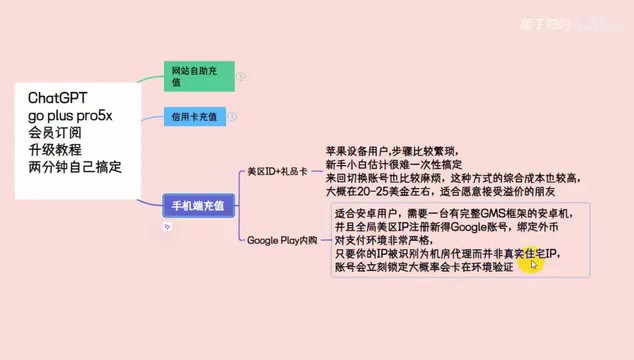
GMS (Google Mobile Services) is the core service framework Google provides for Android devices, encompassing the Google Play Store, Google account sync, push notifications, and other foundational capabilities. For well-known reasons, Android devices manufactured for the Chinese market generally do not come with GMS pre-installed. This means the vast majority of domestic Android users cannot directly use Google Play for in-app purchases. Even if Google Play is installed through third-party means, the payment step still requires a foreign-currency bank card or Google Play gift card — and Google's fraud detection system evaluates transaction legitimacy across multiple dimensions, including device fingerprint, IP address, and the country of the payment method. Any mismatch with the characteristics of a "genuine overseas user" can trigger a declined payment or account lock.
Official Payment via Foreign Credit Card: Looks Simple, Hidden Costs Add Up
If you already have a foreign credit card, you can theoretically fill in your details on the official page and complete payment in seconds — it's the most "legitimate" path. But the source also highlights the practical reality: foreign credit cards are difficult to obtain in the first place, and they're prone to triggering regional restrictions and fraud detection, resulting in failed payments or chargebacks.
On top of that, account opening fees, card maintenance fees, and other hidden charges mean the effective cost can work out to around 180 RMB, making the overall rate fairly high. For users who just want one month of membership, the value proposition isn't great.
Third-Party Self-Service Top-Up: The Session Token Authorization Model
The source primarily recommends third-party self-service top-up websites, using 76ai.vip as an example. The key distinction from traditional "proxy top-up" services is this: you don't hand your account password to a stranger. Instead, authorization is granted by copying the Session token from your ChatGPT account.
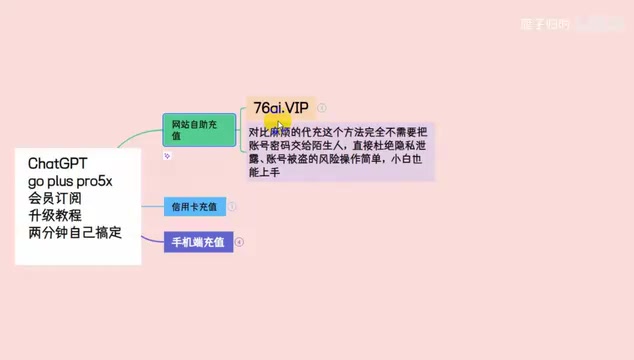
How the Session-Based Top-Up Process Works
As described in the source, the overall process goes roughly like this:
- Visit the top-up website, browse all available products, and select your plan (e.g., Plus / Pulse / Pro);
- Enter your email address — this is used only for order lookup;
- Log into the official ChatGPT website in your browser;
- Return to the top-up website and click the "Get Session" link, then copy all the returned code (including the brackets);
- Paste it into the top-up website, confirm the account details, select a payment method, and submit your order;
- Wait for the system to process the order automatically — once the top-up succeeds, refresh the ChatGPT page and your membership will be active.
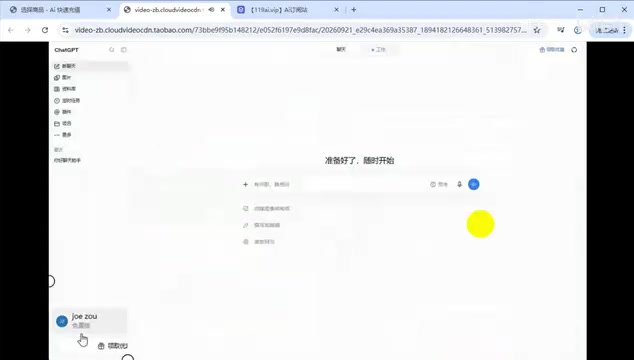
The source offers a useful diagnostic tip: if the Session code you retrieve is very short, it means you weren't actually logged into ChatGPT — you'll need to log in again before copying.
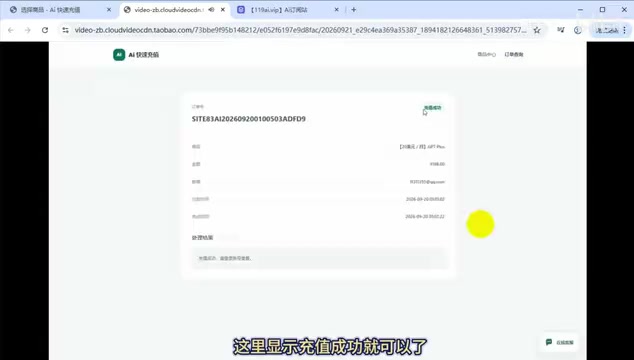
On Session Authorization Security — Let's Be Clear
The source markets the Session method as "the safest" option on the grounds that you don't hand over your password. From a security standpoint, however, this claim deserves a more nuanced look.
A Session token is essentially a "master pass" for your logged-in state. Handing your full Session to a third-party website means that, for the duration of the token's validity, that party theoretically has nearly the same level of access to your account as you do — which isn't meaningfully "safer" than handing over your password. The risk just takes a different form.
So behind the convenience of "self-service top-up" there remain real risks: account manipulation and data exposure are genuine possibilities. It's also worth noting that terms like "GPT6.1" and "GoPlus Pro 5x/20x membership" that appear repeatedly in the source material don't match any official OpenAI product names — they look more like marketing copy, and readers should stay alert.
From a technical perspective, a Session token is a randomly generated string that a web application issues after a user successfully completes username and password verification. It's typically stored in the browser as a cookie. The server uses this token to identify the user, eliminating the need to re-enter credentials with every subsequent request. The token has an expiration period, but within that window it functions as a full substitute for the password — any party holding the token can make requests as you, including reading your conversation history, modifying account settings, and on some platforms even initiating subscription changes.
Compared to a leaked password, recovering from a leaked token is relatively straightforward: logging out or changing your password will typically invalidate all existing tokens immediately. This is the technical rationale behind the end-of-article recommendation to "change your password and sign out of all devices promptly after the top-up" — these two actions force the server to revoke all issued Sessions, cutting off any third-party access to the account.
A Few Rational Takeaways
- Prioritize official channels: If you can get access to a working foreign payment method, official subscriptions remain the highest-security option for your account.
- Watch out for unofficial naming: OpenAI currently has no products called "GPT6.1" or "5x/20x memberships" — treat any exaggerated naming with suspicion.
- Session authorization carries real risk: Any form of third-party top-up touches your account credentials. After the process is complete, change your password and sign out of all devices promptly.
- Start small: If you do choose a third-party channel, test with a small amount first, keep your order receipt, and don't commit too much upfront.
The pain points around subscribing to ChatGPT are real. But "convenience" and "security" are rarely easy to have at the same time. Understanding the true cost structure and risk profile of each channel is what allows you to make the right choice for your own situation.
Related articles

Chain of Thought Isn't Just for AI: How Humans Can Use CoT to Improve Thinking Quality
Chain of Thought isn't just a prompt trick for large models. Starting from a Hacker News discussion, this article analyzes why CoT works for human thinking too, breaks down actionable ways to transfer it, and highlights the key differences between human CoT and machine CoT.
Cloudflare Teams Up with OpenAI: Closi…
Cloudflare Teams Up with OpenAI: Closing the Loop from Vulnerability Discovery to Defense with AI
Cloudflare uses OpenAI Daybreak to investigate security vulnerabilities and generate reviewable remediation plans, while developers use Codex to boost coding efficiency and quality.

Orca Multi-Agent Orchestration in Practice: A Guide to Parallel Collaboration with Claude and Codex
Orca is Stable AI's free open-source agent workbench supporting 34 agents like Claude Code and Codex in parallel. Learn its Git worktree isolation, multi-model orchestration, and mobile management.