ChatGPT Workspace Agent Permission Controls: How Builders and Admins Collaborate on Governance

OpenAI reveals fine-grained permission management and security governance for ChatGPT enterprise Agents.
OpenAI showcased enterprise management controls for ChatGPT Workspace Agents, providing fine-grained permission management from two levels: Agent builders and IT administrators. Builders can control read/write permissions and set constraints using natural language, while administrators implement unified security policies at the organizational level, including role permissions, application access scope, and Human-in-the-Loop confirmation flows—balancing automation efficiency with security governance.
Article
OpenAI recently showcased the management control features for ChatGPT Workspace Agents, revealing how enterprise-grade AI Agents can balance automation efficiency with security governance in real business scenarios. This control system operates from two levels—Agent builders and IT administrators—providing enterprises with a fine-grained permission management framework for AI Agent deployment.
What Are Enterprise AI Agents? AI Agents are AI systems capable of autonomously perceiving their environment, formulating plans, and executing multi-step tasks—fundamentally different from traditional single-turn Q&A AI assistants. Enterprise-grade Agents typically need to integrate with multiple external tools (such as CRM, email, and project management software) and possess persistent memory, task planning, and tool-calling capabilities. The technical foundation of these systems includes large language models (LLMs) as the reasoning core, Function Calling or Tool Use mechanisms, and Agent frameworks like ReAct (Reasoning + Acting). Compared to traditional RPA (Robotic Process Automation), the core advantage of AI Agents lies in their ability to process unstructured information, handle unexpected situations, and collaborate with humans through natural language—which is why their application potential in enterprise scenarios far exceeds that of earlier automation tools.
Real-World Use Cases for Workspace Agents
In the demonstration, OpenAI showcased an Agent called "Product Feedback Intel" that can run critical workflows around the clock. This Agent's core capabilities include:
- Collecting key customer contacts and product feedback from CRM systems
- Automatically generating documents such as PRD briefs and presentation slides
- Creating actionable task tickets in tools like Linear
- Sending weekly update reports on schedule via Slack

What's more noteworthy is that this Agent doesn't just proactively share analytical results in team Slack channels—it can also respond to follow-up questions from team members, receive feedback, and apply that feedback in subsequent runs through its memory function. This means the Agent continuously improves its output quality with use.
Technical Principles Behind Agent Memory The "memory function" mentioned here is not a parameter update to the LLM model itself, but rather an External Memory storage mechanism. The Agent writes user feedback, preference settings, and historical interaction summaries to persistent storage (such as vector databases or structured databases), which are then injected as context into the Prompt during subsequent runs. This design enables Agents to achieve personalized adaptation without retraining the model—a standard implementation in mainstream Agent frameworks (such as LangChain Memory and OpenAI Assistants API's Thread mechanism). For enterprises, this also means that memory data itself needs to be incorporated into data governance frameworks to prevent accidental leakage of sensitive information or cross-user contamination.
Builder Permission Control Capabilities
Agent Builders are the key role in determining an Agent's behavioral boundaries. They are responsible for defining what the Agent can do, what it can access, and which operations it's allowed to execute.
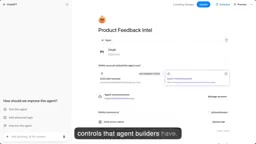
Builders have the following core control capabilities:
Fine-Grained Read/Write Permission Toggles
Builders can independently enable or disable read and write permissions for each connected application. For example, they can allow an Agent to read CRM data while prohibiting it from modifying customer records. This granular permission segmentation ensures data security without compromising the Agent's ability to gather information.
This design follows the Principle of Least Privilege from information security—a system or user should only have the minimum permissions necessary to complete their tasks. In AI Agent scenarios, this principle is particularly important: Agent behavior is driven by LLM reasoning and carries inherent uncertainty, and overly broad permissions could lead to unintended data modifications or operation executions. Through fine-grained read/write separation controls, builders can find a reasonable balance between Agent capability and potential risk.
Natural Language Constraints
This is a highly innovative design—builders can use natural language to set operational constraints, making the process as intuitive as building the Agent itself. In the demo case, the builder set a constraint: the Agent can only send emails to recipients with OpenAI.com domain addresses, because the Agent handles sensitive customer and product information.
Technical Innovation and Challenges of Natural Language Constraints Traditional permission control systems rely on structured rules (such as ACL access control lists and RBAC role-based access control), requiring professional IT staff to configure through configuration files or management interfaces. Natural language constraints transform the expression of security policies into human-readable text, essentially leveraging the LLM's semantic understanding capabilities to parse and enforce security rules. This innovation significantly lowers the technical barrier for security configuration, enabling non-technical roles such as product managers and business analysts to participate in Agent security governance. However, this approach also introduces new challenges: How do you ensure the LLM's interpretation of natural language constraints is fully consistent with human intent? How do you prevent carefully crafted Prompt Injection attacks from bypassing natural language constraints? These are core issues that need continuous verification and reinforcement for large-scale enterprise deployments.
This natural language constraint approach significantly lowers the barrier for security policy configuration, enabling product managers without technical backgrounds to set reasonable behavioral boundaries for Agents.
Enterprise Administrator Governance Framework
In ChatGPT Enterprise, administrators have higher-level governance capabilities, enabling them to implement unified security policies across the entire workspace.

Background on Layered Permission Models in Enterprise IT Governance The Layered Permission Model is a classic design pattern in enterprise IT security architecture, with its theoretical foundation rooted in the Principle of Least Privilege and Separation of Duties. In traditional SaaS products, this typically manifests as a three-tier structure of super administrators, organization administrators, and regular users, implemented through RBAC (Role-Based Access Control) or ABAC (Attribute-Based Access Control) for fine-grained management. OpenAI's introduction of this mature enterprise IT governance approach into the AI Agent domain means that enterprise IT security teams can understand and manage AI Agent permission boundaries using familiar frameworks, significantly reducing the cognitive cost of enterprise adoption and compliance review difficulty. This is also an important foundation for ChatGPT Enterprise's ability to achieve enterprise security certifications such as SOC 2.
Administrators' core responsibilities include:
- Determining who can build Agents: Controlling which users have the authority to create and publish Agents through role permissions
- Controlling application access scope: Defining which third-party applications and services Agents can connect to
- Managing operation permissions: Specifying the concrete operations Agents are allowed to execute within each application
Application-Level Deep Controls

Using Gmail as an example, administrators can exercise the following levels of control:
- Role-based access restrictions: Determining who can let Agents access specific applications based on user roles
- Further application feature controls: More granular control over specific features within applications
- Parameter and operation constraints: Setting restrictions on specific application parameters and operations
- Human-in-the-Loop confirmation flows: When the Agent determines that an operation has significant impact, it prompts the user for confirmation, ensuring human involvement in critical decisions
Human-in-the-Loop: A Core Paradigm in AI Safety Governance Human-in-the-Loop (HITL) is an important safety paradigm in AI system design, referring to the introduction of human review or confirmation at critical nodes in AI automation workflows. This concept originated in industrial automation and Active Learning, and has been given new meaning in the AI Agent era: when an Agent is about to execute an irreversible or high-risk operation (such as sending an email to an external customer, deleting data, or submitting a financial application), the system pauses and requests human confirmation. The HITL mechanism is one of the core methods for balancing efficiency and security in current AI governance frameworks, and is also a basic requirement of regulatory frameworks such as the EU AI Act for high-risk AI systems. Notably, the design of HITL trigger conditions is critical—overly frequent confirmation requests lead to "Confirmation Fatigue," where users tend to click confirm without thinking, actually undermining the security effect; while overly lenient trigger conditions may allow high-risk operations to execute silently. How to intelligently determine "significant impact" remains a design challenge that requires continuous optimization.
Related articles
 Product Reviews
The Programmer's Desk Setup Guide: Building a Workspace That Feels Like Home
Discover how programmers build productive, comfortable workspaces. From multi-monitor setups to ergonomic design, explore the desk philosophy that drives focus and flow.
 Product Reviews
Qoder vs Cursor Real-World Comparison: Which $20/Month AI IDE Is Better?
Hands-on comparison of Qoder vs Cursor AI IDEs: Agent autonomy, human interaction count, and architecture decisions. Qoder needed only 2 interactions vs Cursor's 8.
 Product Reviews
Cursor Cloud Agent Demo: Eliminating Bottlenecks Across the Entire Software Development Lifecycle
Deep analysis of Cursor's Cloud Agent demo showing how cloud VMs, automated test artifacts, and a full-chain control plane systematically eliminate human bottlenecks across the software development lifecycle.